
基于springboot跟poi封装的最便捷的excel导出
概述
详细
一、准备工作
先在pom文件添加依赖如下图所示:
<dependencies>

    <dependency>

      <groupId>junit</groupId>

      <artifactId>junit</artifactId>

      <version>4.11</version>

      <scope>test</scope>

    </dependency>

    <dependency>

			<groupId>javax.servlet</groupId>

			<artifactId>jstl</artifactId>

			<version>1.2</version>

		</dependency>

    	<dependency>

			<groupId>org.springframework.boot</groupId>

			<artifactId>spring-boot-starter-cache</artifactId>

		</dependency>

		<dependency>

			<groupId>org.springframework.boot</groupId>

			<artifactId>spring-boot-starter-web</artifactId>

		</dependency>

		<!-- 使用Jasper引擎解析JSP -->

		<dependency>

			<groupId>org.apache.tomcat.embed</groupId>

			<artifactId>tomcat-embed-jasper</artifactId>

			<scope>provided</scope>

		</dependency>

		<!-- jstl标签 -->

		<dependency>

			<groupId>javax.servlet</groupId>

			<artifactId>jstl</artifactId>

		</dependency>

  	<dependency>

        <groupId>org.apache.commons</groupId>

        <artifactId>commons-lang3</artifactId>

        <version>3.8.1</version>

        </dependency>

      <dependency>

          <groupId>com.google.guava</groupId>

          <artifactId>guava</artifactId>

          <version>27.0-jre</version>

      </dependency>

     	<dependency>

            <groupId>org.apache.poi</groupId>

            <artifactId>poi</artifactId>

            <version>3.17</version>

        </dependency>

        <dependency>

            <groupId>org.apache.poi</groupId>

            <artifactId>poi-ooxml</artifactId>

            <version>3.17</version>

        </dependency>

  </dependencies>
二、程序实现
1、添加excel导出的person-export-config文件
<?xml version="1.0" encoding="UTF-8"?>

<exportFile>

	<fileName>exportConfig</fileName>

	<exportType>0</exportType>

	<cell>

		<title>序号</title>

		<alias>index</alias>

	</cell>

	<cell>

		<title>姓名</title>

		<alias>name</alias>

	</cell>

	<cell>

		<title>年龄</title>

		<alias>age</alias>

	</cell>

	<cell>

		<title>性别</title>

		<alias>sex</alias>

	</cell>

		<cell>

		<title>日期</title>

		<alias>date</alias>

	</cell>

</exportFile>
其中exportType:0表示导出EXCEL2007,exportType:1表示导出csv文件
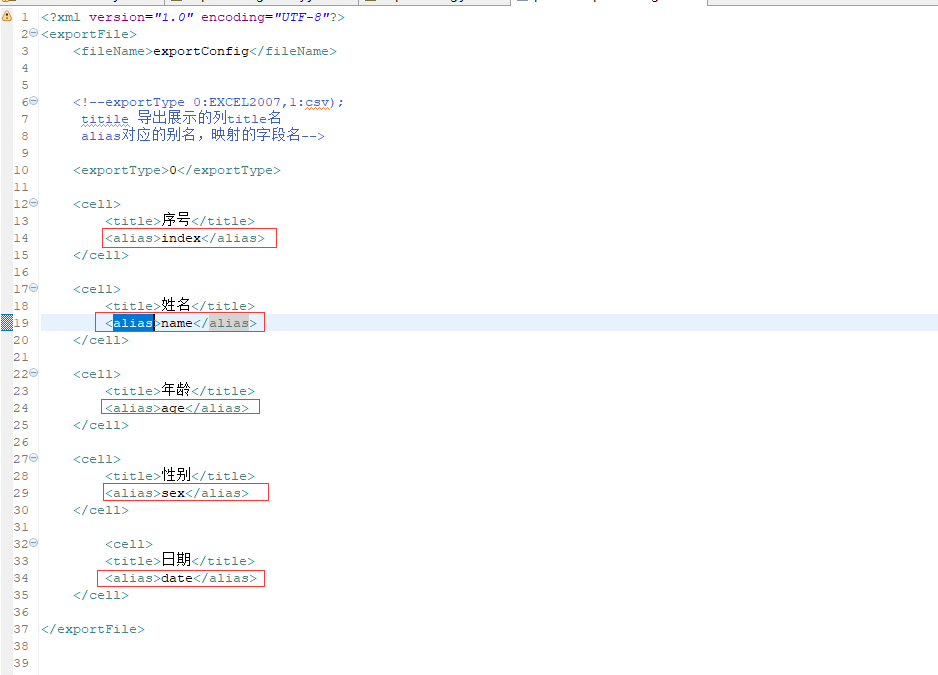
title导出展示列的title名,alias表示映射的字段名
2、从classpath获取person-export-config.xml文件
从classpath获取person-export-coing.xml文件并转为inputStresm
ClassPathResource classPathResource = new ClassPathResource("export/person-export-config.xml");

		InputStream inputStream = classPathResource.getInputStream();

ExportConfig exportConfig = ExportConfigFactory.getExportConfig(inputStream);
3、解析person-export-config.xml文件
主要代码如下:
private static ExportConfig getExportCells(InputStream inputStream) throws FileExportException {

        ExportConfig exportConfig = new ExportConfig();

        DocumentBuilderFactory dbFactory = DocumentBuilderFactory.newInstance();

        DocumentBuilder dBuilder = null;

        Document document = null;

        try {

            dBuilder = dbFactory.newDocumentBuilder();

            document = dBuilder.parse(inputStream);

        } catch (ParserConfigurationException | SAXException | IOException e) {

            throw new FileExportException(e, "pares xml error");

        }

        Element root = document.getDocumentElement();

        NodeList elements = root.getElementsByTagName("cell");

        List<ExportCell> exportCells = initElement(elements);

        String fileName = "";

        String exportType1 = "";

        try {

            fileName = ConfigParser.getNodeText(root, "fileName");

            exportType1 = ConfigParser.getNodeText(root, "exportType");

        } catch (FileImportException e) {

            throw new FileExportException(e);

        }

        if (StringUtils.isEmpty(fileName)) {

            throw new FileExportException("用于导出的xml文档 <fileName> 为空");

        }

        if (StringUtils.isEmpty(exportType1) || !StringUtils.isNumeric(exportType1)) {

            throw new FileExportException("用于导出的xml文档 <exportType> 为空");

        }

        exportConfig.setFileName(fileName);

        ExportType exportType = ExportType.getExportType(Integer.valueOf(exportType1));

        if (exportType == null) {

            throw new FileExportException("找不到相应的ExportType 解析xml得到的exportType 是" + exportType1);

        }

        exportConfig.setExportType(exportType);

        exportConfig.setExportCells(exportCells);

        return exportConfig;

    }
这时我们得到一个ExportConfig对象如下:
public class ExportConfig extends BaseEntity {

    private String fileName;//输出的文件名

    private ExportType exportType;//0 表示 excel, 1 表示csv

    private List<ExportCell> exportCells;
4、添加要输出到excel的list对象
List<Map> lists = new LinkedList<>();

       for (int i = 0; i < 10; i++) {

           Map<String, Object> maps = new HashMap<>();

           maps.put("index", i);

           maps.put("name", "张三" + i);

           maps.put("age", Float.valueOf(i));

           maps.put("sex", "男");

           maps.put("date", new Date());

           lists.add(maps);

       }
在实际项目中map可以是具体的实体类对象比如Person,只要对象里面的字段跟person-export-config里的alias标签对应上即可(如下图所示)。
5、获取ExportResult对象
具体代码如下:
ExportResult exportResult = FileExportor.exportResult(exportConfig, lists);
将exportConfig对象跟要输出到excel的lists对象传入
 public static ExportResult exportResult(ExportConfig exportConfig, List<?> data) throws FileExportException {

        ExportType exportType = exportConfig.getExportType();

        switch (exportType) {

            case EXCEL2007:

                Workbook workbook = new ExcelExportImpl().getExportResult(data, exportConfig.getExportCells());

                ExportExcelResult exportExcelResult = new ExportExcelResult();

                exportExcelResult.setWorkbook(workbook);

                exportExcelResult.setFileName(exportConfig.getFileName());

                return exportExcelResult;

            case CSV:

                StringBuilder stringBuilder = new CSVExportImpl().getExportResult(data, exportConfig.getExportCells());

                ExportCSVResult exportCSVResult = new ExportCSVResult();

                exportCSVResult.setResult(stringBuilder.toString());

                exportCSVResult.setFileName(exportConfig.getFileName());

                return exportCSVResult;

        }

        throw new FileExportException("找不到对应的export type, export type is " + exportType.getNumber());

    }
6、最后将数据通过outputstream导出到excel
       String fileName = "person统计" +".xlsx";

    setResponseHeader(response, fileName);

    OutputStream outputStream = response.getOutputStream();

    exportResult.export(outputStream);
 public void export(OutputStream outputStream) throws FileExportException{

        try {

            workbook.write(outputStream);

            outputStream.close();

        } catch (IOException e) {

            throw new FileExportException("[Error occurred while export excel message is] " + e);

        }

    }
三、项目结构图
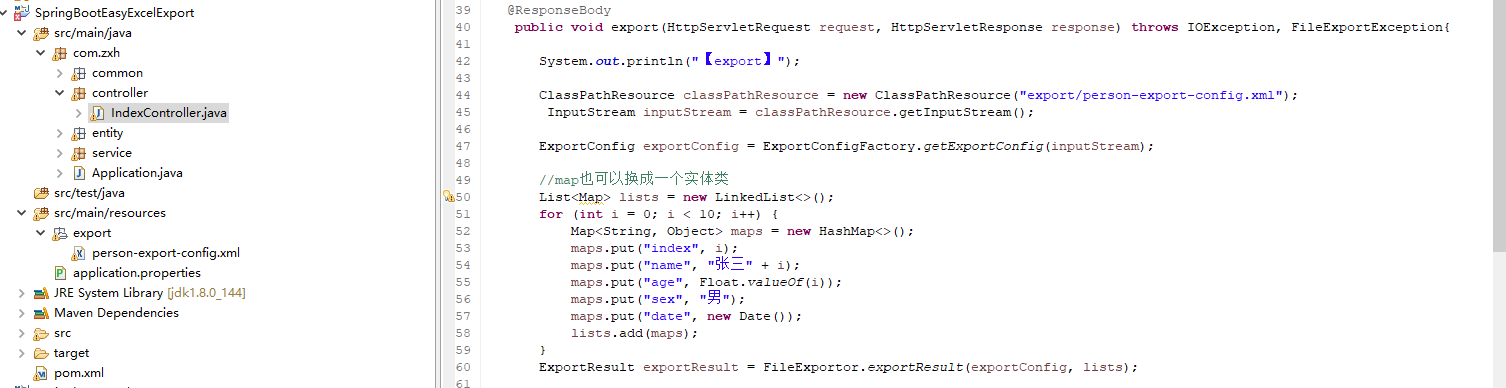
四、运行效果图
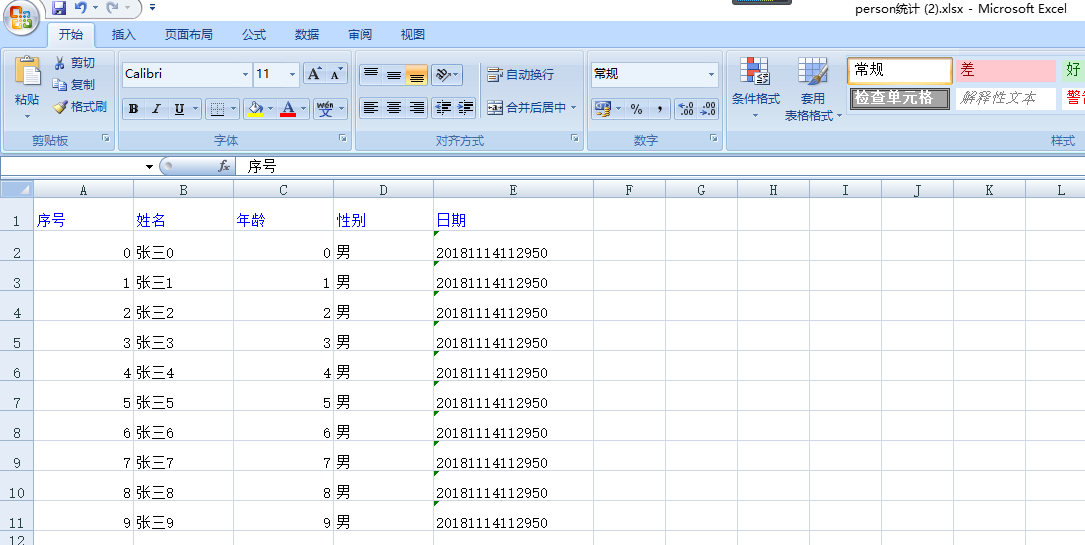
五、补充
本例子主要对poi导出excel进行了一个封装,通过xml配置文件配置跟实体类一一对应的字段,可灵活配置,在实际项目中非常实用。
注:本文著作权归作者,由demo大师发表,拒绝转载,转载需要作者授权
基于springboot跟poi封装的最便捷的excel导出的更多相关文章
- 基于 POI 封装 ExcelUtil 精简的 Excel 导入导出
注 本文是使用 org.apache.poi 进行一次简单的封装,适用于大部分 excel 导入导出功能.过程中可能会用到反射,如若有对于性能有极致强迫症的同学,看看就好. 序 由于 poi 本身只是 ...
- 基于SpringBoot+SSM实现的Dota2资料库智能管理平台
Dota2资料库智能管理平台的设计与实现 摘 要 当今社会,游戏产业蓬勃发展,如PC端的绝地求生.坦克世界.英雄联盟,再到移动端的王者荣耀.荒野行动的火爆.都离不开科学的游戏管理系统,游戏管理系 ...
- 基于spring-boot的社区社交微信小程序,适合做脚手架、二次开发
基于spring-boot的社区社交微信小程序,适合做脚手架.二次开发 代码地址如下:http://www.demodashi.com/demo/13867.html 1 概述 笔者做的一个后端基于s ...
- MyBatis 进阶,MyBatis-Plus!(基于 Springboot 演示)
这一篇从一个入门的基本体验介绍,再到对于 CRUD 的一个详细介绍,在介绍过程中将涉及到的一些问题,例如逐渐策略,自动填充,乐观锁等内容说了一下,只选了一些重要的内容,还有一些没提及到,具体可以参考官 ...
- SpringData 基于SpringBoot快速入门
SpringData 基于SpringBoot快速入门 本章通过学习SpringData 和SpringBoot 相关知识将面向服务架构(SOA)的单点登录系统(SSO)需要的代码实现.这样可以从实战 ...
- 基于Springboot集成security、oauth2实现认证鉴权、资源管理
1.Oauth2简介 OAuth(开放授权)是一个开放标准,允许用户授权第三方移动应用访问他们存储在另外的服务提供者上的信息,而不需要将用户名和密码提供给第三方移动应用或分享他们数据的所有内容,OAu ...
- 基于SpringBoot搭建应用开发框架(二) —— 登录认证
零.前言 本文基于<基于SpringBoot搭建应用开发框架(一)——基础架构>,通过该文,熟悉了SpringBoot的用法,完成了应用框架底层的搭建. 在开始本文之前,底层这块已经有了很 ...
- 基于springboot+bootstrap+mysql+redis搭建一套完整的权限架构【六】【引入bootstrap前端框架】
https://blog.csdn.net/linzhefeng89/article/details/78752658 基于springboot+bootstrap+mysql+redis搭建一套完整 ...
- 单点登录系统实现基于SpringBoot
今天的干货有点湿,里面夹杂着我的泪水.可能也只有代码才能让我暂时的平静.通过本章内容你将学到单点登录系统和传统登录系统的区别,单点登录系统设计思路,Spring4 Java配置方式整合HttpClie ...
随机推荐
- 两个List合并去重
今天遇到一个合并去重问题,从网上搜索一样总结出来两个比较简单的方法,这里去重是只能取出地址相同的数据,例如:如果两个字符串的值相同但都是单独new出来的这样去不了 @Test public void ...
- android Logger 一二三
我们在开发Android应用的过程中可以很方便地使用Log信息来调试程序,这都归功于Android的Logger驱动为用户层提供的Log支持.无论是底层的源代码还是上层的应用,我们都可以使用Logge ...
- java 利用HttpURLConnection方式获取restful格式的服务数据
/** * @Author: * @Description:利用HttpURLConnection方式获取restful格式的服务数据 * @Date: */ private static List& ...
- 利用wsdl2java工具生成webservice的客户端代码
1.JDK环境 2.下载apache-cxf发布包:http://cxf.apache.org/download.html 目前最新版本为3.2.6, 解压后如下: 解压发布包,设置CXF_HOME ...
- 大数据开发实战:Hadoop数据仓库开发实战
1.Hadoop数据仓库架构设计 如上图. ODS(Operation Data Store)层:ODS层通常也被称为准备区(Staging area),它们是后续数据仓库层(即基于Kimball维度 ...
- F分布
定义:设X1服从自由度为m的χ2分布,X2服从自由度为n的χ2分布,且X1.X2相互独立,则称变量F=(X1/m)/(X2/n)所服从的分布为F分布,其中第一自由度为m,第二自由度为n.[1] F分布 ...
- .NET-分页处理方式
分页方案一: 现在常见的前端框架datatable,easyui等的分页插件,都是采用的前端分页,原理:先将符合条件的数据全部加载到页面上,然后计算分页,进行分页处理.(装载全部数据) 优点: --在 ...
- python抓取数据,python使用socks代理抓取数据
在python中,正常的抓取数据直接使用urllib2 这个模块: import urllib2 url = 'http://fanyi.baidu.com/' stream = urllib2.ur ...
- iOS开发技巧 - 使用UISegmentedControl来对信息进行分组
(Swift) import UIKit class ViewController: UIViewController { var segmentedControl:UISegmentedContro ...
- uni-app - 支付(app支付、小程序支付、h5(微信端)支付)
App支付.小程序支付.h5(微信端)支付 APP支付(内置) appPay.js /** * 5+App支付,仅支持支付宝以及微信支付 * * 支付宝Sdk集成,微信sdk未集成 * * @para ...