
springMVC加载远程freemarker模板文件
在一个大网站里,有很多子域名,也就是有很多子系统,这些子系统由不同的团队负责,对整个网站的风格的风格至少得要是一致的(最基本的页头、页尾必须一致),这个时候得提供一份统一的页头、页尾以及公共的JS、css等内容,但如果是直接给源代码(ftl/js/css)的形式,对于后期的升级维护必然增加不必要的麻烦,必须得只有一个维护这个代码。
freemarker提供了远程模板加载的功能,在各个业务方里就像使用本地的模板一样使用远程的统一的模板代码。
1、编写自定义的模板加载器(继续freemarker的接口或者抽象类)
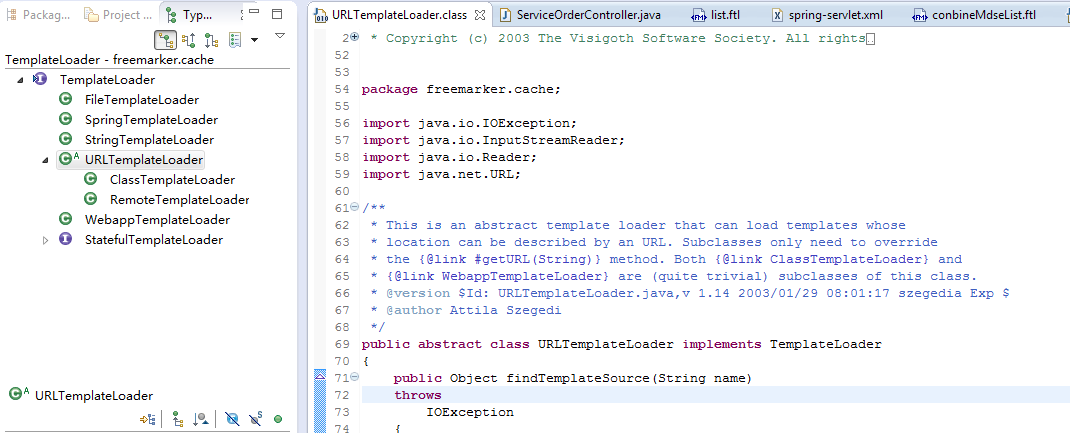
上图中RemoteTemplateLoader是我们实现的freemarker的URLTemplateLoader抽象类的远程模板加载类。
代码如下:
import java.io.IOException;

import java.net.MalformedURLException;

import java.net.URL;

import java.util.Arrays;

import java.util.List;

import org.apache.commons.lang3.StringUtils;

import freemarker.cache.URLTemplateLoader;

/**

 * 自定义远程模板加载器,用来加载远程机器上存放的模板文件.HTTP

 *

 * @author Administrator

 *

 */

public class RemoteTemplateLoader extends URLTemplateLoader {

    // 远程模板文件的存储路径(目录)

    private String remotePath;

    private List<String> includePaths;

    private String paths;

    public RemoteTemplateLoader(String remotePath) {

        if (remotePath == null) {

            throw new IllegalArgumentException("remotePath is null");

        }

        this.remotePath = canonicalizePrefix(remotePath);

        if (this.remotePath.indexOf('/') == 0) {

            this.remotePath = this.remotePath.substring(this.remotePath.indexOf('/') + 1);

        }

    }

    @Override

    public Object findTemplateSource(String name) throws IOException {

        if(this.includePaths!=null&&this.includePaths.contains(name)){

            return super.findTemplateSource(name);

        }

        return null;

    }

    @Override

    protected URL getURL(String name) {

        // name = name.replace("_zh", "");

        String fullPath = this.remotePath + name;

        if ((this.remotePath.equals("/")) && (!isSchemeless(fullPath))) {

            return null;

        }

        URL url = null;

        try {

            url = new URL(fullPath);

        } catch (MalformedURLException e) {

            e.printStackTrace();

        }

        return url;

    }

    private static boolean isSchemeless(String fullPath) {

        int i = 0;

        int ln = fullPath.length();

        if ((i < ln) && (fullPath.charAt(i) == '/'))

            i++;

        while (i < ln) {

            char c = fullPath.charAt(i);

            if (c == '/')

                return true;

            if (c == ':')

                return false;

            i++;

        }

        return true;

    }

    public void setRemotePath(String remotePath) {

        this.remotePath = remotePath;

    }

    public void setPaths(String paths) {

        this.paths = paths;

        if (StringUtils.isNotEmpty(this.paths)) {

            String [] s = this.paths.split(";");

            this.includePaths = Arrays.asList(s);

        }

    }

}
2、在springMVC XML里配置该RemoteTemplateLoader
<bean id="remoteTemplateLoader" class="com.xxx.RemoteTemplateLoader">

  <constructor-arg name="remotePath" value="http://10.1.1.1/" />

  <property name="paths" value="/test/a.ftl;/test/b.ftl" />

</bean>

<bean id="remoteTemplateLoader2" class="com.xxx.RemoteTemplateLoader">

  <constructor-arg name="remotePath" value="http://103.11.5.10/" />

  <property name="paths" value="/test/a.ftl;/test/b.ftl" />

</bean>

<util:list id="preTemplateLoaders" list-class="java.util.ArrayList" value-type="com.xxx.RemoteTemplateLoader">

  <ref bean="remoteTemplateLoader" />

  <ref bean="remoteTemplateLoader2" />

</util:list>

<bean id="freeMarkerConfigurer"

    class="org.springframework.web.servlet.view.freemarker.FreeMarkerConfigurer">

    <description>Required for Freemarker to work in web tier</description>

    <property name="configuration" ref="freemarkerConfiguration" />

</bean>

<bean id="freemarkerConfiguration"

    class="org.springframework.ui.freemarker.FreeMarkerConfigurationFactoryBean">

    <description>Using the Config directly so we can use it outside the

        web tier</description>

    <property name="preferFileSystemAccess" value="true"/>

    <property name="postTemplateLoaders" ref="preTemplateLoaders" />

    <!-- 模板加载路径 -->

    <property name="templateLoaderPaths">

        <list>

            <value>/WEB-INF/views</value>

        </list>

    </property>

    <property name="configLocation">

        <value>classpath:conf/freemarker.properties</value>

    </property>
  ...................

</bean>
3、在自己的FTL文件中include该远程模板
<#include "/test/a.ftl">
这个上面的url中是在RemoteTemplateLoader的XML的参数里已经进行了配置,所以跟使用本地的ftl是一样的。
springMVC加载远程freemarker模板文件的更多相关文章
- 钓鱼攻击之远程加载恶意Word模版文件上线CS
0x00 前言 利用Word文档加载附加模板时的缺陷所发起的恶意请求而达到的攻击目的,所以当目标用户点开攻击者发给他的恶意word文档就可以通过向远程服务器请求恶意模板并执行恶意模板上的恶意代码.这里 ...
- SpringMVC加载配置Properties文件的几种方式
最近开发的项目使用了SpringMVC的框架,用下来感觉SpringMVC的代码实现的非常优雅,功能也非常强大, 网上介绍Controller参数绑定.URL映射的文章都很多了,写这篇博客主要总结一下 ...
- AIRSDK 3.7 加载远程的含有代码的swf文件
之前就说这个版本会解决可以加载远程的含有代码的swf文件的需求.但是,一直比较好奇这个是否行得通,还以为 Adobe 副总裁去了苹果,内部给了特殊待遇. 因为苹果一直就是不允许远程加载代码的,像js文 ...
- XSS漏洞之加载远程js文件
这次在对一个系统渗透测试过程中,发现一个XSS漏洞,可弹窗,并且没有httponly 但是在尝试加载远程js文件的时候发现,script标签被过滤掉了,准确的说应该是服务器后端在识别到输入内容有< ...
- 背水一战 Windows 10 (11) - 资源: CustomResource, ResourceDictionary, 加载外部的 ResourceDictionary 文件
[源码下载] 背水一战 Windows 10 (11) - 资源: CustomResource, ResourceDictionary, 加载外部的 ResourceDictionary 文件 作者 ...
- iOS Cordova 加载远程界面
老大说,我们的项目要hybrid,要实现1.html能调用native:2.本地html调用本地html界面:3.能加载远程界面..... 因为我的项目是已有的(以下简称 项目),所以是要在已有的项目 ...
- 资源: CustomResource, ResourceDictionary, 加载外部的 ResourceDictionary 文件
CustomResource ResourceDictionary 加载外部的 ResourceDictionary 文件 示例1.演示“CustomResource”相关知识点Resource/Cu ...
- freemarker模板文件的4个组成部分
FreeMarker模板文件主要由以下4个部分组成:1.文本,直接输出的部分.2.注释,即<#–…–>格式不会输出.3.插值(Interpolation):即${..}或者#{..}格式的 ...
- DevExpress XtraReport - 动态加载报表布局模板
XtraReport的报表模板文件是.repx,下面的代码演示动态加载报表布局模板. XtraReport mReport = new XtraReport(); mReport.LoadLayout ...
随机推荐
- 机器翻译评价指标之BLEU详细计算过程
原文连接 https://blog.csdn.net/guolindonggld/article/details/56966200 1. 简介 BLEU(Bilingual Evaluation Un ...
- FreePascal - Typhon在Windows10 X64下的使用问题!
Typhon是CodeTyphon中的开发FreePascal的IDE工具. 在Windows10 X64中安装完CodeTyphon后,我们会发现有两套Typhon,分别对应32位和64位,32位可 ...
- 7.5 zookeeper客户端curator的基本使用 + zkui
使用zookeeper原生API实现一些复杂的东西比较麻烦.所以,出现了两款比较好的开源客户端,对zookeeper的原生API进行了包装:zkClient和curator.后者是Netflix出版的 ...
- go语言之进阶篇方法值
1.方法值 示例: package main import "fmt" type Person struct { name string //名字 sex byte //性别, 字 ...
- Cesium原理篇:3D Tiles(1)渲染调度【转】
Cesium在2016年3月份左右推出3D Tiles数据规范,在glTF基础上提供了LOD能力,定位就是Web环境下海量三维模型数据.虽然目前3D Tiles还是Beta阶段,有不少硬伤,但3D T ...
- Binary Tree Maximum Path Sum leetcode java
题目: Given a binary tree, find the maximum path sum. The path may start and end at any node in the tr ...
- Visitor 访问者模式 MD
访问者模式 简介 访问者模式是设计模式中相对比较复杂的一个,项目中可能见得非常少. 定义:封装某些作用于某种数据结构中各元素的操作,它可以在不改变数据结构的前提下,定义作用于这些元素的新的操作. 表示 ...
- Spring Boot Maven 打包可执行Jar文件!
Maven pom.xml 必须包含 <packaging>jar</packaging> <build> <plugins> <plugin&g ...
- 为什么static数据成员一定要在类外初始化?(转)
1.避免重复定义和初始化 <<c++ primer>>说在类外定义和初始化是保证static成员变量只被定义一次的好方法. 但,为什么static const int就可以在类 ...
- LTR之RankSvm
两种对比: 1.深度学习CNN提特征+RankSVM 之前的博客:http://www.cnblogs.com/bentuwuying/p/6681943.html中简单介绍了Learning to ...