
SpringBoot------注解把配置文件自动映射到属性和实体类
1.映射到属性
package top.ytheng.demo.controller;

import org.springframework.beans.factory.annotation.Value;

import org.springframework.context.annotation.PropertySource;

import org.springframework.stereotype.Controller;

import org.springframework.web.bind.annotation.RequestMapping;

import org.springframework.web.bind.annotation.ResponseBody;

@Controller

@RequestMapping("/file")

@PropertySource({"classpath:application.properties"})

public class FileController {

    @Value("${web.file.path}")

    private String filePath;

    @RequestMapping("/testpath")

    @ResponseBody

    private Object testPath() {

        return filePath;

    }

}
2.映射到类
(1)添加类
package top.ytheng.demo.entity;

import org.springframework.beans.factory.annotation.Value;

import org.springframework.boot.context.properties.ConfigurationProperties;

import org.springframework.context.annotation.PropertySource;

import org.springframework.stereotype.Component;

@Component

//使用该注解时,表示添加前缀,得把@Value注解去掉

//@ConfigurationProperties(prefix="serversettings")

@PropertySource({"classpath:application.properties"})

public class ServerSettings {

    @Value("${serversettings.name}")

    private String name;

    @Value("${serversettings.domain}")

    private String domain;

    public String getName() {

        return name;

    }

    public void setName(String name) {

        this.name = name;

    }

    public String getDomain() {

        return domain;

    }

    public void setDomain(String domain) {

        this.domain = domain;

    }

}
(2)添加控制器
package top.ytheng.demo.controller;

import org.springframework.beans.factory.annotation.Autowired;

import org.springframework.web.bind.annotation.GetMapping;

import org.springframework.web.bind.annotation.RestController;

import top.ytheng.demo.entity.ServerSettings;

@RestController

public class UserController {

    @Autowired

    private ServerSettings serverSettings;

    @GetMapping("/testproperties")

    public Object testProperties() {

        return serverSettings;

    }

}
3.添加application.properties配置文件
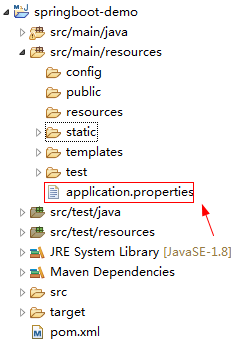
#自定义文件上传路径

web.file.path=C:\\Users\\chenchao\\eclipse-workspace\\springboot-demo\\src\\main\\resources\\static\\images\\

#端口号

server.port=8090

#测试实体类配置

serversettings.name=www.spring.io

serversettings.domain=springboot
4.添加启动类
package top.ytheng.demo;

import javax.servlet.MultipartConfigElement;

import org.springframework.boot.SpringApplication;

import org.springframework.boot.autoconfigure.SpringBootApplication;

import org.springframework.boot.web.servlet.MultipartConfigFactory;

@SpringBootApplication //等于下面3个

//@SpringBootConfiguration

//@EnableAutoConfiguration

//@ComponentScan

public class DemoApplication {

    public static void main(String[] args) {

        SpringApplication.run(DemoApplication.class, args);

    }

    //文件大小配置

    public MultipartConfigElement multipartConfigElement() {

        MultipartConfigFactory factory = new MultipartConfigFactory();

        //单个文件最大

        factory.setMaxFileSize("10240KB");

        //设置总上传数据总大小

        factory.setMaxRequestSize("102400KB");

        return factory.createMultipartConfig();

    }

}
5.测试路径
http://localhost:8090/file/testpath

http://localhost:8090/testproperties
SpringBoot------注解把配置文件自动映射到属性和实体类的更多相关文章
- SpringBoot注解把配置文件自动映射到属性和实体类实战
SpringBoot注解把配置文件自动映射到属性和实体类实战 简介:讲解使用@value注解配置文件自动映射到属性和实体类 1.配置文件加载 方式一 1.Controller上面配置 @Propert ...
- 小D课堂-SpringBoot 2.x微信支付在线教育网站项目实战_2-7.接口配置文件自动映射到属性和实体类配置
笔记 7.接口配置文件自动映射到属性和实体类配置 简介:使用@value注解配置文件自动映射到属性和实体类 1.添加 @Component或者Configuration 注解: ...
- SpringBoot配置文件自动映射到属性和实体类(8)
一.配置文件加载 1.Controller中配置并指向文件 @Controller @PropertySource(value = { "application.properties&quo ...
- 利用在线工具根据JSon数据自动生成对应的Java实体类
如果你希望根据JSon数据自动生成对应的Java实体类,并且希望能进行变量的重命名,那么“JSON To Java”一定适合你.(下面的地址需要FQ) https://jsontojava.appsp ...
- T4 模板自动生成带注释的实体类文件
T4 模板自动生成带注释的实体类文件 - 只需要一个 SqlSugar.dll 生成实体就是这么简单,只要建一个T4文件和 文件夹里面放一个DLL. 使用T4模板教程 步骤1 创建T4模板 如果你没有 ...
- EF自动创建数据库步骤之一(实体类写法)
文章演示使用EF自动创建数据库第一个步骤创建实体类. 一.创建表映射实体类 using System; using System.Collections.Generic; using System.C ...
- springboot自定义属性文件与bean映射注入属性值
主要有几点: 一.导入依赖 springboot的包和: <dependency> <groupId>org.springframework.boot</groupId& ...
- hibernate 数据库列别名自动映射pojo属性名
package com.pccw.business.fcm.common.hibernate; import java.lang.reflect.Field; import java.math.Big ...
- T4 模板自动生成带注释的实体类文件 - 只需要一个 SqlSugar.dll
生成实体就是这么简单,只要建一个T4文件和 文件夹里面放一个DLL. 使用T4模板教程 步骤1 创建T4模板 ,一定要自已新建,把T4代码复制进去,好多人因为用我现成的T4报错(原因不明) 点击添加文 ...
随机推荐
- Linux mail命令使用和sendmail配置
linux mail 命令参数: 使用mail发邮件时,必须先将sendmail服务启动. mail –s “邮件主题” –c”抄送地址” –b “密送地址” -- -f 发送人邮件地址 –F 发件人 ...
- 浏览器自己主动填表安全漏洞:查看浏览器保存的password
我通常会使用浏览器保存自己的帐号和password,下次登录就无需又一次输入,很方便.而像傲游这种浏览器还提供了自己主动同步功能,让我一个傲游帐号.就带着互联网上全部帐号password去旅行. 昨天 ...
- 百度地图Api进阶教程-用户自定义数据(标记和搜索)7.html
<!DOCTYPE html> <html> <head> <meta http-equiv="Content-Type" content ...
- beansbinding NetBeans IDE 中 Swing数据绑定插件
http://my.oschina.net/u/127459/blog/111486 https://kenai.com/projects/betterbeansbinding/pages/Home ...
- 【Qt开发】QThread 实用技巧、误区----但文档中没有提到
本文主要内容: 在任务一中,用 四 种方式实现:点击界面按钮,开线程运行一段程序,结果显示在一个Label上.1. 用不正确的方式得到看似正确的结果2. 用Qt Manual 和 例子中使用的方法3. ...
- 编写一个函数,计算字符串中含有的不同字符的个数。字符在ACSII码范围内(0~127)。不在范围内的不作统计。
题目描述 编写一个函数,计算字符串中含有的不同字符的个数.字符在ACSII码范围内(0~127).不在范围内的不作统计. 输入描述: 输入N个字符,字符在ACSII码范围内. 输出描述: 输出范围在( ...
- java SoftReference WeakReference
Java 2 平台引入了 java.lang.ref 包,其中包括的类可以让您引用对象,而不将它们留在内存中.这些类还提供了与垃圾收集器(garbage collector)之间有限的交互. 1.先“ ...
- 实验三 使用ASP.NET常用服务器控件 总结
这次实验内容是服务器控件的使用,大部分控件都是来自VS2008中的工具箱.使用的时候视图切换到设计或者分析,把工具箱中的目标控件直接拖拽到想要的位置.使用起来非常方便,而且可以通过直接点击控件来对它的 ...
- Mac 下 Homebrew(类似CentOS下的yum)简介及安装
Homebrew官网 http://brew.sh/index_zh-cn.html Homebrew是神马 linux系统有个让人蛋疼的通病,软件包依赖,好在当前主流的两大发行版本都自带了解决方案, ...
- Lamp后端开发技能表v0.1(转)
专业技能 Linux 阿里云服务器免费购买 服务器环境搭建 常用命令:慕课网-Linux达人养成计划 编辑器vim:床用命令.模式等等 shell Apache/Nginx 环境配置 一些配置项的参数 ...