
SpringBoot------注解把配置文件自动映射到属性和实体类
1.映射到属性
package top.ytheng.demo.controller;

import org.springframework.beans.factory.annotation.Value;

import org.springframework.context.annotation.PropertySource;

import org.springframework.stereotype.Controller;

import org.springframework.web.bind.annotation.RequestMapping;

import org.springframework.web.bind.annotation.ResponseBody;

@Controller

@RequestMapping("/file")

@PropertySource({"classpath:application.properties"})

public class FileController {

    @Value("${web.file.path}")

    private String filePath;

    @RequestMapping("/testpath")

    @ResponseBody

    private Object testPath() {

        return filePath;

    }

}
2.映射到类
(1)添加类
package top.ytheng.demo.entity;

import org.springframework.beans.factory.annotation.Value;

import org.springframework.boot.context.properties.ConfigurationProperties;

import org.springframework.context.annotation.PropertySource;

import org.springframework.stereotype.Component;

@Component

//使用该注解时,表示添加前缀,得把@Value注解去掉

//@ConfigurationProperties(prefix="serversettings")

@PropertySource({"classpath:application.properties"})

public class ServerSettings {

    @Value("${serversettings.name}")

    private String name;

    @Value("${serversettings.domain}")

    private String domain;

    public String getName() {

        return name;

    }

    public void setName(String name) {

        this.name = name;

    }

    public String getDomain() {

        return domain;

    }

    public void setDomain(String domain) {

        this.domain = domain;

    }

}
(2)添加控制器
package top.ytheng.demo.controller;

import org.springframework.beans.factory.annotation.Autowired;

import org.springframework.web.bind.annotation.GetMapping;

import org.springframework.web.bind.annotation.RestController;

import top.ytheng.demo.entity.ServerSettings;

@RestController

public class UserController {

    @Autowired

    private ServerSettings serverSettings;

    @GetMapping("/testproperties")

    public Object testProperties() {

        return serverSettings;

    }

}
3.添加application.properties配置文件
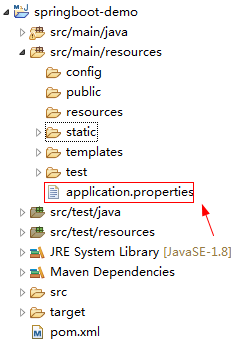
#自定义文件上传路径

web.file.path=C:\\Users\\chenchao\\eclipse-workspace\\springboot-demo\\src\\main\\resources\\static\\images\\

#端口号

server.port=8090

#测试实体类配置

serversettings.name=www.spring.io

serversettings.domain=springboot
4.添加启动类
package top.ytheng.demo;

import javax.servlet.MultipartConfigElement;

import org.springframework.boot.SpringApplication;

import org.springframework.boot.autoconfigure.SpringBootApplication;

import org.springframework.boot.web.servlet.MultipartConfigFactory;

@SpringBootApplication //等于下面3个

//@SpringBootConfiguration

//@EnableAutoConfiguration

//@ComponentScan

public class DemoApplication {

    public static void main(String[] args) {

        SpringApplication.run(DemoApplication.class, args);

    }

    //文件大小配置

    public MultipartConfigElement multipartConfigElement() {

        MultipartConfigFactory factory = new MultipartConfigFactory();

        //单个文件最大

        factory.setMaxFileSize("10240KB");

        //设置总上传数据总大小

        factory.setMaxRequestSize("102400KB");

        return factory.createMultipartConfig();

    }

}
5.测试路径
http://localhost:8090/file/testpath

http://localhost:8090/testproperties
SpringBoot------注解把配置文件自动映射到属性和实体类的更多相关文章
- SpringBoot注解把配置文件自动映射到属性和实体类实战
SpringBoot注解把配置文件自动映射到属性和实体类实战 简介:讲解使用@value注解配置文件自动映射到属性和实体类 1.配置文件加载 方式一 1.Controller上面配置 @Propert ...
- 小D课堂-SpringBoot 2.x微信支付在线教育网站项目实战_2-7.接口配置文件自动映射到属性和实体类配置
笔记 7.接口配置文件自动映射到属性和实体类配置 简介:使用@value注解配置文件自动映射到属性和实体类 1.添加 @Component或者Configuration 注解: ...
- SpringBoot配置文件自动映射到属性和实体类(8)
一.配置文件加载 1.Controller中配置并指向文件 @Controller @PropertySource(value = { "application.properties&quo ...
- 利用在线工具根据JSon数据自动生成对应的Java实体类
如果你希望根据JSon数据自动生成对应的Java实体类,并且希望能进行变量的重命名,那么“JSON To Java”一定适合你.(下面的地址需要FQ) https://jsontojava.appsp ...
- T4 模板自动生成带注释的实体类文件
T4 模板自动生成带注释的实体类文件 - 只需要一个 SqlSugar.dll 生成实体就是这么简单,只要建一个T4文件和 文件夹里面放一个DLL. 使用T4模板教程 步骤1 创建T4模板 如果你没有 ...
- EF自动创建数据库步骤之一(实体类写法)
文章演示使用EF自动创建数据库第一个步骤创建实体类. 一.创建表映射实体类 using System; using System.Collections.Generic; using System.C ...
- springboot自定义属性文件与bean映射注入属性值
主要有几点: 一.导入依赖 springboot的包和: <dependency> <groupId>org.springframework.boot</groupId& ...
- hibernate 数据库列别名自动映射pojo属性名
package com.pccw.business.fcm.common.hibernate; import java.lang.reflect.Field; import java.math.Big ...
- T4 模板自动生成带注释的实体类文件 - 只需要一个 SqlSugar.dll
生成实体就是这么简单,只要建一个T4文件和 文件夹里面放一个DLL. 使用T4模板教程 步骤1 创建T4模板 ,一定要自已新建,把T4代码复制进去,好多人因为用我现成的T4报错(原因不明) 点击添加文 ...
随机推荐
- Ansible 进阶技巧
原文 http://www.ibm.com/developerworks/cn/linux/1608_lih_ansible/index.html?ca=drs- 简介 Ansible 是一个系 ...
- Git 克隆操作
我们有一个裸库Git服务器,Tom 也推了他的第一个版本.现在,Jerry 可以查看他的变化.克隆操作的远程存储库创建实例. Jerry 在他的home目录,并创建新的目录,执行克隆操作. [jerr ...
- windows下安装和配置多个版本的JDK
https://jingyan.baidu.com/article/47a29f2474ba55c015239957.html 如何在windows下安装和配置多个版本的jdk,本文将带你在windo ...
- Python 内置方法new
class Dog(object): def __new__(self): print("i am new .") def __init__(self): print(" ...
- Java虚拟机(JVM)体系结构概述及各种性能参数优化总结
转自:http://blog.csdn.net/zhongwen7710/article/details/39213377 第一部分:相关的概念 数据类型 Java虚拟机中,数据类型可以分为两类:基本 ...
- dd&win32diskimager&软碟通Ultraiso 简单分析区别和长处
在linux操作系统之中的话我们希望烧录镜像到U盘或者是其他的可移动存储设备的话,那么我们就是应当使用dd,但是我估量 在我们的论坛之中根本 之上只有很少的人使用这种工具,很多的使用linux的用户都 ...
- 关于Unity中如何立即中断动画然后重新开始播放
今天做一个FPS游戏的时候,用的是新版的动画系统,遇到一个问题. 就是用枪打敌人的时候,敌人会播放一个被击中的动画,但是如果在动画播放的过程中再射击敌人,敌人会先把第一个被击中的动画播放完,才再播放第 ...
- Python之使用PIL实现cv2
有时候使用cv2需要安装opencv,但是opencv安装比较麻烦,因为需要编译过程. 所以,我们可以使用PIL对cv2的一些常用接口进行复现. 这里我们实现了cv2的imread(), imwrit ...
- SpringBoot系列四:SpringBoot开发(改变环境属性、读取资源文件、Bean 配置、模版渲染、profile 配置)
声明:本文来源于MLDN培训视频的课堂笔记,写在这里只是为了方便查阅. 1.概念 SpringBoot 开发深入 2.具体内容 在之前已经基本上了解了整个 SpringBoot 运行机制,但是也需要清 ...
- MyBatis整合Spring MVC
前面几篇文章已经讲到了mybatis与spring 的集成.目前主流的Web MVC框架,除了Struts这个主力外,还有Spring MVC,主要是由于 Spring MVC 配置比较简单,使用起来 ...