
关于CentOS 7 下的Oracle11g的proc编译器的一些常见问题
1、proc编译器配置问题
在使用proc将.pc文件编译成.c文件时出现一堆的错误,网上的答案七杂八杂的,都没有解决我的问题。
如下是我在使用过程中的一些错误:
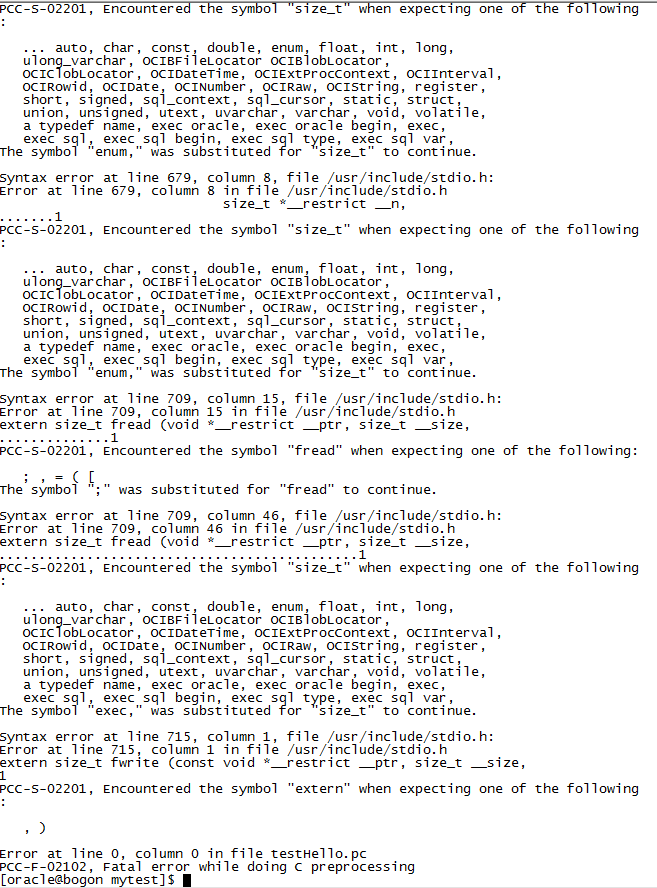
由于我可能比较笨,实在是受不了网上那些奇奇怪怪的答案,所以只能乖乖的自己去琢磨,根据错误来看,应该是跟头文件有关
所以我查询了下proc编译器的配置文件,如下

PS:这个是我后面改回来的,反正差不多就是这样。。。。
然后我一开始想是不是这里面涉及到的gcc版本跟我的系统上的不一样,然后就直接去一个一个进去看,例如cd /usr/lib/gcc-lib/x86_64-redhat-linux/3.4.3/include
得出的结果是未找到这个文件,因为我的CentOS的gcc有两个版本(不是特别懂)就是有一个4.8.2和4.8.5的文件夹,其中刚好有Include文件夹,点开有一堆gcc头文件
所以我就将原本的配置文件的版本参数改成这两个版本参数。
然后,重新编译,成功!如下:

另:这是配置文件的路径:$ORACLE_HOME/precomp/admin/pcscfg.cfg
2、我们成功使用proc xxxx.pc编译成.c文件了,但是却不能编译由C++所写的文件,否则出现以下错误:
[oracle@localhost mytest]$ proc testHello1.pc
Pro*C/C++: Release 11.2.0.1.0 - Production on Sun Apr 1 14:58:27 2018
Copyright (c) 1982, 2009, Oracle and/or its affiliates. All rights reserved.
System default option values taken from: /data/oraacle/product/11.2.0/db_1/precomp/admin/pcscfg.cfg
Error at line 6, column 9 in file testHello1.pc
#include<iostream>
........1
PCC-S-02015, unable to open include file
Syntax error at line 9, column 7, file testHello1.pc:
Error at line 9, column 7 in file testHello1.pc
using namespace std;
......1
PCC-S-02201, Encountered the symbol "namespace" when expecting one of the follow
ing:
; , = ( [
Syntax error at line 16, column 1, file testHello1.pc:
Error at line 16, column 1 in file testHello1.pc
{
1
PCC-S-02201, Encountered the symbol "{" when expecting one of the following:
; , = ( [
The symbol ";" was substituted for "{" to continue.
Syntax error at line 0, column 0, file testHello1.pc:
Error at line 0, column 0 in file testHello1.pc
PCC-S-02201, Encountered the symbol "<eof>" when expecting one of the following:
; { } ( * & + - ~ ! ^ ++ -- ... auto, break, case, char,
const, continue, default, do, double, enum, extern, float,
for, goto, if, int, long, ulong_varchar, OCIBFileLocator
OCIBlobLocator, OCIClobLocator, OCIDateTime,
OCIExtProcContext, OCIInterval, OCIRowid, OCIDate, OCINumber,
OCIRaw, OCIString, register, return, short, signed, sizeof,
sql_context, sql_cursor, static, struct, switch, typedef,
union, unsigned, utext, uvarchar, varchar, void, volatile,
while, an identifier, a typedef name, a precompiled header,
a quoted string, a numeric constant, exec oracle,
exec oracle begin, exec, exec sql, exec sql begin,
exec sql type, exec sql var, exec sql include,
Error at line 0, column 0 in file testHello1.pc
PCC-F-02102, Fatal error while doing C preprocessing
这是因为预编译工具proc,它是完成Pro*C源程序到纯C程序的转换
proc iname=filename [OptionName1=value1]…[OptionNameN=valueN]
常用编译选项
INAME=path and filename (name of the input file)
ONAME=path and filename (name of the output file)
INCLUDE=path (头文件所在路径)
--INCLUDE =路径名 或 INCLUDE =(路径名1,路径名2)
PARSE=FULL | PARTIA | NONE (default FULL for C, Others for C++)
CODE=ANSI_C | CPP (default ansi_c)
USERID=username/password
以上是它的常用编译选项,如果要想将.pc转换成.cc的c++源程序要这样:proc iname=test.pc parse=none code=cpp oname=test.cc
然后编译c++源程序时,要使用g++,这应该都知道的,哈哈哈~
PS:我觉得proc的编译挺麻烦的,要编译两次,后面自己写了个脚本方便多了,然后才发现有个makefile这个东西。。。。。。。。。
关于CentOS 7 下的Oracle11g的proc编译器的一些常见问题的更多相关文章
- Centos环境下删除Oracle11g客户端文档
将安装目录删除 [root@Oracle /root]# rm -rf /opt/oracle/ 将/usr/bin下的文件删除[root@Oracle /root]# rm /usr/local/b ...
- 基于CentOS与VmwareStation10搭建Oracle11G RAC 64集群环境:2.搭建环境-2.7. 配置资源与参数
2.7.配置资源与参数 2.7.1. 修改主机名称 [root@linuxrac1 ~]# cd /etc/sysconfig [root@linuxrac1 sysconfig]# vi netwo ...
- 基于CentOS与VmwareStation10搭建Oracle11G RAC 64集群环境:2.搭建环境-2.6. 安装Oracle所依赖的必要包
2.6. 安装Oracle所依赖的必要包 2.6.1. 检查Oracle所依赖的必要rpm包 [root@localhost /]#rpm -q binutils compat-libstdc elf ...
- 基于CentOS与VmwareStation10搭建Oracle11G RAC 64集群环境:2.搭建环境-2.5. 配置网络
2.5. 配置网络 2.5.1. 配置网络 Oracle Rac数据库涉及到公用网络和私有网络,因此要做网络划分和IP地址规划,下表列出了要安装的RAC数据库对应的IP地址.主机名以及网络连接类型: ...
- 基于CentOS与VmwareStation10搭建Oracle11G RAC 64集群环境:4.安装Oracle RAC FAQ-4.1.系统界面报错Gnome
1.错误信息:登录系统后,屏幕弹出几个错误对话框,无菜单.无按钮 GConf error: Failed to contact configuration server; some possible ...
- 基于CentOS与VmwareStation10搭建Oracle11G RAC 64集群环境:4.安装Oracle RAC FAQ-4.4.无法图形化安装Grid Infrastructure
无法图形化安装: [grid@linuxrac1 grid]$ ./runInstaller Starting Oracle Universal Installer... Checking Temp ...
- CentOS 7 下安装 LEMP 服务(nginx、MariaDB/MySQL 和 php)
原文 CentOS 7 下安装 LEMP 服务(nginx.MariaDB/MySQL 和 php) LEMP 组合包是一款日益流行的网站服务组合软件包,在许多生产环境中的核心网站服务上起着强有力的作 ...
- CentOS系统下Redis安装和自启动配置的步骤
相信大家都知道Redis是一个C实现的基于内存.可持久化的键值对数据库,在分布式服务中常作为缓存服务.所以这篇文章将详细介绍在CentOS系统下如何从零开始安装到配置启动服务.有需要的可以参考借鉴. ...
- CentOS Linux上安装Oracle11g笔记
CentOS Linux上安装Oracle11g 到 otn.oracle.com 网站上下载 Linux版的oracle 11g 编辑 /etc/sysctl.conf : kernel.shmal ...
随机推荐
- ACM-ICPC 2018 沈阳赛区网络预赛 Made In Heaven(K短路)题解
思路:K短路裸题 代码: #include<queue> #include<cstring> #include<set> #include<map> # ...
- 封装TeeChart控件
public class MyChart { //字段 private TChart tChart; /// <summary> /// 构造函数,默认不是3D效果 /// </su ...
- hdu 1427 速算24点 dfs暴力搜索
速算24点 Time Limit: 2000/1000 MS (Java/Others) Memory Limit: 65536/32768 K (Java/Others) Problem De ...
- python 判断一个数字是否为3的幂
def is_Power_of_three(n): == ): n /= ; ; print(is_Power_of_three()) print(is_Power_of_three()) print ...
- Could not find a package configuration file provided by "ecl_build",.................couldn't find required component 'ecl_build'
sudo apt-get install ros-kinetic-ecl-build
- es5,es6,typescript,nodejs
es5新特性 讲到js必讲的几个概念,作用域,闭包,IIFE自执行函数 es5主要是对Object,Array,Function做了扩展,还有josn工具 es6新特性 增加了新的数据类型 WeakM ...
- [don't have permission to access]的一个经典原因
那就是 ..... SELinux ...... 几年前好像经历过这个恶梦.现在又经历了一回. 从Windows上传了一个目录,做一个apache的别名Alias, 结果总是没有权限. chmod 7 ...
- 微服务设计 - api版本控制
要描述了几种API版本控制的方法.用户可以查询原始的API,或者添加定制的头文件来接收特定的版本.如果应用程序收到一个重大修订,将URI修改为V2.在进行迭代改进时,将创建与更改日期相一致的端点,并允 ...
- [转] jquery $.ajax/$(document).ready is not a function的问题
下午完成了一个模块功能的开发,本来测试好的jquery表单验证怎么也出不来了.打开firebug,看到控制台里赫然提示:$(document).ready is not a function.感觉怪怪 ...
- (转)HapMap简介
1.人类基因组的HapMap和国际HapMap计划 (1)何谓HapMap HapMap是Haplotype Map 的简称,Haplo意为单一,在基因组中专指来自父母的一对染色体中的一条.Haplo ...