
关于CentOS 7 下的Oracle11g的proc编译器的一些常见问题
1、proc编译器配置问题
在使用proc将.pc文件编译成.c文件时出现一堆的错误,网上的答案七杂八杂的,都没有解决我的问题。
如下是我在使用过程中的一些错误:
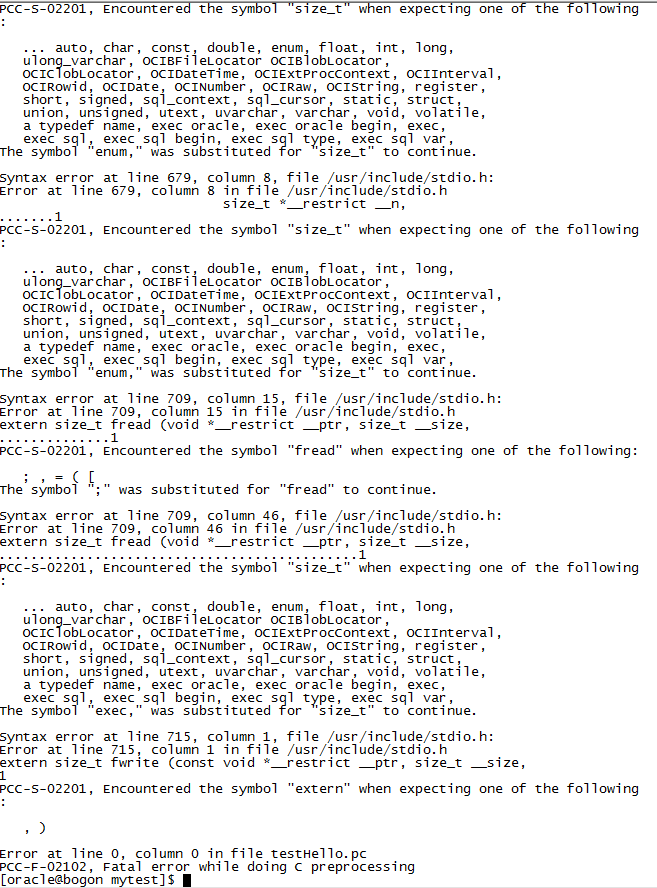
由于我可能比较笨,实在是受不了网上那些奇奇怪怪的答案,所以只能乖乖的自己去琢磨,根据错误来看,应该是跟头文件有关
所以我查询了下proc编译器的配置文件,如下

PS:这个是我后面改回来的,反正差不多就是这样。。。。
然后我一开始想是不是这里面涉及到的gcc版本跟我的系统上的不一样,然后就直接去一个一个进去看,例如cd /usr/lib/gcc-lib/x86_64-redhat-linux/3.4.3/include
得出的结果是未找到这个文件,因为我的CentOS的gcc有两个版本(不是特别懂)就是有一个4.8.2和4.8.5的文件夹,其中刚好有Include文件夹,点开有一堆gcc头文件
所以我就将原本的配置文件的版本参数改成这两个版本参数。
然后,重新编译,成功!如下:

另:这是配置文件的路径:$ORACLE_HOME/precomp/admin/pcscfg.cfg
2、我们成功使用proc xxxx.pc编译成.c文件了,但是却不能编译由C++所写的文件,否则出现以下错误:
[oracle@localhost mytest]$ proc testHello1.pc
Pro*C/C++: Release 11.2.0.1.0 - Production on Sun Apr 1 14:58:27 2018
Copyright (c) 1982, 2009, Oracle and/or its affiliates. All rights reserved.
System default option values taken from: /data/oraacle/product/11.2.0/db_1/precomp/admin/pcscfg.cfg
Error at line 6, column 9 in file testHello1.pc
#include<iostream>
........1
PCC-S-02015, unable to open include file
Syntax error at line 9, column 7, file testHello1.pc:
Error at line 9, column 7 in file testHello1.pc
using namespace std;
......1
PCC-S-02201, Encountered the symbol "namespace" when expecting one of the follow
ing:
; , = ( [
Syntax error at line 16, column 1, file testHello1.pc:
Error at line 16, column 1 in file testHello1.pc
{
1
PCC-S-02201, Encountered the symbol "{" when expecting one of the following:
; , = ( [
The symbol ";" was substituted for "{" to continue.
Syntax error at line 0, column 0, file testHello1.pc:
Error at line 0, column 0 in file testHello1.pc
PCC-S-02201, Encountered the symbol "<eof>" when expecting one of the following:
; { } ( * & + - ~ ! ^ ++ -- ... auto, break, case, char,
const, continue, default, do, double, enum, extern, float,
for, goto, if, int, long, ulong_varchar, OCIBFileLocator
OCIBlobLocator, OCIClobLocator, OCIDateTime,
OCIExtProcContext, OCIInterval, OCIRowid, OCIDate, OCINumber,
OCIRaw, OCIString, register, return, short, signed, sizeof,
sql_context, sql_cursor, static, struct, switch, typedef,
union, unsigned, utext, uvarchar, varchar, void, volatile,
while, an identifier, a typedef name, a precompiled header,
a quoted string, a numeric constant, exec oracle,
exec oracle begin, exec, exec sql, exec sql begin,
exec sql type, exec sql var, exec sql include,
Error at line 0, column 0 in file testHello1.pc
PCC-F-02102, Fatal error while doing C preprocessing
这是因为预编译工具proc,它是完成Pro*C源程序到纯C程序的转换
proc iname=filename [OptionName1=value1]…[OptionNameN=valueN]
常用编译选项
INAME=path and filename (name of the input file)
ONAME=path and filename (name of the output file)
INCLUDE=path (头文件所在路径)
--INCLUDE =路径名 或 INCLUDE =(路径名1,路径名2)
PARSE=FULL | PARTIA | NONE (default FULL for C, Others for C++)
CODE=ANSI_C | CPP (default ansi_c)
USERID=username/password
以上是它的常用编译选项,如果要想将.pc转换成.cc的c++源程序要这样:proc iname=test.pc parse=none code=cpp oname=test.cc
然后编译c++源程序时,要使用g++,这应该都知道的,哈哈哈~
PS:我觉得proc的编译挺麻烦的,要编译两次,后面自己写了个脚本方便多了,然后才发现有个makefile这个东西。。。。。。。。。
关于CentOS 7 下的Oracle11g的proc编译器的一些常见问题的更多相关文章
- Centos环境下删除Oracle11g客户端文档
将安装目录删除 [root@Oracle /root]# rm -rf /opt/oracle/ 将/usr/bin下的文件删除[root@Oracle /root]# rm /usr/local/b ...
- 基于CentOS与VmwareStation10搭建Oracle11G RAC 64集群环境:2.搭建环境-2.7. 配置资源与参数
2.7.配置资源与参数 2.7.1. 修改主机名称 [root@linuxrac1 ~]# cd /etc/sysconfig [root@linuxrac1 sysconfig]# vi netwo ...
- 基于CentOS与VmwareStation10搭建Oracle11G RAC 64集群环境:2.搭建环境-2.6. 安装Oracle所依赖的必要包
2.6. 安装Oracle所依赖的必要包 2.6.1. 检查Oracle所依赖的必要rpm包 [root@localhost /]#rpm -q binutils compat-libstdc elf ...
- 基于CentOS与VmwareStation10搭建Oracle11G RAC 64集群环境:2.搭建环境-2.5. 配置网络
2.5. 配置网络 2.5.1. 配置网络 Oracle Rac数据库涉及到公用网络和私有网络,因此要做网络划分和IP地址规划,下表列出了要安装的RAC数据库对应的IP地址.主机名以及网络连接类型: ...
- 基于CentOS与VmwareStation10搭建Oracle11G RAC 64集群环境:4.安装Oracle RAC FAQ-4.1.系统界面报错Gnome
1.错误信息:登录系统后,屏幕弹出几个错误对话框,无菜单.无按钮 GConf error: Failed to contact configuration server; some possible ...
- 基于CentOS与VmwareStation10搭建Oracle11G RAC 64集群环境:4.安装Oracle RAC FAQ-4.4.无法图形化安装Grid Infrastructure
无法图形化安装: [grid@linuxrac1 grid]$ ./runInstaller Starting Oracle Universal Installer... Checking Temp ...
- CentOS 7 下安装 LEMP 服务(nginx、MariaDB/MySQL 和 php)
原文 CentOS 7 下安装 LEMP 服务(nginx.MariaDB/MySQL 和 php) LEMP 组合包是一款日益流行的网站服务组合软件包,在许多生产环境中的核心网站服务上起着强有力的作 ...
- CentOS系统下Redis安装和自启动配置的步骤
相信大家都知道Redis是一个C实现的基于内存.可持久化的键值对数据库,在分布式服务中常作为缓存服务.所以这篇文章将详细介绍在CentOS系统下如何从零开始安装到配置启动服务.有需要的可以参考借鉴. ...
- CentOS Linux上安装Oracle11g笔记
CentOS Linux上安装Oracle11g 到 otn.oracle.com 网站上下载 Linux版的oracle 11g 编辑 /etc/sysctl.conf : kernel.shmal ...
随机推荐
- IDEA,RubyMine等JetBrains系列软件通用破解教程
此教程不光适用于IDEA,还可以在RubyMine等JetBrains系列软件使用,亲测可用. (1)下载安装你需要的JetBrains系列软件,安装完最好不要打开,直接finish,断开网络. (2 ...
- 第十四章 数字签名算法--RSA
注意:本节内容主要参考自 <Java加密与解密的艺术(第2版)>第9章“带密钥的消息摘要算法--数字签名算法” <大型分布式网站架构(设计与实践)>第3章“互联网安全架构” 1 ...
- [luoguP1119]灾后重建
题目链接 毒瘤题 卡spfa 可能dij也卡,没试过 然后放floyd过了 但其实spfa很好打,虽然只有60 让我们来分析一下spfa的效率,假设这个出题人极其毒瘤,出网格图 又因为是在线询问,所以 ...
- 【Coursera】Third Week(1)
The Early World-Wide-Web 关于CERN 欧洲核子研究组织,除了它为世界物理学所作出的卓越贡献,它还是世界上第一个网站,第一个网络服务器,第一个浏览器的诞生地. Robert C ...
- Vim简本
参考链接:http://yannesposito.com/Scratch/en/blog/Learn-Vim-Progressively/ 本文将更简化,只保留其中的精华部分. Level One — ...
- PCH Warning: header stop cannot be in a macro or #if block.
在编写头文件时,遇到这么一个warning:PCH Warning: header stop cannot be in a macro or #if block. An intellisense PC ...
- linux 系统调用号表
位于 /usr/include/asm/unistd.h 由于我是64位系统,所以有一些额外的东西.我的这个文件为下文 #ifndef _ASM_X86_UNISTD_H #define _ASM_X ...
- Qt5_加载DLL
1.QLibrary 加载普通 DLL //写清楚库的路径,如果放在当前工程的目录下,路径为./Oracle.so QLibrary *libOCI = new QLibrary("F:\\ ...
- 告诉maven,我真的不需要web.xml
<!-- 告诉maven,我真的不需要web.xml --> <plugin> <groupId>org.apache.maven.plugins</grou ...
- Codeforces 447D - DZY Loves Modification
447D - DZY Loves Modification 思路:将行和列分开考虑.用优先队列,计算出行操作i次的幸福值r[i],再计算出列操作i次的幸福值c[i].然后将行取i次操作和列取k-i次操 ...