
Demo中的IOC自定义实现
在做练习的时候,小小项目,使用IOC控件觉得麻烦,使用工厂觉得不高大上啊,自己写个简陋的依赖注入IOC吧;
控制反转(IOC)是管理映射依赖的的,是依赖倒置(DIP)的实现方式;
依赖倒置(DIP)是设计原则,控制反转(IOC)是具体实现,依赖注入(DI)是控制反转的具体实现;
解决方案的目录:

IOC 有3个类,一个是用来保存依赖关系的实体类(EntityIOC),一个是保存依赖关系的类(InterviewsDependencyResolver),一个是外部调用类(InterviewsIOC);
我理解的核心就是依赖关系.使用反射实现依赖倒置.
EntityIOC 代码:
/// <summary>

    /// 依赖注入实体

    /// </summary>

    internal class EntityIoc

    {

        private EntityIoc(){        }

        public EntityIoc(string _namespace, string _fullName)

        {

            Namespace = _namespace;

            FullName = _fullName;

        }

        /// <summary>

        /// 程序集名称

        /// </summary>

        public string Namespace { get; set; }

        /// <summary>

        /// 实例名(不包括命名空间)

        /// </summary>

        public string FullName { get; set; }

    }
.csharpcode, .csharpcode pre
{
font-size: small;
color: black;
font-family: consolas, "Courier New", courier, monospace;
background-color: #ffffff;
/*white-space: pre;*/
}
.csharpcode pre { margin: 0em; }
.csharpcode .rem { color: #008000; }
.csharpcode .kwrd { color: #0000ff; }
.csharpcode .str { color: #006080; }
.csharpcode .op { color: #0000c0; }
.csharpcode .preproc { color: #cc6633; }
.csharpcode .asp { background-color: #ffff00; }
.csharpcode .html { color: #800000; }
.csharpcode .attr { color: #ff0000; }
.csharpcode .alt
{
background-color: #f4f4f4;
width: 100%;
margin: 0em;
}
.csharpcode .lnum { color: #606060; }
InterviewsDependencyResolver 代码:
 /// <summary>

    ///容器

    /// </summary>

    internal   class InterviewsDependencyResolver<IEntity> where IEntity : class

    {

        private InterviewsDependencyResolver() { }

        private static Dictionary<EntityIoc, EntityIoc> _dictIoc = new Dictionary<EntityIoc, EntityIoc>();

        //private static Dictionary<Type, Type> accessDict = new Dictionary<Type, Type>();

        public static EntityIoc Get()

        {

            Type ientity = typeof(IEntity);

            //需要返回的值

            EntityIoc iioc = new EntityIoc(ientity.Module.Name.Replace(".dll", ""), ientity.FullName);

            //集合中的数据

            iioc = _dictIoc.Keys.Where(a => a.FullName == iioc.FullName && a.Namespace == iioc.Namespace).FirstOrDefault();

            if (iioc != null)

            {

                //根据Key返回集合中保存的实例信息

                return _dictIoc[iioc];

            }

            return null;

        }

        /// <summary>

        /// 绑定

        /// </summary>

        /// <typeparam name="T"></typeparam>

        public static void To<T>() where T : class

        {

            Type ientity = typeof(IEntity);

            Type entity = typeof(T);

            EntityIoc iioc = new EntityIoc(ientity.Module.Name.Replace(".dll", ""), ientity.FullName);

            EntityIoc ioc = new EntityIoc(entity.Module.Name.Replace(".dll", ""), entity.FullName);

            if (!_dictIoc.Keys.Contains(iioc))

            {

                _dictIoc.Add(iioc, ioc);

            }

        }

        /// <summary>

        /// 取消绑定

        /// </summary>

        /// <typeparam name="T"></typeparam>

        public static void UninstallTo<T>() where T : class

        {

            Type ientity = typeof(IEntity);

            EntityIoc iioc = new EntityIoc(ientity.Module.Name.Replace(".dll", ""), ientity.FullName);

            //集合中的数据

            iioc = _dictIoc.Keys.Where(a => a.FullName == iioc.FullName && a.Namespace == iioc.Namespace).FirstOrDefault();

            if (iioc != null)

            {

                _dictIoc.Remove(iioc);

            }

        }

    }
InterviewsIOC 代码:
.csharpcode, .csharpcode pre
{
font-size: small;
color: black;
font-family: consolas, "Courier New", courier, monospace;
background-color: #ffffff;
/*white-space: pre;*/
}
.csharpcode pre { margin: 0em; }
.csharpcode .rem { color: #008000; }
.csharpcode .kwrd { color: #0000ff; }
.csharpcode .str { color: #006080; }
.csharpcode .op { color: #0000c0; }
.csharpcode .preproc { color: #cc6633; }
.csharpcode .asp { background-color: #ffff00; }
.csharpcode .html { color: #800000; }
.csharpcode .attr { color: #ff0000; }
.csharpcode .alt
{
background-color: #f4f4f4;
width: 100%;
margin: 0em;
}
.csharpcode .lnum { color: #606060; }
/// <summary>

    /// 简单IOC

    /// </summary>

    public class InterviewsIOC

    {

        private InterviewsIOC() { }

        /// <summary>

        /// 绑定

        /// </summary>

        public static void Bing()

        {

            //配置文件读取或者直接绑定,如果是配置文件读取,需要先读取后反射为类(用来判断依赖是否正确)

            InterviewsDependencyResolver<IAccountService>.To<Impl.AccountService>();

        }

        /// <summary>

        /// 获取依赖中具体实现

        /// </summary>

        /// <typeparam name="IEntity"></typeparam>

        /// <returns></returns>

        public static IEntity LoadInstance<IEntity>() where IEntity : class

        {

            IEntity resultEntity = null;

            EntityIoc ioc = InterviewsDependencyResolver<IEntity>.Get();

            if (ioc != null)

            {

                try

                {

                    //反射实现接口实例

                    resultEntity = (IEntity)Assembly.Load(ioc.Namespace).CreateInstance(ioc.FullName);

                }

                catch (Exception ex)

                {

                    throw;

                }

            }

            return resultEntity;

        }

    }
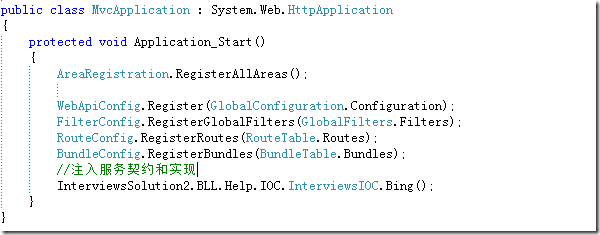
程序使用:

.csharpcode, .csharpcode pre
{
font-size: small;
color: black;
font-family: consolas, "Courier New", courier, monospace;
background-color: #ffffff;
/*white-space: pre;*/
}
.csharpcode pre { margin: 0em; }
.csharpcode .rem { color: #008000; }
.csharpcode .kwrd { color: #0000ff; }
.csharpcode .str { color: #006080; }
.csharpcode .op { color: #0000c0; }
.csharpcode .preproc { color: #cc6633; }
.csharpcode .asp { background-color: #ffff00; }
.csharpcode .html { color: #800000; }
.csharpcode .attr { color: #ff0000; }
.csharpcode .alt
{
background-color: #f4f4f4;
width: 100%;
margin: 0em;
}
.csharpcode .lnum { color: #606060; }
Demo中的IOC自定义实现的更多相关文章
- Spring——Web应用中的IoC容器创建(WebApplicationContext根应用上下文的创建过程)
基于Spring-4.3.7.RELEASE Spring的配置不仅仅局限在XML文件,同样也可以使用Java代码来配置.在这里我使用XML配置文件的方式来粗略地讲讲WebApplicationCon ...
- WebRTC中Android Demo中的远程视频流的获取到传输
1.CallActivity#onCreate 执行startCall开始连接或创建房间 2.WebSocketClient#connectToRoom 请求一次服务器 3.回调到CallActivi ...
- 理解Spring中的IoC和DI
什么是IoC和DI IoC(Inversion of Control 控制反转):是一种面向对象编程中的一种设计原则,用来减低计算机代码之间的耦合度.其基本思想是:借助于"第三方" ...
- Android中如何做到自定义的广播只能有指定的app接收
今天没吊事,又去面试了,具体哪家公司就不说了,因为我在之前的blog中注明了那些家公司的名字,结果人家给我私信说我泄露他们的题目,好吧,我错了...其实当我们已经在工作的时候,我们可以在空闲的时间去面 ...
- 【asp.net core 系列】14 .net core 中的IOC
0.前言 通过前面几篇,我们了解到了如何实现项目的基本架构:数据源.路由设置.加密以及身份验证.那么在实现的时候,我们还会遇到这样的一个问题:当我们业务类和数据源越来越多的时候,我们无法通过普通的构造 ...
- 152-技巧-Power Query 快速合并文件夹中表格之自定义函数 TableXlsxCsv
152-技巧-Power Query 快速合并文件夹中表格之自定义函数 TableXlsxCsv 附件下载地址:https://jiaopengzi.com/2602.html 一.背景 在我们使用 ...
- YbSoftwareFactory 代码生成插件【二十四】:MVC中实现动态自定义路由
上一篇介绍了 公文流转系统 的实现,本篇介绍下MVC下动态自定义路由的实现. 在典型的CMS系统中,通常需要为某个栏目指定个友链地址,通过指定友链地址,该栏目的地址更人性化.方便记忆,也有利用于搜索引 ...
- HTML5 UI框架Kendo UI Web中如何创建自定义组件(二)
在前面的文章<HTML5 UI框架Kendo UI Web自定义组件(一)>中,对在Kendo UI Web中如何创建自定义组件作出了一些基础讲解,下面将继续前面的内容. 使用一个数据源 ...
- Android 进阶 Android 中的 IOC 框架 【ViewInject】 (下)
上一篇博客我们已经带大家简单的吹了一下IoC,实现了Activity中View的布局以及控件的注入,如果你不了解,请参考:Android 进阶 教你打造 Android 中的 IOC 框架 [View ...
随机推荐
- ios app 企业帐号发布,在浏览器中直接点击链接下载安装
软件环境:Xcode 6.4 参考链接: 1.http://zxs19861202.iteye.com/blog/1997722 2.http://www.cnblogs.com/abl1992/p/ ...
- 虚拟机下Centos7如何设置静态IP地址
最近在学习linux环境部署~~~~ 首先,将网络适配设置成为桥接模式 查看本机IP地址,ipconfig,记住ipv4地址和默认网关地址,等会配置的时候要用 启动Centos,进入终端模式,设置IP ...
- Ubuntu下运行Shell脚本
将一个脚本保存为带有扩展名的文件,如test.sh, 在终端上输入: chmod +x test.sh 然后输入: test.sh 终端显示: test.sh 找不到命令(后来看了鸟个私房菜,发现这样 ...
- 【bzoj1415】 Noi2005—聪聪和可可
http://www.lydsy.com/JudgeOnline/problem.php?id=1415 (题目链接) 题意 一张图,聪聪想吃可可.每单位时间聪聪可以先移动两次:可可后移动一次或停在原 ...
- Unity Game窗口中还原Scene窗口摄像机操作 强化版
之前写的那个版本看来真的是不行啊.最近研究了一下官方第一人称脚本,人家的平滑过渡真的是没得说.借鉴了一下,写出来了一个新的比较完美的控制. 之前我们的操作是通过鼠标输入的开始坐标和转动坐标.其实官方有 ...
- zookeeper原理解析-选举
1)QuorumPeerMain加载 Zookeeper集群启动的入口类是QuorumPeerMain来加载配置启动QuorumPeer线程.首先我们来看下QuorumPeer, 谷歌翻译quorum ...
- 微信学习总结 02 ngrok 部署本机代码,使外网可以访问
一 什么是ngrok ngrok is a reverse proxy that creates a secure tunnel from a public endpoint to a locally ...
- 2 django系列之django分页与templatetags
preface 当页面出现的条目多的时候,我们就需要使用分页功能了.Django作为一个知名的web框架,自然也提供了分页功能,下面说说它. Python-shell 练练手 在python下入手 先 ...
- php-7.1.0 rpm包制作
nginx-1.8.0 rpm包制作见上篇文章:http://www.cnblogs.com/xiaoming279/p/6251149.html spec文件 Name: php Version: ...
- linux命令汇总
GPU使用率 使用率查看,GPU-Util $ nvidia-smi 实时查看 $ watch [options] command 最常用的参数是 -n, 后面指定是每多少秒来执行一次命令. 监视显存 ...