
Inside NGINX: How We Designed for Performance & Scale
NGINX leads the pack in web performance, and it’s all due to the way the software is designed. Whereas many web servers and application servers use a simple threaded or process-based architecture, NGINX stands out with a sophisticated event-driven architecture that enables it to scale to hundreds of thousands of concurrent connections on modern hardware.
The Inside NGINX infographic drills down from the high-level process architecture to illustrate how NGINX handles multiple connections within a single process. This blog explains how it all works in further detail.
Setting the Scene – The NGINX Process Model

To better understand this design, you need to understand how NGINX runs. NGINX has a master process (which performs the privileged operations such as reading configuration and binding to ports) and a number of worker and helper processes.
# service nginx restart

* Restarting nginx

# ps -ef --forest | grep nginx

root     32475     1  0 13:36 ?        00:00:00 nginx: master process /usr/sbin/nginx \

                                                -c /etc/nginx/nginx.conf

nginx    32476 32475  0 13:36 ?        00:00:00  \_ nginx: worker process

nginx    32477 32475  0 13:36 ?        00:00:00  \_ nginx: worker process

nginx    32479 32475  0 13:36 ?        00:00:00  \_ nginx: worker process

nginx    32480 32475  0 13:36 ?        00:00:00  \_ nginx: worker process

nginx    32481 32475  0 13:36 ?        00:00:00  \_ nginx: cache manager process

nginx    32482 32475  0 13:36 ?        00:00:00  \_ nginx: cache loader process
On this 4-core server, the NGINX master process creates 4 worker processes and a couple of cache helper processes which manage the on-disk content cache.
Why Is Architecture Important?
The fundamental basis of any Unix application is the thread or process. (From the Linux OS perspective, threads and processes are mostly identical; the major difference is the degree to which they share memory.) A thread or process is a self-contained set of instructions that the operating system can schedule to run on a CPU core. Most complex applications run multiple threads or processes in parallel for two reasons:
- They can use more compute cores at the same time.
- Threads and processes make it very easy to do operations in parallel (for example, to handle multiple connections at the same time).
Processes and threads consume resources. They each use memory and other OS resources, and they need to be swapped on and off the cores (an operation called a context switch). Most modern servers can handle hundreds of small, active threads or processes simultaneously, but performance degrades seriously once memory is exhausted or when high I/O load causes a large volume of context switches.
The common way to design network applications is to assign a thread or process to each connection. This architecture is simple and easy to implement, but it does not scale when the application needs to handle thousands of simultaneous connections.
How Does NGINX Work?
NGINX uses a predictable process model that is tuned to the available hardware resources:
- The master process performs the privileged operations such as reading configuration and binding to ports, and then creates a small number of child processes (the next three types).
- The cache loader process runs at startup to load the disk-based cache into memory, and then exits. It is scheduled conservatively, so its resource demands are low.
- The cache manager process runs periodically and prunes entries from the disk caches to keep them within the configured sizes.
- The worker processes do all of the work! They handle network connections, read and write content to disk, and communicate with upstream servers.
The NGINX configuration recommended in most cases – running one worker process per CPU core – makes the most efficient use of hardware resources. You configure it by setting the auto parameter on the worker_processes directive:
worker_processes auto;When an NGINX server is active, only the worker processes are busy. Each worker process handles multiple connections in a non-blocking fashion, reducing the number of context switches.
Each worker process is single-threaded and runs independently, grabbing new connections and processing them. The processes can communicate using shared memory for shared cache data, session persistence data, and other shared resources.
Inside the NGINX Worker Process

Each NGINX worker process is initialized with the NGINX configuration and is provided with a set of listen sockets by the master process.
The NGINX worker processes begin by waiting for events on the listen sockets (accept_mutex andkernel socket sharding). Events are initiated by new incoming connections. These connections are assigned to a state machine – the HTTP state machine is the most commonly used, but NGINX also implements state machines for stream (raw TCP) traffic and for a number of mail protocols (SMTP, IMAP, and POP3).

The state machine is essentially the set of instructions that tell NGINX how to process a request. Most web servers that perform the same functions as NGINX use a similar state machine – the difference lies in the implementation.
Scheduling the State Machine
Think of the state machine like the rules for chess. Each HTTP transaction is a chess game. On one side of the chessboard is the web server – a grandmaster who can make decisions very quickly. On the other side is the remote client – the web browser that is accessing the site or application over a relatively slow network.
However, the rules of the game can be very complicated. For example, the web server might need to communicate with other parties (proxying to an upstream application) or talk to an authentication server. Third-party modules in the web server can even extend the rules of the game.
A Blocking State Machine
Recall our description of a process or thread as a self-contained set of instructions that the operating system can schedule to run on a CPU core. Most web servers and web applications use a process-per-connection or thread-per-connection model to play the chess game. Each process or thread contains the instructions to play one game through to the end. During the time the process is run by the server, it spends most of its time ‘blocked’ – waiting for the client to complete its next move.

- The web server process listens for new connections (new games initiated by clients) on the listen sockets.
- When it gets a new game, it plays that game, blocking after each move to wait for the client’s response.
- Once the game completes, the web server process might wait to see if the client wants to start a new game (this corresponds to a keepalive connection). If the connection is closed (the client goes away or a timeout occurs), the web server process returns to listening for new games.
The important point to remember is that every active HTTP connection (every chess game) requires a dedicated process or thread (a grandmaster). This architecture is simple and easy to extend with third-party modules (‘new rules’). However, there’s a huge imbalance: the rather lightweight HTTP connection, represented by a file descriptor and a small amount of memory, maps to a separate thread or process, a very heavyweight operating system object. It’s a programming convenience, but it’s massively wasteful.
NGINX is a True Grandmaster
Perhaps you’ve heard of simultaneous exhibition games, where one chess grandmaster plays dozens of opponents at the same time?
 Kiril Georgiev played 360 people simultaneously in Sofia, Bulgaria. His final score was 284 wins, 70 draws and 6 losses.
That’s how an NGINX worker process plays “chess.” Each worker (remember – there’s usually one worker for each CPU core) is a grandmaster that can play hundreds (in fact, hundreds of thousands) of games simultaneously.

- The worker waits for events on the listen and connection sockets.
- Events occur on the sockets and the worker handles them:
- An event on the listen socket means that a client has started a new chess game. The worker creates a new connection socket.
- An event on a connection socket means that the client has made a new move. The worker responds promptly.
A worker never blocks on network traffic, waiting for its “opponent” (the client) to respond. When it has made its move, the worker immediately proceeds to other games where moves are waiting to be processed, or welcomes new players in the door.
Why Is This Faster than a Blocking, Multi-Process Architecture?
NGINX scales very well to support hundreds of thousands of connections per worker process. Each new connection creates another file descriptor and consumes a small amount of additional memory in the worker process. There is very little additional overhead per connection. NGINX processes can remain pinned to CPUs. Context switches are relatively infrequent and occur when there is no work to be done.
In the blocking, connection-per-process approach, each connection requires a large amount of additional resources and overhead, and context switches (swapping from one process to another) are very frequent.
For a more detailed explanation, check out this article about NGINX architecture, by Andrew Alexeev, VP of Corporate Development and Co-Founder at NGINX, Inc.
With appropriate system tuning, NGINX can scale to handle hundreds of thousands of concurrent HTTP connections per worker process, and can absorb traffic spikes (an influx of new games) without missing a beat.
Updating Configuration and Upgrading NGINX
NGINX’s process architecture, with a small number of worker processes, makes for very efficient updating of the configuration and even the NGINX binary itself.
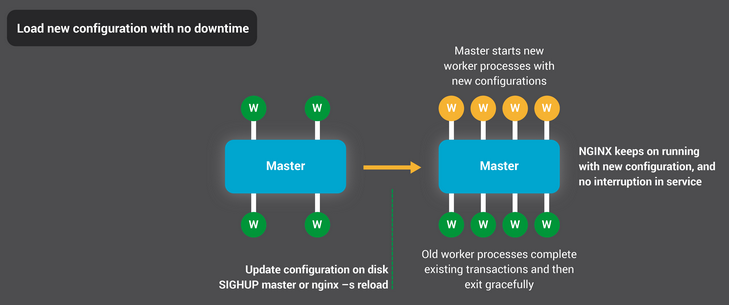
Updating NGINX configuration is a very simple, lightweight, and reliable operation. It typically just means running the nginx –s reload command, which checks the configuration on disk and sends the master process a SIGHUP signal.
When the master process receives a SIGHUP, it does two things:
- Reloads the configuration and forks a new set of worker processes. These new worker processes immediately begin accepting connections and processing traffic (using the new configuration settings).
- Signals the old worker processes to gracefully exit. The worker processes stop accepting new connections. As soon as each current HTTP request completes, the worker process cleanly shuts down the connection (that is, there are no lingering keepalives). Once all connections are closed, the worker processes exit.
This reload process can cause a small spike in CPU and memory usage, but it’s generally imperceptible compared to the resource load from active connections. You can reload the configuration multiple times per second (and many NGINX users do exactly that). Very rarely, issues arise when there are many generations of NGINX worker processes waiting for connections to close, but even those are quickly resolved.
NGINX’s binary upgrade process achieves the holy grail of high-availability – you can upgrade the software on the fly, without any dropped connections, downtime, or interruption in service.

The binary upgrade process is similar in approach to the graceful reload of configuration. A new NGINX master process runs in parallel with the original master process, and they share the listening sockets. Both processes are active, and their respective worker processes handle traffic. You can then signal the old master and its workers to gracefully exit.
The entire process is described in more detail in Controlling NGINX.
Conclusion
The Inside NGINX infographic provides a high-level overview of how NGINX functions, but behind this simple explanation is over ten years of innovation and optimization that enable NGINX to deliver the best possible performance on a wide range of hardware while maintaining the security and reliability that modern web applications require.
If you’d like to read more about the optimizations in NGINX, check out these great resources:
- Installing and Tuning NGINX for Performance (webinar; slides at Speaker Deck)
- Tuning NGINX for Performance
- The Architecture of Open Source Applications – NGINX
- Socket Sharding in NGINX Release 1.9.1 (using the SO_REUSEPORT socket option)
转自:https://www.nginx.com/blog/inside-nginx-how-we-designed-for-performance-scale/
Inside NGINX: How We Designed for Performance & Scale的更多相关文章
- [转]Amazon DynamoDB – a Fast and Scalable NoSQL Database Service Designed for Internet Scale Applications
This article is from blog of Amazon CTO Werner Vogels. -------------------- Today is a very exciting ...
- Nginx实现内参:为什么架构很重要?
Nginx在web开发者眼中就是高并发高性能的代名词,其基于事件的架构也被众多开发者效仿.我从Nginx的网站找到一篇技术文章将Nginx是怎样实现的,文章是Nginx的产品老大Owen Garret ...
- 深入NGINX:nginx高性能的实现原理
深入NGINX:我们如何设计它的性能和扩展性 来源: cnBeta 原文链接 英文原文:Inside NGINX: How We Designed for Performance & Sca ...
- [译]深入 NGINX: 为性能和扩展所做之设计
来自:http://ifeve.com/inside-nginx-how-we-designed-for-performance-scale/ 这篇文章写了nginx的设计,写的很仔细全面, 同时里面 ...
- 性能追击:万字长文30+图揭秘8大主流服务器程序线程模型 | Node.js,Apache,Nginx,Netty,Redis,Tomcat,MySQL,Zuul
本文为<高性能网络编程游记>的第六篇"性能追击:万字长文30+图揭秘8大主流服务器程序线程模型". 最近拍的照片比较少,不知道配什么图好,于是自己画了一个,凑合着用,让 ...
- ngnix高并发的原理实现(转)
英文原文:Inside NGINX: How We Designed for Performance & Scale 为了更好地理解设计,你需要了解NGINX是如何工作的.NGINX之所以能在 ...
- Nginx Tutorial #1: Basic Concepts(转)
add by zhj: 文章写的很好,适合初学者 原文:https://www.netguru.com/codestories/nginx-tutorial-basics-concepts Intro ...
- 【大型网站技术实践】初级篇:借助Nginx搭建反向代理服务器
一.反向代理:Web服务器的“经纪人” 1.1 反向代理初印象 反向代理(Reverse Proxy)方式是指以代理服务器来接受internet上的连接请求,然后将请求转发给内部网络上的服务器,并将从 ...
- Nginx搭建反向代理服务器过程详解
一.反向代理:Web服务器的“经纪人” 1.1 反向代理初印象 反向代理(Reverse Proxy)方式是指以代理服务器来接受internet上的连接请求,然后将请求转发给内部网络上的服务器,并将从 ...
随机推荐
- [leetcode]Best Time to Buy and Sell Stock III @ Python
原题地址:https://oj.leetcode.com/problems/best-time-to-buy-and-sell-stock-iii/ 题意: Say you have an array ...
- iOS开发-简单抽奖
路过商场,看过抽奖感觉挺有意思的,商场进行抽奖活动,三个奖项,一等奖的概率1/10,二等奖的概率的3/10,三等奖的概率是6/10,具体奖品我没仔细看,回来随便练手了一下,思考了一下,奖品分为10份, ...
- Ubuntu环境变量解析
在Ubuntu中有如下几个文件可以设置环境变量 /etc/profile:在登录时,操作系统定制用户环境时使用的第一个文件,此文件为系统的每个用户设置环境信息,当用户第一次登录时,该文件被执行. /e ...
- JAVA的Split小技巧
在日常的开发中截取字符串必不可少,但是在JAVA中的Split截取有点特点的地方是 例如: String str=1,2,3,; 那么 str.split(&q ...
- 很有用的mobile web application远程调试工具 weinre
在移动web应用中,因为没有类似chrome和firebug的调试工具,调试起来比在PC上相对麻烦一些,有时候仅仅能重复进行改动比对,但使用weinre我们能够轻松做到远程调试的功能. 什么是wein ...
- Docker登录失败
% docker login Username: xxxx Password: Email: xxxxxxx@yahoo.co.jp FATA[0033] Error response from ...
- mysql CAPI 接口 读取中文乱码的解决方案(转)
最近的yymysqlsdk的开源项目里,对中文的支持不到位,因此用了1.5天的时间,对中文处理的各个情况进行了分析. 1.首先确认你的MySQL配置文件,my.ini (只针对window ...
- 一个ActiveX control的创建过程
创建 根据这篇文章的介绍:http://www.cnblogs.com/time-is-life/p/6354152.html 来创建,里面包含了创建的基本过程以及属性事件方法的使用. 使用: 参考文 ...
- GPUImage简单滤镜使用(一)
今天来学习一下一个简单滤镜使用的流程,通过调节亮度滤镜来了解.先将GPUImage库导入到项目中,引入头文件"GPUImage.h" 一.创建亮度滤镜对象 GPUImag ...
- FancyBox-经典的jQuery Lightbox插件
在线演示 本地下载 FancyBox 是一款非常优秀的弹窗插件,能够为图片.HTML内容和其它任务的多媒体内容提供优雅的弹出缩放效果.作为是最流行的 Lightbox 插件之一,可以通过 fitToV ...