
[AX2012]关于财务默认维度
和以前的版本一样,AX2012中很多地方都使用财务维度,比如客户、销售订单、销售订单行等,根据相应的财务维度设置,生成的相应财务分录将带有财务维度,方便后续对财务分录交易的分析。下图是在客户记录上设置默认财务维度的情况:

默认财务维度只包括CostCenter、Department和ExpensePurpose,如果要象上图要添加显示其他的财务维度,在以前的版本中需要编程实现,但是在AX2012我们只需要配置即可实现。
首先需要创建相应的财务维度(General ledger>Setup>Financial dimensions>Financial dimensions,表DimensionAttribute的一条记录对应一个财务维度):

需要注意的是“use values from”选项,系统集成了几种维度值来源,比如这里维度“Customer”的维度取值为“Customers”,维度的值将来自于CustTable表由系统自动生成不能手工添加(其实来自于视图DimAttributeCustTable)。“use values from”可以是“<Custom dimension>”,这种维度的维度值是手工维护的,点击“Financial dimension values”可以维护维度的值列表:
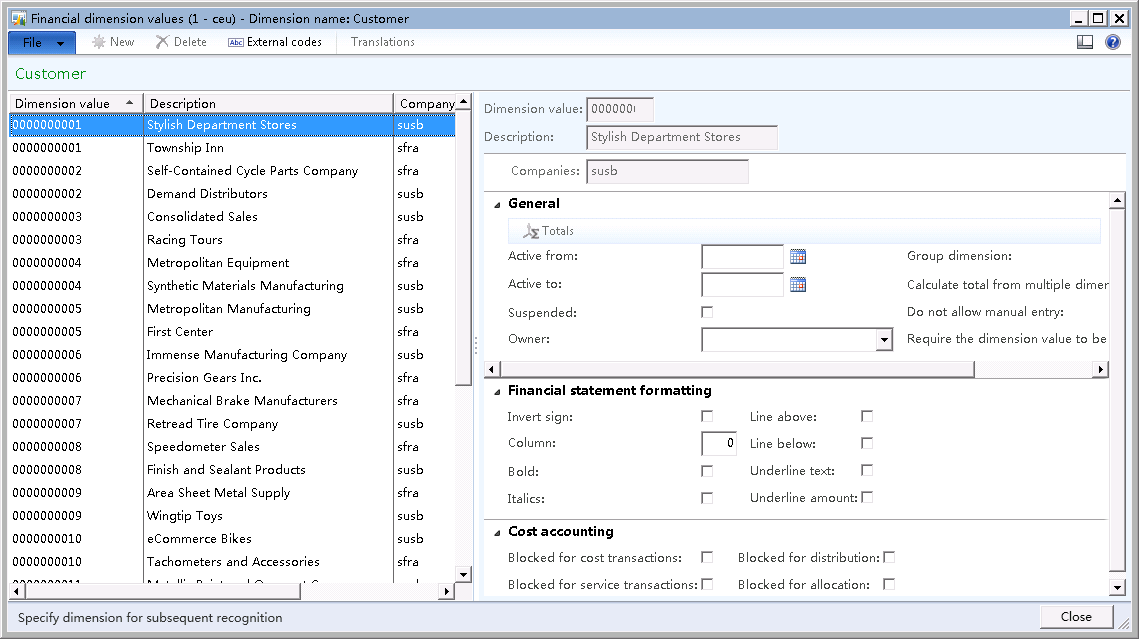
维度“Customer”取值来自于系统,所以上图中是不能修改维度取值的,“new”、“delete”等按钮是灰化的。
创建的财务维度我们需要添加到相应公司的总账账号结构中,找到General ledger>Setup>Ledger:

Account structures有两条记录,选择一条记录点击“Config account structure”:

上图中我们把“Customer”和“Vendor”添加到默认的总账账号结构中,激活后我们在客户记录的默认财务维度中就能看到“Customer”和“Vendor”两个维度了。
再来看看相关的数据是如何保存的,客户表CusTable.DefaultDimension保存的是来自于DimensionAttributeValueSet表的一条记录RecId,表单上维度信息的显示与编辑由类DimensionDefaultingController实现,它用下面的代码根据DimensionAttributeValueSet.RecId获取各个维度的设置值:
protected container getAttributeValueSet(DimensionDefault _dimAttributeValueSetId, selectableDataArea _company)

{

    return DimensionControllerObject::getAttributeValueSetServer(_dimAttributeValueSetId, _company);

}
这里用到另外一个表DimensionAttributeValueSetItem,假设我们在图1中同时设置客户的Department和Department两个财务维度,这个过程会创建1条DimensionAttributeValueSet记录和2条DimensionAttributeValueSetItem记录:
- DimensionAttributeValueSetItem.DimensionAttributeValueSet 字段 -> DimensionAttributeValueSet.RecId
- DimensionAttributeValueSetItem.DimensionAttributeValue 字段 -> DimensionAttributeValue.RecId (该表的一条记录保存财务维度的一个取值)
- DimensionAttributeValue.DimensionAttribute 字段 -> DimensionAttribute.RecId
通过关联查询这几个表,我们就能查找出CustTable.DefaultDimension所代表的一组Dimension及其值的组合。DimensionAttributeValueSet表只有一个字段Hash,且被设置为不能重复的索引,它表示的是其代表的一组维度值HashKey经过运算后得到的哈希值,存放在表DimensionAttributeValueSet以表示这样的财务组合已经存在,以防止重复生成相应的维度组合。
在有一定的了解后,我们来看看如何通过代码设置默认维度:
static void setCustTableDefaultFinancialDimension(Args _args)

{

    #LedgerSHA1Hash

    DimensionSHA1Hash               hash; //To store the calculated hash for DimensionAttributeValueSet

    HashKey                         valueKeyHashArray[]; //To store the has key of dimension in question

    Map                             dimAttrIdx; //to store the dimension index and backing entity type

    DimensionAttributeSetItem       dimAttrSetItem; // Contains the number of dimensions active for a account structure ledger

    DimensionAttribute              dimAttr; // Contains the financial dimensions records

    DimensionAttributeValue         dimAttrValue; // Contains used financial dimension values

    DimensionAttributeValueSet      dimAttrValueSet; //Contains default dimension records

    DimensionAttributeValueSetItem  dimAttrValueSetItem; //Contains individual records for default dimensions

    DimAttributeCustTable           dimAttrCustTable; //Backing entity view for Employee type dimension

    DimensionEnumeration            dimensionSetId; //Record id for table that contains active dimensions for current ledger

    CustTable                       custTable; //Record of the customer used to set the dimension

    int dimAttrCount, i;

    int custBackEntityType; //Stores the backing entity type for Employee type dimension

    ;

    //The employee backing entity will be the view DimAttributeHcmWorker

    custBackEntityType = tableNum(DimAttributeCustTable);

    //Initialize the map to store the backing entity types

    dimAttrIdx = new Map(Types::Integer, Types::Integer);

    //Get the record Id (dimension set id) for current ledger to find active dimensions

    dimensionSetId = DimensionCache::getDimensionAttributeSetForLedger();

    //Find all the active dimensions for current ledger except main account and store there

    //backing entity type in the map

    while select * from dimAttr

        order by Name

            where dimAttr.Type != DimensionAttributeType::MainAccount

        join RecId from dimAttrSetItem

            where dimAttrSetItem.DimensionAttribute == dimAttr.RecId &&

                dimAttrSetItem.DimensionAttributeSet == dimensionSetId

    {

        dimAttrCount++;

        dimAttrIdx.insert(dimAttr.BackingEntityType, dimAttrCount);

        info(dimAttr.Name);

    }

    //initialize hash key array to null

    for (i = ; i<= dimAttrCount; i++)

        valueKeyHashArray[i] = emptyGuid();

    //Find the Dimension attribute record for the dimension to work on

    dimAttr.clear();

    select firstonly dimAttr

        where dimAttr.BackingEntityType == custBackEntityType;

    //Get the backing entity type for the dimension value to process

    select firstOnly dimAttrCustTable

        where dimAttrCustTable.Value == '';

    //Find the required Dimension Attribute Value record

    //Create if necessary

    dimAttrValue = DimensionAttributeValue::findByDimensionAttributeAndEntityInst(dimAttr.RecId, dimAttrCustTable.RecId, false, true);

    //Store the required combination hash keys

    valueKeyHashArray[dimAttrIdx.lookup(custBackEntityType)] = dimAttrValue.HashKey;

    //Calculate the hash for the current values

    hash = DimensionAttributeValueSetStorage::getHashFromArray(valueKeyHashArray, dimAttrCount);

    //Null hash indicates no values exist, which may occur if the user entered an invalid value for one dimension attribute

    if (hash == conNull())

    {

        throw error("Wrong value for Customer Dimension");

    }

    // Search for existing value set

    dimAttrValueSet = DimensionAttributeValueSet::findByHash(hash);

    // This value set does not exist, so it must be persisted

    if (!dimAttrValueSet)

    {

        ttsbegin;

        // Insert the value set with appropriate hash

        dimAttrValueSet.Hash = hash;

        dimAttrValueSet.insert();

        //Insert Customer dimension set item

        dimAttrValueSetItem.clear();

        dimAttrValueSetItem.DimensionAttributeValueSet = dimAttrValueSet.RecId;

        dimAttrValueSetItem.DimensionAttributeValue = dimAttrValue.RecId;

        dimAttrValueSetItem.DisplayValue = dimAttrCustTable.Value;

        dimAttrValueSetItem.insert();

        ttscommit;

    }

    //Update the customer default dimension field

    ttsBegin;

    select forUpdate custTable where custTable.AccountNum == '';

    custTable.DefaultDimension = dimAttrValueSet.RecId;

    custTable.Update();

    ttsCommit;

    info(strFmt("%1", dimAttrValueSet.RecId));

}
上面代码参考http://sumitsaxfactor.wordpress.com/2011/12/28/defaulting-financial-dimensions-ax-2012/,设置客户代码为“1101”客户的“Customer”维度为其自身。
代码更改默认维度还有其他一些方法,在以后的文章中再讨论。
[AX2012]关于财务默认维度的更多相关文章
- [AX2012]代码更改默认财务维度
在前文(http://www.cnblogs.com/duanshuiliu/p/3243048.html)最后演示了如何使用代码更改默认财务维度,那段代码模拟了创建各数据表记录的过程,实际上AX提供 ...
- Keras中图像维度介绍
报错问题: ValueError: Negative dimension size caused by subtracting 5 from 1 for 'conv2d_1/convolution' ...
- H2的MVStore
翻译自http://www.h2database.com/html/mvstore.html 转载请著名出处,及译者信息. 第一次翻译,诸多不妥请谅解,谢谢. 概述 MVStore是一个持久化的.日志 ...
- 解决 border-radius 元素在应用了 transform 的子元素 时overflow:hidden 失效的问题
受大家启迪,于是最近深入研究了一下Css3中的一些属性.之中也是碰到了个不为我知的问题,在这里特此总结并与大家分享. 问题重现:在父元素上应用了 border-radius 的圆角属性.加上 ove ...
- PyTorch入门(一)向量
什么是PyTorch? PyTorch是Facebook人工智能团队开发的一个机器学习和深度学习工具,用于处理大规模图像分析,包括物体检测,分割与分类.但是它的功能不仅限于此.它与其它深度学习框架 ...
- PROJ.4学习——初识PROJ
PROJ.4介绍——初始认识 前言 PROJ是一个通用的坐标转换软件,它将地理空间坐标从一个坐标系转换为另一个坐标系.这包括地图投影和大地坐标变换. PROJ包含命令行应用程序,可以方便地从文本文件或 ...
- OLAP了解与OLAP引擎——Mondrian入门
一. OLAP的基本概念 OLAP(On-Line Analysis Processing)在线分析处理是一种共享多维信息的快速分析技术:OLAP利用多维数据库技术使用户从不同角度观察数据:OLAP ...
- C++Primer学习笔记《2》
数组是一种复合类型,由类型名+数组名+维度组成. 数组定义中的类型能够是C++基本内置类型.也能够是类类型的.数组元素的类型能够是除了引用类型以外的其它不论什么类型.没有全部的元素都是引用的数组. 数 ...
- Python numpy的基本操作你一般人都不会
前言 本文的文字及图片来源于网络,仅供学习.交流使用,不具有任何商业用途,版权归原作者所有,如有问题请及时联系我们以作处理. PS:如有需要最新Python学习资料的小伙伴可以加点击下方链接自行获取 ...
随机推荐
- CATALINA_BASE与CATALINA_HOME的区别
http://blog.csdn.net/keda8997110/article/details/21400455 —————————————————————————————————————————— ...
- combobox无法显示选中的数据,都是undefined
$('#firstfactor').combobox({ url: '@Url.Action("GetMultiAirFactor_Day_New", ...
- Linux 条件变量函数signal和wait补充
pthread_cond_wait必须放在pthread_mutex_lock和pthread_mutex_unlock之间,因为他要根据共享变量的状态来觉得是否要等待,而为了不永远等待下去所以必须要 ...
- 关于Unity中如何立即中断动画然后重新开始播放
今天做一个FPS游戏的时候,用的是新版的动画系统,遇到一个问题. 就是用枪打敌人的时候,敌人会播放一个被击中的动画,但是如果在动画播放的过程中再射击敌人,敌人会先把第一个被击中的动画播放完,才再播放第 ...
- 【转】【Python】Python 中文编码报错
用 Python 输出 "Hello, World!",英文没有问题,但是如果你输出中文字符"你好,世界"就有可能会碰到中文编码问题. Python 文件中如果 ...
- e810. 创建弹出菜单
final JPopupMenu menu = new JPopupMenu(); // Create and add a menu item JMenuItem item = new JMenuIt ...
- Windows10锁屏壁纸提取
CMD执行: %localappdata%\Packages\Microsoft.Windows.ContentDeliveryManager_cw5n1h2txyewy\LocalState\As ...
- webstorm 重置所有设置
我的是win10的,删除如下路径的文件夹C:\Users\XXX(你自己电脑用户名)\.IntelliJIdeaxxxx(版本号) 这是最快捷的方法
- Oracle EM错误,java.lang.Exception: Exception in sending Request :: null 分类: Oracle 2015-07-08 21:24 44人阅读 评论(0) 收藏
操作系统:Win7 64bit Oracle: 10.2.0.1.0 很久没有使用EM了,打开一看,居然报错了,出现java.lang.Exception: Exception in sending ...
- OpenGL中各种坐标系的理解
转载:https://blog.csdn.net/meegomeego/article/details/8686816 OPENGL坐标系可分为:世界坐标系和当前绘图坐标系. 世界坐标系以屏幕中心为原 ...