
【翻译】在Visual Studio中使用Asp.Net Core MVC创建第一个Web Api应用(二)
运行应用
In Visual Studio, press CTRL+F5 to launch the app. Visual Studio launches a browser and navigates to http://localhost:port/api/values, where port is a randomly chosen port number. If you're using Chrome, Edge or Firefox, the data will be displayed. If you're using IE, IE will prompt to you open or save the values.json file. Navigate to the Todocontroller we just created http://localhost:port/api/todo.
在Visual Studio中,按CTRL+F5运行程序。Visual Studio将运行默认浏览器并导航至http://localhost:port/api/values, 这个port端口是自动生成。如果你使用的是Chrome,Edge或者Firefox,将直接显示数据。如果你使用IE,IE会提示你打开或保存valuse.json文件。我们输入http://localhost:port/api/todo 将导航到TodoController。
执行其他的CRUD操作
We'll add Create, Update, and Delete methods to the controller. These are variations on a theme, so I'll just show the code and highlight the main differences. Build the project after adding or changing code.
我们将在Controller中添加Create、Update和Delete方法。模板中已经创建这些方法,我将会高亮我添加的代码。添加或者更改代码后生成项目。
[HttpPost]

public IActionResult Create([FromBody] TodoItem item)

{

    if (item == null)

    {

        return BadRequest();

    }

    TodoItems.Add(item);

    return CreatedAtRoute("GetTodo", new { id = item.Key }, item);

}
This is an HTTP POST method, indicated by the [HttpPost] attribute. The [FromBody] attribute tells MVC to get the value of the to-do item from the body of the HTTP request.
这使一个HTTP POST方法,使用了HTTPPost特性。FromBody特性告诉了MVC我们从HTTP request中获取to-do项所需要的值。
The CreatedAtRoute method returns a 201 response, which is the standard response for an HTTP POST method that creates a new resource on the server. CreateAtRoute also adds a Location header to the response. The Location header specifies the URI of the newly created to-do item. See 10.2.2 201 Created.
这个CreatedAtRoute方法返回一个201响应,它是当HTTP POST在服务器上创建新资源后的标准响应。CreateAtRoute方法在响应中添加了定位头信息,这个定位头信息提供了这个新对象的URI。详见:10.2.2 201 Created。
使用Postman发送一个创建的请求
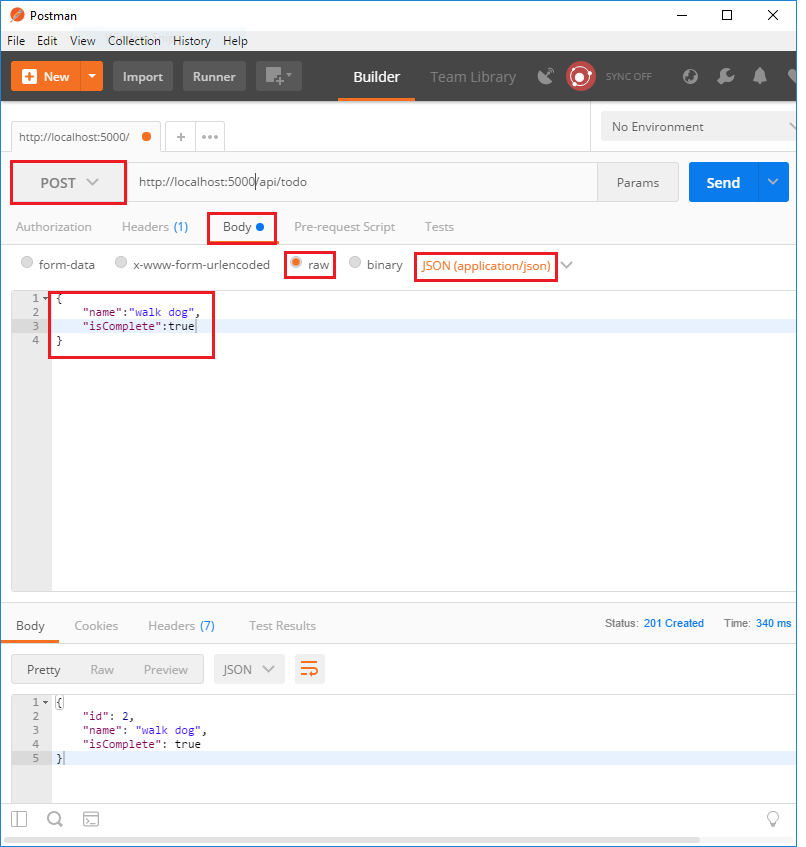
Set the HTTP method to
POST设置HTTP方法为POSTTap the Body radio button
点击Body按钮
Tap the raw radio button
选中raw选项
Set the type to JSON
设置类型为JSON
In the key-value editor, enter a Todo item such as
{"Name":"<your to-do item>"}在key-value编辑器中,输入一个Todo项,比如{"Name":"<your to-do item>"}Tap Send
点击Send
Tap the Headers tab and copy the Location header:
点击Headers选项卡,复制Location信息:
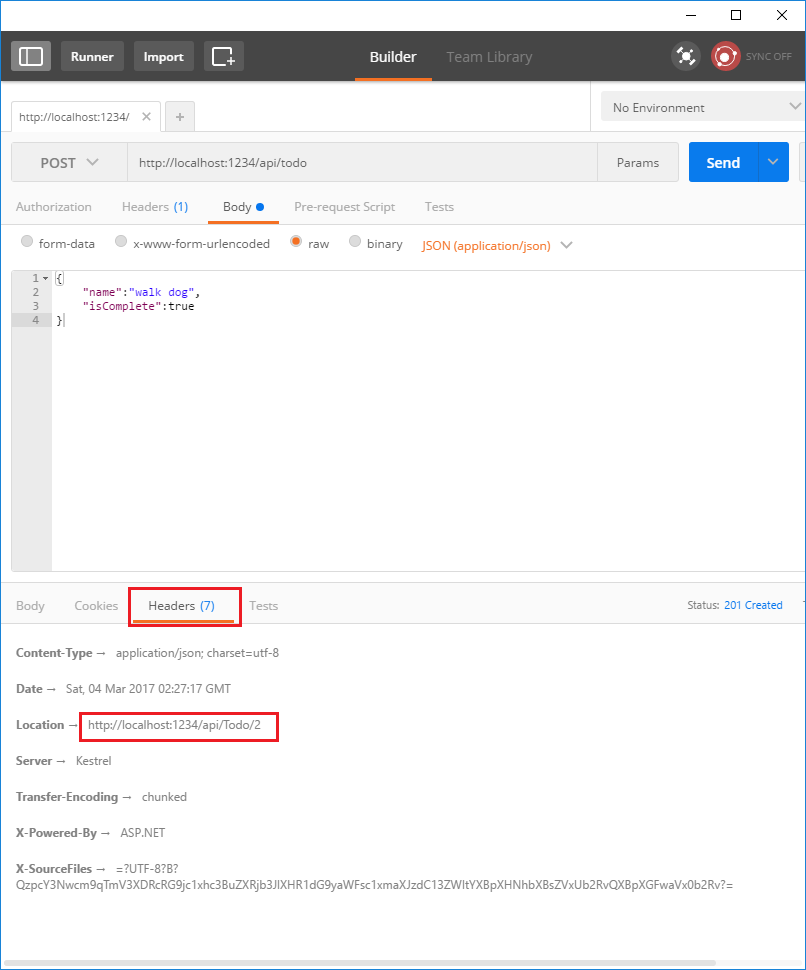
You can use the Location header URI to access the resource you just created. Recall the GetById method created the "GetTodo" named route:
你可以使用这个定位头信息中的URI访问你刚创建的资源。还记得我们在GetById中创建的"GetTodo"路由:
[HttpGet("{id}", Name = "GetTodo")]

public IActionResult GetById(string id)
更新
[HttpPut("{id}")]

public IActionResult Update(string id, [FromBody] TodoItem item)

{

    if (item == null || item.Key != id)

    {

        return BadRequest();

    }

    var todo = TodoItems.Find(id);

    if (todo == null)

    {

        return NotFound();

    }

    TodoItems.Update(item);

    return new NoContentResult();

}
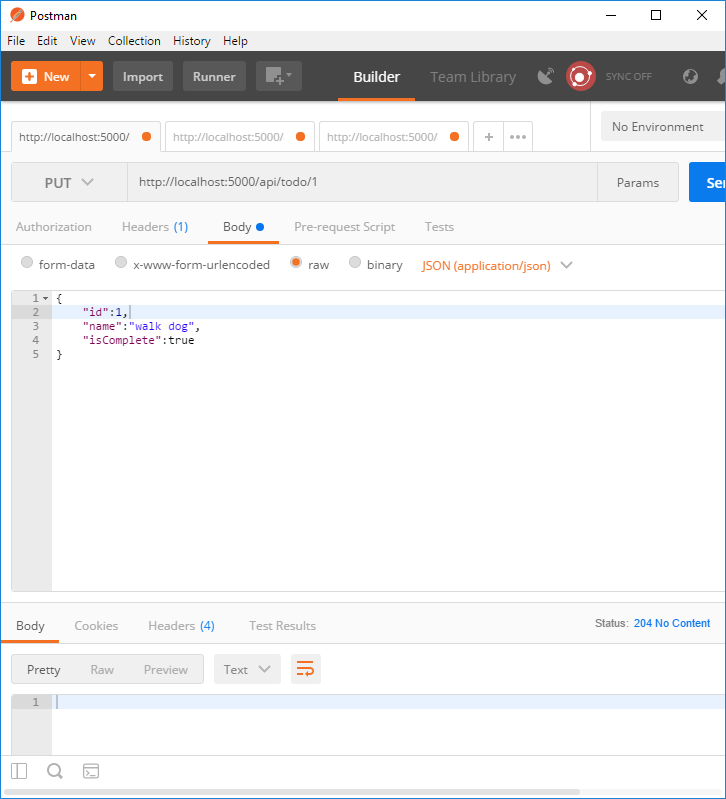
Update is similar to Create, but uses HTTP PUT. The response is 204 (No Content). According to the HTTP spec, a PUT request requires the client to send the entire updated entity, not just the deltas. To support partial updates, use HTTP PATCH.
Update类似于Create,但使用的HTTP Put,响应代码204(无内容)。根据HTTP规范,PUT请求需要客户端发送整个更新实体,而不是部分。如果需要支持部分更新,需要使用HTTP PATCH。
删除
[HttpDelete("{id}")]

public IActionResult Delete(string id)

{

    var todo = TodoItems.Find(id);

    if (todo == null)

    {

        return NotFound();

    }

    TodoItems.Remove(id);

    return new NoContentResult();

}
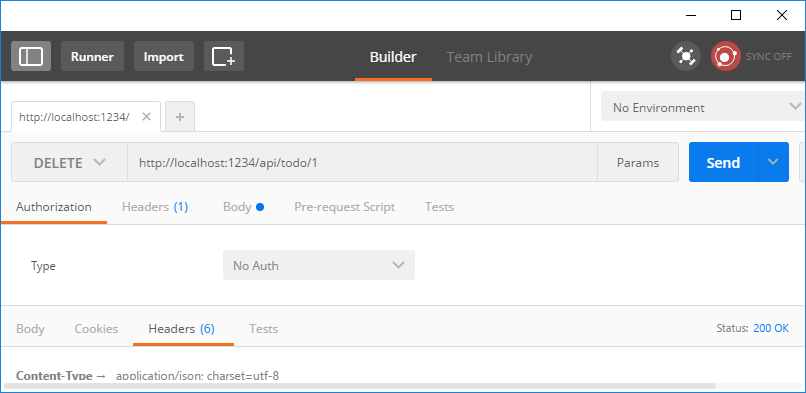
The response is 204 (No Content).
相应代码为:204.
原文链接
https://docs.microsoft.com/zh-cn/aspnet/core/tutorials/first-web-api
【翻译】在Visual Studio中使用Asp.Net Core MVC创建第一个Web Api应用(二)的更多相关文章
- 【翻译】在Visual Studio中使用Asp.Net Core MVC创建你的第一个Web API应用(一)
HTTP is not just for serving up web pages. It's also a powerful platform for building APIs that expo ...
- [转]【翻译】在Visual Studio中使用Asp.Net Core MVC创建你的第一个Web API应用(一)
本文转自:https://www.cnblogs.com/inday/p/6288707.html HTTP is not just for serving up web pages. It’s al ...
- ASP.NET Core 中文文档 第二章 指南(2)用 Visual Studio 和 ASP.NET Core MVC 创建首个 Web API
原文:Building Your First Web API with ASP.NET Core MVC and Visual Studio 作者:Mike Wasson 和 Rick Anderso ...
- 006.Adding a controller to a ASP.NET Core MVC app with Visual Studio -- 【在asp.net core mvc 中添加一个控制器】
Adding a controller to a ASP.NET Core MVC app with Visual Studio 在asp.net core mvc 中添加一个控制器 2017-2-2 ...
- 在 Visual Studio 中部署 ASP.NET Core 应用
另一篇:在 Docker 中手工部署 ASP.NET Core 应用 操作步骤 1. 安装 Docker For Windows(安装之前 Windows 需要 开启 Hyper-V 虚拟机功能 ) ...
- 在Chrome+Visual Studio中调试asp.net程序很慢的问题(Firefox也有类似问题)
在Chrome+Visual Studio中调试asp.net程序很慢的问题(Firefox也有类似问题) 今天开始起在Chrome中调试,发现问题主要出在菜单栏(layout文件)中,google了 ...
- 002.Create a web API with ASP.NET Core MVC and Visual Studio for Windows -- 【在windows上用vs与asp.net core mvc 创建一个 web api 程序】
Create a web API with ASP.NET Core MVC and Visual Studio for Windows 在windows上用vs与asp.net core mvc 创 ...
- 使用 ASP.NET Core MVC 创建 Web API(五)
使用 ASP.NET Core MVC 创建 Web API 使用 ASP.NET Core MVC 创建 Web API(一) 使用 ASP.NET Core MVC 创建 Web API(二) 使 ...
- 使用 ASP.NET Core MVC 创建 Web API(二)
使用 ASP.NET Core MVC 创建 Web API 使用 ASP.NET Core MVC 创建 Web API(一) 六.添加数据库上下文 数据库上下文是使用Entity Framewor ...
随机推荐
- Xamarin For Visual Studio 3.0.54.0 完整离线破解版
Xamarin For Visual Studio 3.0.54.0 完整离线破解版 Xamarin For Visual Studio就是原本的Xamarin For Android 以及 Xama ...
- opencart添加任意页面到导航栏(修改一级菜单)
pencart默认的黑色导航栏只显示分类目录下的一级分类,这块整个网页中最显眼的“风水宝地”怎么能让他闲置呢,因此我想到了为opencart导航栏添加自定义页面,它可以连接到任意一个网址或者ope ...
- TCP与UDP的区别(转)
源:http://blog.chinaunix.net/uid-20745340-id-1878774.html 参考:TCP协议与UDP协议的区别 TCP与UDP的区别 中国移动.中国联通推行的GP ...
- Xcode8 去除系统日志输出
Edit Scheme-> Run -> Arguments, 在Environment Variables里边添加 OS_ACTIVITY_MODE = disable
- aspx界面中,怎么调用后台的方法,处理某个数据
<%# GetUrl(Eval("Url").ToString(),Eval("ID").ToString()) %> GetUrl() 就是后台的 ...
- 改变Button文字和图片的位置
button.imageEdgeInsets = UIEdgeInsetsMake(0, labelWidth, 0, -labelWidth);button.titleEdgeInsets = UI ...
- Codeforces#355
大小号刷题,大号,被查重,悲剧,最后小号过了3题 A题: 分析:大于h的+2,小于等于h的+1 #include <iostream> #include <cstdio> #i ...
- Spring MVC 关于分页的简单实现
据本人了解,目前较常用的分页实现办法有两种: 1.每次翻页都修改SQL,向SQL传入相关参数去数据库实时查出该页的数据并显示. 2.查出数据库某张表的全部数据,再通过在业务逻辑里面进行处理去取得某些数 ...
- [转] 如何让CloudStack使用KVM创建Windows实例成功识别并挂载数据盘
在使用kvm给windows虚拟机动态挂载virtio类型的硬盘时候遇到问题,通过下面的文章知道需要安装virtio驱动,从而解决问题使挂在正常,在此处mark一下 问题产生背景: 使用CloudSt ...
- nodejs抓取数据一(列表抓取)
纯属初学...有很多需要改进的地方,请多多指点... 目标是抓取58同城 这个大分类下的列表数据: http://cd.58.com/caishui/?PGTID=14397169455980.924 ...