
[转]Intercepting the App Store's Traffic on iOS
Source:https://nabla-c0d3.github.io/blog/2013/08/20/intercepting-the-app-stores-traffic-on-ios/
TL;DR: By default, MobileSubstrate tweaks do not get injected into system daemons on iOS which explains why my SSL Kill Switch tool wasn’t able to disable SSL certificate validation in the iTunes App Store.
The problem
Last year I released the iOS SSL Kill Switch, a tool designed to help penetration testers decrypt and intercept an application’s network traffic, by disabling the system’s default SSL certificate validation as well as any kind of custom certificate validation (such as certificate pinning ).
While the tool worked well on most applications including SSL-pinning apps such as Twitter or Square,users reported that it didn’t work the iTunes App Store, which would still refuse to connect to an intercepting proxy impersonating the iTunes servers. Other similar tools such as Intrepidus Group’s trustmealso seemed to have the same limitation.
A quick look at the App Store on iOS
The first step was to get the right setup:
- An intercepting proxy (Burp Pro) running on my laptop.
- An iPad with the SSL Kill Switch installed, and configured to use my laptop as the device’s proxy.
After starting the App Store app, I noticed that I could already intercept and decrypt specific SSL connections initiated by the App Store: all the HTTP requests to query iTunes for available apps (as part of the App Store’s tabs such as Featured'',Top Charts’’, etc.) as well as app descriptions (Details'',Reviews’’).
However, more sensitive operations including user login or app installation and purchase would fail by rejecting my intercepting proxy’s invalid SSL certificate. From looking at logs on the device, it turns out that two distinct processes are behind the App Store’s functionality:
AppStore[339] <Warning>: JS: its.sf6.Bootstrap.init: Initialize

itunesstored[162] <Error>: Aug 22 11:29:10  SecTrustEvaluate  [root AnchorTrusted]
- AppStore is the actual App Store iOS application that you can launch from the Springboard. It is responsible for displaying the App Store UI to the user.
- itunesstored is a daemon launched at boot time by launchd, the process responsible for booting the system and managing services/daemons. tunesstored seems to be responsible for the more sensitive operations within the App Store (login, app purchase, etc.) and possibly some of the DRM/Fairplay functionality.
Why SSL Kill Switch didn’t work
I initially thought the issue to be that the strategy used by the SSL Kill Switch to disable certificate validation somehow wasn’t enough to bypass itunesstored’s certificate pinning. However, it turns out that the SSL Kill Switch was just not being injected into the itunesstored process at all, for a couple reasons:
- The itunesstored process is started as a daemon by launchd early during the device’s boot sequence, before MobileSubstrate and MobileLoader get started. Therefore, none of the MobileSubstrate tweaks installed on the device, including the SSL Kill Switch, get injected into this process.
- The SSL Kill Switch had a MobileLoader filter so that the code disabling certificate validation would only be loaded into apps linking the UIKit bundle (ie. applications with a user interface). This was initially done to restrict the effect of the SSL Kill Switch to App Store apps only. However, itunesstored is a daemon that doesn’t have a user interface, hence the filter prevented MobileLoader from injecting the SSL Kill Switch into the process.
Man-in-the-Middle on itunesstored
After figuring this out, getting itunesstored to stop validating SSL certificates was very straightforward. First of all, make sure you’re using the latest version of the SSL Kill Switch (at least v0.5). Then, all you need to do is kill the itunesstored process:
iPad-Mini:~ root# ps -ef | grep itunesstored

501   170     1   0   0:00.00 ??         0:01.95 /System/Library/PrivateFrameworks/iTunesStore.framework/Support/itunesstored

  0   432   404   0   0:00.00 ttys000    0:00.01 grep itunesstored

iPad-Mini:~ root# kill -s KILL 170
When doing so, launchd will automatically restart itunesstored. This time however, MobileLoader will inject the SSL Kill Switch’s code into the process. You can validate this by looking at the device’s logs, for example using the xCode console. You should see something like this:
itunesstored[1045] <Notice>: MS:Notice: Loading: /Library/MobileSubstrate/DynamicLibraries/SSLKillSwitch.dylib

itunesstored[1045] <Warning>: SSL Kill Switch - Hook Enabled.
If you restart the App Store app, you should then be able to proxy all the traffic and see app store transactions such as logins or app downloads.
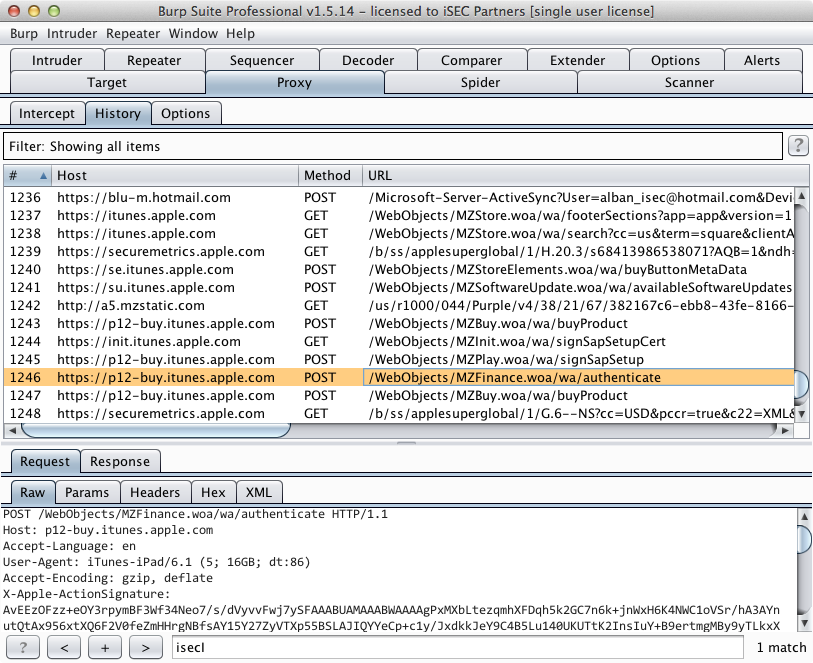
If you try to install an app while proxying, your proxy might crash or freeze when the App Store tries to download the app because IPA files can be fairly large (200+ MB).
Takeaway
A similar methodology could be used to proxy other system daemons including for example accountsd, which is responsible for the Twitter and Facebook integration that was added to iOS 5 and iOS 6.
While working on this, I also discovered a better way to disable SSL certificate validation and certificate pinning in iOS apps. Hence, SSL Kill Switch v0.5 is actually a complete rewrite. If you’re interested in knowing how it works, I wrote a blog post explaining what the tool does.
[转]Intercepting the App Store's Traffic on iOS的更多相关文章
- 向苹果App Store提交新应用的图文教程(转)
当你克服重重困难终于开发出了自己的App,下一步就是向App Store提交应用了,这时应该如何操作呢?我的App真的准备好提交了?我敢肯定这些问题将会浮现在你的脑海.基于这篇教程,我将告诉你一个完整 ...
- 【转】APP被苹果App Store拒绝的N个原因(持续补充)
作为iOS开发者,估计有很多都遇到过APP提交到App Store被拒,然后这些被拒的原因多种多样,今天dApps收集了常见的被拒的原因,以便更多开发者了解. 1.程序有重大bug,程序不能启动,或者 ...
- 不通过App Store,在iOS设备上直接安装应用程序(转)
今天在iOS设备上安装天翼云存储app,在safari上直接打开http://cloud.189.cn/wap/index.jsp,点击“点击免费安装”,如下图: 神奇的事情发生了,设备上直接下载ap ...
- APP store 上架过程中碰到的那些坑&被拒的各种奇葩原因整理&审核指南中文版
苹果官方发布的十大常见被拒原因 1.崩溃次数和Bug数量.苹果要求开发者在将应用提交给App Store之前彻查自己的应用,以尽量避免Bug的存在. 2.链或错误的链接.应用中所有的链接必须是真实且有 ...
- iPhone应用提交流程:如何将App程序发布到App Store?
对于刚加入iOS应用开发行列的开发者来说,终于经过艰苦的Coding后完成了第一个应用后最重要的历史时刻就是将应用程序提交到iTunes App Store.Xcode 4.2开发工具已经把App提交 ...
- APP被苹果App Store拒绝的79个原因【转】
作为iOS开发者,估计有很多都遇到过APP提交到App Store被拒,然后这些被拒的原因多种多样,今天dApps收集了常见的被拒的原因,以便更多开发者了解. APP被苹果APPStore拒绝的各种原 ...
- 20190415 - iOS11 无法连接到 App Store 的解决办法
问题:更新 iOS 11 后,打开 App Store 提示: 无法连接至 app store 解决: 进入 iOS 系统[设置][iTunes Store 与 App Store],退出当前登录用户 ...
- iPhone应用提交流程:如何将App程序发布到App Store
http://www.techolics.com/apple/20120401_197.html 对于刚加入iOS应用开发行列的开发者来说,终于经过艰苦的Coding后完成了第一个应用后最重要的历史时 ...
- 开发商应用被App Store拒绝的79个原因
转自:http://www.gamelook.com.cn/2014/10/186017 作为iOS开发者,估计有很多都遇到过APP提交到App Store被拒,然后这些被拒的原因多种多样,今天小编收 ...
随机推荐
- php_常用操作_读取文件_数据库操作
作为php新手 ,把经常用到的phpcode,做个备份 1: 文件处理 //读取配置 启动是指定文件 $filepath=$argv[1]; if(null==$filepath){ echo&quo ...
- elasticsearch的rest搜索--- 查询
目录: 一.针对这次装B 的解释 二.下载,安装插件elasticsearch-1.7.0 三.索引的mapping 四. 查询 五.对于相关度的大牛的文档 四. 查询 1. 查询的官网的文档 ...
- Visio Premium 2010钥匙+激活破解方法
Visio Premium 2010钥匙+激活破解方法: 安装时能够使用的关键: GR24B-GC2XY-KRXRG-2TRJJ-4X7DC VWQ6G-37WBG-J7DJP-CY66Y-V278X ...
- Entity Framework加载相关实体——延迟加载Lazy Loading、贪婪加载Eager Loading、显示加载Explicit Loading
Entity Framework提供了三种加载相关实体的方法:Lazy Loading,Eager Loading和Explicit Loading.首先我们先来看一下MSDN对三种加载实体方法的定义 ...
- 如何利用百度音乐播放器的API接口来获取高音质歌曲
第一步:在网页中打开以下网址: http://box.zhangmen.baidu.com/x?op=12&count=1&title=时间都去哪儿了$$王铮亮$$$$ 其中红色地方可 ...
- Windows RPC
转载 Windows RPC Demo实现 本文参考并整理以下相关文章 1. <远程过程调用> -百度百科 2. <RPC 编程> -http://www.ibm.com/de ...
- iOS # Charles拦截封包
Charles: 是在Mac下常用的截取网络封包的工具,在做iOS开发时,我们为了调试与服务器端的网络通讯协议,常常需要截取网络封包来分析.Charles通过将自己设置成系统的网络访问代理服务器,使得 ...
- C# 窗口间传递数据
C#两个窗口之间传递数据 1 公用变量值传递 public partial class Form1 : Form //parent form { public string name="&q ...
- 日积月累系列之分页控件(js源码)
最近开发了一款分页控件,分享给大家. 主要功能和界面介绍 cform分页控件支持服务端分页.客户端分页.数据过滤.数据排序等功能. 源码介绍 cform-pager分页控件主要由三部分组成:css.s ...
- C#中使用REDIS
C#中使用REDIS 上一篇>> 摘要 上一篇讲述了安装redis客户端和服务器端,也大体地介绍了一下redis.本篇着重讲解.NET4.0 和 .NET4.5中如何使用redis和C# ...