
Useful NumPy functions: Reshape, Argpartition, Clip, Extract, Setdiff1d
In everyday data processing for Machine Learning and Data Science projects, we encounter unique situations, those require boilerplate code to solve the problem. Over the period some of those are converted into base features provided by the core language or the package itself as per need and usage from the community. Here I am sharing 5 elegant python Numpy functions, which can be used for efficient and neat data manipulation.
1) Use of -1 in Reshape
Numpy allows us to reshape a matrix provided new shape should be compatible with the original shape. One interesting aspect of this new shape is, we can give one of the shape parameter as -1. It simply means that it is an unknown dimension and we want Numpy to figure it out. Numpy will figure this by looking at the ‘length of the array and remaining dimensions’ and making sure it satisfies the above mentioned criteria. Let's see one example now.

Pictorial representation of different reshape with one dimension as -1
a = np.array([[1, 2, 3, 4],

              [5, 6, 7, 8]])

a.shape

(2, 4)
Suppose we give row as 1 and -1 as column then Numpy will able to find column as 8.
a.reshape(1,-1)

array([[1, 2, 3, 4, 5, 6, 7, 8]])
Suppose we give row as -1 and 1 as column then Numpy will able to find row as 8.
a.reshape(-1,1)

array([[1],

       [2],

       [3],

       [4],

       [5],

       [6],

       [7],

       [8]])
Similarly below are possible.
a.reshape(-1,4)

array([[1, 2, 3, 4],

       [5, 6, 7, 8]])a.reshape(-1,2)

array([[1, 2],

       [3, 4],

       [5, 6],

       [7, 8]])a.reshape(2,-1)

array([[1, 2, 3, 4],

       [5, 6, 7, 8]])a.reshape(4,-1)

array([[1, 2],

       [3, 4],

       [5, 6],

       [7, 8]])
This is also applicable to any higher level tensor reshape as well but only one dimension can be given -1.
a.reshape(2,2,-1)

array([[[1, 2],

        [3, 4]],

       [[5, 6],

        [7, 8]]])a.reshape(2,-1,1)

array([[[1],

        [2],

        [3],

        [4]],

       [[5],

        [6],

        [7],

        [8]]])
If we try to reshape a non-compatible shape or more than one unknown shape then there will be an error message.
a.reshape(-1,-1)

ValueError: can only specify one unknown dimensiona.reshape(3,-1)

ValueError: cannot reshape array of size 8 into shape (3,newaxis)
To summarize, when reshaping an array, the new shape must contain the same number of elements as the old shape, meaning the products of the two shapes’ dimensions must be equal. When using a -1, the dimension corresponding to the -1 will be the product of the dimensions of the original array divided by the product of the dimensions given to reshape so as to maintain the same number of elements.
2) Argpartition : Find N maximum values in an array
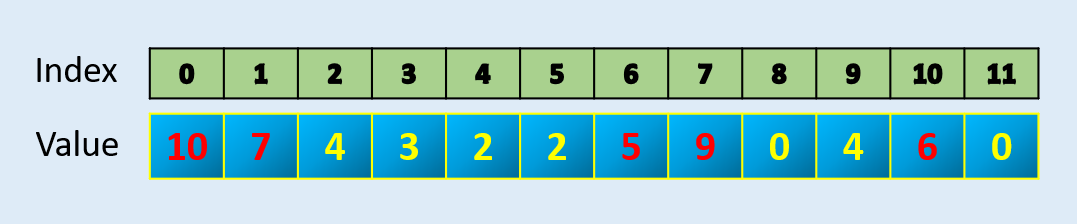
Numpy has a function called argpartition which can efficiently find largest of N values index and in-turn N values. It gives index and then you can sort if you need sorted values.
array = np.array([10, 7, 4, 3, 2, 2, 5, 9, 0, 4, 6, 0])index = np.argpartition(array, -5)[-5:]

index

array([ 6,  1, 10,  7,  0], dtype=int64)np.sort(array[index])

array([ 5,  6,  7,  9, 10])
3) Clip : How to keep values in an array within an interval
In many data problem or algorithm (like PPO in Reinforcement Learning) we need to keep all values within an upper and lower limit. Numpy has a built in function called Clip that can be used for such purpose. Numpy clip() function is used to Clip (limit) the values in an array. Given an interval, values outside the interval are clipped to the interval edges. For example, if an interval of [-1, 1] is specified, values smaller than -1 become -1, and values larger than 1 become 1.

Clip example with min value 2 and maximum value 6
#Example-1

array = np.array([10, 7, 4, 3, 2, 2, 5, 9, 0, 4, 6, 0])

print (np.clip(array,2,6))[6 6 4 3 2 2 5 6 2 4 6 2]#Example-2

array = np.array([10, -1, 4, -3, 2, 2, 5, 9, 0, 4, 6, 0])

print (np.clip(array,2,5))[5 2 4 2 2 2 5 5 2 4 5 2]
4) Extract: To extract specific elements from an array based on condition
We can use Numpy extract() function to extract specific elements from an array that matches the condition.
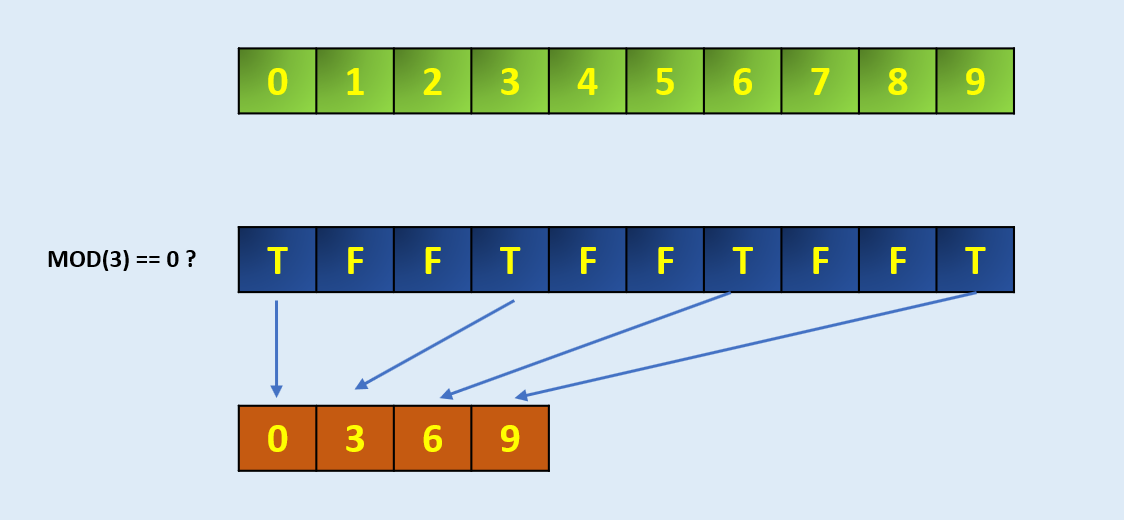
arr = np.arange(10)

arrarray([0, 1, 2, 3, 4, 5, 6, 7, 8, 9])# Define the codition, here we take MOD 3 if zero

condition = np.mod(arr, 3)==0

conditionarray([ True, False, False,  True, False, False,  True, False, False,True])np.extract(condition, arr)

array([0, 3, 6, 9])
Similarly, we can use direct condition with combination of AND and OR if required like
np.extract(((arr > 2) & (arr < 8)), arr)array([3, 4, 5, 6, 7])
5) setdiff1d : How to find unique values in an array compared to another
Return the unique values in an array that are not in present in another array. This is equivalent to set difference of two arrays.
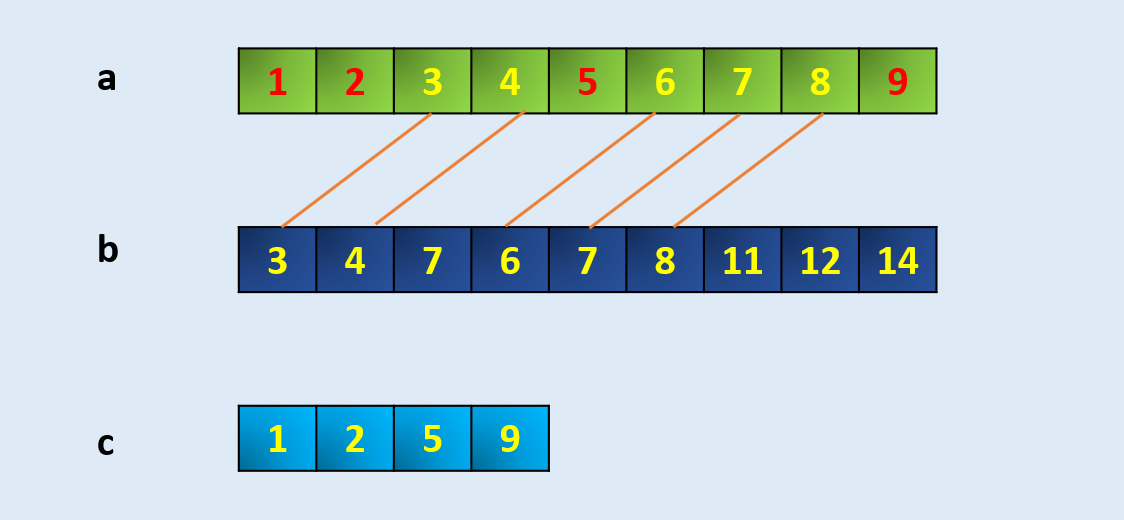
a = np.array([1, 2, 3, 4, 5, 6, 7, 8, 9])

b = np.array([3,4,7,6,7,8,11,12,14])

c = np.setdiff1d(a,b)

carray([1, 2, 5, 9])
Final Note :
These are 5 Numpy functions which are not used frequently by the community but they are neat and elegant. In my view, we should use them whenever there is similar situation as these provide not just less code but mostly smart way of achieving a solution for a complex problem.
Useful NumPy functions: Reshape, Argpartition, Clip, Extract, Setdiff1d的更多相关文章
- numpy中的argpartition
numpy.argpartition(a, kth, axis=-1, kind='introselect', order=None) 在快排算法中,有一个典型的操作:partition.这个操作指: ...
- numpy 矩阵变换 reshape ravel flatten
1. 两者的区别在于返回拷贝(copy)还是返回视图(view),numpy.flatten()返回一份拷贝,对拷贝所做的修改不会影响(reflects)原始矩阵,而numpy.ravel()返回的是 ...
- python库numpy的reshape的终极解释
a = np.arange(2*4*4) b = a.reshape(1,4,4,2) #应该这样按反序来理解:最后一个2是一个只有2个元素的向量,最后的4,2代表4×2的矩阵,最 ...
- 小白眼中的AI之~Numpy基础
周末码一文,明天见矩阵- 其实Numpy之类的单讲特别没意思,但不稍微说下后面说实际应用又不行,所以大家就练练手吧 代码裤子: https://github.com/lotapp/BaseCode ...
- numpy基本用法
numpy 简介 numpy的存在使得python拥有强大的矩阵计算能力,不亚于matlab. 官方文档(https://docs.scipy.org/doc/numpy-dev/user/quick ...
- numpy快速指南
Quickstart tutorial 引用https://docs.scipy.org/doc/numpy-dev/user/quickstart.html Prerequisites Before ...
- 课程一(Neural Networks and Deep Learning),第二周(Basics of Neural Network programming)—— 3、Python Basics with numpy (optional)
Python Basics with numpy (optional)Welcome to your first (Optional) programming exercise of the deep ...
- Python Basics with Numpy
Welcome to your first assignment. This exercise gives you a brief introduction to Python. Even if yo ...
- Python Basics with numpy (optional)
Python Basics with Numpy (optional assignment) Welcome to your first assignment. This exercise gives ...
随机推荐
- 使用GitHub搜索技巧
in:name example 名字中有"example"in:readme example readme中有"example"in:description e ...
- 2019 荔枝java面试笔试题 (含面试题解析)
本人5年开发经验.18年年底开始跑路找工作,在互联网寒冬下成功拿到阿里巴巴.今日头条.荔枝等公司offer,岗位是Java后端开发,因为发展原因最终选择去了荔枝,入职一年时间了,也成为了面试官,之 ...
- Android-----实现给图片添加字体
实现给图片添加字体,图片旋转功能:xml布局文件内容如下,一个简单的ImageView布局 <com.example.hsjgapp.RotateImageView //这里存放要展示的图片 a ...
- SAP CDS redirect view支持写操作吗,一个实验来验证
According to this wiki, write back on CDS view is not supported: And also it is defined in ABAP help ...
- ip黑名单-做过ssh扫描黑的ip
# # hosts.deny This file contains access rules which are used to # deny connections to network servi ...
- MySQL数据库中字符串函数之left、right用法
语法 LEFT(str,len) Returns the leftmost len characters from the string str, or NULL if any argument is ...
- JanusGraph安装graphexp
准备:JanusGraph环境,graphexp源码,nginx 本文采用的环境:JanusGraph + cassandra + ES + GraphExp(cassandra 或者HBase作为后 ...
- Httpd服务入门知识-Httpd服务常见配置案例之定义路径别名
Httpd服务入门知识-Httpd服务常见配置案例之定义路径别名 作者:尹正杰 版权声明:原创作品,谢绝转载!否则将追究法律责任. 一.创建测试数据 [root@node101.yinzhengj ...
- 汇编 JMP 详解
汇编 JMP 详解 关键词说明 RVA: 相对虚拟地址(Relative Virtual Address),在内存中相对于PE文件装入地址的偏移位置,是一个相对地址. JMP 的 3 种类型 短跳转( ...
- beta冲刺总结那周余嘉熊掌将得队
作业格式 课程名称:软件工程1916|W(福州大学) 作业要求:项目Beta冲刺 团队名称: 那周余嘉熊掌将得队 作业目标:beta冲刺总结 队员学号 队员姓名 博客地址 备注 221600131 J ...