
Asynchronous Streaming Request Processing in Spring MVC 4.2 + Spring Boot(SpringBoot中处理异步流请求 SpringMvc4.2以上)
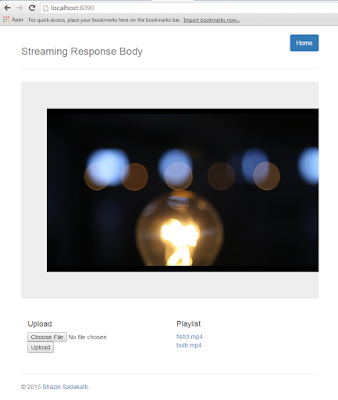
@RequestMapping(method = RequestMethod.GET, value = "/{video:.+}")

public StreamingResponseBody stream(@PathVariable String video)

        throws FileNotFoundException {

    File videoFile = videos.get(video);

    final InputStream videoFileStream = new FileInputStream(videoFile);

    return (os) -> {

        readAndWrite(videoFileStream, os);

    };

}
And a Custom Web Configuration to over ride default timeout behavior to no timeout and finally configuring an AsyncTaskExecutor
@Configuration

public static class WebConfig extends WebMvcConfigurerAdapter {

    @Override

    public void configureAsyncSupport(AsyncSupportConfigurer configurer) {

        configurer.setDefaultTimeout(-1);

        configurer.setTaskExecutor(asyncTaskExecutor());

    }

    @Bean

    public AsyncTaskExecutor asyncTaskExecutor() {

        return new SimpleAsyncTaskExecutor("async");

    }

}
转载自:http://shazsterblog.blogspot.com/2016/02/asynchronous-streaming-request.html
笔者代码:
    @RequestMapping(value = "{uuid}.m3u8")

    public ResponseEntity<StreamingResponseBody> m3u8Generator(@PathVariable("uuid") String uuid){

        String key = "media.".concat(uuid);

        Map<String, Object> cached = cacheService.getCacheMap(key);

        if(CollectionUtils.isEmpty(cached))

        {

            return new ResponseEntity(null, HttpStatus.OK);

        }

        String playlist = (String) cached.get("playlist");

        String[] lines = playlist.split("\n");

        //人为在每个MPEG-2 transport stream文件前面加上一个地址前缀

        StringBuffer buffer = new StringBuffer();

        StreamingResponseBody responseBody = new StreamingResponseBody() {

            @Override

            public void writeTo (OutputStream out) throws IOException {

                for(int i = 0; i < lines.length; i++)

                {

                    String line = lines[i];

                    if(line.endsWith(".ts"))

                    {

                        buffer.append("/streaming/");

                        buffer.append(uuid);

                        buffer.append("/");

                        buffer.append(line);

                    }else {

                        buffer.append(line);

                    }

                    buffer.append("\r\n");

                }

                out.write(buffer.toString().getBytes());

                out.flush();

            }

        };

        return new ResponseEntity(responseBody, HttpStatus.OK);

    }
其他类似功能代码:
//https://www.baeldung.com/spring-mvc-sse-streams

    //https://www.logicbig.com/tutorials/spring-framework/spring-web-mvc/streaming-response-body.html

    //@GetMapping("/{fileName:[0-9A-z]+}")

    @GetMapping("/streaming2/{uuid}/{fileName}")

    //https://stackoverflow.com/questions/47868352/how-to-stream-large-http-response-in-spring

    @ResponseBody

    public ResponseEntity<InputStreamResource> get_File2(

            @PathVariable String uuid,

            @PathVariable String fileName) throws IOException {

        String dbFile = fileRepository.findByUUID(uuid,fileName);

        dbFile=String.format("E:/hls/test/%s",fileName);

        if (dbFile.equals(null)) {

            return new ResponseEntity<>(HttpStatus.NOT_FOUND);

        }

        Resource file = storageService.loadAsResource(dbFile);

        long len = 0;

        try {

            len = file.contentLength();

        } catch (IOException e) {

            e.printStackTrace();

        }

        MediaType mediaType = MediaType.valueOf(FileTypeMap.getDefaultFileTypeMap().getContentType(file.getFile()));

//        if (filename.toLowerCase().endsWith("mp4") || filename.toLowerCase().endsWith("mp3") ||

//                filename.toLowerCase().endsWith("3gp") || filename.toLowerCase().endsWith("mpeg") ||

//                filename.toLowerCase().endsWith("mpeg4"))

        if(fileName.toLowerCase().endsWith("ts")) {

            mediaType = MediaType.APPLICATION_OCTET_STREAM;

        }

        InputStreamResource resource = new InputStreamResource(new FileInputStream(file.getFile()));

        return ResponseEntity.ok()

        .contentType(mediaType)

        .contentLength(len)

        .header(HttpHeaders.ACCEPT_RANGES, "bytes")

        .body(resource);

    }
    @RequestMapping("/111111")

    public StreamingResponseBody handleRequest (HttpServletRequest request) {

        return outputStream -> {

            Map<String, BigInteger> map = new HashMap<>();

            map.put("one", BigInteger.ONE);

            map.put("ten", BigInteger.TEN);

            try(ObjectOutputStream oos = new ObjectOutputStream(outputStream)){

                oos.writeObject(map);

            }

        };

    }
    @GetMapping("/media/{uuid}/{fileName}")

    @ResponseBody

    public ResponseEntity<ByteArrayResource> getStream(@PathVariable String uuid,

                                                       @PathVariable String fileName) throws IOException {

        String key = "media.".concat(uuid);

        String encoded = cacheService.getCachedHashValue(key, fileName, String.class);

        byte[] bytes = Base64.getDecoder().decode(encoded);

        long len = bytes.length;

        //InputStreamResource resource = new InputStreamResource(new FileInputStream(file.getFile()));

        ByteArrayResource resource = new ByteArrayResource(bytes);

        return  ResponseEntity.ok().contentType(MediaType.APPLICATION_OCTET_STREAM).contentLength(len).header(HttpHeaders.ACCEPT_RANGES, "bytes").body(resource);

//        return ResponseEntity.ok()

//                .contentType(MediaType.APPLICATION_OCTET_STREAM)

//                .contentLength(len)

//                .header(HttpHeaders.ACCEPT_RANGES, "bytes")

//                .body(resource);

    }
Asynchronous Streaming Request Processing in Spring MVC 4.2 + Spring Boot(SpringBoot中处理异步流请求 SpringMvc4.2以上)的更多相关文章
- 2017.3.31 spring mvc教程(六)转发、重定向、ajax请求
学习的博客:http://elf8848.iteye.com/blog/875830/ 我项目中所用的版本:4.2.0.博客的时间比较早,11年的,学习的是Spring3 MVC.不知道版本上有没有变 ...
- Spring MVC普通类或工具类中调用service报空空指针的解决办法(调用service报java.lang.NullPointerException)
当我们在非Controller类中应用service的方法是会报空指针,如图: 这是因为Spring MVC普通类或工具类中调用service报空null的解决办法(调用service报java.la ...
- Spring MVC 零配置 / Spring MVC JavaConfig
1. Spring MVC的核心就是DispatcherServlet类,Spring MVC处理请求的流程如下图所示: 2. Spring MVC中典型的上下文层次 当我们初始化一个Dispatch ...
- spring mvc注解和spring boot注解
1 spring mvc和spring boot之间的关系 spring boot包含spring mvc.所以,spring mvc的注解在spring boot总都是可以用的吗? spring b ...
- java之spring mvc之初始spring mvc
1. mvc : mvc框架是处理 http请求和响应的框架 2. mvc 做的事情有哪些: 将 url 映射到一个java的处理方法上 将表单数据提交到 java 类中 将后台 java 类处理的结 ...
- Spring MVC mapping[From Spring MVC Beginner's Guide]
In a Spring MVC application, the URL can logically be divided into five parts (see the following fig ...
- Spring MVC 学习笔记 spring mvc Schema-based configuration
Spring mvc 目前支持5个tag,分别是 mvc:annotation-driven,mvc:interceptors,mvc:view-controller, mvc:resources和m ...
- Spring MVC(十六)--Spring MVC国际化实例
上一篇文章总结了一下Spring MVC中实现国际化所需的配置,本文继上一文举一个完整的例子,我选择用XML的方式.我的场景是这样的: 访问一个页面时,这个页面有个表格,对表头中的列名实现国际化. 第 ...
- 玩转spring mvc(四)---在spring MVC中整合JPA
关于在Spring MVC中整合JPA是在我的上一篇关于spring mvc基本配置基础上进行的,所以大家先参考一下我的上一篇文章:http://blog.csdn.net/u012116457/ar ...
随机推荐
- 织梦dedecms会员中心分类管理无法修改、删除分类名
member/mtypes.PHP 文件中添加 另外,member/myfriend_group.php文件中也存在同样的问题,也要添加,不添加的话好友分组中也是同样问题
- boost.tribool
tribool boost.tribool类似c++内建的bool类,但基于三态的布尔逻辑,在true和false之外还有一个indeterminate状态.一个例子场景是执行某项任务,在执行之前状态 ...
- NTSTATUS
一.NTSTATUS 直译就是NT状态,也就是内核状态.主要是内核开发/驱动开发用到的API返回的状态.许多内核模式的标准驱动程序例程和驱动程序支持例程使用ntstatus类型作为返回值.此外,当完成 ...
- C void的指针 强制类型转换(int*)p 把变量指针p强制转换成指向int类型的指针
#include <stdio.h> int main(void){ void *p; int a = 14322; char c ='A'; p = &a; //p = & ...
- 最长升序列 DP
class Solution: def lengthOfLIS(self,nums): if not nums:return 0 #边界处理 dp = [1 for _ in range(len(nu ...
- Pytorch在colab和kaggle中使用TensorBoard/TensorboardX可视化
在colab和kaggle内核的Jupyter notebook中如何可视化深度学习模型的参数对于我们分析模型具有很大的意义,相比tensorflow, pytorch缺乏一些的可视化生态包,但是幸好 ...
- Sudoku(简单DFS)
题目链接:http://acm.hdu.edu.cn/showproblem.php?pid=5547 数据比较少,直接暴力DFS,检验成立情况即可 AC代码:但是不知道为什么用scanf,print ...
- __enter__,__exit__区别
__enter__():在使用with语句时调用,会话管理器在代码块开始前调用,返回值与as后的参数绑定 __exit__():会话管理器在代码块执行完成好后调用,在with语句完成时,对象销毁之前调 ...
- Flink(一) —— 启动与基本使用
一.Flink概念 lambda架构 将离线计算和实时计算结合在一起,发挥离线计算准确率高.实时计算响应速度快的优势.缺点是,同一套逻辑要分别在两个模式下实现,存在代码冗余的问题. Flink特点 ( ...
- 2019-2020-1 20175313 《信息安全系统设计基础》实现mypwd
目录 MyPWD 一.题目要求 二.题目理解 三.需求分析 四.设计思路 五.伪代码分析 六.码云链接 七.运行结果截图 MyPWD 一.题目要求 学习pwd命令 研究pwd实现需要的系统调用(man ...