
Asynchronous Streaming Request Processing in Spring MVC 4.2 + Spring Boot(SpringBoot中处理异步流请求 SpringMvc4.2以上)
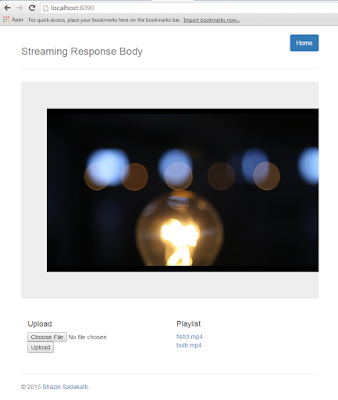
@RequestMapping(method = RequestMethod.GET, value = "/{video:.+}")

public StreamingResponseBody stream(@PathVariable String video)

        throws FileNotFoundException {

    File videoFile = videos.get(video);

    final InputStream videoFileStream = new FileInputStream(videoFile);

    return (os) -> {

        readAndWrite(videoFileStream, os);

    };

}
And a Custom Web Configuration to over ride default timeout behavior to no timeout and finally configuring an AsyncTaskExecutor
@Configuration

public static class WebConfig extends WebMvcConfigurerAdapter {

    @Override

    public void configureAsyncSupport(AsyncSupportConfigurer configurer) {

        configurer.setDefaultTimeout(-1);

        configurer.setTaskExecutor(asyncTaskExecutor());

    }

    @Bean

    public AsyncTaskExecutor asyncTaskExecutor() {

        return new SimpleAsyncTaskExecutor("async");

    }

}
转载自:http://shazsterblog.blogspot.com/2016/02/asynchronous-streaming-request.html
笔者代码:
    @RequestMapping(value = "{uuid}.m3u8")

    public ResponseEntity<StreamingResponseBody> m3u8Generator(@PathVariable("uuid") String uuid){

        String key = "media.".concat(uuid);

        Map<String, Object> cached = cacheService.getCacheMap(key);

        if(CollectionUtils.isEmpty(cached))

        {

            return new ResponseEntity(null, HttpStatus.OK);

        }

        String playlist = (String) cached.get("playlist");

        String[] lines = playlist.split("\n");

        //人为在每个MPEG-2 transport stream文件前面加上一个地址前缀

        StringBuffer buffer = new StringBuffer();

        StreamingResponseBody responseBody = new StreamingResponseBody() {

            @Override

            public void writeTo (OutputStream out) throws IOException {

                for(int i = 0; i < lines.length; i++)

                {

                    String line = lines[i];

                    if(line.endsWith(".ts"))

                    {

                        buffer.append("/streaming/");

                        buffer.append(uuid);

                        buffer.append("/");

                        buffer.append(line);

                    }else {

                        buffer.append(line);

                    }

                    buffer.append("\r\n");

                }

                out.write(buffer.toString().getBytes());

                out.flush();

            }

        };

        return new ResponseEntity(responseBody, HttpStatus.OK);

    }
其他类似功能代码:
//https://www.baeldung.com/spring-mvc-sse-streams

    //https://www.logicbig.com/tutorials/spring-framework/spring-web-mvc/streaming-response-body.html

    //@GetMapping("/{fileName:[0-9A-z]+}")

    @GetMapping("/streaming2/{uuid}/{fileName}")

    //https://stackoverflow.com/questions/47868352/how-to-stream-large-http-response-in-spring

    @ResponseBody

    public ResponseEntity<InputStreamResource> get_File2(

            @PathVariable String uuid,

            @PathVariable String fileName) throws IOException {

        String dbFile = fileRepository.findByUUID(uuid,fileName);

        dbFile=String.format("E:/hls/test/%s",fileName);

        if (dbFile.equals(null)) {

            return new ResponseEntity<>(HttpStatus.NOT_FOUND);

        }

        Resource file = storageService.loadAsResource(dbFile);

        long len = 0;

        try {

            len = file.contentLength();

        } catch (IOException e) {

            e.printStackTrace();

        }

        MediaType mediaType = MediaType.valueOf(FileTypeMap.getDefaultFileTypeMap().getContentType(file.getFile()));

//        if (filename.toLowerCase().endsWith("mp4") || filename.toLowerCase().endsWith("mp3") ||

//                filename.toLowerCase().endsWith("3gp") || filename.toLowerCase().endsWith("mpeg") ||

//                filename.toLowerCase().endsWith("mpeg4"))

        if(fileName.toLowerCase().endsWith("ts")) {

            mediaType = MediaType.APPLICATION_OCTET_STREAM;

        }

        InputStreamResource resource = new InputStreamResource(new FileInputStream(file.getFile()));

        return ResponseEntity.ok()

        .contentType(mediaType)

        .contentLength(len)

        .header(HttpHeaders.ACCEPT_RANGES, "bytes")

        .body(resource);

    }
    @RequestMapping("/111111")

    public StreamingResponseBody handleRequest (HttpServletRequest request) {

        return outputStream -> {

            Map<String, BigInteger> map = new HashMap<>();

            map.put("one", BigInteger.ONE);

            map.put("ten", BigInteger.TEN);

            try(ObjectOutputStream oos = new ObjectOutputStream(outputStream)){

                oos.writeObject(map);

            }

        };

    }
    @GetMapping("/media/{uuid}/{fileName}")

    @ResponseBody

    public ResponseEntity<ByteArrayResource> getStream(@PathVariable String uuid,

                                                       @PathVariable String fileName) throws IOException {

        String key = "media.".concat(uuid);

        String encoded = cacheService.getCachedHashValue(key, fileName, String.class);

        byte[] bytes = Base64.getDecoder().decode(encoded);

        long len = bytes.length;

        //InputStreamResource resource = new InputStreamResource(new FileInputStream(file.getFile()));

        ByteArrayResource resource = new ByteArrayResource(bytes);

        return  ResponseEntity.ok().contentType(MediaType.APPLICATION_OCTET_STREAM).contentLength(len).header(HttpHeaders.ACCEPT_RANGES, "bytes").body(resource);

//        return ResponseEntity.ok()

//                .contentType(MediaType.APPLICATION_OCTET_STREAM)

//                .contentLength(len)

//                .header(HttpHeaders.ACCEPT_RANGES, "bytes")

//                .body(resource);

    }
Asynchronous Streaming Request Processing in Spring MVC 4.2 + Spring Boot(SpringBoot中处理异步流请求 SpringMvc4.2以上)的更多相关文章
- 2017.3.31 spring mvc教程(六)转发、重定向、ajax请求
学习的博客:http://elf8848.iteye.com/blog/875830/ 我项目中所用的版本:4.2.0.博客的时间比较早,11年的,学习的是Spring3 MVC.不知道版本上有没有变 ...
- Spring MVC普通类或工具类中调用service报空空指针的解决办法(调用service报java.lang.NullPointerException)
当我们在非Controller类中应用service的方法是会报空指针,如图: 这是因为Spring MVC普通类或工具类中调用service报空null的解决办法(调用service报java.la ...
- Spring MVC 零配置 / Spring MVC JavaConfig
1. Spring MVC的核心就是DispatcherServlet类,Spring MVC处理请求的流程如下图所示: 2. Spring MVC中典型的上下文层次 当我们初始化一个Dispatch ...
- spring mvc注解和spring boot注解
1 spring mvc和spring boot之间的关系 spring boot包含spring mvc.所以,spring mvc的注解在spring boot总都是可以用的吗? spring b ...
- java之spring mvc之初始spring mvc
1. mvc : mvc框架是处理 http请求和响应的框架 2. mvc 做的事情有哪些: 将 url 映射到一个java的处理方法上 将表单数据提交到 java 类中 将后台 java 类处理的结 ...
- Spring MVC mapping[From Spring MVC Beginner's Guide]
In a Spring MVC application, the URL can logically be divided into five parts (see the following fig ...
- Spring MVC 学习笔记 spring mvc Schema-based configuration
Spring mvc 目前支持5个tag,分别是 mvc:annotation-driven,mvc:interceptors,mvc:view-controller, mvc:resources和m ...
- Spring MVC(十六)--Spring MVC国际化实例
上一篇文章总结了一下Spring MVC中实现国际化所需的配置,本文继上一文举一个完整的例子,我选择用XML的方式.我的场景是这样的: 访问一个页面时,这个页面有个表格,对表头中的列名实现国际化. 第 ...
- 玩转spring mvc(四)---在spring MVC中整合JPA
关于在Spring MVC中整合JPA是在我的上一篇关于spring mvc基本配置基础上进行的,所以大家先参考一下我的上一篇文章:http://blog.csdn.net/u012116457/ar ...
随机推荐
- 解决SQL Error: 0, SQLState: S1009,Invalid value for getLong() - 'XX'的问题
内容简介 今天遇到一个异常,报出消息为SQL Error: 0, SQLState: S1009,Invalid value for getLong() - 'PH',排查问题后,结果令人哑然失笑,也 ...
- [RxJS] Groupby operator
The use case is similar to Twitter "like" button, you can click "click" button o ...
- Tensorflow细节-P62-完整的神经网络样例程序
这样是比较好的一个summary命名 (1)'networks'.'layer_%d' % n_layer.'weights'三个命名空间相互叠加 (2) if i % 50 == 0: result ...
- SQL Server Default Trace查看是谁对数据库进行了DDL操作
在我们的工作中可能会遇到这样一种情形.由于数据库中某些对象被altered/created/deleted,造成我们的应用程序crash. 当我们把问题解决之后,老板可能会问发生了什么?为什么会这样? ...
- BZOJ 5093: [Lydsy1711月赛]图的价值 第二类斯特林数+NTT
定义有向图的价值为图中每一个点的度数的 \(k\) 次方之和. 求:对于 \(n\) 个点的无向图所有可能情况的图的价值之和. 遇到这种题,八成是每个点单独算贡献,然后累加起来. 我们可以枚举一个点的 ...
- learning java Random 和 ThreadLocalRandom类
var rand = new Random(); System.out.println(rand.nextBoolean()); System.out.println(rand.nextInt()); ...
- 笔记-读官方Git教程(1)~认识Git
小书匠版本管理 教程内容基本来自git官方教程,认真都了系列的文章,然后对一些重点的记录下来,做了简单的归纳并写上自己的思考. 目录: 1.Git介绍 2.Git版本控制原理 3.Git特点 4.Gi ...
- [php]Windows环境下Composer的安装教程
方法一: 下载Composer-Setup.exe后安装,它会自动搜索 php.exe 路径, 如果找不到,则手动添加路径. Windows安装Composer 方法二: 如果出现如下错误,说明伟 ...
- 《挑战30天C++入门极限》C++类静态数据成员与类静态成员函数
C++类静态数据成员与类静态成员函数 在没有讲述本章内容之前如果我们想要在一个范围内共享某一个数据,那么我们会设立全局对象,但面向对象的程序是由对象构成的,我们如何才能在类范围内共享数据呢? ...
- P1016 旅行家的预算——贪心
P1016 旅行家的预算 贪心求,在当前点如果能到达距离最近的油价比他小的就直接去油价比他小的, 如果在可行范围内没有比他油价小的,就加满开到可行范围内油价最小的点: 这么做是对的,我不会证明: 还有 ...