
Httpd服务进阶知识-LAMP架构概述
Httpd服务进阶知识-LAMP架构概述
作者:尹正杰
版权声明:原创作品,谢绝转载!否则将追究法律责任。
一.LAMP架构概述
1>.什么是LAM(M)P架构
  L:
    linux

  A:
    apache (httpd)

  M:
    mysql, mariadb

  (M):
    memcached

  P:
    php, perl, python
2>.WEB资源类型
静态资源:

    原始形式与响应内容一致,在客户端浏览器执行

    客户端web相关技术: html,javascript,css,jpg

动态资源:

    原始形式通常为程序文件,需要在服务器端执行之后,将执行结果返回给客户端

    服务器端web相关技术:php, jsp,python,asp,java
3>.CGI(全称:Common Gateway Interface)
CGI描述了客户端和服务器程序之间传输的一种标准,可以让一个客户端,从网页浏览器通过http服务器向执行在网络服务器上的程序传输数据。
4>.LAMP工作原理
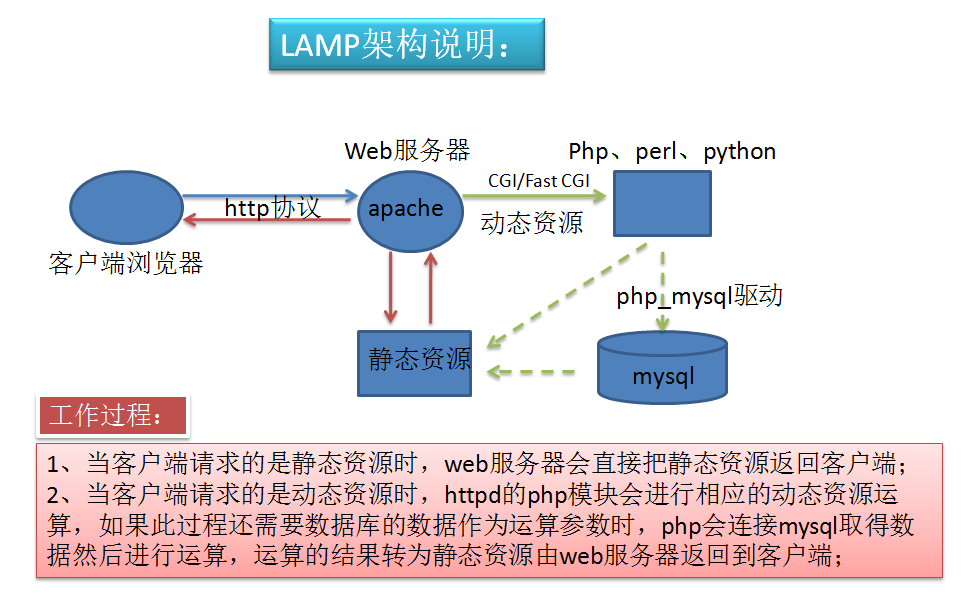
请求流程:

    Client -- (http协议) --> Httpd/Nginx/Tomcat -- (fastcgi) --> application server (可以是Php,Perl,Python程序文件) -- (mysql) --> mysql

php简介:

  基于zend编译成opcode(二进制格式的字节码,重复运行,可省略编译环境)

  和Python类似,也是脚本编程语言,Php可以嵌入到html中的嵌入式web程序语言,非常适合快速开发网站。

  由于Php和Python一样,开发效率非常高,因此一些小公司想要快速上手开发网站一般都会选择Php进行网站开发,但是其稳定性相对于Java来比较差,所以一些公司达到一定的规模都会将php的网站推翻使用Java来重写,如京东,淘宝等电商网站基本上都被Java占据天下了。

  再加上近几年python人工智能被一些培训机构,运维人员给各种吹捧,于是python的web开发人员也跑来和Php开发人员抢饭碗了,哎,随着时间的流逝,Php的市场在逐渐的减少(前有Java,后有Python),不过小公司相对还是较多的,因此Php语言的使用者在一些小的网站依旧能活得很好,当然运维人员可能会更喜欢使用Python的Django框架来快速开发web网站了。


快速部署LAMP:

  CentOS 7:

    Modules:httpd, php, php-mysql, mariadb-server

    FastCGI:httpd, php-fpm, php-mysql, mariadb-server

  CentOS 6:

    Modules:httpd, php, php-mysql, mysql-server

    FastCGI:默认不支持

安装LAMP:

  CentOS 6:

    yum -y install httpd, php, mysql-server, php-mysql

    service httpd start

    service mysqld start

  CentOS 7:

    yum -y install httpd, php, php-mysql, mariadb-server

    systemctl start httpd.service

    systemctl start mariadb.service

  注意:要使用prefork模型

温馨提示:

  我们可以通过fastcgi程序来实现动态资源处理,也可以使用apache的模块来处理动态资源,但后者在生产环境中使用相对较少,因为在访问量较高时,fastcgi程序是可以单独找一台服务器部署,从而降低httpd服务器的压力,而使用模块方式加载的话就只能依附于httpd服务了,便不可拆分部署。

  因此,从理论上来说,直接使用apache模块来处理动态资源在生产环境使用的场景相对较少,因为扩展性较差。
二.PHP配置
1>.PHP简介
  PHP是通用服务器端脚本编程语言,主要用于web开发实现动态web页面,也是最早实现将脚本嵌入HTML源码文档中的服务器端脚本语言之一。同时,php还提供了一个命令行接口,因此,其也可以在大多数系统上作为一个独立的shell来使用

  Rasmus Lerdorf于1994年开始开发PHP,最初是一组被Rasmus Lerdorf称作“Personal Home Page Tool” 的Perl脚本, 可以用于显示作者的简历并记录用户对其网站的访问。后来,Rasmus Lerdorf使用C语言将这些Perl脚本重写为CGI程序,还为其增加了运行Web forms的能力以及与数据库交互的特性,并将其重命名为“Personal Home Page/Forms Interpreter”或“PHP/FI”。此时,PHP/FI已经可以用于开发简单的动态web程序了,这即PHP1.。

  1995年6月,Rasmus Lerdorf把它的PHP发布于comp.infosystems.www.authoring.cgi Usenet讨论组,从此PHP开始走进人们的视野。

  1997年,其2.0版本发布。

  1997年,两名以色列程序员Zeev Suraski和Andi Gutmans重写的PHP的分析器(parser)成为PHP发展到3.0的基础,而且从此将PHP重命名为PHP: Hypertext Preprocessor。

  此后,这两名程序员开始重写整个PHP核心,并于1999年发布了Zend Engine 1.0,这也意味着PHP .0的诞生。

  2004年7月,Zend Engine .0发布,由此也将PHP带入了PHP 5时代。PHP5包含了许多重要的新特性,如增强的面向对象编程的支持、支持PDO(PHP Data Objects)扩展机制以及一系列对PHP性能的改进。

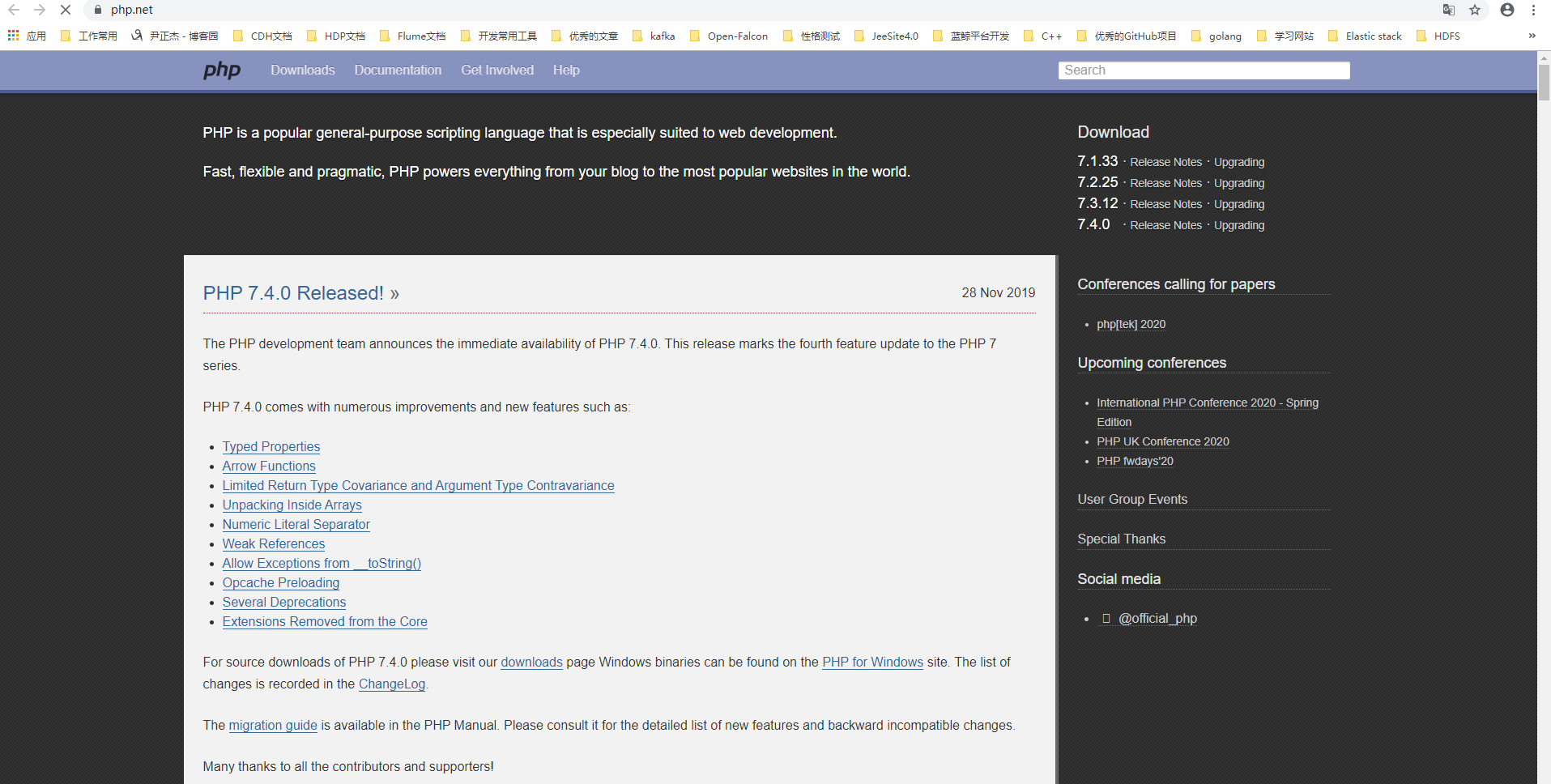
  PHP官网:

    http://www.php.net/
2>.PHP Zend Engine
  Zend Engine是开源的、PHP脚本语言的解释器,它最早是由以色列理工学院(Technion)的学生Andi Gutmans和Zeev Suraski所开发,Zend也正是此二人名字的合称。后来两人联合创立了Zend Technologies公司

  Zend Engine .0于1999年随PHP 4发布,由C语言开发且经过高度优化,并能够做为PHP的后端模块使用。Zend Engine为PHP提供了内存和资源管理的功能以及其它的一些标准服务,其高性能、可靠性和可扩展性在促进PHP成为一种流行的语言方面发挥了重要作用

  Zend Engine的出现将PHP代码的处理过程分成了两个阶段:
    首先是分析PHP代码并将其转换为称作Zend opcode的二进制格式opcode(类似Java的字节码),并将其存储于内存中;
    第二阶段是使用Zend Engine去执行这些转换后的Opcode
3>.PHP的Opcode
Opcode是一种PHP脚本编译后的中间语言,类似于Java的ByteCode,或者.NET的MSL。PHP执行PHP脚本代码一般会经过如下4个步骤(确切的来说,应该是PHP的语言引擎Zend)

  ()Scanning 词法分析,将PHP代码转换为语言片段(Tokens)

  ()Parsing 语义分析,将Tokens转换成简单而有意义的表达式

  ()Compilation 将表达式编译成Opcode

  ()Execution 顺次执行Opcode,每次一条,从而实现PHP脚本的功能

综上所述,我们可以概要PHP执行过程为:

  扫描-->分析-->编译-->执行
4>.php配置
  配置文件:

    /etc/php.ini
    /etc/php.d/*.ini

  配置文件在php解释器启动时被读取

  对配置文件的修改生效方法

    Modules:
      重启httpd服务

    FastCGI:
      重启php-fpm服务

  /etc/php.ini配置文件格式:

    [foo]:Section Header

    directive = value

    注释符:较新的版本中,已经完全使用;进行注释

    #:纯粹的注释信息

    ;:用于注释可启用的directive

  /etc/php.ini配置文件常用参数:

    max_execution_time= 30

      最长执行时间30s

    memory_limit 128M

      生产不够,可调大

    display_errors off

      调试使用,不要打开,否则可能暴露重要信息

    display_startup_errors off

      建议关闭

    post_max_size 8M

      最大上传数据大小,生产可能临时要调大,比下面项要大

    upload_max_filesize 2M

      最大上传文件,生产可能要调大

    max_file_uploads = 20

      同时上传最多文件数

    date.timezone =Asia/Shanghai

      指定时区

    short_open_tag=on

      开启短标签,如<? phpinfo();?>

  php.ini的核心配置选项文档:

    http://php.net/manual/zh/ini.core.php

  php.ini配置选项列表:

    http://php.net/manual/zh/ini.list.php

  php语言格式

    <?php

      ...php code...

    ?>
5>.php的加速器
php的加速器:

  基于PHP的特殊扩展机制如opcode缓存扩展也可以将opcode缓存于php的共享内存中,从而可以让同一段代码的后续重复执行时跳过编译阶段以提高性能。这些加速器并非真正提高了opcode的运行速度,而仅是通过分析opcode后并将它们重新排列以达到快速执行的目的

常见的php加速器有:

  1、APC (Alternative PHP Cache)

      遵循PHP License的开源框架,PHP opcode缓存加速器,目前的版本不适用于PHP 5.4

      项目地址http://pecl.php.net/package/APC

  2、eAccelerator

      源于Turck MMCache,早期的版本包含了一个PHP encoder和PHP loader,目前encoder已经不在支持。

      项目地址 http://eaccelerator.net/

  3、XCache

      快速而且稳定的PHP opcode缓存,经过严格测试且被大量用于生产环境。

      项目地址:http://xcache.lighttpd.net/,收录EPEL源

  4、Zend Optimizer和Zend Guard Loader

      Zend Optimizer并非一个opcode加速器,它是由Zend Technologies为PHP5.2及以前的版本提供的一个免费、闭源的PHP扩展,其能够运行由Zend Guard生成的加密的PHP代码或模糊代码。 而Zend Guard Loader则是专为PHP5.3提供的类似于Zend Optimizer功能的扩展。

      项目地址http://www.zend.com/en/products/guard/runtime-decoders

  5、NuSphere PhpExpress

      NuSphere的一款开源PHP加速器,它支持装载通过NuSphere PHP Encoder编码的PHP程序文件,并能够实现对常规PHP文件的执行加速。

      项目地址,http://www.nusphere.com/products/phpexpress.htm
三.php代码风格
1>.风格一
<?php

  echo "<h1>Hello world!</h1>"

?>
2>.风格二
<h1>

    <?php echo "Hello world!" ?>

</h1>
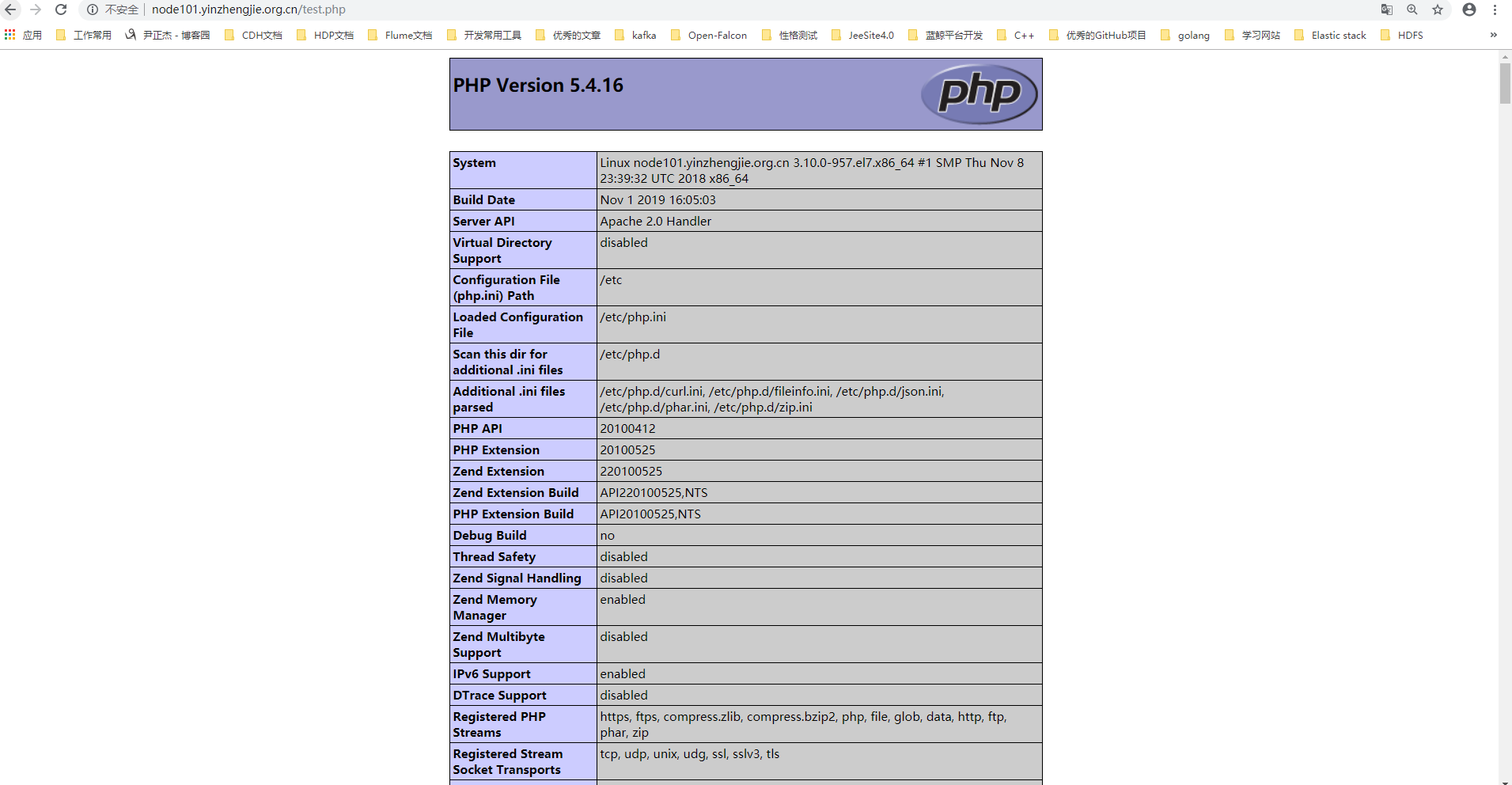
3>.php测试代码
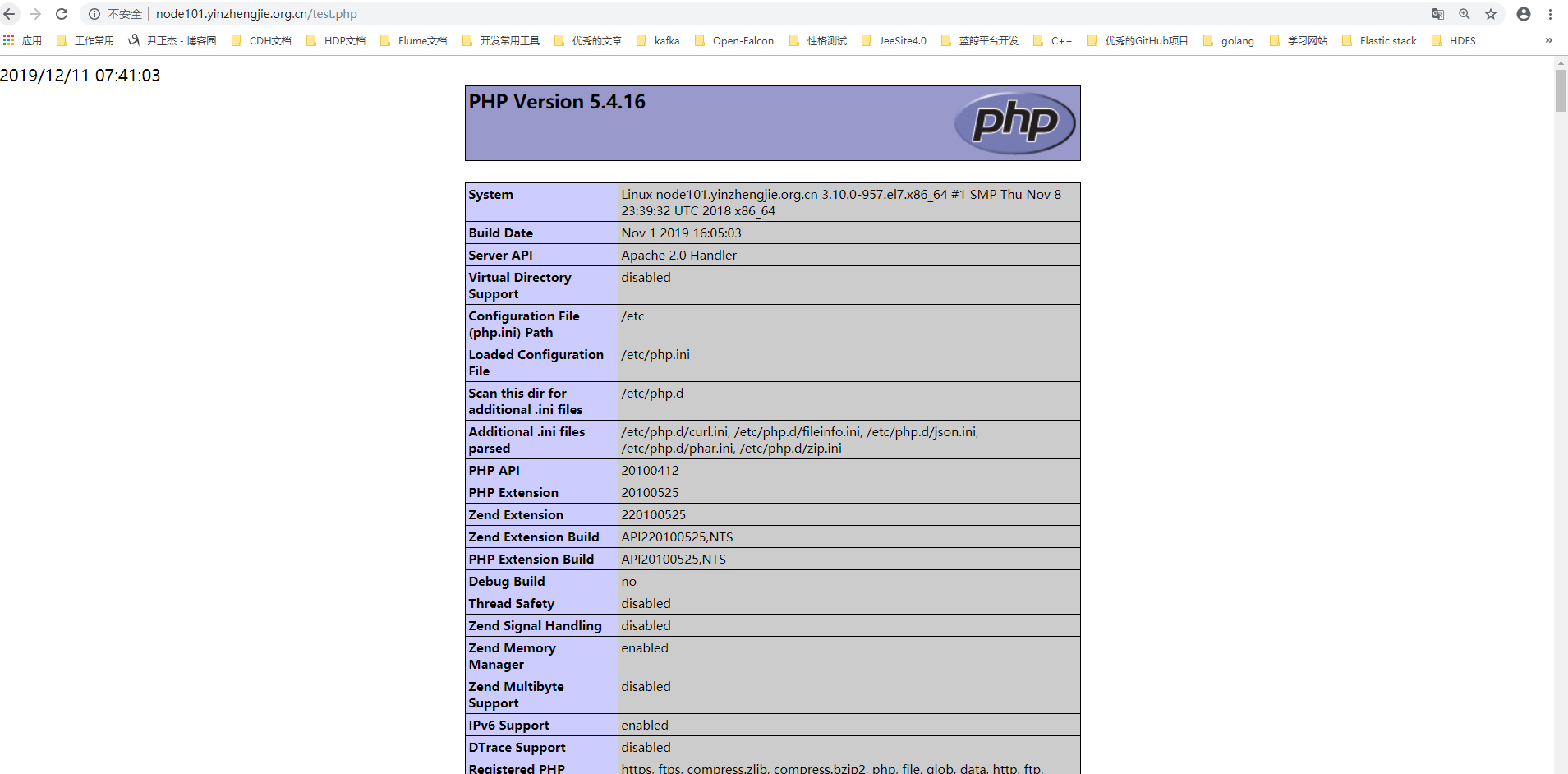
[root@node101.yinzhengjie.org.cn ~]# cat /var/www/html/test.php       #编写的网页查看网页的效果如下图所示。

<?php

    echo date("Y/m/d H:i:s");

    phpinfo();

?>

[root@node101.yinzhengjie.org.cn ~]#
四.基于php model连接数据库
1>.安装数据库(注意,为了避免试验的干扰性,请临时禁用selinux,firewalld,iptables相关工具,否则可能授权成功但无法通过php访问web界面的清空,如果遇到了请查看相应的日志信息哟~)
[root@node101.yinzhengjie.org.cn ~]#

[root@node101.yinzhengjie.org.cn ~]# yum -y install mariadb-server

Loaded plugins: fastestmirror, langpacks

Loading mirror speeds from cached hostfile

 * base: mirror.jdcloud.com

 * extras: mirror.bit.edu.cn

 * updates: mirrors.huaweicloud.com

Resolving Dependencies

--> Running transaction check

---> Package mariadb-server.x86_64 :5.5.-.el7 will be installed

--> Processing Dependency: perl-DBI for package: :mariadb-server-5.5.-.el7.x86_64

--> Processing Dependency: perl-DBD-MySQL for package: :mariadb-server-5.5.-.el7.x86_64

--> Processing Dependency: perl(DBI) for package: :mariadb-server-5.5.-.el7.x86_64

--> Running transaction check

---> Package perl-DBD-MySQL.x86_64 :4.023-.el7 will be installed

---> Package perl-DBI.x86_64 :1.627-.el7 will be installed

--> Processing Dependency: perl(RPC::PlServer) >= 0.2001 for package: perl-DBI-1.627-.el7.x86_64

--> Processing Dependency: perl(RPC::PlClient) >= 0.2000 for package: perl-DBI-1.627-.el7.x86_64

--> Running transaction check

---> Package perl-PlRPC.noarch :0.2020-.el7 will be installed

--> Processing Dependency: perl(Net::Daemon) >= 0.13 for package: perl-PlRPC-0.2020-.el7.noarch

--> Processing Dependency: perl(Net::Daemon::Test) for package: perl-PlRPC-0.2020-.el7.noarch

--> Processing Dependency: perl(Net::Daemon::Log) for package: perl-PlRPC-0.2020-.el7.noarch

--> Running transaction check

---> Package perl-Net-Daemon.noarch :0.48-.el7 will be installed

--> Finished Dependency Resolution

Dependencies Resolved

============================================================================================================================================================================

 Package                                       Arch                                 Version                                        Repository                          Size

============================================================================================================================================================================

Installing:

 mariadb-server                                x86_64                               :5.5.-.el7                                 base                                 M

Installing for dependencies:

 perl-DBD-MySQL                                x86_64                               4.023-.el7                                    base                                k

 perl-DBI                                      x86_64                               1.627-.el7                                    base                                k

 perl-Net-Daemon                               noarch                               0.48-.el7                                     base                                 k

 perl-PlRPC                                    noarch                               0.2020-.el7                                  base                                 k

Transaction Summary

============================================================================================================================================================================

Install   Package (+ Dependent packages)

Total download size:  M

Installed size:  M

Downloading packages:

(/): mariadb-server-5.5.-.el7.x86_64.rpm                                                                                                        |   MB  ::

(/): perl-DBI-1.627-.el7.x86_64.rpm                                                                                                               |  kB  ::

(/): perl-Net-Daemon-0.48-.el7.noarch.rpm                                                                                                         |   kB  ::

(/): perl-PlRPC-0.2020-.el7.noarch.rpm                                                                                                           |   kB  ::

(/): perl-DBD-MySQL-4.023-.el7.x86_64.rpm                                                                                                         |  kB  ::

----------------------------------------------------------------------------------------------------------------------------------------------------------------------------

Total                                                                                                                                        kB/s |   MB  ::

Running transaction check

Running transaction test

Transaction test succeeded

Running transaction

  Installing : perl-Net-Daemon-0.48-.el7.noarch                                                                                                                        /

  Installing : perl-PlRPC-0.2020-.el7.noarch                                                                                                                          /

  Installing : perl-DBI-1.627-.el7.x86_64                                                                                                                              /

  Installing : perl-DBD-MySQL-4.023-.el7.x86_64                                                                                                                        /

  Installing : :mariadb-server-5.5.-.el7.x86_64                                                                                                                     /

  Verifying  : perl-DBI-1.627-.el7.x86_64                                                                                                                              /

  Verifying  : perl-Net-Daemon-0.48-.el7.noarch                                                                                                                        /

  Verifying  : perl-DBD-MySQL-4.023-.el7.x86_64                                                                                                                        /

  Verifying  : :mariadb-server-5.5.-.el7.x86_64                                                                                                                     /

  Verifying  : perl-PlRPC-0.2020-.el7.noarch                                                                                                                          /

Installed:

  mariadb-server.x86_64 :5.5.-.el7

Dependency Installed:

  perl-DBD-MySQL.x86_64 :4.023-.el7         perl-DBI.x86_64 :1.627-.el7         perl-Net-Daemon.noarch :0.48-.el7         perl-PlRPC.noarch :0.2020-.el7

Complete!

[root@node101.yinzhengjie.org.cn ~]#
[root@node101.yinzhengjie.org.cn ~]# yum -y install mariadb-server
[root@node101.yinzhengjie.org.cn ~]# systemctl start mariadb

[root@node101.yinzhengjie.org.cn ~]#

[root@node101.yinzhengjie.org.cn ~]# mysql

Welcome to the MariaDB monitor.  Commands end with ; or \g.

Your MariaDB connection id is

Server version: 5.5.-MariaDB MariaDB Server

Copyright (c) , , Oracle, MariaDB Corporation Ab and others.

Type 'help;' or '\h' for help. Type '\c' to clear the current input statement.

MariaDB [(none)]>

MariaDB [(none)]> GRANT ALL ON *.* TO jason@'172.30.1.%' IDENTIFIED BY 'yinzhengjie';                #为客户端授权

Query OK,  rows affected (0.00 sec)

MariaDB [(none)]>

MariaDB [(none)]> GRANT ALL ON *.* TO jason@'node101.yinzhengjie.org.cn' IDENTIFIED BY 'yinzhengjie';      #为httpd服务器单独授权

Query OK,  rows affected (0.00 sec)

MariaDB [(none)]>

MariaDB [(none)]> SELECT user,host FROM mysql.user WHERE user='jason';

+-------+----------------------------+

| user  | host                       |

+-------+----------------------------+

| jason | 172.30..%                 |

| jason | node101.yinzhengjie.org.cn |

+-------+----------------------------+

 rows in set (0.00 sec)

MariaDB [(none)]>

MariaDB [(none)]>

+------------------------------------------------------------------------------------------------------------------------+

| Grants for jason@172.30..%                                                                                            |

+------------------------------------------------------------------------------------------------------------------------+

| GRANT ALL PRIVILEGES ON *.* TO 'jason'@'172.30.1.%' IDENTIFIED BY PASSWORD '*BD0B1F48FDC55BD27555FC2F22FF29A68A25A1D7' |

+------------------------------------------------------------------------------------------------------------------------+

 row in set (0.00 sec)

MariaDB [(none)]>

MariaDB [(none)]> SHOW GRANTS FOR jason@'node101.yinzhengjie.org.cn';

+----------------------------------------------------------------------------------------------------------------------------------------+

| Grants for jason@node101.yinzhengjie.org.cn                                                                                            |

+----------------------------------------------------------------------------------------------------------------------------------------+

| GRANT ALL PRIVILEGES ON *.* TO 'jason'@'node101.yinzhengjie.org.cn' IDENTIFIED BY PASSWORD '*BD0B1F48FDC55BD27555FC2F22FF29A68A25A1D7' |

+----------------------------------------------------------------------------------------------------------------------------------------+

 row in set (0.00 sec)

MariaDB [(none)]>

MariaDB [(none)]>

MariaDB [(none)]> QUIT

Bye

[root@node101.yinzhengjie.org.cn ~]#
[root@node101.yinzhengjie.org.cn ~]# mysql -h 172.30.1.101 -ujason -pyinzhengjie

Welcome to the MariaDB monitor.  Commands end with ; or \g.

Your MariaDB connection id is

Server version: 5.5.-MariaDB MariaDB Server

Copyright (c) , , Oracle, MariaDB Corporation Ab and others.

Type 'help;' or '\h' for help. Type '\c' to clear the current input statement.

MariaDB [(none)]> SHOW DATABASES;

+--------------------+

| Database           |

+--------------------+

| information_schema |

| mysql              |

| performance_schema |

| test               |

+--------------------+

 rows in set (0.01 sec)

MariaDB [(none)]>

MariaDB [(none)]>  CREATE SCHEMA IF NOT EXISTS yinzhengjie2019 DEFAULT CHARACTER SET = utf8mb4;

Query OK,  row affected (0.00 sec)

MariaDB [(none)]>

MariaDB [(none)]> SHOW DATABASES;

+--------------------+

| Database           |

+--------------------+

| information_schema |

| mysql              |

| performance_schema |

| test               |

| yinzhengjie2019    |

+--------------------+

 rows in set (0.00 sec)

MariaDB [(none)]>

MariaDB [(none)]> QUIT

Bye

[root@node101.yinzhengjie.org.cn ~]#

[root@node101.yinzhengjie.org.cn ~]#
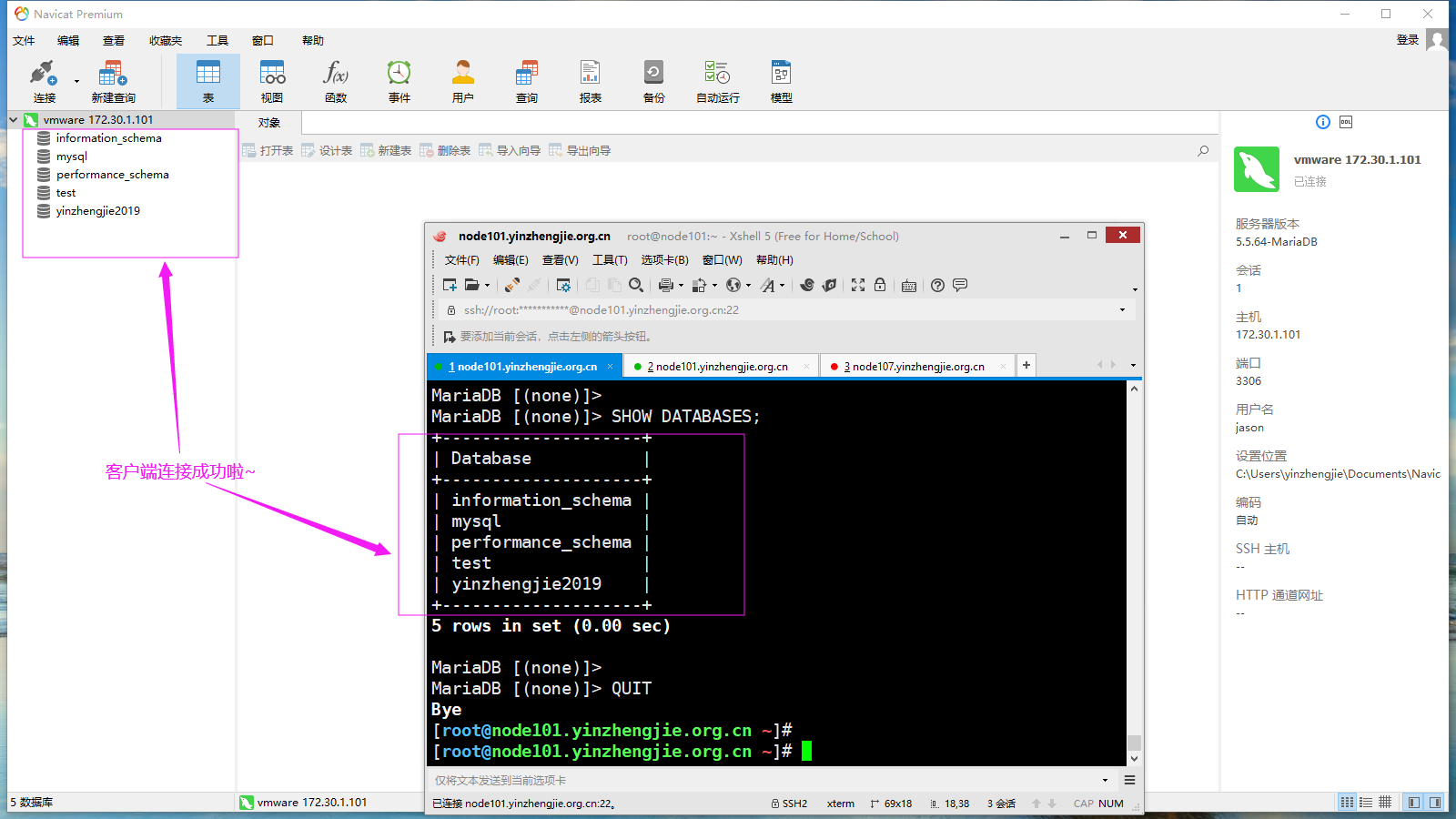
[root@node101.yinzhengjie.org.cn ~]# mysql -h 172.30.1.101 -ujason -pyinzhengjie #测试服务端是否正常连接
2>.安装php程序和mysql连接的客户端软件包
[root@node101.yinzhengjie.org.cn ~]# yum info php-mysql

Loaded plugins: fastestmirror, langpacks

Loading mirror speeds from cached hostfile

 * base: mirror.jdcloud.com

 * extras: mirror.bit.edu.cn

 * updates: mirrors.huaweicloud.com

Available Packages

Name        : php-mysql

Arch        : x86_64

Version     : 5.4.

Release     : 46.1.el7_7

Size        :  k

Repo        : updates//x86_64

Summary     : A module for PHP applications that use MySQL databases

URL         : http://www.php.net/

License     : PHP

Description : The php-mysql package contains a dynamic shared object that will add

            : MySQL database support to PHP. MySQL is an object-relational database

            : management system. PHP is an HTML-embeddable scripting language. If

            : you need MySQL support for PHP applications, you will need to install

            : this package and the php package.

[root@node101.yinzhengjie.org.cn ~]#

[root@node101.yinzhengjie.org.cn ~]#
[root@node101.yinzhengjie.org.cn ~]# yum info php-mysql
[root@node101.yinzhengjie.org.cn ~]# yum -y install php-mysql

Loaded plugins: fastestmirror, langpacks

Loading mirror speeds from cached hostfile

 * base: mirror.jdcloud.com

 * extras: mirror.bit.edu.cn

 * updates: mirrors.huaweicloud.com

Resolving Dependencies

--> Running transaction check

---> Package php-mysql.x86_64 :5.4.-46.1.el7_7 will be installed

--> Processing Dependency: php-pdo(x86-) = 5.4.-46.1.el7_7 for package: php-mysql-5.4.-46.1.el7_7.x86_64

--> Running transaction check

---> Package php-pdo.x86_64 :5.4.-46.1.el7_7 will be installed

--> Processing Dependency: php-common(x86-) = 5.4.-46.1.el7_7 for package: php-pdo-5.4.-46.1.el7_7.x86_64

--> Running transaction check

---> Package php-common.x86_64 :5.4.-46.1.el7_7 will be installed

--> Processing Dependency: libzip.so.()(64bit) for package: php-common-5.4.-46.1.el7_7.x86_64

--> Running transaction check

---> Package libzip.x86_64 :0.10.-.el7 will be installed

--> Finished Dependency Resolution

Dependencies Resolved

============================================================================================================================================================================

 Package                                  Arch                                 Version                                          Repository                             Size

============================================================================================================================================================================

Installing:

 php-mysql                                x86_64                               5.4.-46.1.el7_7                                updates                                k

Installing for dependencies:

 libzip                                   x86_64                               0.10.-.el7                                     base                                    k

 php-common                               x86_64                               5.4.-46.1.el7_7                                updates                                k

 php-pdo                                  x86_64                               5.4.-46.1.el7_7                                updates                                 k

Transaction Summary

============================================================================================================================================================================

Install   Package (+ Dependent packages)

Total download size:  k

Installed size: 4.3 M

Downloading packages:

(/): php-mysql-5.4.-46.1.el7_7.x86_64.rpm                                                                                                        |  kB  ::

(/): php-common-5.4.-46.1.el7_7.x86_64.rpm                                                                                                       |  kB  ::

(/): libzip-0.10.-.el7.x86_64.rpm                                                                                                                |   kB  ::

php-pdo-5.4.-46.1.el7_7.x86_ FAILED

http://mirrors.ustc.edu.cn/centos/7.7.1908/updates/x86_64/Packages/php-pdo-5.4.16-46.1.el7_7.x86_64.rpm: [Errno 12] Timeout on http://mirrors.ustc.edu.cn/centos/7.7.1908/up

dates/x86_64/Packages/php-pdo-5.4.-46.1.el7_7.x86_64.rpm: (, 'Operation too slow. Less than 1000 bytes/sec transferred the last 30 seconds')Trying other mirror.

(/): php-pdo-5.4.-46.1.el7_7.x86_64.rpm                                                                                                          |   kB  ::

----------------------------------------------------------------------------------------------------------------------------------------------------------------------------

Total                                                                                                                                         kB/s |  kB  ::

Running transaction check

Running transaction test

Transaction test succeeded

Running transaction

  Installing : libzip-0.10.-.el7.x86_64                                                                                                                               /

  Installing : php-common-5.4.-46.1.el7_7.x86_64                                                                                                                      /

  Installing : php-pdo-5.4.-46.1.el7_7.x86_64                                                                                                                         /

  Installing : php-mysql-5.4.-46.1.el7_7.x86_64                                                                                                                       /

  Verifying  : php-common-5.4.-46.1.el7_7.x86_64                                                                                                                      /

  Verifying  : libzip-0.10.-.el7.x86_64                                                                                                                               /

  Verifying  : php-mysql-5.4.-46.1.el7_7.x86_64                                                                                                                       /

  Verifying  : php-pdo-5.4.-46.1.el7_7.x86_64                                                                                                                         /

Installed:

  php-mysql.x86_64 :5.4.-46.1.el7_7

Dependency Installed:

  libzip.x86_64 :0.10.-.el7                        php-common.x86_64 :5.4.-46.1.el7_7                        php-pdo.x86_64 :5.4.-46.1.el7_7

Complete!

[root@node101.yinzhengjie.org.cn ~]#
[root@node101.yinzhengjie.org.cn ~]# yum -y install php-mysql
[root@node101.yinzhengjie.org.cn ~]# rpm -ql php-mysql

/etc/php.d/mysql.ini

/etc/php.d/mysqli.ini

/etc/php.d/pdo_mysql.ini

/usr/lib64/php/modules/mysql.so

/usr/lib64/php/modules/mysqli.so

/usr/lib64/php/modules/pdo_mysql.so

[root@node101.yinzhengjie.org.cn ~]#

[root@node101.yinzhengjie.org.cn ~]# cat /etc/php.d/mysql.ini

; Enable mysql extension module

extension=mysql.so

[root@node101.yinzhengjie.org.cn ~]#

[root@node101.yinzhengjie.org.cn ~]#

[root@node101.yinzhengjie.org.cn ~]# cat /etc/php.d/mysqli.ini

; Enable mysqli extension module

extension=mysqli.so

[root@node101.yinzhengjie.org.cn ~]#

[root@node101.yinzhengjie.org.cn ~]# cat /etc/php.d/pdo_mysql.ini

; Enable pdo_mysql extension module

extension=pdo_mysql.so

[root@node101.yinzhengjie.org.cn ~]#

[root@node101.yinzhengjie.org.cn ~]#
[root@node101.yinzhengjie.org.cn ~]# rpm -ql php-mysql
3>.安装httpd和php程序
[root@node101.yinzhengjie.org.cn ~]# yum -y install httpd

Loaded plugins: fastestmirror, langpacks

Loading mirror speeds from cached hostfile

 * base: mirror.jdcloud.com

 * extras: mirror.bit.edu.cn

 * updates: mirrors.huaweicloud.com

Resolving Dependencies

--> Running transaction check

---> Package httpd.x86_64 0:2.4.6-90.el7.centos will be installed

--> Processing Dependency: httpd-tools = 2.4.6-90.el7.centos for package: httpd-2.4.6-90.el7.centos.x86_64

--> Processing Dependency: libaprutil-1.so.0()(64bit) for package: httpd-2.4.6-90.el7.centos.x86_64

--> Processing Dependency: libapr-1.so.0()(64bit) for package: httpd-2.4.6-90.el7.centos.x86_64

--> Running transaction check

---> Package apr.x86_64 0:1.4.8-5.el7 will be installed

---> Package apr-util.x86_64 0:1.5.2-6.el7 will be installed

---> Package httpd-tools.x86_64 0:2.4.6-90.el7.centos will be installed

--> Finished Dependency Resolution

Dependencies Resolved

============================================================================================================================================================================

 Package                                   Arch                                 Version                                            Repository                          Size

============================================================================================================================================================================

Installing:

 httpd                                     x86_64                               2.4.6-90.el7.centos                                base                               2.7 M

Installing for dependencies:

 apr                                       x86_64                               1.4.8-5.el7                                        base                               103 k

 apr-util                                  x86_64                               1.5.2-6.el7                                        base                                92 k

 httpd-tools                               x86_64                               2.4.6-90.el7.centos                                base                                91 k

Transaction Summary

============================================================================================================================================================================

Install  1 Package (+3 Dependent packages)

Total download size: 3.0 M

Installed size: 9.9 M

Downloading packages:

(1/4): apr-util-1.5.2-6.el7.x86_64.rpm                                                                                                               |  92 kB  00:00:00

(2/4): httpd-2.4.6-90.el7.centos.x86_64.rpm                                                                                                          | 2.7 MB  00:00:00

(3/4): httpd-tools-2.4.6-90.el7.centos.x86_64.rpm                                                                                                    |  91 kB  00:00:00

(4/4): apr-1.4.8-5.el7.x86_64.rpm                                                                                                                    | 103 kB  00:00:04

----------------------------------------------------------------------------------------------------------------------------------------------------------------------------

Total                                                                                                                                       612 kB/s | 3.0 MB  00:00:05

Running transaction check

Running transaction test

Transaction test succeeded

Running transaction

  Installing : apr-1.4.8-5.el7.x86_64                                                                                                                                   1/4

  Installing : apr-util-1.5.2-6.el7.x86_64                                                                                                                              2/4

  Installing : httpd-tools-2.4.6-90.el7.centos.x86_64                                                                                                                   3/4

  Installing : httpd-2.4.6-90.el7.centos.x86_64                                                                                                                         4/4

  Verifying  : apr-1.4.8-5.el7.x86_64                                                                                                                                   1/4

  Verifying  : httpd-tools-2.4.6-90.el7.centos.x86_64                                                                                                                   2/4

  Verifying  : apr-util-1.5.2-6.el7.x86_64                                                                                                                              3/4

  Verifying  : httpd-2.4.6-90.el7.centos.x86_64                                                                                                                         4/4

Installed:

  httpd.x86_64 0:2.4.6-90.el7.centos

Dependency Installed:

  apr.x86_64 0:1.4.8-5.el7                          apr-util.x86_64 0:1.5.2-6.el7                          httpd-tools.x86_64 0:2.4.6-90.el7.centos

Complete!

[root@node101.yinzhengjie.org.cn ~]#
[root@node101.yinzhengjie.org.cn ~]# yum -y install httpd
[root@node101.yinzhengjie.org.cn ~]# yum -y install php

Loaded plugins: fastestmirror, langpacks

Loading mirror speeds from cached hostfile

 * base: mirror.jdcloud.com

 * extras: mirror.bit.edu.cn

 * updates: mirrors.huaweicloud.com

Resolving Dependencies

--> Running transaction check

---> Package php.x86_64 0:5.4.16-46.1.el7_7 will be installed

--> Processing Dependency: php-cli(x86-64) = 5.4.16-46.1.el7_7 for package: php-5.4.16-46.1.el7_7.x86_64

--> Running transaction check

---> Package php-cli.x86_64 0:5.4.16-46.1.el7_7 will be installed

--> Finished Dependency Resolution

Dependencies Resolved

============================================================================================================================================================================

 Package                                Arch                                  Version                                          Repository                              Size

============================================================================================================================================================================

Installing:

 php                                    x86_64                                5.4.16-46.1.el7_7                                updates                                1.4 M

Installing for dependencies:

 php-cli                                x86_64                                5.4.16-46.1.el7_7                                updates                                2.7 M

Transaction Summary

============================================================================================================================================================================

Install  1 Package (+1 Dependent package)

Total download size: 4.1 M

Installed size: 13 M

Downloading packages:

(1/2): php-cli-5.4.16-46.1.el7_7.x86_64.rpm                                                                                                          | 2.7 MB  00:00:00

(2/2): php-5.4.16-46.1.el7_7.x86_64.rpm                                                                                                              | 1.4 MB  00:00:00

----------------------------------------------------------------------------------------------------------------------------------------------------------------------------

Total                                                                                                                                        10 MB/s | 4.1 MB  00:00:00

Running transaction check

Running transaction test

Transaction test succeeded

Running transaction

  Installing : php-cli-5.4.16-46.1.el7_7.x86_64                                                                                                                         1/2

  Installing : php-5.4.16-46.1.el7_7.x86_64                                                                                                                             2/2

  Verifying  : php-cli-5.4.16-46.1.el7_7.x86_64                                                                                                                         1/2

  Verifying  : php-5.4.16-46.1.el7_7.x86_64                                                                                                                             2/2

Installed:

  php.x86_64 0:5.4.16-46.1.el7_7

Dependency Installed:

  php-cli.x86_64 0:5.4.16-46.1.el7_7

Complete!

[root@node101.yinzhengjie.org.cn ~]#
[root@node101.yinzhengjie.org.cn ~]# yum -y install php
[root@node101.yinzhengjie.org.cn ~]# systemctl start httpd

[root@node101.yinzhengjie.org.cn ~]#

[root@node101.yinzhengjie.org.cn ~]# systemctl status httpd

● httpd.service - The Apache HTTP Server

   Loaded: loaded (/usr/lib/systemd/system/httpd.service; disabled; vendor preset: disabled)

   Active: active (running) since Thu -- :: CST; 27s ago

     Docs: man:httpd()

           man:apachectl()

 Main PID:  (httpd)

   Status: "Total requests: 0; Current requests/sec: 0; Current traffic:   0 B/sec"

    Tasks:

   CGroup: /system.slice/httpd.service

           ├─ /usr/sbin/httpd -DFOREGROUND

           ├─ /usr/sbin/httpd -DFOREGROUND

           ├─ /usr/sbin/httpd -DFOREGROUND

           ├─ /usr/sbin/httpd -DFOREGROUND

           ├─ /usr/sbin/httpd -DFOREGROUND

           └─ /usr/sbin/httpd -DFOREGROUND

Dec  :: node101.yinzhengjie.org.cn systemd[]: Starting The Apache HTTP Server...

Dec  :: node101.yinzhengjie.org.cn systemd[]: Started The Apache HTTP Server.

[root@node101.yinzhengjie.org.cn ~]#
4>.使用mysql扩展连接数据库的测试代码(不推荐使用,php 7.x版本已经淘汰该方式)
[root@node101.yinzhengjie.org.cn ~]# cat /var/www/html/mysql.php             #连接成功后如下图所示

<?php

$conn = mysql_connect('172.30.1.101','jason','yinzhengjie');

if ($conn)

    echo "mysql ok";

else

    echo "mysql Failure";

    mysql_close();

?>

[root@node101.yinzhengjie.org.cn ~]#

5>.使用mysqli扩展连接数据库的测试代码(只能连接MySQL数据库)
[root@node101.yinzhengjie.org.cn ~]# cat /var/www/html/mysqli.php         #连接成功如下图所示。

<?php

$mysqli=new mysqli("172.30.1.101","jason","yinzhengjie");

if(mysqli_connect_errno()){

    echo " MySQLIFailure";

    $mysqli=null;

    exit;

}

    echo "MySQLI OK";

    $mysqli->close();

?>

[root@node101.yinzhengjie.org.cn ~]#

6>.使用PDO(PHP Data Object)扩展连接数据库方法一(相对比较通用,可以连接各种类型的数据库)
[root@node101.yinzhengjie.org.cn ~]# cat /var/www/html/pdo1.php

<?php

$dsn='mysql:host=172.30.1.101;dbname=yinzhengjie2019';

$username='jason';

$passwd='yinzhengjie';

$dbh=new PDO($dsn,$username,$passwd);

var_dump($dbh);

?>

[root@node101.yinzhengjie.org.cn ~]#

6>.使用PDO(PHP Data Object)扩展连接数据库方法二(相对比较通用,可以连接各种类型的数据库)
[root@node101.yinzhengjie.org.cn ~]# cat /var/www/html/pdo2.php

<?php

try {

$user='jason';

$pass='yinzhengjie';

$dbh = new PDO('mysql:host=172.30.1.101;dbname=mysql', $user, $pass);

foreach($dbh->query('SELECT user,host,password from user') as $row) {

    print_r($row);

}

$dbh = null;

} catch (PDOException $e) {

    print "Error!: ". $e->getMessage(). "<br/>";

    die();

}

?>

[root@node101.yinzhengjie.org.cn ~]#

[root@node101.yinzhengjie.org.cn ~]#

五.单独使用PHP模块案例
1>.安装httpd和php软件包(由于php模块就是httpd服务运行时动态加载的模块,因此想要使用php模块就必须安装httpd服务)
[root@node101.yinzhengjie.org.cn ~]# yum info php

Loaded plugins: fastestmirror

Loading mirror speeds from cached hostfile

 * base: mirror.bit.edu.cn

 * extras: mirrors.huaweicloud.com

 * updates: mirrors.huaweicloud.com

Installed Packages

Name        : php

Arch        : x86_64

Version     : 5.4.

Release     : 46.1.el7_7

Size        : 4.4 M

Repo        : installed

From repo   : updates

Summary     : PHP scripting language for creating dynamic web sites

URL         : http://www.php.net/

License     : PHP and Zend and BSD

Description : PHP is an HTML-embedded scripting language. PHP attempts to make it

            : easy for developers to write dynamically generated web pages. PHP also

            : offers built-in database integration for several commercial and

            : non-commercial database management systems, so writing a

            : database-enabled webpage with PHP is fairly simple. The most common

            : use of PHP coding is probably as a replacement for CGI scripts.

            :

            : The php package contains the module (often referred to as mod_php)

            : which adds support for the PHP language to Apache HTTP Server.

[root@node101.yinzhengjie.org.cn ~]#
[root@node101.yinzhengjie.org.cn ~]# yum info php #从描述信息就可以看出来该软件包是运行在httpd server之上的
[root@node101.yizhengjie.org.cn ~]# yum -y install httpd

Loaded plugins: fastestmirror

Determining fastest mirrors

 * base: mirror.jdcloud.com

 * extras: mirror.jdcloud.com

 * updates: mirrors.aliyun.com

base                                                                                                                  | 3.6 kB  ::

extras                                                                                                                | 2.9 kB  ::

updates                                                                                                               | 2.9 kB  ::

(/): base//x86_64/group_gz                                                                                         |  kB  ::

(/): extras//x86_64/primary_db                                                                                     |  kB  ::

(/): base//x86_64/primary_db                                                                                       | 6.0 MB  ::

(/): updates//x86_64/primary_db                                                                                    | 5.8 MB  ::

Resolving Dependencies

--> Running transaction check

---> Package httpd.x86_64 :2.4.-.el7.centos will be installed

--> Processing Dependency: httpd-tools = 2.4.-.el7.centos for package: httpd-2.4.-.el7.centos.x86_64

--> Processing Dependency: libaprutil-.so.()(64bit) for package: httpd-2.4.-.el7.centos.x86_64

--> Processing Dependency: libapr-.so.()(64bit) for package: httpd-2.4.-.el7.centos.x86_64

--> Running transaction check

---> Package apr.x86_64 :1.4.-.el7 will be installed

---> Package apr-util.x86_64 :1.5.-.el7 will be installed

---> Package httpd-tools.x86_64 :2.4.-.el7.centos will be installed

--> Finished Dependency Resolution

Dependencies Resolved

=============================================================================================================================================

 Package                           Arch                         Version                                     Repository                  Size

=============================================================================================================================================

Installing:

 httpd                             x86_64                       2.4.-.el7.centos                         base                       2.7 M

Installing for dependencies:

 apr                               x86_64                       1.4.-.el7                                 base                        k

 apr-util                          x86_64                       1.5.-.el7                                 base                         k

 httpd-tools                       x86_64                       2.4.-.el7.centos                         base                         k

Transaction Summary

=============================================================================================================================================

Install   Package (+ Dependent packages)

Total download size: 3.0 M

Installed size: 9.9 M

Downloading packages:

(/): httpd-tools-2.4.-.el7.centos.x86_64.rpm                                                                     |   kB  ::

(/): apr-1.4.-.el7.x86_64.rpm                                                                                     |  kB  ::

(/): apr-util-1.5.-.el7.x86_64.rpm                                                                                |   kB  ::

httpd-2.4.-.el7.centos.x86_ FAILED                                                                      ]  1.6 B/s |  kB :: ETA

http://mirrors.nju.edu.cn/centos/7.7.1908/os/x86_64/Packages/httpd-2.4.6-90.el7.centos.x86_64.rpm: [Errno 12] Timeout on http://mirrors.nju.e

du.cn/centos/7.7./os/x86_64/Packages/httpd-2.4.-.el7.centos.x86_64.rpm: (, 'Operation too slow. Less than 1000 bytes/sec transferred the last 30 seconds')Trying other mirror.

(/): httpd-2.4.-.el7.centos.x86_64.rpm                                                                           | 2.7 MB  ::

---------------------------------------------------------------------------------------------------------------------------------------------

Total                                                                                                          kB/s | 3.0 MB  ::

Running transaction check

Running transaction test

Transaction test succeeded

Running transaction

  Installing : apr-1.4.-.el7.x86_64                                                                                                    /

  Installing : apr-util-1.5.-.el7.x86_64                                                                                               /

  Installing : httpd-tools-2.4.-.el7.centos.x86_64                                                                                    /

  Installing : httpd-2.4.-.el7.centos.x86_64                                                                                          /

  Verifying  : apr-1.4.-.el7.x86_64                                                                                                    /

  Verifying  : httpd-tools-2.4.-.el7.centos.x86_64                                                                                    /

  Verifying  : apr-util-1.5.-.el7.x86_64                                                                                               /

  Verifying  : httpd-2.4.-.el7.centos.x86_64                                                                                          /

Installed:

  httpd.x86_64 :2.4.-.el7.centos

Dependency Installed:

  apr.x86_64 :1.4.-.el7               apr-util.x86_64 :1.5.-.el7               httpd-tools.x86_64 :2.4.-.el7.centos

Complete!

[root@node101.yizhengjie.org.cn ~]#
[root@node101.yizhengjie.org.cn ~]# yum -y install httpd
[root@node101.yinzhengjie.org.cn ~]# yum -y install php

Loaded plugins: fastestmirror

Loading mirror speeds from cached hostfile

 * base: mirror.bit.edu.cn

 * extras: mirrors.huaweicloud.com

 * updates: mirrors.huaweicloud.com

base                                                                                                                                                 | 3.6 kB  ::

extras                                                                                                                                               | 2.9 kB  ::

updates                                                                                                                                              | 2.9 kB  ::

Resolving Dependencies

--> Running transaction check

---> Package php.x86_64 :5.4.-46.1.el7_7 will be installed

--> Processing Dependency: php-common(x86-) = 5.4.-46.1.el7_7 for package: php-5.4.-46.1.el7_7.x86_64

--> Processing Dependency: php-cli(x86-) = 5.4.-46.1.el7_7 for package: php-5.4.-46.1.el7_7.x86_64

--> Processing Dependency: httpd-mmn = 20120211x8664 for package: php-5.4.-46.1.el7_7.x86_64

--> Processing Dependency: httpd for package: php-5.4.-46.1.el7_7.x86_64

--> Running transaction check

---> Package httpd.x86_64 :2.4.-.el7.centos will be installed

--> Processing Dependency: httpd-tools = 2.4.-.el7.centos for package: httpd-2.4.-.el7.centos.x86_64

---> Package php-cli.x86_64 :5.4.-46.1.el7_7 will be installed

---> Package php-common.x86_64 :5.4.-46.1.el7_7 will be installed

--> Processing Dependency: libzip.so.()(64bit) for package: php-common-5.4.-46.1.el7_7.x86_64

--> Running transaction check

---> Package httpd-tools.x86_64 :2.4.-.el7.centos will be installed

---> Package libzip.x86_64 :0.10.-.el7 will be installed

--> Finished Dependency Resolution

Dependencies Resolved

============================================================================================================================================================================

 Package                                  Arch                                Version                                            Repository                            Size

============================================================================================================================================================================

Installing:

 php                                      x86_64                              5.4.-46.1.el7_7                                  updates                              1.4 M

Installing for dependencies:

 httpd                                    x86_64                              2.4.-.el7.centos                                base                                 2.7 M

 httpd-tools                              x86_64                              2.4.-.el7.centos                                base                                   k

 libzip                                   x86_64                              0.10.-.el7                                       base                                   k

 php-cli                                  x86_64                              5.4.-46.1.el7_7                                  updates                              2.7 M

 php-common                               x86_64                              5.4.-46.1.el7_7                                  updates                               k

Transaction Summary

============================================================================================================================================================================

Install   Package (+ Dependent packages)

Total download size: 7.5 M

Installed size:  M

Downloading packages:

(/): httpd-tools-2.4.-.el7.centos.x86_64.rpm                                                                                                    |   kB  ::

(/): php-cli-5.4.-46.1.el7_7.x86_64.rpm                                                                                                          | 2.7 MB  ::

(/): libzip-0.10.-.el7.x86_64.rpm                                                                                                                |   kB  ::

(/): php-common-5.4.-46.1.el7_7.x86_64.rpm                                                                                                       |  kB  ::

(/): php-5.4.-46.1.el7_7.x86_64.rpm                                                                                                              | 1.4 MB  ::

(/): httpd-2.4.-.el7.centos.x86_64.rpm                                                                                                          | 2.7 MB  ::

----------------------------------------------------------------------------------------------------------------------------------------------------------------------------

Total                                                                                                                                       1.1 MB/s | 7.5 MB  ::

Running transaction check

Running transaction test

Transaction test succeeded

Running transaction

  Installing : libzip-0.10.-.el7.x86_64                                                                                                                               /

  Installing : php-common-5.4.-46.1.el7_7.x86_64                                                                                                                      /

  Installing : php-cli-5.4.-46.1.el7_7.x86_64                                                                                                                         /

  Installing : httpd-tools-2.4.-.el7.centos.x86_64                                                                                                                   /

  Installing : httpd-2.4.-.el7.centos.x86_64                                                                                                                         /

  Installing : php-5.4.-46.1.el7_7.x86_64                                                                                                                             /

  Verifying  : php-cli-5.4.-46.1.el7_7.x86_64                                                                                                                         /

  Verifying  : httpd-tools-2.4.-.el7.centos.x86_64                                                                                                                   /

  Verifying  : httpd-2.4.-.el7.centos.x86_64                                                                                                                         /

  Verifying  : libzip-0.10.-.el7.x86_64                                                                                                                               /

  Verifying  : php-5.4.-46.1.el7_7.x86_64                                                                                                                             /

  Verifying  : php-common-5.4.-46.1.el7_7.x86_64                                                                                                                      /

Installed:

  php.x86_64 :5.4.-46.1.el7_7

Dependency Installed:

  httpd.x86_64 :2.4.-.el7.centos           httpd-tools.x86_64 :2.4.-.el7.centos        libzip.x86_64 :0.10.-.el7        php-cli.x86_64 :5.4.-46.1.el7_7

  php-common.x86_64 :5.4.-46.1.el7_7

Complete!

[root@node101.yinzhengjie.org.cn ~]#
[root@node101.yinzhengjie.org.cn ~]# yum -y install php
2>.安装php软件后查看相关配置文件
[root@node101.yinzhengjie.org.cn ~]# rpm -ql php

/etc/httpd/conf.d/php.conf               #httpd的配置文件中多出来一个子配置文件

/etc/httpd/conf.modules.d/-php.conf        #自动安装了模块相关的配置,该配置文件中有php相关模块的加载

/usr/lib64/httpd/modules/libphp5.so          #在apache httpd server模块存放目录生成了PHP相关的模块库,libphp5.so支持MPM为prefork,而event和worker的MPM需要libphp5-zts.so支持哟~

/usr/share/httpd/icons/php.gif

/var/lib/php/session

[root@node101.yinzhengjie.org.cn ~]#
[root@node101.yinzhengjie.org.cn ~]# cat /etc/httpd/conf.d/php.conf

#

# Cause the PHP interpreter to handle files with a .php extension.

#

<FilesMatch \.php$>

    SetHandler application/x-httpd-php

</FilesMatch>

#

# Allow php to handle Multiviews

#

AddType text/html .php

#

# Add index.php to the list of files that will be served as directory

# indexes.

#

DirectoryIndex index.php

#

# Uncomment the following lines to allow PHP to pretty-print .phps

# files as PHP source code:

#

#<FilesMatch \.phps$>

#    SetHandler application/x-httpd-php-source

#</FilesMatch>

#

# Apache specific PHP configuration options

# those can be override in each configured vhost

#

php_value session.save_handler "files"

php_value session.save_path    "/var/lib/php/session"

[root@node101.yinzhengjie.org.cn ~]#

[root@node101.yinzhengjie.org.cn ~]#
[root@node101.yinzhengjie.org.cn ~]# cat /etc/httpd/conf.d/php.conf
[root@node101.yinzhengjie.org.cn ~]# cat /etc/httpd/conf.modules.d/-php.conf

#

# PHP is an HTML-embedded scripting language which attempts to make it

# easy for developers to write dynamically generated webpages.

#

<IfModule prefork.c>

  LoadModule php5_module modules/libphp5.so

</IfModule>

[root@node101.yinzhengjie.org.cn ~]#

[root@node101.yinzhengjie.org.cn ~]#
[root@node101.yinzhengjie.org.cn ~]# cat /etc/httpd/conf.modules.d/10-php.conf
3>.编写php测试代码
[root@node101.yinzhengjie.org.cn ~]# vim /var/www/html/test.php        #编写php测试代码

[root@node101.yinzhengjie.org.cn ~]#

[root@node101.yinzhengjie.org.cn ~]# cat /var/www/html/test.php

<?php

phpinfo();

?>

[root@node101.yinzhengjie.org.cn ~]#

[root@node101.yinzhengjie.org.cn ~]# httpd -t

Syntax OK

[root@node101.yinzhengjie.org.cn ~]#

[root@node101.yinzhengjie.org.cn ~]# systemctl start httpd          #配置完成后,启动httpd服务

[root@node101.yinzhengjie.org.cn ~]#

[root@node101.yinzhengjie.org.cn ~]# ss -ntl

State      Recv-Q Send-Q                                         Local Address:Port                                                        Peer Address:Port

LISTEN                                                                   *:                                                                     *:*

LISTEN                                                                   *:                                                                     *:*

LISTEN                                                                  :::                                                                    :::*

[root@node101.yinzhengjie.org.cn ~]#
4>.客户端访问httpd服务指定资源
六.LAMP架构实战案例
通过上面的学习,我们了解到如何通过php的模块去连接数据库,与此同时也写过一些php测试代码,想必对PHP这个脚本解释性语言有了大致的了解。

但毕竟咱们不是专业的php开发人员,想要使用PHP开发大型的网站项目规矩还够呛啊,值得庆幸的是,有很多开源的php项目,咱们开源拿过来安装一下练练手。

博主推荐阅读基于module(php方式实现):

  PhpMyAdmin案例

    https://www.cnblogs.com/yinzhengjie/p/12019502.html

  WordPress案例
    https://www.cnblogs.com/yinzhengjie/p/12019875.html

  Discuz!论坛案例

    https://www.cnblogs.com/yinzhengjie/p/12020030.html
博主推荐阅读基于fastcgi(php-fpm方式实现):
  https://www.cnblogs.com/yinzhengjie/p/12020168.html
Httpd服务进阶知识-LAMP架构概述的更多相关文章
- Httpd服务进阶知识-LAMP源码编译安装
Httpd服务进阶知识-LAMP源码编译安装 作者:尹正杰 版权声明:原创作品,谢绝转载!否则将追究法律责任. 想必大家都知道,动态资源交给fastcgi程序处理,静态资源依旧由httpd服务器处理 ...
- Httpd服务进阶知识-基于FASTCGI实现的LAMP架构
Httpd服务进阶知识-基于FASTCGI实现的LAMP架构 作者:尹正杰 版权声明:原创作品,谢绝转载!否则将追究法律责任. 一.httpd+php结合的方式 module: php fastcgi ...
- Httpd服务进阶知识-基于Apache Modele的LAMP架构之Discuz!案例
Httpd服务进阶知识-基于Apache Modele的LAMP架构之Discuz!论坛案例 作者:尹正杰 版权声明:原创作品,谢绝转载!否则将追究法律责任. 一.安装依赖包及数据库 博主推荐阅读: ...
- Httpd服务进阶知识-基于Apache Modele的LAMP架构之WordPress案例
Httpd服务进阶知识-基于Apache Modele的LAMP架构之WordPress案例 作者:尹正杰 版权声明:原创作品,谢绝转载!否则将追究法律责任. 一.安装依赖包及数据库授权 博主推荐阅读 ...
- Httpd服务进阶知识-基于Apache Modele的LAMP架构之PhpMyAdmin案例
Httpd服务进阶知识-基于Apache Modele的LAMP架构之PhpMyAdmin案例 作者:尹正杰 版权声明:原创作品,谢绝转载!否则将追究法律责任. 一.常见LAMP应用 PhpMyAdm ...
- Httpd服务进阶知识-HTTP协议详解
Httpd服务进阶知识-HTTP协议详解 作者:尹正杰 版权声明:原创作品,谢绝转载!否则将追究法律责任. 一.WEB开发概述 1>.C/S编程 CS即客户端.服务器编程. 客户端.服务端之间需 ...
- Httpd服务进阶知识-调用操作系统的Sendfile机制
Httpd服务进阶知识-调用操作系统的Sendfile机制 作者:尹正杰 版权声明:原创作品,谢绝转载!否则将追究法律责任. 一.不用 sendfile 的传统网络传输过程 read(file, tm ...
- Httpd服务入门知识-正向代理和反向代理
Httpd服务入门知识-正向代理和反向代理 作者:尹正杰 版权声明:原创作品,谢绝转载!否则将追究法律责任. 一.正向代理和反向代理 启用反向代理 ProxyPass "/" &q ...
- Httpd服务入门知识-https(http over ssl)安全配置
Httpd服务入门知识-https(http over ssl)安全配置 作者:尹正杰 版权声明:原创作品,谢绝转载!否则将追究法律责任. 一.SSL会话的简化过程 ()客户端发送可供选择的加密方式, ...
随机推荐
- C语言实现FTP服务器
公共部分代码 /* common.h */ #ifndef COMMON_H #define COMMON_H #include <arpa/inet.h> #include <ct ...
- 分布式事务解决方案(一) 2阶段提交 & 3阶段提交 & TCC
参考文档:http://blog.jobbole.com/95632/https://yq.aliyun.com/articles/582282?spm=a2c4e.11163080.searchbl ...
- jvm参数设置实例
- [HeadFrist-HTMLCSS学习笔记]第三章构建模块:Web页面建设
[HeadFrist-HTMLCSS学习笔记]第三章构建模块:Web页面建设 敲黑板!! <q>元素添加短引用,<blockquote>添加长引用 在段落里添加引用就使用< ...
- 【技术博客】使用PhpStorm和Xdebug实现Laravel工程的远程开发及调试
目录 使用PhpStorm和Xdebug实现Laravel工程的远程开发及调试 简介 PhpStorm中的远程开发 1. 配置服务器 2. 配置路径对应 3. 配置同步 4. 进行代码同步 5. 优点 ...
- jenkins pipeline使用方式
pipeline 使用 使用groovy的一种DSL语言,流程控制 pipeline脚本同其他脚本语言一样,从上到下顺序执行,它的流程控制取决于Groovy表达式,为jenkins用户提供了更巨大的灵 ...
- [转帖]IBM Q3财报:云营收达到50亿美元 上升11%
IBM Q3财报:云营收达到50亿美元 上升11% http://www.eetop.cn/cpu_soc/6946136.html 2019年Q3 IBM的营收 从千亿到 缩减到了 八百亿刀 卖掉了 ...
- Zookeeper简单入门
官网地址https://zookeeper.apache.org/releases.html 下载https://mirrors.tuna.tsinghua.edu.cn/apache/zookeep ...
- How to let your website login with domain account when using IIS to deploy it?
如何让你的网站以域账号登录 Select your website in IIS Manager, open Authentication, enable Windows Authentication ...
- Go语言【数据结构】切片
切片 简介 简单地说,切片就是一种简化版的动态数组.Go 数组的长度不可改变,而切片长度是不固定,切片的长度自然也就不能是类型的组成部分了.数组虽然有适用它们的地方,但是数组的类型和操作都不够灵活,因 ...