
数据库迁移Flyway
为什么需要Flyway
日常开发常常会遇到一些这样的场景
- 小红开发一个模块在本地数据库增加了两个字段,并且改动了dao层的代码提交到git。这时候小黄拉取了代码Run很可能报错。
- 如果在上线正式环境的时候,忘记在正式数据库执行sql脚本可能造成严重的问题。
- 传统的解决方式是在一个固定的地方添加sql脚本,开发人员相互沟通执行哪个sql脚本
Flyway可以将这一类问题解决,在项目编译期就将改动写入数据库。只要启动成功就没有问题。
Flyway 导入
如果是Gradle,在build.gradle添加依赖
compile "org.flywaydb:flyway-core:4.1.2"

Maven 在pom.xml添加依赖
<dependency>

  <groupId>org.flywaydb</groupId>

  <artifactId>flyway-core</artifactId>

  <version>4.0.3</version>

</dependency>
实际使用
使用Spring Boot,Gradle 构建项目,添加依赖。
如果是已经开发一段时间的项目需要开启 baselineOnMigrate 否则抛出异常
Found non-empty schema(s) `reshelf2` without metadata table! Use baseline() or set baselineOnMigrate to true to initialize the metadata table.
在 application.properties 添加配置
flyway.baselineOnMigrate=true

# 是否开启flyway,默认true

flyway.enable=true
当然也可以实现接口
@Component

public class BaselineOnMigrateMigrationStrategy implements FlywayMigrationStrategy {

    @Override

    public void migrate(Flyway flyway) {

        flyway.setBaselineOnMigrate(true);

        flyway.migrate();

    }

}
数据库中的schema_version为存储对比脚本版本的表
sql脚本默认放置在 classpath:db/migration
文件以.sql结尾,命名V字开头,后面数字为版本号 例如 V1__init.sql
实例:
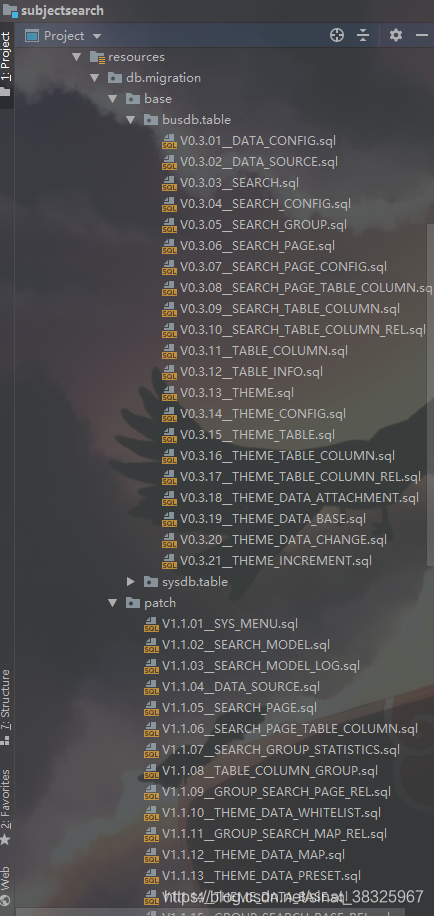
摘自 org.flywaydb.core.Flyway
/**
* The locations to scan recursively for migrations.
* <p/>
* <p>The location type is determined by its prefix.
* Unprefixed locations or locations starting with {@code classpath:} point to a package on the classpath and may
* contain both sql and java-based migrations.
* Locations starting with {@code filesystem:} point to a directory on the filesystem and may only contain sql
* migrations.</p>
* <p/>
* (default: db/migration)
*/
private Locations locations = new Locations("db/migration"); /**
* The encoding of Sql migrations. (default: UTF-8)
*/
private String encoding = "UTF-8"; /**
* The schemas managed by Flyway. These schema names are case-sensitive. (default: The default schema for the datasource connection)
* <p>Consequences:</p>
* <ul>
* <li>The first schema in the list will be automatically set as the default one during the migration.</li>
* <li>The first schema in the list will also be the one containing the metadata table.</li>
* <li>The schemas will be cleaned in the order of this list.</li>
* </ul>
*/
private String[] schemaNames = new String[0]; /**
* <p>The name of the schema metadata table that will be used by Flyway. (default: schema_version)</p><p> By default
* (single-schema mode) the metadata table is placed in the default schema for the connection provided by the
* datasource. </p> <p> When the <i>flyway.schemas</i> property is set (multi-schema mode), the metadata table is
* placed in the first schema of the list. </p>
*/
private String table = "schema_version"; /**
* The target version up to which Flyway should consider migrations. Migrations with a higher version number will
* be ignored. The special value {@code current} designates the current version of the schema (default: the latest version)
*/
private MigrationVersion target = MigrationVersion.LATEST; /**
* Whether placeholders should be replaced. (default: true)
*/
private boolean placeholderReplacement = true; /**
* The map of <placeholder, replacementValue> to apply to sql migration scripts.
*/
private Map<String, String> placeholders = new HashMap<String, String>(); /**
* The prefix of every placeholder. (default: ${ )
*/
private String placeholderPrefix = "${"; /**
* The suffix of every placeholder. (default: } )
*/
private String placeholderSuffix = "}"; /**
* The file name prefix for sql migrations. (default: V)
* <p/>
* <p>Sql migrations have the following file name structure: prefixVERSIONseparatorDESCRIPTIONsuffix ,
* which using the defaults translates to V1_1__My_description.sql</p>
*/
private String sqlMigrationPrefix = "V"; /**
* The file name prefix for repeatable sql migrations. (default: R)
* <p/>
* <p>Repeatable sql migrations have the following file name structure: prefixSeparatorDESCRIPTIONsuffix ,
* which using the defaults translates to R__My_description.sql</p>
*/
private String repeatableSqlMigrationPrefix = "R"; /**
* The file name separator for sql migrations. (default: __)
* <p/>
* <p>Sql migrations have the following file name structure: prefixVERSIONseparatorDESCRIPTIONsuffix ,
* which using the defaults translates to V1_1__My_description.sql</p>
*/
private String sqlMigrationSeparator = "__"; /**
* The file name suffix for sql migrations. (default: .sql)
* <p/>
* <p>Sql migrations have the following file name structure: prefixVERSIONseparatorDESCRIPTIONsuffix ,
* which using the defaults translates to V1_1__My_description.sql</p>
*/
private String sqlMigrationSuffix = ".sql";
参数配置:
flyway.baseline-description对执行迁移时基准版本的描述.

flyway.baseline-on-migrate当迁移时发现目标schema非空,而且带有没有元数据的表时,是否自动执行基准迁移,默认false.

flyway.baseline-version开始执行基准迁移时对现有的schema的版本打标签,默认值为1.

flyway.check-location检查迁移脚本的位置是否存在,默认false.

flyway.clean-on-validation-error当发现校验错误时是否自动调用clean,默认false.

flyway.enabled是否开启flywary,默认true.

flyway.encoding设置迁移时的编码,默认UTF-8.

flyway.ignore-failed-future-migration当读取元数据表时是否忽略错误的迁移,默认false.

flyway.init-sqls当初始化好连接时要执行的SQL.

flyway.locations迁移脚本的位置,默认db/migration.

flyway.out-of-order是否允许无序的迁移,默认false.

flyway.password目标数据库的密码.

flyway.placeholder-prefix设置每个placeholder的前缀,默认${.

flyway.placeholder-replacementplaceholders是否要被替换,默认true.

flyway.placeholder-suffix设置每个placeholder的后缀,默认}.

flyway.placeholders.[placeholder name]设置placeholder的value

flyway.schemas设定需要flywary迁移的schema,大小写敏感,默认为连接默认的schema.

flyway.sql-migration-prefix迁移文件的前缀,默认为V.

flyway.sql-migration-separator迁移脚本的文件名分隔符,默认__

flyway.sql-migration-suffix迁移脚本的后缀,默认为.sql

flyway.tableflyway使用的元数据表名,默认为schema_version

flyway.target迁移时使用的目标版本,默认为latest version

flyway.url迁移时使用的JDBC URL,如果没有指定的话,将使用配置的主数据源

flyway.user迁移数据库的用户名

flyway.validate-on-migrate迁移时是否校验,默认为true.
可以自定义配置,但是建议不要。
注意:sql脚本需要有相应的版本号,例如如果想让 V2__init.sql执行 需要有V1__init.sql作为一个基准对比,然后flyway才会执行相应的sql脚本。
一些链接
https://flywaydb.org/documentation/gradle/
https://github.com/spark-jobserver/spark-jobserver/issues/503
链接:https://www.jianshu.com/p/7f7279376349
数据库迁移Flyway的更多相关文章
- 195. Spring Boot 2.0数据库迁移:Flyway
[视频&交流平台] àSpringBoot视频:http://t.cn/R3QepWG à SpringCloud视频:http://t.cn/R3QeRZc à Spring Boot源码: ...
- 数据库迁移框架Flyway介绍
官方文档 https://flywaydb.org/getstarted/firststeps/api[https://flywaydb.org/getstarted/firststeps/api] ...
- 数据库迁移神器——Flyway
不知道你有没有遇到过这种场景,一套代码部署在不同的环境中,随着时间的过去,各个环境代码有版本差异,代码层面可以通过不同的版本来控制,但是数据库层面经常容易忘记更新! 前言 比如刚开始环境 A 和环境 ...
- EF Code First Migrations数据库迁移
1.EF Code First创建数据库 新建控制台应用程序Portal,通过程序包管理器控制台添加EntityFramework. 在程序包管理器控制台中执行以下语句,安装EntityFramewo ...
- 2.EF中 Code-First 方式的数据库迁移
原文链接:http://www.c-sharpcorner.com/UploadFile/3d39b4/code-first-migrations-with-entity-framework/ 系列目 ...
- laravel数据库迁移(三)
laravel号称世界上最好的框架,数据库迁移算上一个,在这里先简单入个门: laravel很强大,它把表中的操作写成了migrations迁移文件,然后可以直接通过迁移文件来操作表.所以 , 数据迁 ...
- Code First开发系列之数据库迁移
返回<8天掌握EF的Code First开发>总目录 本篇目录 开启并运行迁移 使用迁移API 应用迁移 给已存在的数据库添加迁移 EF的其他功能 本章小结 自我测试 本系列的源码本人已托 ...
- ABP Migration(数据库迁移)
今天准备说说EntityFramework 6.0+,它与我之前所学的4.0有所区别,自从4.1发布以来,code first 被许多人所钟爱,Dbcontext API也由此时而生.早在学校的时候就 ...
- sqlserver 2008R2数据库迁移oracle
x项目需要,将以前的sqlserver数据库迁移的oracle数据库中,由于以前对oracle只是在DML语句的步骤,所以总结一下这次遇到的问题以及具体步骤 1,oracle新建数据库 新建Oracl ...
随机推荐
- Zabbix 3.0 配置企业微信报警(配置zabbix-web)
一.添加报警媒体类型 Name:自定义 Type:选择script Scripts name:填写脚本名称 Script parameters:脚本参数 --corpid=XXX --corpsecr ...
- python从写定时器学习Thread
目录 python从写定时器学习Thread Timer 对象 粗陋的循环定时器 更 pythonic 循环定时器 FAQ python从写定时器学习Thread python 如何写一个定时器,循环 ...
- windos server2012安装.net core 2.2问题
服务器是:WinServer 2012 Standard X64 版本 服务器是:WinServer 2012 DataCenter R2 X64 版本.几个老站点本身正常.如题:.Net Core ...
- cocoapods安装 Unable to download data from http://ruby.taobao.org/ & don't have write permissions for the /Library/Ruby/Gems/2.0.0 directory.
安装cocoapods,记录两个问题! 1.镜像已经替换成了 http://ruby.taobao.org/, 还是不能不能安装cocoapods, 报错:Unable to download dat ...
- Linux安装kafka2.3.1基于Scala2.12
一,先从官网下载:http://kafka.apache.org/downloads 二,解压压缩包(虽然后缀是tgz,但和gz解压方式一样):然后mv kafka_2.12-2.3.1 /usr/l ...
- 手把手教你做JavaWeb项目:登录模块
现如今,无论是客户端还是移动端,无论是游戏登陆还是社交平台登陆,无处不在的“登陆”.那么你知道怎么制作吗?今天就为你娓娓道来: 用户登录 在各大信息管理系统中,登录功能是必不可少的,他的作用就是验证用 ...
- ubuntu Docker安装部署Rancher
一.Rancher简介 Rancher是一个开源的企业级容器管理平台.通过Rancher,企业再也不必自己使用一系列的开源软件去从头搭建容器服务平台.Rancher提供了在生产环境中使用的管理Dock ...
- 2、在NET中实现多线程
1.System.Threading命名空间 System.Threading命名空间提供了使得可以多线程编程的类和接口 其中 (1)Thread类构成了C#多线程编程的支柱,他用于创建并控制线程 ( ...
- MVC中Model BLL层Model模型互转
MVC中Model BLL层Model模型互转 一. 模型通常可以做2种:充血模型和失血模型,一般做法是模型就是模型,不具备方法来操作,只具有属性,这种叫做失血模型(可能不准确):具备对模型一定的简单 ...
- Java调用Http/Https接口(2)--HttpURLConnection/HttpsURLConnection调用Http/Https接口
HttpURLConnection是JDK自身提供的网络类,不需要引入额外的jar包.文中所使用到的软件版本:Java 1.8.0_191. 1.服务端 参见Java调用Http接口(1)--编写服务 ...