
最新NetMonitor代码
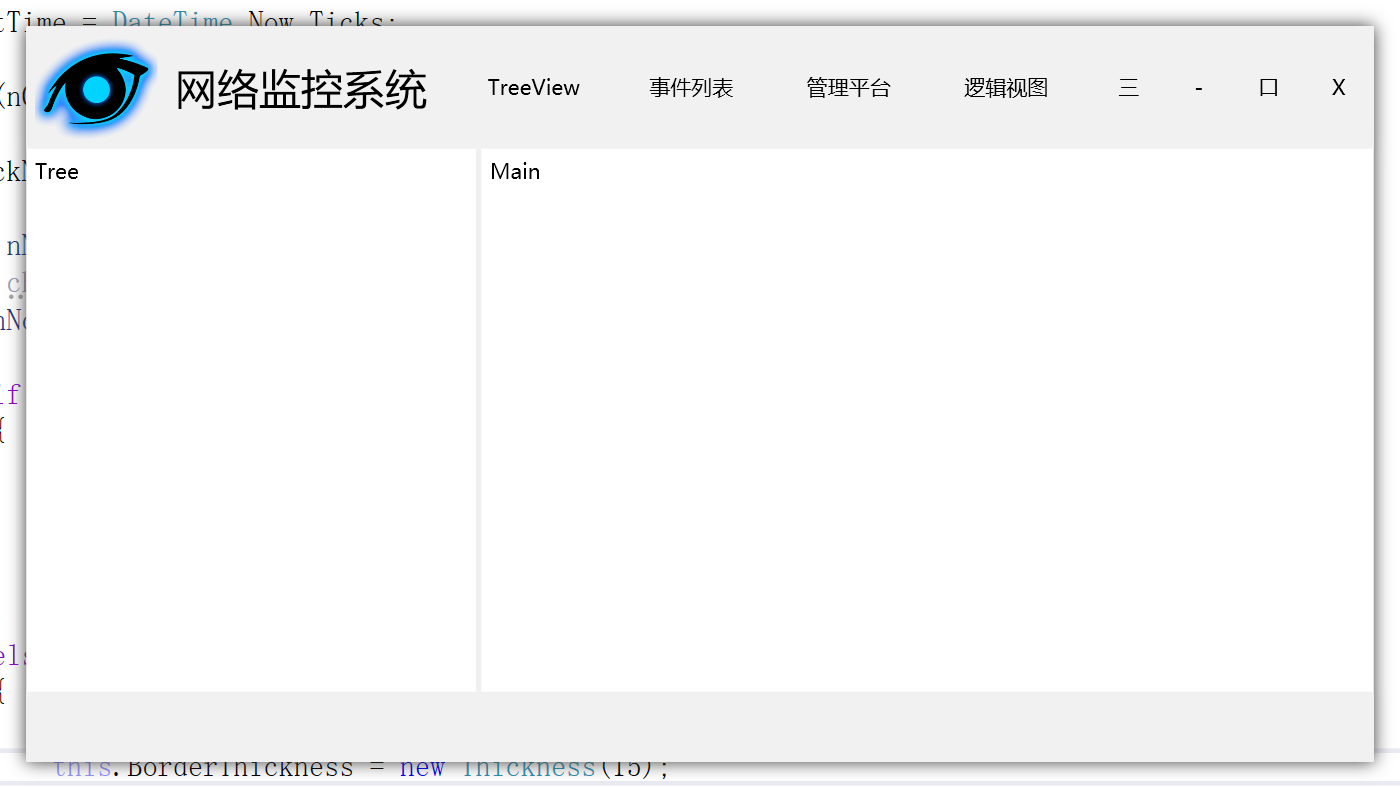
<Window x:Class="NetMonitor.MainWindow"

        xmlns="http://schemas.microsoft.com/winfx/2006/xaml/presentation"

        xmlns:x="http://schemas.microsoft.com/winfx/2006/xaml"

        xmlns:d="http://schemas.microsoft.com/expression/blend/2008"

        xmlns:mc="http://schemas.openxmlformats.org/markup-compatibility/2006"

        xmlns:local="clr-namespace:NetMonitor"

        mc:Ignorable="d"

        BorderThickness="15"

        Title="MainWindow" Height="450" Width="800" AllowsTransparency="True" WindowStyle="None">

    <Window.Effect>

        <DropShadowEffect BlurRadius="15" Color="Gray" Direction="100" ShadowDepth="0"/>

    </Window.Effect>

    <Grid>

        <Grid.RowDefinitions>

            <RowDefinition Height="70" />

            <RowDefinition Height="*" />

            <RowDefinition Height="40" />

        </Grid.RowDefinitions>

        <Grid.ColumnDefinitions>

            <ColumnDefinition Width="260"/>

            <ColumnDefinition/>

        </Grid.ColumnDefinitions>

        <DockPanel Grid.Row="0" Grid.Column="0" Grid.ColumnSpan="2" Background="#f1f1f1" MouseLeftButtonDown="OnWindowMouseMove" MouseDown="OnWindowMouseDown">

            <Image DockPanel.Dock="Left" Width="80" Source="res/logo.ico" />

            <Label DockPanel.Dock="Left" Width="160" Content="网络监控系统" FontFamily="微软雅黑" FontSize="24" VerticalAlignment="Center"/>

            <Button DockPanel.Dock="Right" Width="40" Background="Transparent" BorderBrush="Transparent" Click="OnClose">X</Button>

            <Button DockPanel.Dock="Right" Width="40" Background="Transparent" BorderBrush="Transparent" Click="OnMax">口</Button>

            <Button DockPanel.Dock="Right" Width="40" Background="Transparent" BorderBrush="Transparent" Click="OnMin">-</Button>

            <Button DockPanel.Dock="Right" Width="40" Background="Transparent" BorderBrush="Transparent">三</Button>

            <StackPanel Orientation="Horizontal" HorizontalAlignment="Center">

                <Button Width="90" Background="Transparent" BorderBrush="Transparent">TreeView</Button>

                <Button Width="90" Background="Transparent" BorderBrush="Transparent">事件列表</Button>

                <Button Width="90" Background="Transparent" BorderBrush="Transparent">管理平台</Button>

                <Button Width="90" Background="Transparent" BorderBrush="Transparent">逻辑视图</Button>

            </StackPanel>

        </DockPanel>

        <StackPanel Grid.Row="1" Grid.Column="0">

            <Label Content="Tree" />

        </StackPanel>

        <StackPanel Grid.Row="1" Grid.Column="1">

            <Label Content="Main" />

        </StackPanel>

        <Border Background="#f1f1f1" BorderBrush="#f1f1f1" BorderThickness="0,3,0,0" Grid.Row="2" Grid.Column="0" Grid.ColumnSpan="2">

        </Border>

        <GridSplitter Grid.Row="1" Grid.Column="0" Width="3"/>

    </Grid>

</Window>
using System;

using System.Collections.Generic;

using System.Linq;

using System.Text;

using System.Threading.Tasks;

using System.Windows;

using System.Windows.Controls;

using System.Windows.Data;

using System.Windows.Documents;

using System.Windows.Input;

using System.Windows.Interop;

using System.Windows.Media;

using System.Windows.Media.Imaging;

using System.Windows.Navigation;

using System.Windows.Shapes;

using System.Windows.Threading;

namespace NetMonitor

{

    public partial class MainWindow : Window

    {

        public int nClickNum = ;

        public long nLastTime;

        public MainWindow()

        {

            InitializeComponent();

            WindowStartupLocation = WindowStartupLocation.CenterScreen;

        }

        private void OnWindowMouseMove(object sender, MouseEventArgs e)

        {

            if (e.LeftButton == MouseButtonState.Pressed)

            {

                this.DragMove();

            }

        }

        private void OnClose(object sender, RoutedEventArgs e)

        {

            this.Close();

        }

        private void OnMax(object sender, RoutedEventArgs e)

        {

            if (this.WindowState == WindowState.Normal)

            {

                this.BorderThickness = new Thickness();

                this.MaxWidth = SystemParameters.WorkArea.Width + ;

                this.MaxHeight = SystemParameters.WorkArea.Height + ;

                this.WindowState = WindowState.Maximized;

            }

            else

            {

                this.WindowState = WindowState.Normal;

                this.BorderThickness = new Thickness();

            }

        }

        private void OnMin(object sender, RoutedEventArgs e)

        {

            this.WindowState = WindowState.Minimized;

        }

        private void OnWindowMouseDown(object sender, MouseButtonEventArgs e)

        {

            nClickNum++;

            if (nClickNum == )

            {

                nLastTime = DateTime.Now.Ticks;

            }

            else if (nClickNum == )

            {

                nClickNum = ;

                long nNow = DateTime.Now.Ticks;

                long cha = nNow - nLastTime;

                if (nNow - nLastTime < )

                {

                    if (this.WindowState == WindowState.Normal)

                    {

                        this.BorderThickness = new Thickness();

                        this.MaxWidth = SystemParameters.WorkArea.Width + ;

                        this.MaxHeight = SystemParameters.WorkArea.Height + ;

                        this.WindowState = WindowState.Maximized;

                    }

                    else

                    {

                        this.WindowState = WindowState.Normal;

                        this.BorderThickness = new Thickness();

                    }

                }

            }

        }

    }

}
最新NetMonitor代码的更多相关文章
- 下载最新Android代码的方法
之前我是去Android官方网站下载最新Android代码,但是这种方法需要FQ,而且有时候FQ又不太方便,今天我发现一个不错的网站,是清华大学搞的,跟Android官方的代码基本保持同步,而且下载方 ...
- struts2最新s2-016代码执行漏洞CVE-2013-2251
这是一个代码执行漏洞,利用java代码来执行系统命令. 影响版本:Struts 2.0.0 – Struts 2.3.15 漏洞说明: The Struts 2 DefaultActionMa ...
- 构建命令maven install 打包不是最新的代码
问题: 之前一直用的是mvn install 命令来构建项目,但是最近发现最新的代码没有在war包中.之前看的说 mvn install 命令会执行之前的所有阶段,会被编译,测试,打包. 经查最后采用 ...
- 【IDEA】【Git】pull代码始终无法pull到最新的代码或者提示pull no items 【解决方式】
最近pull代码老是提示pull no items,但是本地并不是最新的代码,看了各种博客始终无法解决,最后靠自己的方式解决.下面是解决方法. 方法:1.首先git --> repository ...
- 用控制台命令拉取git最新仓库代码
C#利用Diagnostics 拉取最新代码 示例代码 static void DiagnosticTest() { Process p; ProcessStartInfo psi; psi = ...
- jenkins构建,拉取不到最新版本代码,报clock of the subversion server appears to be out of sync
一.问题描述 今天遇到个问题,我这边提交了代码后,一般会马上去jenkins上点一下,构建到开发环境上. 但是发现修改没生效,后来发现,提交的版本假设是3250,但是jenkins构建使用的版本为32 ...
- Git使用手册/Git教程:git fetch 将远程仓库的分支及分支最新版本代码拉取到本地
相关文章: 关于验证是否存在ssh配置以及生成SSH Key的方法可以参照文章:Git使用手册:生成SSH Key 关于SSH Key的使用和公钥在gitHub.gitLab的配置等,请参考文章:Gi ...
- iOS 设备推断 最新统计代码
- (NSString*) deviceName { struct utsname systemInfo; uname(&systemInfo); ...
- github如何pull最新代码
github现在已经经常用了,但是经常遇到下面的问题 比如:从一个项目A中fork了一个分支B,并且在分支B有了改动.过了几天后,项目A中的代码应该会有很多人提交修改了,现在想将最新的代码pull ...
随机推荐
- Docker Overview
Docker 是一个用于开发.交付和运行应用的开放平台,Docker 设计用来更快的交付你的应用程序.Docker 可以将你的应用程序和基础设施层隔离,并且还可以将你的基础设施当作程序一样进行管理.D ...
- Android MVP模式简单介绍:以一个登陆流程为例
老的项目用的MVC的模式,最近完成了全部重构成MVP模式的工作,虽然比较麻烦,好处是代码逻辑更加清楚.简洁,流程更加清晰,对于后续版本迭代维护都挺方便.对于一些想要学习MVP模式的同学来讲,百度搜出来 ...
- [ERROR ]Failed to execute goal org.codehaus.mojo:flatten-maven-plugin:1.1.0:flatten (flatten) on project
今天在启动项目的时候,莫名的Maven install命令的时候出现错误 错误提示:Failed to execute goal org.codehaus.mojo:flatten-maven-plu ...
- POJ 2386 DFS深搜入门
题目链接 Time Limit: 1000MS Memory Limit: 65536K Description Due to recent rains, water has pooled in va ...
- 在 Java 中不使用多余变量交换两个字符串
在 Java 中不使用多余变量交换两个字符串 public class Test { public static void main(String[] args) { String a = " ...
- go上传图片微信服务器<<临时素材
type WxImage struct { Type string `json:"type"` MediaId string `json:"media_id"` ...
- HDU校赛 | 2019 Multi-University Training Contest 1
2019 Multi-University Training Contest 1 http://acm.hdu.edu.cn/contests/contest_show.php?cid=848 100 ...
- 华为云实战开发】5.如何快速创建免费Git代码仓库【华为云技术分享】
1 文章目的 本文主要帮助已经掌握或者想要掌握Git的开发者,如何更好的应用Git,以及更好的将Git与DevCloud结合应用. 2 概述 2.1 版本控制系统介绍 从狭义上来说,版本控制系统是软件 ...
- The driver is automatically registered via the SPI and manual loading of the driver class....
Loading class `com.mysql.jdbc.Driver'. This is deprecated. The new driver class is `com.mysql.cj.jdb ...
- Java中Date、String、Calendar类型之间的转化
1.Calendar 转化 String //获取当前时间的具体情况,如年,月,日,week,date,分,秒等 Calendar calendat = Calendar.getInstanc ...