
【C#】上机实验七
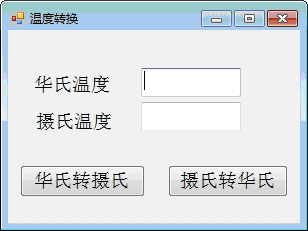
、开发一个窗体应用程序,窗体上能接收华氏温度或者摄氏温度,点击相应按钮可以相互转换。

要求转换后的华氏温度或者摄氏温度保留小数点后3位,程序中要有异常处理结构。
 using System;

 using System.Collections.Generic;

 using System.ComponentModel;

 using System.Data;

 using System.Drawing;

 using System.Linq;

 using System.Text;

 using System.Windows.Forms;

 namespace Myform1

 {

     public partial class Form1 : Form

     {

         public Form1()

         {

             InitializeComponent();

         }

         private void label1_Click(object sender, EventArgs e)

         {

         }

         private void button1_Click(object sender, EventArgs e)

         {

             try

             {

                 textBox2.Text = htc(textBox1.Text).ToString("f3");

             }

             catch (Exception ex)

             {

                 Text = ex.Message;

             }

         }

         private void button2_Click(object sender, EventArgs e)

         {

             try

             {

                 textBox1.Text = cth(textBox2.Text).ToString("f3");

             }

             catch (Exception ex)

             {

                 Text = ex.Message;

             }

         }

         public double htc( double x ){

             return (x - ) *  / ;

         }

         public double htc(string s)

         {

             double x = double.Parse(s);

             return (x - ) *  / ;

         }

         public double cth(double x)

         {

             return (x *  / ) + ;

         }

         public double cth(string s)

         {

             double x = double.Parse(s);

             return (x *  / ) + ;

         }

     }

 }
温度转换
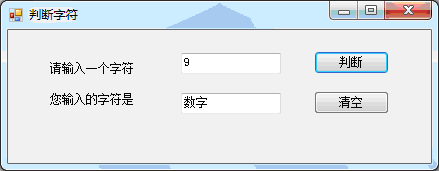
、设计一个窗体应用程序,输入一个字符,判定此字符是数字、大写字母、小写字母,还是其它字符。

要求:

()类中定义公有方法(判断字符归属)

()在按钮单击事件中调用该方法及返回值完成判断。

()程序中要有异常处理结构。
 using System;

 using System.Collections.Generic;

 using System.ComponentModel;

 using System.Data;

 using System.Drawing;

 using System.Linq;

 using System.Text;

 using System.Windows.Forms;

 namespace Myproject2

 {

     public partial class Form1 : Form

     {

         public Form1()

         {

             InitializeComponent();

         }

         private void button1_Click(object sender, EventArgs e)

         {

             string s = textBox1.Text;

             if (s.Length > )

             {

                 Text = "请输入一个字符";

                 textBox1.Text = "";

                 textBox2.Text = "";

                 MessageBox.Show("请输入一个字符", "Warming", MessageBoxButtons.OK);

             }

             if( s.Length ==  )

             try

             {

                 char ch = s[];

                 if ('a' <= ch && ch <= 'z') {

                     textBox2.Text = "小写字母";

                 }

                 else if ('A' <= ch && ch <= 'Z') {

                     textBox2.Text = "大写字母";

                 }

                 else if ('' <= ch && ch <= '')

                 {

                     textBox2.Text = "数字";

                 }

                 else {

                     textBox2.Text = "其他字符";

                 }

             }

             catch (Exception ex)

             {

                 Text = ex.Message;

             }

         }

         private void button2_Click(object sender, EventArgs e)

         {

             textBox1.Text = "";

             textBox2.Text = "";

         }

     }

 }
判断字符
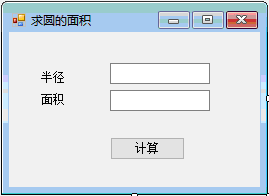
、开发一个窗体应用程序,可以根据圆的半径计算圆的面积。具体要求如下:

()设计一个方法求圆的面积。

()求圆面积的方法要定义成重载方法,既能接收整形参数,也能接收单精度类型参数。

()程序中要有异常处理结构。
 using System;

 using System.Collections.Generic;

 using System.ComponentModel;

 using System.Data;

 using System.Drawing;

 using System.Linq;

 using System.Text;

 using System.Windows.Forms;

 namespace Myproject3

 {

     public partial class Form1 : Form

     {

         public Form1()

         {

             InitializeComponent();

         }

         private void button1_Click(object sender, EventArgs e)

         {

             string str = textBox1.Text;

             double d = ;

             int x = ;

             bool Is_int = false;

             bool Is_double = false;

             if (Is_int = int.TryParse(str, out x)){}

             else if ( Is_double = double.TryParse(str, out d)){}

             if (Is_int || Is_double)

             {

                 try

                 {

                     if (Is_int)

                     {

                         textBox2.Text = (Math.PI * x * x).ToString("f2");

                     }

                     else

                     {

                         textBox2.Text = (Math.PI * d * d).ToString("f2");

                     }

                 }

                 catch (Exception ex)

                 {

                     Text = ex.Message;

                 }

             }

             else

             {

                 MessageBox.Show("请输入数字", "Warning", MessageBoxButtons.OK);

                 textBox1.Text = textBox2.Text = "";

             }

         }

     }

 }
求圆的面积
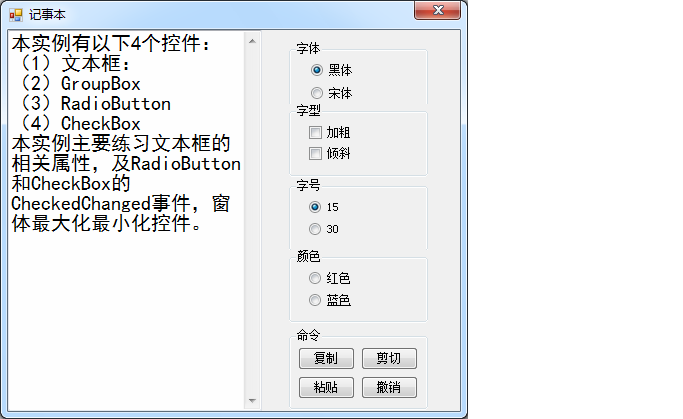
、设计一个窗体应用程序,练习最基本的控件使用,实现单选按钮、复选按钮和命令按钮的相关功能。
 using System;

 using System.Collections.Generic;

 using System.ComponentModel;

 using System.Data;

 using System.Drawing;

 using System.Linq;

 using System.Text;

 using System.Windows.Forms;

 namespace Myproject4

 {

     public partial class Form1 : Form

     {

         public Form1()

         {

             InitializeComponent();

         }

         private void groupBox1_Enter(object sender, EventArgs e)

         {

         }

         private FontFamily fontFamily = new FontFamily("宋体");

         private FontStyle Style = FontStyle.Regular;

         private float Size =  ;

         private void radioButton1_CheckedChanged(object sender, EventArgs e)

         {

             fontFamily = new FontFamily("黑体");

             textBox1.Font = new Font(fontFamily, Size, Style);

         }

         private void radioButton2_CheckedChanged(object sender, EventArgs e)

         {

             fontFamily = new FontFamily("楷体");

             textBox1.Font = new Font(fontFamily, Size, Style);

         }

         private void checkBox1_CheckedChanged(object sender, EventArgs e)

         {

             Style ^= FontStyle.Bold;

             textBox1.Font = new Font(fontFamily, Size, Style);

         }

         private void checkBox2_CheckedChanged(object sender, EventArgs e)

         {

             Style ^= FontStyle.Italic;

             textBox1.Font = new Font(fontFamily, Size, Style);

         }

         private void radioButton4_CheckedChanged(object sender, EventArgs e)

         {

             Size = ;

             textBox1.Font = new Font(fontFamily, Size, Style);

         }

         private void radioButton3_CheckedChanged(object sender, EventArgs e)

         {

             Size = ;

             textBox1.Font = new Font(fontFamily, Size, Style);

         }

         private void radioButton6_CheckedChanged(object sender, EventArgs e)

         {

             textBox1.ForeColor = Color.Red;

         }

         private void radioButton5_CheckedChanged(object sender, EventArgs e)

         {

             textBox1.ForeColor = Color.Blue ;

         }

         private void button1_Click(object sender, EventArgs e)

         {

             textBox1.Copy();

         }

         private void button2_Click(object sender, EventArgs e)

         {

             textBox1.Cut();

         }

         private void button3_Click(object sender, EventArgs e)

         {

             textBox1.Paste();

         }

         private void button4_Click(object sender, EventArgs e)

         {

             textBox1.Undo();

         }

     }

 }
记事本
【C#】上机实验七的更多相关文章
- oracle上机实验内容
这是oracle实验的部分代码,我花了一中午做的. 第一次上机内容 实验目的:熟悉ORACLE11G的环境 实验内容: 第二次上机内容 实验目标:掌握oracle体系结构,掌握sqlplus的运行环境 ...
- lingo运筹学上机实验指导
<运筹学上机实验指导>分为两个部分,第一部分12学时,是与运筹学理论课上机同步配套的4个实验(线性规划.灵敏度分析.运输问题与指派问题.最短路问题和背包问题)的Excel.LONGO和LI ...
- 算法课上机实验(一个简单的GUI排序算法比较程序)
(在家里的电脑上Linux Deepin截的图,屏幕大一点的话,deepin用着还挺不错的说) 这个应该是大二的算法课程上机实验时做的一个小程序,也是我的第一个GUI小程序,实现什么的都记不清了,只记 ...
- 【C++ 流类库与输入输出 】实验七
1. 基础练习 (1)教材习题 11-7 (2)教材习题 11-3 (3)教材习题 11-4 2. 应用练习 (1)已知有班级名单文件 list.txt(见实验 7 附件包).编写一个应用程序实现随机 ...
- Java第一次上机实验源代码
小学生计算题: package 第一次上机实验_; import java.util.*; public class 小学计算题 { public static void main(String[] ...
- 【黑金原创教程】【FPGA那些事儿-驱动篇I 】实验七:PS/2模块① — 键盘
实验七:PS/2模块① — 键盘 实验七依然也是熟烂的PS/2键盘.相较<建模篇>的PS/2键盘实验,实验七实除了实现基本的驱动以外,我们还要深入解PS/2时序,还有PS/2键盘的行为.不 ...
- 软件测试技术lab2——Selenium上机实验
Selenium上机实验说明 1.安装SeleniumIDE插件 2.学会使用SeleniumIDE录制脚本和导出脚本 3.访问http://121.193.130.195:8080/使用学号登录系统 ...
- 合肥工业大学数据结构上机实验代码与实验报告(全)github地址
我已经将这个学期的所有数据结构上机实验的代码与报告上传到github上了,一直都有这个想法,但没抽出时间来学习git.经过上周简单的练习后,我已经基本学会运营自己的代码仓库了.所有代码都是C++写的类 ...
- 《数据挖掘导论》实验课——实验七、数据挖掘之K-means聚类算法
实验七.数据挖掘之K-means聚类算法 一.实验目的 1. 理解K-means聚类算法的基本原理 2. 学会用python实现K-means算法 二.实验工具 1. Anaconda 2. skle ...
随机推荐
- My journey introducing the data build tool (dbt) in project’s analytical stacks
转自:https://www.lantrns.co/my-journey-introducing-the-data-build-tool-dbt-in-projects-analytical-stac ...
- [RN] React Native 实现 FlatList上拉加载
FlatList可以利用官方组件 RefreshControl实现下拉刷新功能,但官方没有提供相应的上拉加载的组件,因此在RN中实现上拉加载比下拉刷新要复杂一点. 不过我们仍可以通过FlatList ...
- 【树形DP】骑士
骑士 题目描述 \(Z\)国的骑士团是一个很有势力的组织,帮会中汇聚了来自各地的精英.他们劫富济贫,惩恶扬善,受到社会各界的赞扬. 最近发生了一件可怕的事情,邪恶的\(Y\)国发动了一场针对Z国的侵略 ...
- centos7---mysql5.7主从复制读写分离
1 分别在两台centos 7系统上安装mysql 5.7 具体的安装步骤可以见此链接,https://blog.csdn.net/qq_15092079/article/details/816292 ...
- 集合类 collection接口 LinkedList
LinkedList 是另外一种重要的数据结构形式, 底层是使用了双向链表数据结构, 特点: 查询速度慢,增删快. 继承关系如下: 可以发现,LinkedList同时实现了Quene和Deque接口. ...
- SSM项目实战 之 EasyUI
目录 EasyUI 简介 概述 使用EasyUI panel组件 简介 示例 JS形式及属性介绍 panel事件与方法 Window组件 概述 使用 行为 dialog 概述 使用 tabs组件 概述 ...
- DB proxy, mysql proxy
db proxy 在大型互联网站的数据库部署中,部署最多的数据库为MySQL.随着MySQL中Innodb存储引擎对事物的支持,MySQL在互联网公司部署中,应用量越来越多.典型应用MySQL的公司有 ...
- 忘记zip密码咋办?python在手密码我有
整理资料时发现几个 zip 文件的密码忘记了,于是尝试用python暴力破解 首先是读取和解压zip文件,使用 zipfile 库 import zipfile z = zipfile.ZipFile ...
- Research Guide for Neural Architecture Search
Research Guide for Neural Architecture Search 2019-09-19 09:29:04 This blog is from: https://heartbe ...
- mysql实现oracle存储过程默认参数
我们都知道oracle存储过程支持为参数设置默认值,这样即使存储过程升级,原来的调用也可以不受影响.但是mysql不支持,mariadb也没有支持(截止10.4也是如此).但是这一限制会导致升级麻烦重 ...