
【C#】上机实验七
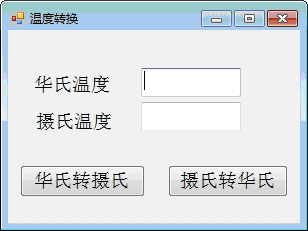
、开发一个窗体应用程序,窗体上能接收华氏温度或者摄氏温度,点击相应按钮可以相互转换。

要求转换后的华氏温度或者摄氏温度保留小数点后3位,程序中要有异常处理结构。
 using System;

 using System.Collections.Generic;

 using System.ComponentModel;

 using System.Data;

 using System.Drawing;

 using System.Linq;

 using System.Text;

 using System.Windows.Forms;

 namespace Myform1

 {

     public partial class Form1 : Form

     {

         public Form1()

         {

             InitializeComponent();

         }

         private void label1_Click(object sender, EventArgs e)

         {

         }

         private void button1_Click(object sender, EventArgs e)

         {

             try

             {

                 textBox2.Text = htc(textBox1.Text).ToString("f3");

             }

             catch (Exception ex)

             {

                 Text = ex.Message;

             }

         }

         private void button2_Click(object sender, EventArgs e)

         {

             try

             {

                 textBox1.Text = cth(textBox2.Text).ToString("f3");

             }

             catch (Exception ex)

             {

                 Text = ex.Message;

             }

         }

         public double htc( double x ){

             return (x - ) *  / ;

         }

         public double htc(string s)

         {

             double x = double.Parse(s);

             return (x - ) *  / ;

         }

         public double cth(double x)

         {

             return (x *  / ) + ;

         }

         public double cth(string s)

         {

             double x = double.Parse(s);

             return (x *  / ) + ;

         }

     }

 }
温度转换
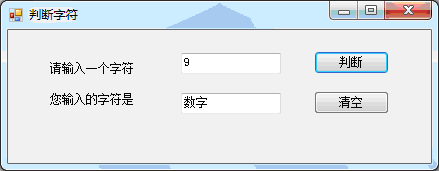
、设计一个窗体应用程序,输入一个字符,判定此字符是数字、大写字母、小写字母,还是其它字符。

要求:

()类中定义公有方法(判断字符归属)

()在按钮单击事件中调用该方法及返回值完成判断。

()程序中要有异常处理结构。
 using System;

 using System.Collections.Generic;

 using System.ComponentModel;

 using System.Data;

 using System.Drawing;

 using System.Linq;

 using System.Text;

 using System.Windows.Forms;

 namespace Myproject2

 {

     public partial class Form1 : Form

     {

         public Form1()

         {

             InitializeComponent();

         }

         private void button1_Click(object sender, EventArgs e)

         {

             string s = textBox1.Text;

             if (s.Length > )

             {

                 Text = "请输入一个字符";

                 textBox1.Text = "";

                 textBox2.Text = "";

                 MessageBox.Show("请输入一个字符", "Warming", MessageBoxButtons.OK);

             }

             if( s.Length ==  )

             try

             {

                 char ch = s[];

                 if ('a' <= ch && ch <= 'z') {

                     textBox2.Text = "小写字母";

                 }

                 else if ('A' <= ch && ch <= 'Z') {

                     textBox2.Text = "大写字母";

                 }

                 else if ('' <= ch && ch <= '')

                 {

                     textBox2.Text = "数字";

                 }

                 else {

                     textBox2.Text = "其他字符";

                 }

             }

             catch (Exception ex)

             {

                 Text = ex.Message;

             }

         }

         private void button2_Click(object sender, EventArgs e)

         {

             textBox1.Text = "";

             textBox2.Text = "";

         }

     }

 }
判断字符
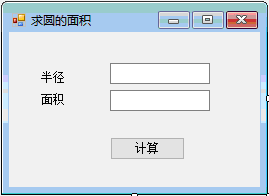
、开发一个窗体应用程序,可以根据圆的半径计算圆的面积。具体要求如下:

()设计一个方法求圆的面积。

()求圆面积的方法要定义成重载方法,既能接收整形参数,也能接收单精度类型参数。

()程序中要有异常处理结构。
 using System;

 using System.Collections.Generic;

 using System.ComponentModel;

 using System.Data;

 using System.Drawing;

 using System.Linq;

 using System.Text;

 using System.Windows.Forms;

 namespace Myproject3

 {

     public partial class Form1 : Form

     {

         public Form1()

         {

             InitializeComponent();

         }

         private void button1_Click(object sender, EventArgs e)

         {

             string str = textBox1.Text;

             double d = ;

             int x = ;

             bool Is_int = false;

             bool Is_double = false;

             if (Is_int = int.TryParse(str, out x)){}

             else if ( Is_double = double.TryParse(str, out d)){}

             if (Is_int || Is_double)

             {

                 try

                 {

                     if (Is_int)

                     {

                         textBox2.Text = (Math.PI * x * x).ToString("f2");

                     }

                     else

                     {

                         textBox2.Text = (Math.PI * d * d).ToString("f2");

                     }

                 }

                 catch (Exception ex)

                 {

                     Text = ex.Message;

                 }

             }

             else

             {

                 MessageBox.Show("请输入数字", "Warning", MessageBoxButtons.OK);

                 textBox1.Text = textBox2.Text = "";

             }

         }

     }

 }
求圆的面积
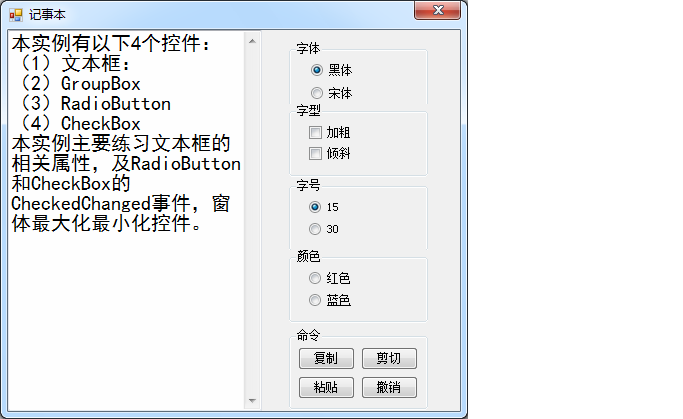
、设计一个窗体应用程序,练习最基本的控件使用,实现单选按钮、复选按钮和命令按钮的相关功能。
 using System;

 using System.Collections.Generic;

 using System.ComponentModel;

 using System.Data;

 using System.Drawing;

 using System.Linq;

 using System.Text;

 using System.Windows.Forms;

 namespace Myproject4

 {

     public partial class Form1 : Form

     {

         public Form1()

         {

             InitializeComponent();

         }

         private void groupBox1_Enter(object sender, EventArgs e)

         {

         }

         private FontFamily fontFamily = new FontFamily("宋体");

         private FontStyle Style = FontStyle.Regular;

         private float Size =  ;

         private void radioButton1_CheckedChanged(object sender, EventArgs e)

         {

             fontFamily = new FontFamily("黑体");

             textBox1.Font = new Font(fontFamily, Size, Style);

         }

         private void radioButton2_CheckedChanged(object sender, EventArgs e)

         {

             fontFamily = new FontFamily("楷体");

             textBox1.Font = new Font(fontFamily, Size, Style);

         }

         private void checkBox1_CheckedChanged(object sender, EventArgs e)

         {

             Style ^= FontStyle.Bold;

             textBox1.Font = new Font(fontFamily, Size, Style);

         }

         private void checkBox2_CheckedChanged(object sender, EventArgs e)

         {

             Style ^= FontStyle.Italic;

             textBox1.Font = new Font(fontFamily, Size, Style);

         }

         private void radioButton4_CheckedChanged(object sender, EventArgs e)

         {

             Size = ;

             textBox1.Font = new Font(fontFamily, Size, Style);

         }

         private void radioButton3_CheckedChanged(object sender, EventArgs e)

         {

             Size = ;

             textBox1.Font = new Font(fontFamily, Size, Style);

         }

         private void radioButton6_CheckedChanged(object sender, EventArgs e)

         {

             textBox1.ForeColor = Color.Red;

         }

         private void radioButton5_CheckedChanged(object sender, EventArgs e)

         {

             textBox1.ForeColor = Color.Blue ;

         }

         private void button1_Click(object sender, EventArgs e)

         {

             textBox1.Copy();

         }

         private void button2_Click(object sender, EventArgs e)

         {

             textBox1.Cut();

         }

         private void button3_Click(object sender, EventArgs e)

         {

             textBox1.Paste();

         }

         private void button4_Click(object sender, EventArgs e)

         {

             textBox1.Undo();

         }

     }

 }
记事本
【C#】上机实验七的更多相关文章
- oracle上机实验内容
这是oracle实验的部分代码,我花了一中午做的. 第一次上机内容 实验目的:熟悉ORACLE11G的环境 实验内容: 第二次上机内容 实验目标:掌握oracle体系结构,掌握sqlplus的运行环境 ...
- lingo运筹学上机实验指导
<运筹学上机实验指导>分为两个部分,第一部分12学时,是与运筹学理论课上机同步配套的4个实验(线性规划.灵敏度分析.运输问题与指派问题.最短路问题和背包问题)的Excel.LONGO和LI ...
- 算法课上机实验(一个简单的GUI排序算法比较程序)
(在家里的电脑上Linux Deepin截的图,屏幕大一点的话,deepin用着还挺不错的说) 这个应该是大二的算法课程上机实验时做的一个小程序,也是我的第一个GUI小程序,实现什么的都记不清了,只记 ...
- 【C++ 流类库与输入输出 】实验七
1. 基础练习 (1)教材习题 11-7 (2)教材习题 11-3 (3)教材习题 11-4 2. 应用练习 (1)已知有班级名单文件 list.txt(见实验 7 附件包).编写一个应用程序实现随机 ...
- Java第一次上机实验源代码
小学生计算题: package 第一次上机实验_; import java.util.*; public class 小学计算题 { public static void main(String[] ...
- 【黑金原创教程】【FPGA那些事儿-驱动篇I 】实验七:PS/2模块① — 键盘
实验七:PS/2模块① — 键盘 实验七依然也是熟烂的PS/2键盘.相较<建模篇>的PS/2键盘实验,实验七实除了实现基本的驱动以外,我们还要深入解PS/2时序,还有PS/2键盘的行为.不 ...
- 软件测试技术lab2——Selenium上机实验
Selenium上机实验说明 1.安装SeleniumIDE插件 2.学会使用SeleniumIDE录制脚本和导出脚本 3.访问http://121.193.130.195:8080/使用学号登录系统 ...
- 合肥工业大学数据结构上机实验代码与实验报告(全)github地址
我已经将这个学期的所有数据结构上机实验的代码与报告上传到github上了,一直都有这个想法,但没抽出时间来学习git.经过上周简单的练习后,我已经基本学会运营自己的代码仓库了.所有代码都是C++写的类 ...
- 《数据挖掘导论》实验课——实验七、数据挖掘之K-means聚类算法
实验七.数据挖掘之K-means聚类算法 一.实验目的 1. 理解K-means聚类算法的基本原理 2. 学会用python实现K-means算法 二.实验工具 1. Anaconda 2. skle ...
随机推荐
- 洛谷 P4707 重返现世
洛谷 P4707 重返现世 k-minimax容斥 有这一个式子:\(E(\max_k(S))=\sum_{T\subseteq S}(-1)^{|T|-k}C_{|T|-1}^{k-1}\min(T ...
- Theano安装笔记
由于实验需要,近三个月来,安装过十几次Theano,基本上每次都是从最基本的nvidia driver装起.总结一些粗浅的安装心得. GPU:Nvidia K40, M40, M60 软件环境:Unb ...
- 【JZOJ6225】【20190618】计数
题目 对于一个01串,定义\(f(s)\)为\(f(s) = \sum_{i=0}^{\lfloor \frac{|s|}{2} \rfloor -1 }[s_i=s_{|s|-1-i}]\) 定义\ ...
- GitHub页面基本知识
官网地址:https://help.github.com/categories/github-pages-basics/ GitHub页面是什么? GitHub页面是一个静态的站点托管服务. GitH ...
- 2019 SDN第6次上机作业
1.作业要求: 作业链接 参考资料: Ryu控制器的API文档:ryu.app.ofctl_rest Ryu的拓扑展示 助教博客:基于RYU restful api实现的VLAN网络虚拟化 2.具体操 ...
- ffmpeg接收udp输入的h264文件流,推流到rtmp服务器
ffmpeg -re -f h264 -i udp://192.168.5.49:10002 -vcodec libx264 -f flv rtmp://192.168.5.155/live/1
- 使用yarn代替npm作为node.js的模块管理器
使用yarn代替npm作为node.js的模块管理器 转 https://www.jianshu.com/p/bfe96f89da0e Fast, reliable, and secure d ...
- Python之pandas读取mysql中文乱码问题
# -*- coding: utf-8 -*- # author:baoshan import pandas as pd import pymysql config = { "host&qu ...
- 【翻译】Flink Table Api & SQL — 内置函数
本文翻译自官网:Built-In Functions https://ci.apache.org/projects/flink/flink-docs-release-1.9/dev/table/fu ...
- prettier
prettier,是一个自以为是 Opinionated 的代码格式化工具,用来批量处理旧代码的统一. 涉及引号,分号,换行,缩进. prettier 支持我们大前端目前大部分语言处理,包括 Jav ...