
Java压缩和解压缩zip文件
介绍
Java提供的java.util.zip包只支持zip和gzip。至于更多格式的压缩可以选择apache的Commons Compress。
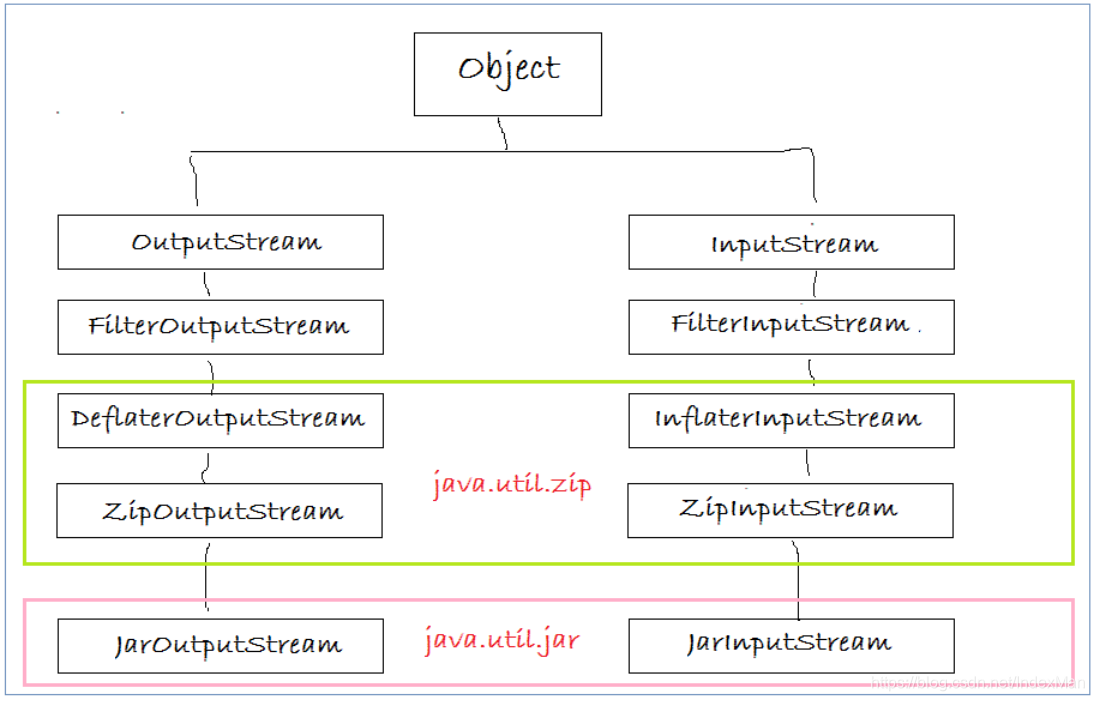
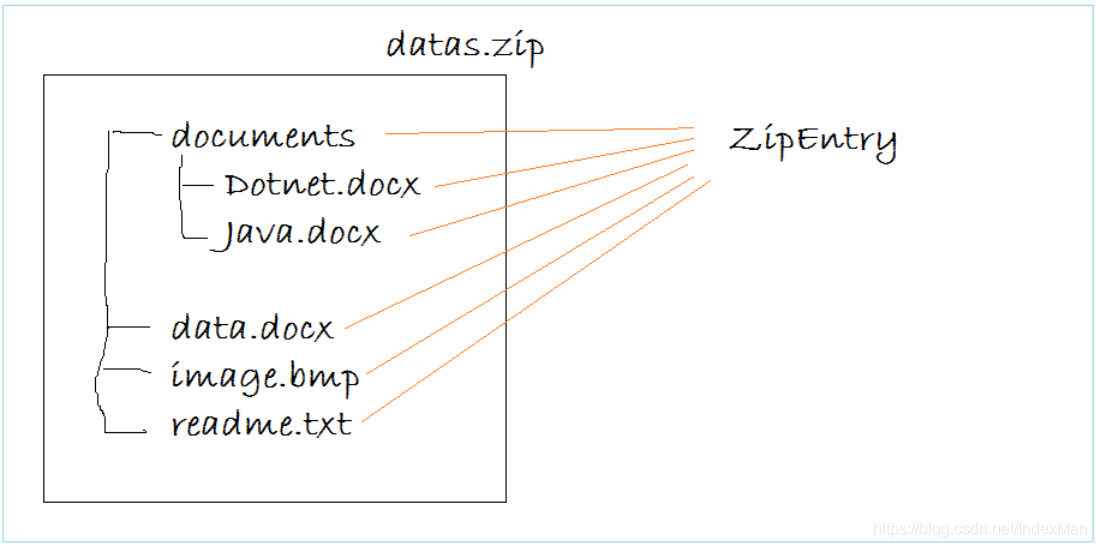
参考:https://o7planning.org/en/10195/java-compression-and-decompression-tutorial
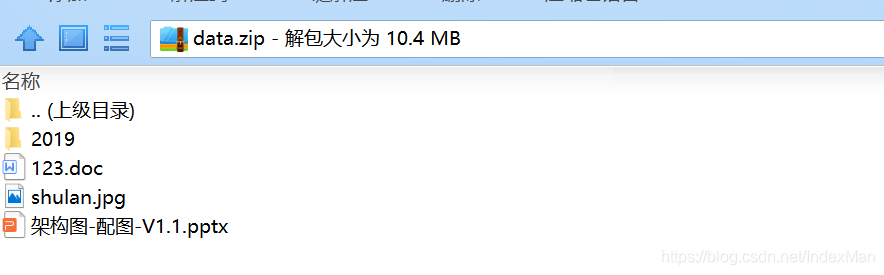
读取zip文件列表
package com.dylan.javacore.compress;

import java.io.FileInputStream;

import java.io.FileNotFoundException;

import java.io.IOException;

import java.nio.charset.Charset;

import java.util.zip.ZipEntry;

import java.util.zip.ZipInputStream;

/**

 * @Description: 列出压缩包中的文件结构

 * @Author laoxu

 * @Date 2019/8/5 10:01

 **/

public class ListZipEntriesDemo {

    public static void main(String[] args) {

        String FILE_PATH="D:/test/data.zip";

        ZipInputStream zipls = null;

        try {

            zipls = new ZipInputStream(new FileInputStream(FILE_PATH), Charset.forName("GBK"));

            ZipEntry entry = null;

            while ((entry=zipls.getNextEntry())!=null){

                if(entry.isDirectory()){

                    System.out.print("Directory:");

                }else{

                    System.out.print("File:");

                }

                System.out.println(entry.getName());

            }

        } catch (IOException e) {

            e.printStackTrace();

        } finally {

            if(zipls!=null){

                try {

                    zipls.close();

                } catch (IOException e) {

                    e.printStackTrace();

                }

            }

        }

    }

}
输出:

解压zip到指定目录
package com.dylan.javacore.compress;

import java.io.*;

import java.nio.charset.Charset;

import java.nio.file.Files;

import java.nio.file.Paths;

import java.util.zip.ZipEntry;

import java.util.zip.ZipInputStream;

/**

 * @Description: 解压zip

 * @Author laoxu

 * @Date 2019/8/5 13:50

 **/

public class UnZipDemo {

    public static void main(String[] args) {

        final String OUTPUT_FOLDER="d:/test/output";

        String FILE_PATH="d:/test/data.zip";

        // 判断文件夹是否存在

        File folder = new File(OUTPUT_FOLDER);

        if(!folder.exists()){

            folder.mkdir();

        }

        // 创建buffer

        byte[] buffer = new byte[1024];

        ZipInputStream zipls = null;

        try {

            zipls = new ZipInputStream(new FileInputStream(FILE_PATH), Charset.forName("GBK"));

            ZipEntry entry = null;

            while ((entry=zipls.getNextEntry())!=null){

                String entryName = entry.getName();

                String outFileName = OUTPUT_FOLDER + File.separator + entryName;

                System.out.println("Unzip: " + outFileName);

                if(entry.isDirectory()){

                    new File(outFileName).mkdirs();

                }else{

                    FileOutputStream fos = new FileOutputStream(outFileName);

                    int len;

                    while ((len = zipls.read(buffer))>0){

                        fos.write(buffer,0,len);

                    }

                    fos.close();

                }

            }

        } catch (IOException e) {

            e.printStackTrace();

        } finally {

            try {

                zipls.close();

            } catch (IOException e) {

                e.printStackTrace();

            }

        }

    }

}
压缩文件夹
package com.dylan.javacore.compress;

import java.io.File;

import java.io.FileInputStream;

import java.io.FileOutputStream;

import java.io.IOException;

import java.io.OutputStream;

import java.nio.charset.Charset;

import java.util.ArrayList;

import java.util.List;

import java.util.zip.ZipEntry;

import java.util.zip.ZipOutputStream;

/**

 * @Description: 压缩文件夹

 * @Author laoxu

 * @Date 2019/8/5 15:25

 **/

public class ZipDirectory {

    public ZipDirectory() {

    }

    // A method to Compress a directory.

    public void zipDirectory(File inputDir, File outputZipFile) {

        // Create parent directory for the output file.

        outputZipFile.getParentFile().mkdirs();

        String inputDirPath = inputDir.getAbsolutePath();

        byte[] buffer = new byte[1024];

        FileOutputStream fileOs = null;

        ZipOutputStream zipOs = null;

        try {

            List<File> allFiles = this.listChildFiles(inputDir);

            // Create ZipOutputStream object to write to the zip file

            fileOs = new FileOutputStream(outputZipFile);

            //

            zipOs = new ZipOutputStream(fileOs, Charset.forName("GBK"));

            for (File file : allFiles) {

                String filePath = file.getAbsolutePath();

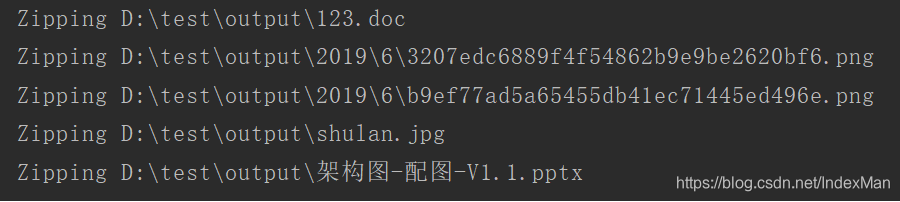
                System.out.println("Zipping " + filePath);

                // entryName: là một đường dẫn tương đối.

                String entryName = filePath.substring(inputDirPath.length() + 1);

                ZipEntry ze = new ZipEntry(entryName);

                // Put new entry into zip file.

                zipOs.putNextEntry(ze);

                // Read the file and write to ZipOutputStream.

                FileInputStream fileIs = new FileInputStream(filePath);

                int len;

                while ((len = fileIs.read(buffer)) > 0) {

                    zipOs.write(buffer, 0, len);

                }

                fileIs.close();

            }

        } catch (IOException e) {

            e.printStackTrace();

        } finally {

            closeQuite(zipOs);

            closeQuite(fileOs);

        }

    }

    private void closeQuite(OutputStream out) {

        try {

            out.close();

        } catch (Exception e) {

        }

    }

    // This method returns the list of files,

    // including the children, grandchildren files of the input folder.

    private List<File> listChildFiles(File dir) throws IOException {

        List<File> allFiles = new ArrayList<File>();

        File[] childFiles = dir.listFiles();

        for (File file : childFiles) {

            if (file.isFile()) {

                allFiles.add(file);

            } else {

                List<File> files = this.listChildFiles(file);

                allFiles.addAll(files);

            }

        }

        return allFiles;

    }

    public static void main(String[] args) {

        ZipDirectory zipDir = new ZipDirectory();

        File inputDir = new File("D:/test/output");

        File outputZipFile = new File("D:/test/output/datas.zip");

        zipDir.zipDirectory(inputDir, outputZipFile);

    }

}

下一篇讲Common Compress
Java压缩和解压缩zip文件的更多相关文章
- JAVA调用外部安装7-Zip压缩和解压zip文件
1.首先在本地安装7-Zip(下载链接:https://www.7-zip.org/)2.调用7-Zip压缩.zip文件: /** * 生成.zip压缩文件 * @param fi ...
- [Java 基础] 使用java.util.zip包压缩和解压缩文件
reference : http://www.open-open.com/lib/view/open1381641653833.html Java API中的import java.util.zip ...
- Java用ZIP格式压缩和解压缩文件
转载:java jdk实例宝典 感觉讲的非常好就转载在这保存! java.util.zip包实现了Zip格式相关的类库,使用格式zip格式压缩和解压缩文件的时候,须要导入该包. 使用zipoutput ...
- Java ZIP压缩和解压缩文件(解决中文文件名乱码问题)
Java ZIP压缩和解压缩文件(解决中文文件名乱码问题) 学习了:http://www.tuicool.com/articles/V7BBvy 引用原文: JDK中自带的ZipOutputStrea ...
- Java ZIP压缩和解压缩文件并兼容linux
JDK中自带的ZipOutputStream在压缩文件时,如果文件名中有中文,则压缩后的 zip文件打开时发现中文文件名变成乱码. 解决的方法是使用apache-ant-zip.jar包(见附件)中的 ...
- Java 的zip压缩和解压缩
Java 的zip压缩和解压缩 好久没有来这写东西了,今天中秋节,有个东西想拿出来分享,一来是工作中遇到的问题,一来是和csdn问候一下,下面就分享一个Java中的zip压缩技术,代码实现比较简单,代 ...
- IO操作之使用zip包压缩和解压缩文件
转自:http://www.cdtarena.com/java.htmlJava API中的import java.util.zip.*;包下包含了Java对于压缩文件的所有相关操作. 我们可以使 ...
- 使用commons-compress操作zip文件(压缩和解压缩)
http://www.cnblogs.com/luxh/archive/2012/06/28/2568758.html Apache Commons Compress是一个压缩.解压缩文件的类库. 可 ...
- Java对zip格式压缩和解压缩
Java对zip格式压缩和解压缩 通过使用java的相关类可以实现对文件或文件夹的压缩,以及对压缩文件的解压. 1.1 ZIP和GZIP的区别 gzip是一种文件压缩工具(或该压缩工具产生的压缩文件格 ...
- java 压缩和解压zip包
网上有关压缩和解压zip包的博文一大堆,我随便找了一个.看了看,依照自己的须要改动了一下,与各位分享一下,希望各位大神指正: package com.wangpeng.utill; import ja ...
随机推荐
- [转帖]如何不耍流氓的做运维之-SHELL脚本
https://www.cnblogs.com/luoahong/articles/8504691.html 前言 大家都是文明人,尤其是做运维的,那叫一个斯文啊.怎么能耍流氓呢?赶紧看看,编写SHE ...
- [转帖]细说ASCII、GB2312/GBK/GB18030、Unicode、UTF-8/UTF-16/UTF-32编码
参考: <编码标准-GB2312 GBK GB18030> <字符编码笔记:ASCII,Unicode 和 UTF-8> <字体编辑用中日韩汉字Unicode编码表> ...
- [转帖]Export Prometheus metrics from SQL queries
https://github.com/albertodonato/query-exporter query-exporter is a Prometheus exporter which allows ...
- [转帖]Navicat连接openGauss数据库报错
news/2023/10/19 21:23:19 错误信息:fe_sendauth:invalid authentication request from server:AUTH_REQ_SASL_C ...
- [转帖]一个小技巧解决笔记本HDMI接口失灵
https://baijiahao.baidu.com/s?id=1738289993804283647&wfr=spider&for=pc 现如今笔记本的接口是越来越多,哪怕是标 ...
- [转帖]HotSpot 虚拟机对象探秘
https://www.cnblogs.com/xiaojiesir/p/15593092.html 对象的创建 一个对象创建的时候,到底是在堆上分配,还是在栈上分配呢?这和两个方面有关:对象的类型和 ...
- Ubuntu18.04 安装Postgresql12
Postgresql 12 是有很多新增特性的,但是最关键的一点是Postgresql 12 的SQL备份文件是不能直接使用psql命令导入到Postgresql 10 的. Ubuntu18.04 ...
- FinClip 小程序的自有账户体系是怎么做的?
随着公司规模越来越大,员工需要使用的产品矩阵也会越来越丰富,不仅包括内部的 IT 系统,OA 系统,业务系统,还会有很多和外部产品集成的登录流程,更别提各种业务系统或者子系统中的账户体系了.如果使用简 ...
- 行云部署成长之路--慢SQL优化之旅 | 京东云技术团队
当项目的SQL查询慢得像蜗牛爬行时,用户的耐心也在一点点被消耗,作为研发,我们可不想看到这样的事.这篇文章将结合行云部署项目的实践经验,带你走进SQL优化的奇妙世界,一起探索如何让那些龟速的查询飞 ...
- echarts饼状图自定义legend的样式付费
先看效果图 代码 <!DOCTYPE html> <html> <head> <meta charset="utf-8"> < ...