
JDBC详解(韩顺平教程)
JDBC
一、原理示意图
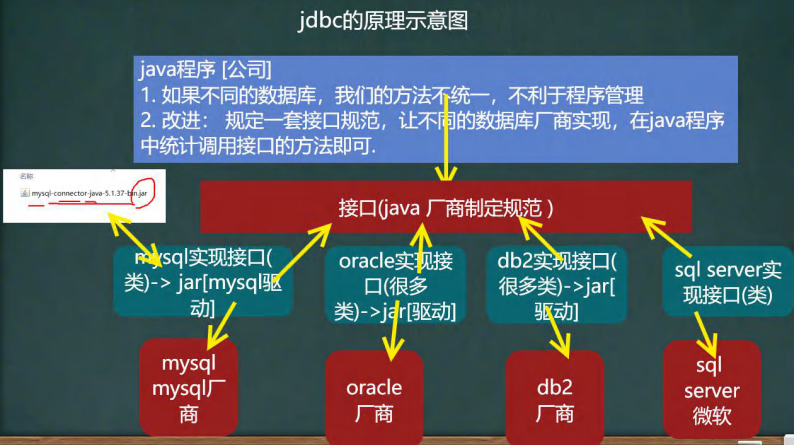
二、前提步骤
IDEA导入MySQL的jdbc驱动,并操作数据库 - 打点 - 博客园 (cnblogs.com)
三、JDBC编写步骤:
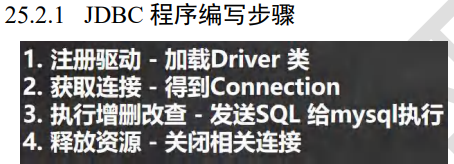
用法1:
package Hsp.JDBC;
import com.mysql.jdbc.Driver;
import java.sql.Connection;
import java.sql.SQLException;
import java.sql.Statement;
import java.util.Properties;
public class BaseUsage01 {
public static void main(String[] args) throws SQLException, ClassNotFoundException, InstantiationException, IllegalAccessException {
//1.注册驱动 采用反射机制更加灵活
Class<?> clazz = Class.forName("com.mysql.jdbc.Driver");
Driver driver = (Driver) clazz.newInstance();
//2.把用户名和密码放入properties更加灵活
Properties properties = new Properties();
properties.setProperty("user","root");
properties.setProperty("password","20030515");
//3.获取连接 "协议:jdbc连mysql//ip地址:端口/数据库名"
String url ="jdbc:mysql://localhost:3306/hsp";
Connection connect = driver.connect(url,properties);
//4.写好mysql语句
String sql = "insert into natural1 value(4,'yuan')";
//statement 用于执行静态 SQL 语句并返回其生成的结果的对象
Statement statement = connect.createStatement();
int row = statement.executeUpdate(sql);
System.out.println(row>0);
statement.close();
connect.close();
}
}
用法2:采用DriverMannager
public class BaseUsage02 {
public static void main(String[] args) throws ClassNotFoundException, InstantiationException, IllegalAccessException, SQLException {
//1.注册驱动 采用反射机制更加灵活
Class.forName("com.mysql.jdbc.Driver"); //使用反射加载Driver类自动完成注册驱动
//2.把用户名和密码放入properties更加灵活
Properties properties = new Properties();
properties.setProperty("user","root");
properties.setProperty("password","20030515");
properties.setProperty("url","jdbc:mysql://localhost:3306/hsp");
//3.获取连接
Connection connection = DriverManager.getConnection(properties.getProperty("url"), properties.getProperty("user"), properties.getProperty("password"));
//4.写好静态mysql语句测试一下
String sql = "insert into natural1 value(1,'yuan')";
//5.statement 用于执行静态 SQL 语句并返回其生成的结果的对象
Statement statement = connection.createStatement();
int update = statement.executeUpdate(sql);
System.out.println(update>0);
statement.close();
connect.close();
}
}四、结果集(ResultSet)

public class ResultSet_1 {

    public static void main(String[] args) throws ClassNotFoundException, SQLException, IOException {

        Class.forName("com.mysql.jdbc.Driver");


        Properties properties = new Properties();

        properties.load(new FileReader("src/mysql.properties"));


        Connection connection = DriverManager.getConnection(properties.getProperty("url"), properties.getProperty("user"), properties.getProperty("pwd"));


        Statement statement = connection.createStatement();

        String sql = "select * from natural1";


        ResultSet resultSet = statement.executeQuery(sql);          //resultSet指向该表的第0行

        while(resultSet.next()){                                    //光标后移获取第一行,如果后面没有行了则返回false

            int id = resultSet.getInt(1);               //获取该行第一列

            String name = resultSet.getString(2);       //获取该行第二列

            System.out.println(id+ "\t" + name);

        }

        connection.close();

        resultSet.close();

    }

}
五、PreparedStatement(预处理)
Statement注入问题
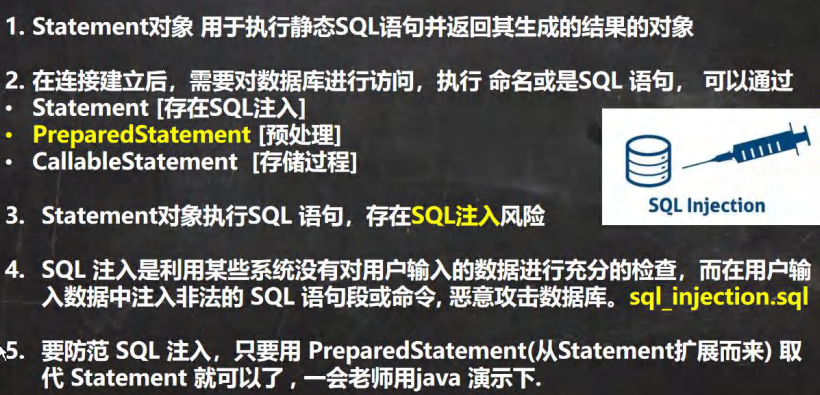
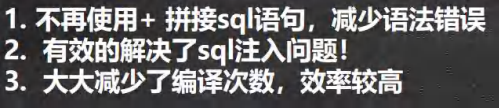
因此我们不再使用Statement而转用PreparedStatement(预处理)
使用方法:
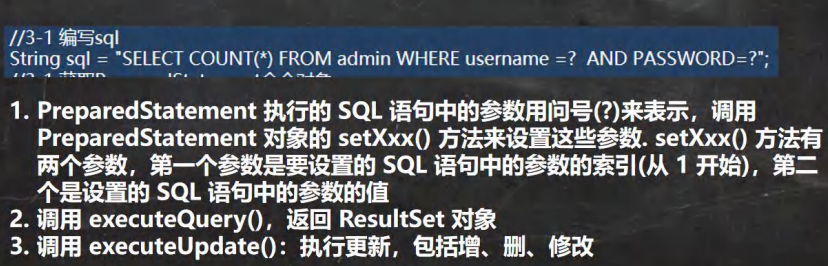
好处:
public class preparedstatement {
public static void main(String[] args) throws ClassNotFoundException, IOException, SQLException {
Class.forName("com.mysql.jdbc.Driver");
Properties properties = new Properties();
properties.load(new FileReader("src/mysql.properties")); //把properties文件加载好
Connection connection = DriverManager.getConnection(properties.getProperty("url"), properties.getProperty("user"), properties.getProperty("pwd"));
//采用预处理方式
//1.先组织好sql语句
String sql = "select * from natural1 where name = ? and id = ?";
//2.再将sql语句创建成一个预处理对象
PreparedStatement pstate = connection.prepareStatement(sql); //pstate只是一个实现了PreparedStatement接 口的实现类的对象
//3.然后就可以给问号赋值了
pstate.setString(1,"yuan"); //第一个参数代表第几个问号
pstate.setString(2,"4");
//4.最后才可以执行预处理对象
ResultSet resultSet = pstate.executeQuery(); //这里不要再写sql在括号里了,因为mysql无法识别带问号的语句,这 也是为什么要用setString给问号赋值的原因
//打印表看一眼
while (resultSet.next()){
int anInt = resultSet.getInt("id"); //获取表中叫id的列
String string = resultSet.getString("name"); //获取叫name的列
System.out.println(anInt +"\t" + string);
}
connection.close();
resultSet.close();
}
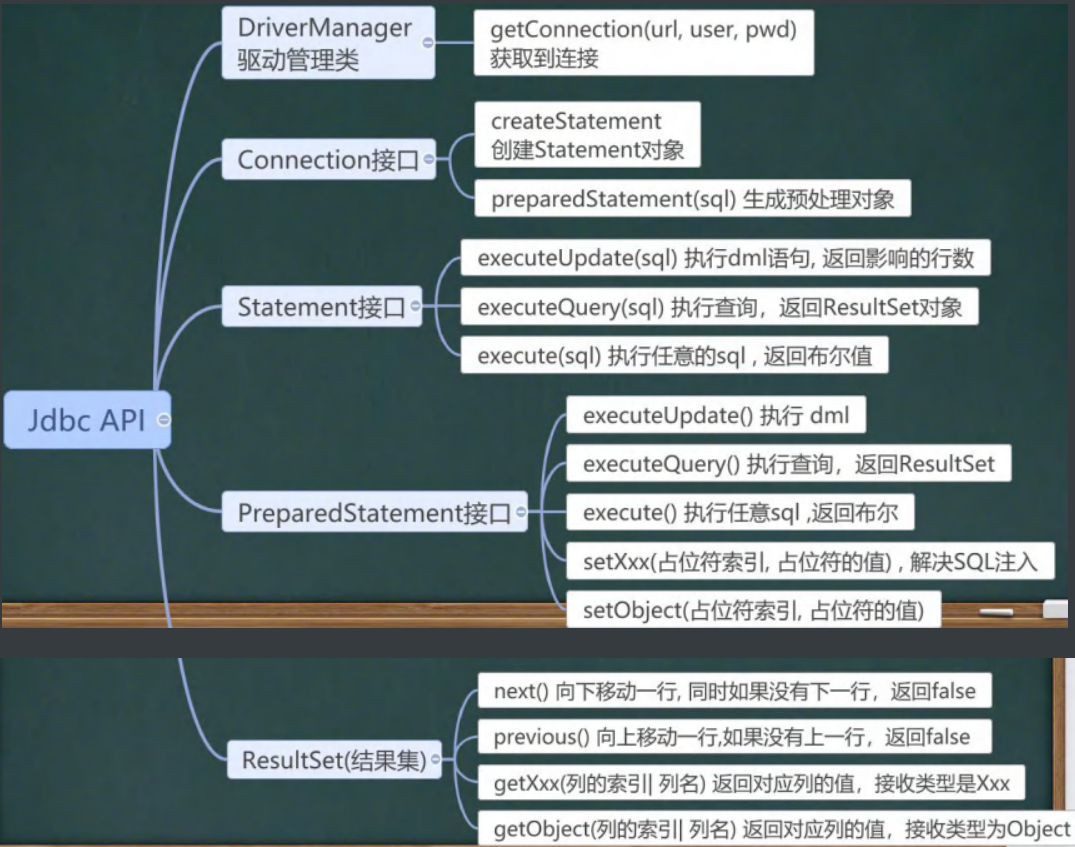
}JDBC API图
六、事务
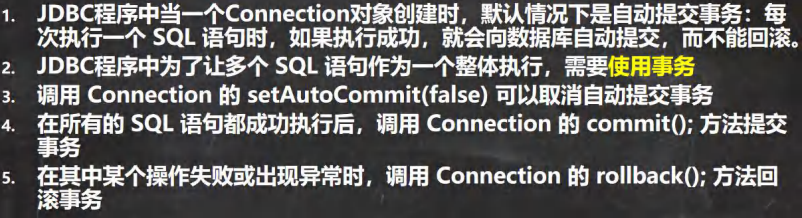
区别就在调用connection后输入下面这段代码取消自动提交事务
connection.setAutoCommit(false); //开启了事务七、批处理
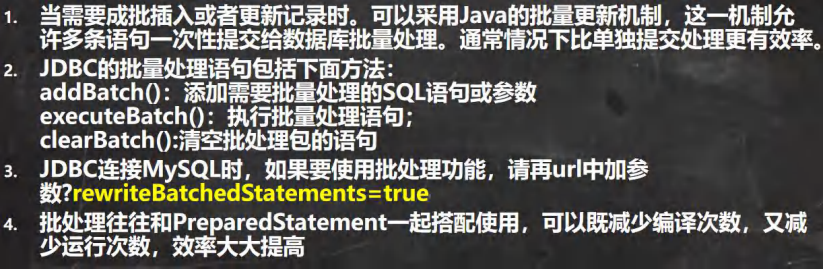
注意要在url中添加 : ?rewriteBatchedStatements = true 这句话
for (int i = 0; i < 5000; i++) {                //执行5000次

    preparedStatement.setString(1, "jack" + i);

    preparedStatement.setString(2, "666");

    //以下为核心批量处理语句

    preparedStatement.addBatch();           //1.添加需要批处理的sql语句

    if((i + 1) % 1000 == 0) {               //2.当有 1000 条记录时,再批量执行(可改)

    preparedStatement.executeBatch();       //3.每满 1000 条sql语句批量处理一次

    preparedStatement.clearBatch();         //4.清空一次批处理包

}
八、连接池
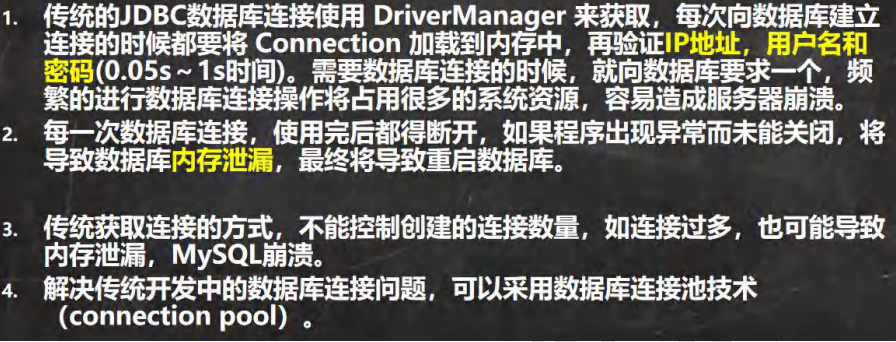
传统连接弊端分析:
连接池的作用:
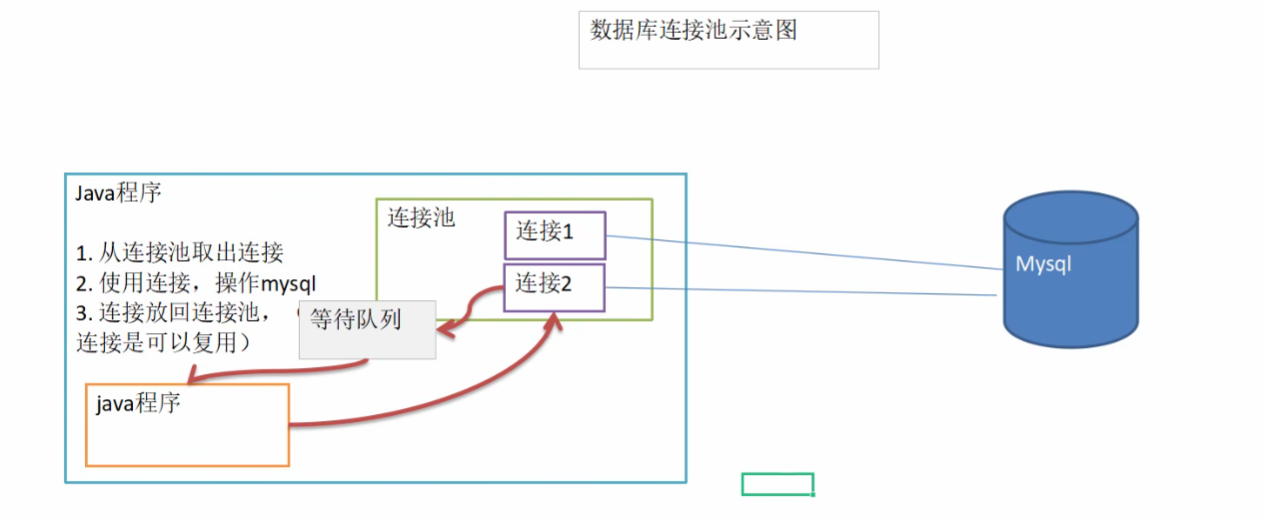
是为了提高性能,避免重复多次的打开数据库连接而造成性能的下降和系统资源的浪费;连接池是将已经创建好的连接保存在池中,当有请求来时,直接使用已经创建好的连接对数据库进行访问。这样省略了创建和销毁的过程。这样以提高系统的性能。
为什么频繁建立、关闭连接会降低系统的性能呢?数据库连接是一项有限的昂贵资源,一个数据库连接对象均对应一个物理数据库连接,每次使用都要打开一个物理连接,使用完都关闭。建立数据库连接时非常耗费资源和时间的,首先要建立TCP连接,然后TCP协议三次握手的发送与响应,客户端的账户验证,服务器返回确认;用户验证后,需要传输相关链接变量如是否自动提交事务的设置等,会有很多次的数据交互,然后才能建立连接。
数据库连接池示意图:
C3P0的使用方式:
使用前先把其jar包引入
public class C3P0 {
public static void main(String[] args) throws PropertyVetoException, SQLException, IOException {
C3P0 c3P0 = new C3P0();
c3P0.c3p0get_2();
}
public void c3p0get() throws IOException, PropertyVetoException, SQLException {
//1.创建一个连接池 ComboPooledDataSource是一个开源的JDBC连接池
ComboPooledDataSource comboPooledDataSource = new ComboPooledDataSource();
//2.设置一些属性,如驱动程序类名、JDBC URL、用户名和密码
Properties properties = new Properties();
properties.load(new FileReader("src/mysql.properties"));
String url = properties.getProperty("url");
String pwd = properties.getProperty("pwd");
String user = properties.getProperty("user");
String driver = properties.getProperty("driver");
comboPooledDataSource.setDriverClass(driver);
comboPooledDataSource.setPassword(pwd);
comboPooledDataSource.setUser(user);
comboPooledDataSource.setJdbcUrl(url);
//3.初始化连接数
comboPooledDataSource.setInitialPoolSize(10);
//最大连接数
comboPooledDataSource.setMaxPoolSize(50);
//核心方法:也是从DataSource接口实现的
long start = System.currentTimeMillis();
for (int i = 0; i < 5000; i++) {
Connection connection = comboPooledDataSource.getConnection(); //getconnection 这个方法就是combopool从 DataSource 接口继承下来的
connection.close();
}
long end = System.currentTimeMillis();
System.out.println(end-start+"ms");
}
//第二种模式(常用模式),使用官方配置文件模板C3P0-config-xml
public void c3p0get_2() throws SQLException {
ComboPooledDataSource comboPooledDataSource = new ComboPooledDataSource("hello");
Connection connection = comboPooledDataSource.getConnection();
System.out.println("ok");
connection.close();
}
}
Druid德鲁伊连接池:
/**
* 一个基于jdbc的德鲁伊工具类
*/
public class JDBCUtilsByDruid {
private static DataSource dataSource;
//在静态代码块中完成初始化
static {
Properties properties = new Properties(); //先导入配置
try {
properties.load(new FileReader("src/druid.properties")); //至于如何在javaweb中读取配置文件参考web路径那篇文章
dataSource = DruidDataSourceFactory.createDataSource(properties); //用德鲁伊工厂类来创建一个基于properties模板的德鲁伊连接池
} catch (Exception e) {
throw new RuntimeException(e);
}
}
//获取连接的方法
public Connection getconnection() throws SQLException {
return dataSource.getConnection();
}
//关闭连接,注意!是把connection对象放回连接池中而不是把他和mysql断开
public void closedruid(ResultSet resultSet, Connection connection, Statement statement){ //要关结果集,预处理/statement和连接对象
try {
if(resultSet != null) resultSet.close();
if (connection!=null) connection.close();
if (statement != null) statement.close();
} catch (SQLException e) {
throw new RuntimeException(e);
}
}
}工厂类是干嘛用的?
工厂类是一种设计模式,它是一种创建型模式,提供了一种创建对象的最佳方式。在工厂模式中,我们在创建对象时不会对客户端暴露创建逻辑,并且是通过使用一个共同的接口来指向新创建的对象。工厂类负责创建其他类的实例,它通常是一个静态方法,返回一个实现了某个接口的类的实例
Apache阿帕奇工具类:
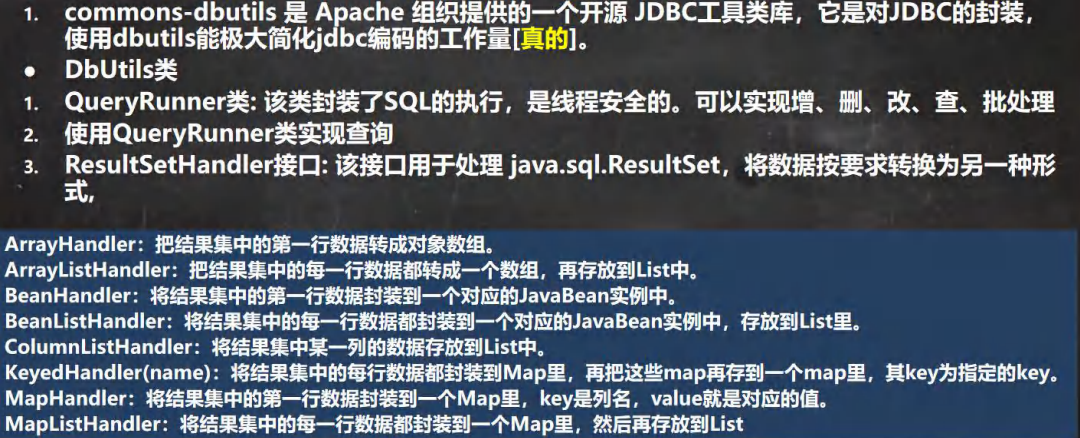
目的:传统方式获取结果集之后,如果把 connection关闭了,结果集就用不了了,所以我们要有一个方法让我们获取结果集后关闭链接还可以使用
基本方法:
Java Bean是什么
正如 Java 是咖啡的一种,不是所有的咖啡都是 Java 一样。并非所有的类都是 Java Bean,其是一种特殊的类,具有以下特征:
提供一个默认的无参构造函数。
需要被序列化并且实现了 Serializable 接口。
可能有一系列可读写属性,并且一般是 private 的。
可能有一系列的 getter 或 setter 方法。
根据封装的思想,我们使用 get 和 set 方法封装 private 的属性,并且根据属性是否可读写来选择封装方法。
那么Apache又有以下几个方向
多行查询
单行查询
单行单列查询
DML增删改操作
他们的核心思想都是将其数据读入一个类中,再将其封装到一个List中或者Object
public class Apache_druid { //利用apache实现resultset结果集不依赖connection的查询方式
//1.多行查询
@Test
public void MrowQuery() throws SQLException {
String sql = "select * from natural1 where name = ? and id > ?";
//1.先获取连接
Druid_Utils druidUtils = new Druid_Utils();
Connection connection = druidUtils.getconnection();
//2.用导入的dbutils包创建一个用于 查询的交通员(runner)
QueryRunner queryRunner = new QueryRunner();
//(1) query方法就是执行sql查询语句,得到resultset之后封装到arraylist里
//(2) query会返回集合
//(3) connection: 连接
//(4) sql : 执行 sql 语句
//(5) new BeanListHandler<>(xxx.class): 在将 resultset -> xxx 对象 -> 封装到 ArrayList
// 底层使用反射机制 去获取 Actor 类的属性,然后进行封装
//(6) 可变参数 Object... params 就是给 sql 语句中的 ? 赋值,可以有多个值
//(7) 底层得到了 resultset后 , query 会帮你关闭, 并且关闭 PreparedStatment
List<natural1_data> list = queryRunner.query(connection, sql, new BeanListHandler<>(natural1_data.class), "yuan",1);
for (natural1_data natural1Data : list){
System.out.println(natural1Data);
}
druidUtils.closedruid(null,connection,null);
}
//2.单行查询
@Test
public void SingleQuery() throws SQLException {
String sql = "select * from natural1 where name = ? and id = ?";
//1.先获取连接
Druid_Utils druidUtils = new Druid_Utils();
Connection connection = druidUtils.getconnection();
//2.用导入的dbutils包创建一个用于 查询的交通员(runner)
QueryRunner queryRunner = new QueryRunner();
natural1_data query = queryRunner.query(connection, sql, new BeanHandler<>(natural1_data.class), "yuan", 1); //改成使用BeanHandler,编译类型为该类即可
System.out.println(query);
druidUtils.closedruid(null,connection,null);
}
//3.单行单列(1个值)查询
@Test
public void ScalarQuery() throws SQLException { //Scalar:标量
String sql = "select id from natural1 where id = ? ";
//1.先获取连接
Druid_Utils druidUtils = new Druid_Utils();
Connection connection = druidUtils.getconnection();
//2.用导入的dbutils包创建一个用于 查询的交通员(runner)
QueryRunner queryRunner = new QueryRunner();
Object obj = queryRunner.query(connection, sql, new ScalarHandler(), 5); //改成使用ScalarHandler,编译类型为object即可
System.out.println(obj);
druidUtils.closedruid(null,connection,null);
}
//4.DML操作
@Test
public void DML() throws SQLException {
String sql = "update natural1 set id = 123 where id = ? "; //不只是update也可以是其他dml语句
//1.先获取连接
Druid_Utils druidUtils = new Druid_Utils();
Connection connection = druidUtils.getconnection();
//2.用导入的dbutils包创建一个用于 查询的交通员(runner)
QueryRunner queryRunner = new QueryRunner();
//(1) 执行 dml 操作是 queryRunner.update()
//(2) 返回的值是受影响的行数
int affectedrow = queryRunner.update(connection, sql,1);
System.out.println(affectedrow > 0 ? "ok" : "no");
druidUtils.closedruid(null,connection,null);
}
}
九、MySQL和 Java 的类型映射:
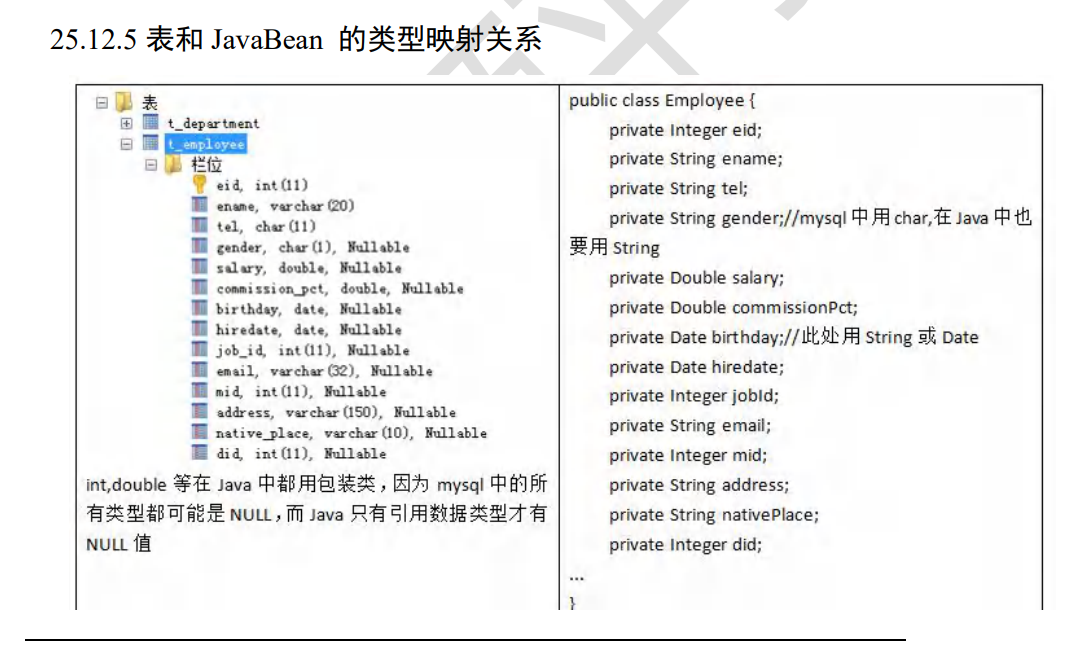
因为mysql的数据有可能是null,所以我们使用包装类而不是int,double等,(当然也可以使用但是有风险)
十、DAO 和增删改查通用方法-BasicDao (DdataBase Access Object)访问数据的对象
Apache+德鲁伊虽然已经很好,但是还有不足,sql语句是固定的,不能通过参数传入,所以我们引入Dao,从而可以使用泛型和可变sql,更方便使用CRUD。其核心不过是将Apache的方法的同类项合并,包装成一个方法,这样我们就可以把sql作为参数传进去,从而实现灵活使用sql语句的目的
同理也和Apache一样,分为
多行查询
单行查询
单行单列查询
DML增删改操作
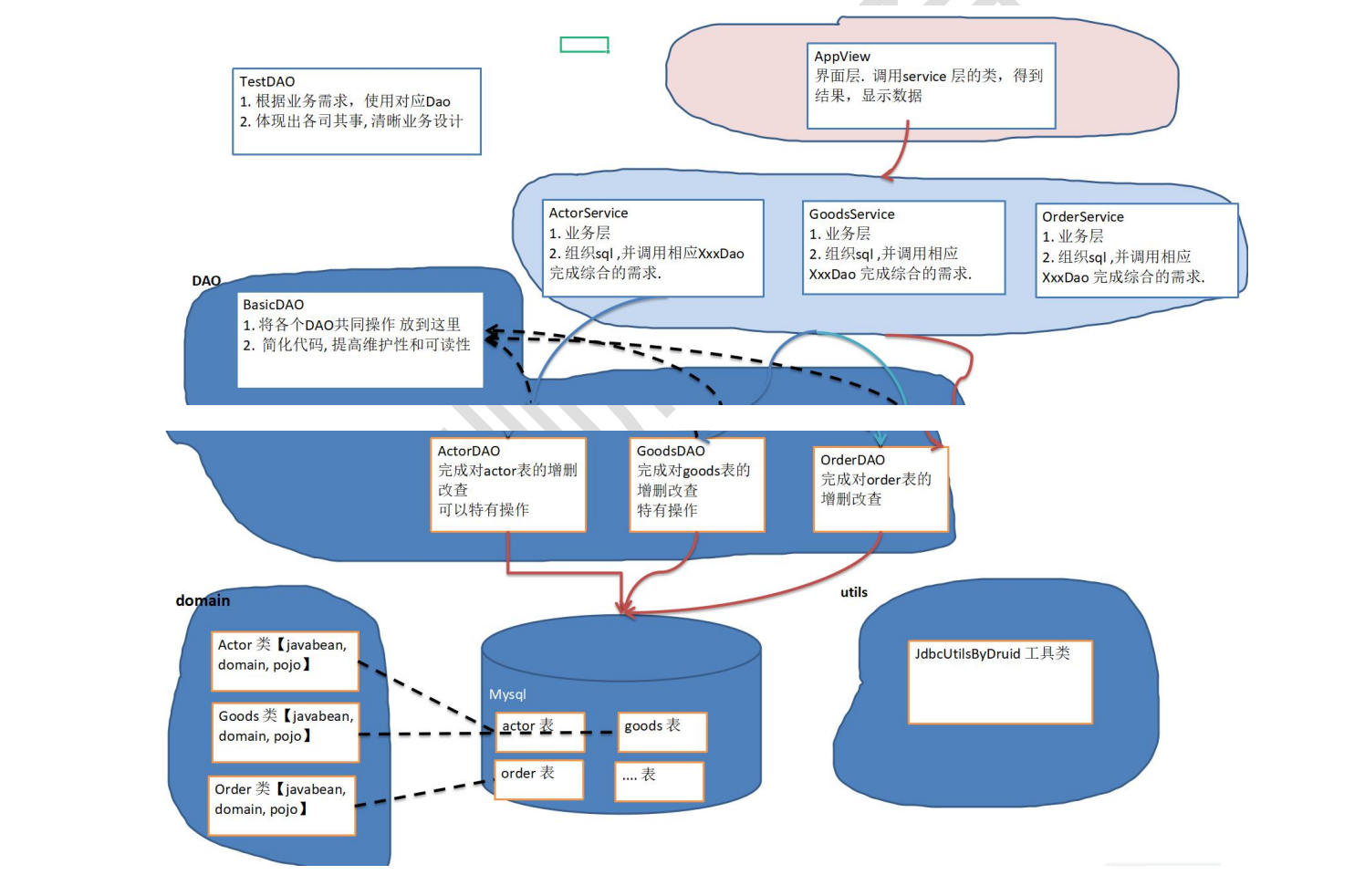
我们先来实现一下BasicDao
/**
* 开发BasicDao类作为父类
*/
public class BasicDao<T> { //要有一个泛型
private QueryRunner queryRunner = new QueryRunner(); //DbUtils的查询器,提供了多种query方法和update方法,可以执行SQL的增删改查
public int DML(String sql, Object... param) throws SQLException { //通用的DML方法,目的是加一个形参sql,这样就可以动态的指定sql语句
int update = 0;
Connection getconnection = null;
try {
getconnection = new Druid_Utils().getconnection();
update = queryRunner.update(getconnection,sql,param);
return update;
} catch (SQLException e) {
throw new RuntimeException(e);
} finally {
Druid_Utils druidUtils = new Druid_Utils();
druidUtils.closedruid(null,getconnection,null); //不管怎么样最后都关闭连接
}
}
//返回多个对象,查询多行结果
/**
*
* @param sql:传入的的sql语句
* @param clazz:传入一个要封装到List里面的类的Class对象,因为底层封装进List要用到反射爆破机制,这样就可以获取类的私有对象
* @param param:可变形参,对应sql的?
* @return
*/
public List<T> QueryMrow(String sql,Class<T> clazz,Object...param){
int update = 0;
Connection getconnection = null;
try {
getconnection = new Druid_Utils().getconnection();
List<T> query = queryRunner.query(getconnection, sql, new BeanListHandler<T>(clazz), param); //获取查询的多行对象封装到list里
return query;
} catch (SQLException e) {
throw new RuntimeException(e);
} finally {
Druid_Utils druidUtils = new Druid_Utils();
druidUtils.closedruid(null,getconnection,null); //不管怎么样最后都关闭连接
}
}
public T SingleQuery(String sql,Class<T> clazz,Object...param){
Connection getconnection = null;
try {
getconnection = new Druid_Utils().getconnection();
T query = queryRunner.query(getconnection, sql, new BeanHandler<T>(clazz), param);//获取查询的多行对象封装到list里
return query;
} catch (SQLException e) {
throw new RuntimeException(e);
} finally {
Druid_Utils druidUtils = new Druid_Utils();
druidUtils.closedruid(null,getconnection,null); //不管怎么样最后都关闭连接
}
}
public Object ScalarQuery(String sql,Object...param){
Connection getconnection = null;
try {
getconnection = new Druid_Utils().getconnection();
Object query = queryRunner.query(getconnection, sql, new ScalarHandler(), param);//获取查询的多行对象封装到list里
return query;
} catch (SQLException e) {
throw new RuntimeException(e);
} finally {
Druid_Utils druidUtils = new Druid_Utils();
druidUtils.closedruid(null,getconnection,null); //不管怎么样最后都关闭连接
}
}
}
实现完Basic后开始实现具体操作表的类了
public class ActorDao extends BasicDao<Actor_domin>{       //注意泛型里应该填入的是表的(domain)类

    //可以自行实现其他业务逻辑

}
JDBC详解(韩顺平教程)的更多相关文章
- Spring4 JDBC详解
Spring4 JDBC详解 在之前的Spring4 IOC详解 的文章中,并没有介绍使用外部属性的知识点.现在利用配置c3p0连接池的契机来一起学习.本章内容主要有两个部分:配置c3p0(重点)和 ...
- JDBC详解系列(二)之加载驱动
---[来自我的CSDN博客](http://blog.csdn.net/weixin_37139197/article/details/78838091)--- 在JDBC详解系列(一)之流程中 ...
- JDBC详解系列(三)之建立连接(DriverManager.getConnection)
在JDBC详解系列(一)之流程中,我将数据库的连接分解成了六个步骤. JDBC流程: 第一步:加载Driver类,注册数据库驱动: 第二步:通过DriverManager,使用url,用户名和密码 ...
- JDBC详解(一)
一.相关概念介绍 1.1.数据库驱动 这里驱动的概念和平时听到的那种驱动的概念是一样的,比如平时购买的声卡,网卡直接插到计算机上面是不能用的,必须要安装相应的驱动程序之后才能够使用声卡和网卡,同样道理 ...
- Java基础-面向接口编程-JDBC详解
Java基础-面向接口编程-JDBC详解 作者:尹正杰 版权声明:原创作品,谢绝转载!否则将追究法律责任. 一.JDBC概念和数据库驱动程序 JDBC(Java Data Base Connectiv ...
- dva框架使用详解及Demo教程
dva框架的使用详解及Demo教程 在前段时间,我们也学习讲解过Redux框架的基本使用,但是有很多同学在交流群里给我的反馈信息说,redux框架理解上有难度,看了之后还是一脸懵逼不知道如何下手,很多 ...
- redux-saga框架使用详解及Demo教程
redux-saga框架使用详解及Demo教程 前面我们讲解过redux框架和dva框架的基本使用,因为dva框架中effects模块设计到了redux-saga中的知识点,可能有的同学们会用dva框 ...
- JDBC详解1
JDBC详解1 JDBC整体思维导图 JDBC入门 导jar包:驱动! 加载驱动类:Class.forName("类名"); 给出url.username.password,其中u ...
- EditText使用详解-包含很多教程上看不到的功能演示
写道 标题有点大,说是详解,其实就是对EditText的一些常用功能的介绍,包括密码框,电话框,空白提示文字等等的讲解,尽量的介绍详细一点,也就是所谓的详解了..呵呵 广告一下我的应用“我团”,最新1 ...
- iOS中 HTTP/Socket/TCP/IP通信协议详解 韩俊强的博客
每日更新关注:http://weibo.com/hanjunqiang 新浪微博 简单介绍: // OSI(开放式系统互联), 由ISO(国际化标准组织)制定 // 1. 应用层 // 2. 表示层 ...
随机推荐
- CTF-Web-PHP反序列化
概念解释 PHP 反序列化漏洞又叫做 PHP 对象注入漏洞,我觉得这个表达很不直白,也不能说明根本的问题,不如我们叫他 PHP 对象的属性篡改漏洞好了(别说这是我说的~~) 反序列化漏洞的成因在于代码 ...
- 第一推动|2023年VSCode插件最新推荐(54款)
本文介绍前端开发领域常用的一些VSCode插件,插件是VSCode最重要的组成部分之一,本文列出了我自己在以往工作经验中积累的54款插件,个人觉得这些插件是有用或有趣的,根据它们的作用,我粗略的把它们 ...
- ES_ChatGPT问答
Q1:springboot项目,如何使用elasticsearch的api增删改查?查询中有哪些方式,如果模糊查询.排序查询.分页查询?分别阐述下这些查询方式的用法?最后举一个完整的例子 答: 在Sp ...
- MySQL(一)Linux下MySQL的安装
Linux下MySQL的安装 1 MySQL的安装 1.1 Linux系统以及工具的准备 这里使用两台CentOS7虚拟机,一台安装8.0版本,另一台克隆的虚拟机安装5.7版本 克隆的虚拟机需要进行配 ...
- If选择语句的用法
今天我们学习下If判断语句. 首先了解下它有几种用法: If单选择语句 If双选择语句 If多选择语句 我们一个一个用,每一个用法都给一个运用的过程演练一下. If单选择语句:我们很多需要判断一个东西 ...
- Git代码提交规范
1. 引言 思想,因人而异,难以重复 写代码时,每个人的习惯是不一样的,所以,引入了代码规范,为了省力,引入了自动格式化代码工具,前端工程中比较典型的自动格式化代码工具如:Prettier · Opi ...
- [C++基础入门] 4、 程序流程结构
文章目录 4 程序流程结构 4.1 选择结构 4.1.1 if语句 4.1.2 三目运算符 4.1.3 switch语句 4.2 循环结构 4.2.1 while循环语句 4.2.2 do...whi ...
- 2023-04-21:用go语言重写ffmpeg的metadata.c示例。
2023-04-21:用go语言重写ffmpeg的metadata.c示例. 答案2023-04-21: 这段 Go 代码演示了如何使用 ffmpeg-go 库中的函数来读取多媒体文件元数据,包括视频 ...
- 2022-10-22:以下go语言代码输出什么?A:moonfdd1;B:编译错误;C:运行时 panic。 package main import “fmt“ func main() {
2022-10-22:以下go语言代码输出什么?A:moonfdd1:B:编译错误:C:运行时 panic. package main import "fmt" func main ...
- 2022-04-06:go中proto文件能跨平台,那是因为能生成不同语言的代码,做框架开发用protoc+插件生成代码是不合适的,需要解析,请问如何解析?
2022-04-06:go中proto文件能跨平台,那是因为能生成不同语言的代码,做框架开发用protoc+插件生成代码是不合适的,需要解析,请问如何解析? 答案2022-04-06: go get ...