
.NET程序员AI开发基座:Microsoft.Extensions.AI
大家好,我是Edison。
微软在2024年11月就发布了新的AI核心库Microsoft.Extensions.AI,虽然目前还是一个预览版,但其可以大大简化我们的AI集成和开发工作。
Microsoft.Extensions.AI介绍
Microsoft.Extensions.AI 是一组核心 .NET 库,是在与整个 .NET 生态系统(包括语义内核)的开发人员协作中创建的。 这些库提供统一的 C# 抽象层,用于与 AI 服务交互,例如小型和大型语言模型(SLA 和 LLM)、嵌入和中间件。
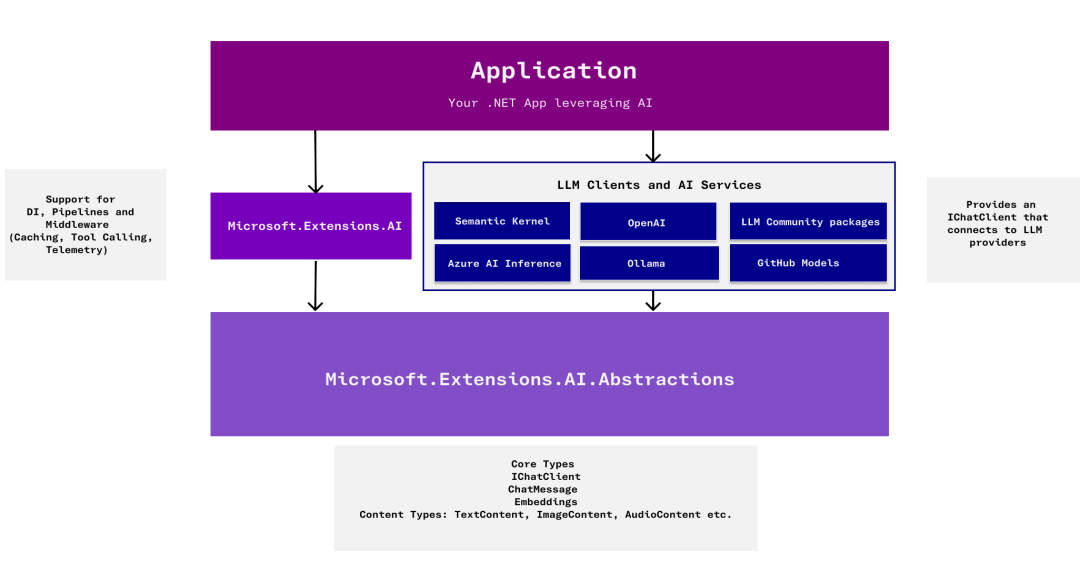
Microsoft.Extensions.AI 提供可由各种服务实现的抽象,所有这些概念都遵循相同的核心概念。 此库不旨在提供针对任何特定提供商服务定制的 API。
Microsoft.Extensions.AI 目标是在 .NET 生态系统中充当一个统一层,使开发人员能够选择他们的首选框架和库,同时确保整个生态系统之间的无缝集成和协作。
画外音>开发者可以节省时间下来专注自己的应用程序的业务逻辑实现,从而不必花过多时间去做AI服务的集成调试,点个大大的赞!
我能使用哪些服务实现?
Microsoft.Extensions.AI 通过 NuGet 包提供了以下服务的实现:
- OpenAI
- Azure OpenAI
- Azure AI Inference
- Ollama
将来,这些抽象的服务实现都将会是客户端库的一部分。
基本使用
安装NuGet包:
Microsoft.Extensions.AI (9.1.0-preview)

Microsoft.Extensions.AI.OpenAI (9.1.0-preivew)
这里我们使用SiliconCloud提供的 DeepSeek-R1-Distill-Llama-8B 模型,这是一个使用DeepSeek-R1开发的基于Llama-3.1-8B的蒸馏模型,免费好用。
注册SiliconCloud:https://cloud.siliconflow.cn/i/DomqCefW
简单对话:
var openAIClientOptions = new OpenAIClientOptions();

 openAIClientOptions.Endpoint = new Uri("https://api.siliconflow.cn/v1");

 var client = new OpenAIClient(new ApiKeyCredential("sk-xxxxxxxxxx"),  openAIClientOptions);

 var chatClient = client.AsChatClient("deepseek-ai/DeepSeek-R1-Distill-Llama-8B");

 var response = await chatClient.CompleteAsync("Who are you?");

 Console.WriteLine(response.Message);
封装的IChatClient对象可以十分方便地屏蔽差异,用起来十分方便。
函数调用
要想实现函数调用(Function Calling),则需要调整一下:
var openAIClientOptions = new OpenAIClientOptions();

 openAIClientOptions.Endpoint = new Uri("https://api.siliconflow.cn/v1");

[Description("Get the current time")]

string GetCurrentTime() => DateTime.Now.ToLocalTime().ToString();

var client = new ChatClientBuilder()

      .UseFunctionInvocation()

      .Use(new OpenAIClient(new ApiKeyCredential("sk-xxxxxxxxx"), openAIClientOptions)

      .AsChatClient("deepseek-ai/DeepSeek-R1-Distill-Llama-8B"));

var response = await client.CompleteAsync(

      "What's the time now?",

      new() { Tools = [AIFunctionFactory.Create(GetCurrentTime)] });

Console.Write(response);
可以看到,需要主动使用 UseFunctionInvocation 方法 及 提供 Tools 注册列表,就能使用我们封装的 Tools 了。
多模型使用
很多时候,我们希望Chat入口用一个模型,业务处理则用另一个模型,我们完全可以对其进行独立配置。
例如,这里参考mingupupu大佬的PaperAssistant,我也实现了一个。
在配置文件中,配置多AI模型:
{

  // For Paper Smmary

  "PaperSummaryModel": {

    "ModelId": "deepseek-ai/DeepSeek-R1-Distill-Llama-8B",

    "ApiKey": "sk-xxxxxxxxxx",

    "EndPoint": "https://api.siliconflow.cn"

  },

  // For Main Chat

  "MainChatModel": {

    "ModelId": "Qwen/Qwen2.5-7B-Instruct",

    "ApiKey": "sk-xxxxxxxxxx",

    "EndPoint": "https://api.siliconflow.cn"

  }

}
对于某个业务处理,将其封装为Plugin,并使用 DeepSeek-R1-Distill-Llama-8B 模型:
public sealed class PaperAssistantPlugins

{

    public PaperAssistantPlugins(IConfiguration config)

    {

        var apiKeyCredential = new ApiKeyCredential(config["PaperSummaryModel:ApiKey"]);

        var aiClientOptions = new OpenAIClientOptions();

        aiClientOptions.Endpoint = new Uri(config["PaperSummaryModel:EndPoint"]);

        var aiClient = new OpenAIClient(apiKeyCredential, aiClientOptions)

            .AsChatClient(config["PaperSummaryModel:ModelId"]);

        ChatClient = new ChatClientBuilder(aiClient)

            .UseFunctionInvocation()

            .Build();

    }

    public IChatClient ChatClient { get; }

    [Description("Read the PDF content from the file path")]

    [return: Description("PDF content")]

    public string ExtractPdfContent(string filePath)

    {

        Console.WriteLine($"[Tool] Now executing {nameof(ExtractPdfContent)}, params: {filePath}");

        var pdfContentBuilder = new StringBuilder();

        using (var document = PdfDocument.Open(filePath))

        {

            foreach (var page in document.GetPages())

                pdfContentBuilder.Append(page.Text);

        }

        return pdfContentBuilder.ToString();

    }

    [Description("Create a markdown note file by file path")]

    public void SaveMarkDownFile([Description("The file path to save")] string filePath, [Description("The content of markdown note")] string content)

    {

        Console.WriteLine($"[Tool] Now executing {nameof(SaveMarkDownFile)}, params: {filePath}, {content}");

        try

        {

            if (!File.Exists(filePath))

                File.WriteAllText(filePath, content);

            else

                File.WriteAllText(filePath, content);

        }

        catch (Exception ex)

        {

            Console.WriteLine($"[Error] An error occurred: {ex.Message}");

        }

    }

    [Description("Generate one summary of one paper and save the summary to a local file by file path")]

    public async Task GeneratePaperSummary(string sourceFilePath, string destFilePath)

    {

        var pdfContent = this.ExtractPdfContent(sourceFilePath);

        var prompt = """

                     You're one smart agent for reading the content of a PDF paper and summarizing it into a markdown note.

                     User will provide the path of the paper and the path to create the note.

                     Please make sure the file path is in the following format:

                     "D:\Documents\xxx.pdf"

                     "D:\Documents\xxx.md"

                     Please summarize the abstract, introduction, literature review, main points, research methods, results, and conclusion of the paper.

                     The tile should be 《[Title]》, Authour should be [Author] and published in [Year].

                     Please make sure the summary should include the following:

                     (1) Abstrat

                     (2) Introduction

                     (3) Literature Review

                     (4) Main Research Questions and Background

                     (5) Research Methods and Techniques Used

                     (6) Main Results and Findings

                     (7) Conclusion and Future Research Directions

                     """;

        var history = new List<ChatMessage>

        {

            new ChatMessage(ChatRole.System, prompt),

            new ChatMessage(ChatRole.User, pdfContent)

        };

        var result = await ChatClient.CompleteAsync(history);

        this.SaveMarkDownFile(destFilePath, result.ToString());

    }

}
对于对话主入口,则使用 Qwen2.5-7B-Instruct 模型即可:
Console.WriteLine("Now loading the configuration...");

var config = new ConfigurationBuilder()

    .AddJsonFile($"appsettings.json")

    .Build();

Console.WriteLine("Now loading the chat client...");

var apiKeyCredential = new ApiKeyCredential(config["MainChatModel:ApiKey"]);

var aiClientOptions = new OpenAIClientOptions();

aiClientOptions.Endpoint = new Uri(config["MainChatModel:EndPoint"]);

var aiClient = new OpenAIClient(apiKeyCredential, aiClientOptions)

    .AsChatClient(config["MainChatModel:ModelId"]);

var chatClient = new ChatClientBuilder(aiClient)

    .UseFunctionInvocation()

    .Build();

Console.WriteLine("Now loading the plugins...");

var plugins = new PaperAssistantPlugins(config);

var chatOptions = new ChatOptions()

{

    Tools =

    [

      AIFunctionFactory.Create(plugins.ExtractPdfContent),

      AIFunctionFactory.Create(plugins.SaveMarkDownFile),

      AIFunctionFactory.Create(plugins.GeneratePaperSummary)

    ]

};

Console.WriteLine("Now starting chatting...");

var prompt = """

             You're one smart agent for reading the content of a PDF paper and summarizing it into a markdown note.

             User will provide the path of the paper and the path to create the note.

             Please make sure the file path is in the following format:

             "D:\Documents\xxx.pdf"

             "D:\Documents\xxx.md"

             Please summarize the abstract, introduction, literature review, main points, research methods, results, and conclusion of the paper.

             The tile should be 《[Title]》, Authour should be [Author] and published in [Year].

             Please make sure the summary should include the following:

             (1) Abstrat

             (2) Introduction

             (3) Literature Review

             (4) Main Research Questions and Background

             (5) Research Methods and Techniques Used

             (6) Main Results and Findings

             (7) Conclusion and Future Research Directions

             """;

var history = new List<ChatMessage>

{

    new ChatMessage(ChatRole.System, prompt)

};

bool isComplete = false;

Console.WriteLine("AI> I'm Ready! What can I do for you?");

do

{

    Console.Write("You> ");

    string? input = Console.ReadLine();

    if (string.IsNullOrWhiteSpace(input))

        continue;

    if (input.Trim().Equals("EXIT", StringComparison.OrdinalIgnoreCase))

    {

        isComplete = true;

        break;

    }

    if (input.Trim().Equals("Clear", StringComparison.OrdinalIgnoreCase))

    {

        history.Clear();

        Console.WriteLine("Cleared our chatting history successfully!");

        continue;

    }

    history.Add(new ChatMessage(ChatRole.User, input));

    Console.WriteLine();

    var result = await chatClient.CompleteAsync(input, chatOptions);

    Console.WriteLine(result.ToString());

    history.Add(new ChatMessage(ChatRole.Assistant, result.ToString() ?? string.Empty));

} while (!isComplete);
这里测试一下,我让它帮我总结一个pdf并将总结内容生成到一个md文件中输出到我指定的目录下保存。
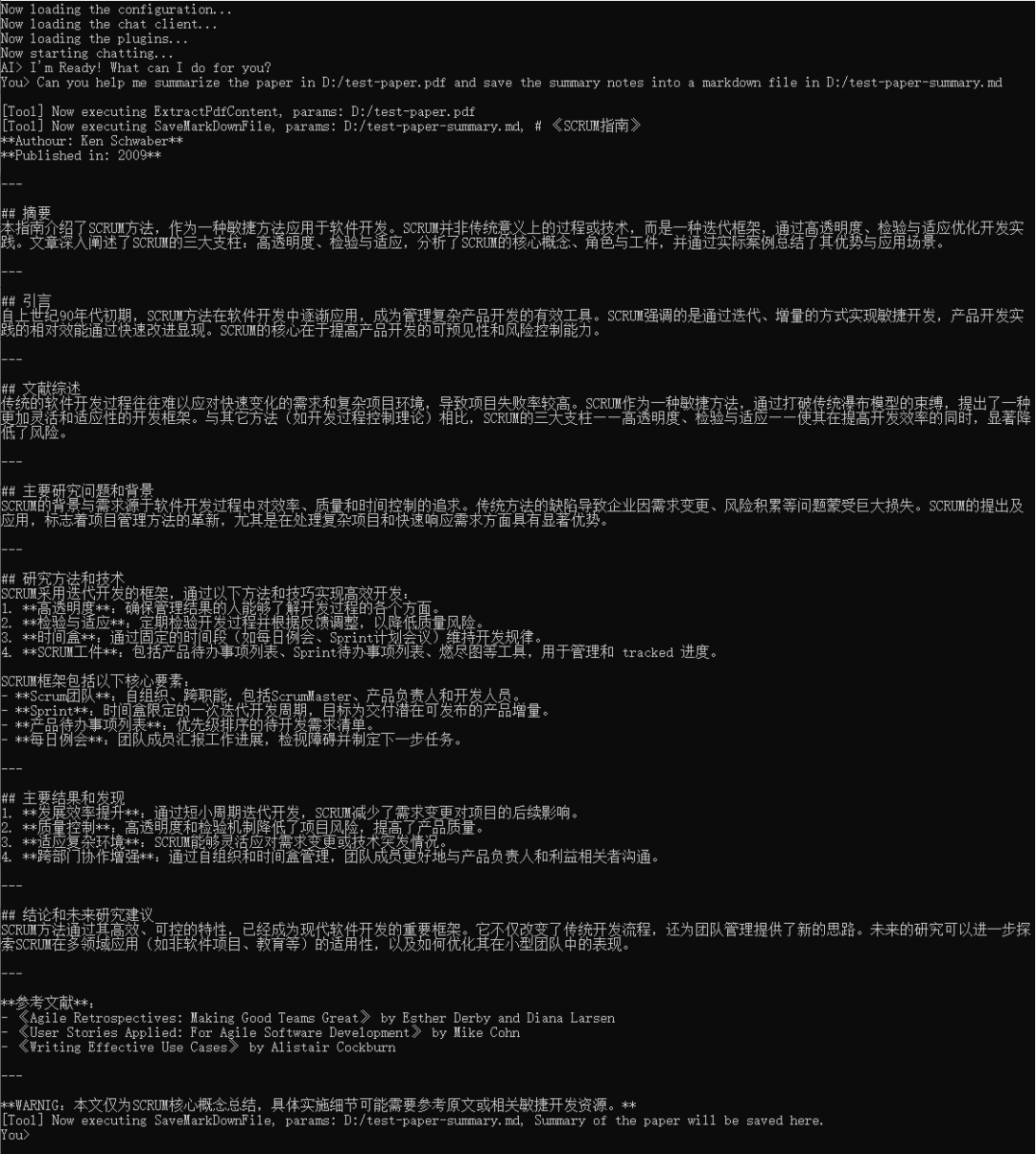
可以看出,它成功地调用了Plugin完成了PDF读取、内容提取总结 和 生成Markdown文件。
eShopSupport
ShopSupport 是一个开源的AI示例应用程序,客户可以使用它来与AI客户对话查询产品,实现网站系统的“智能客服”的场景。
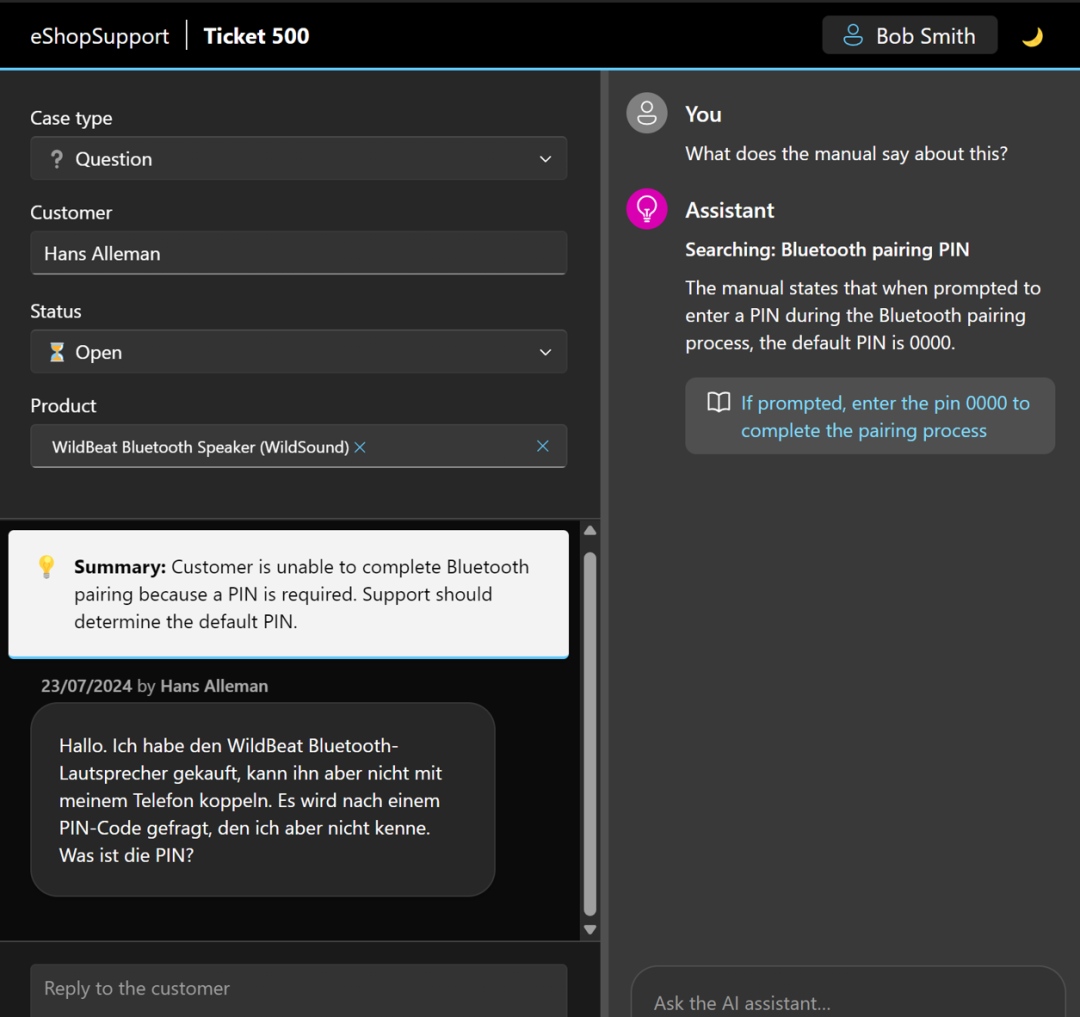
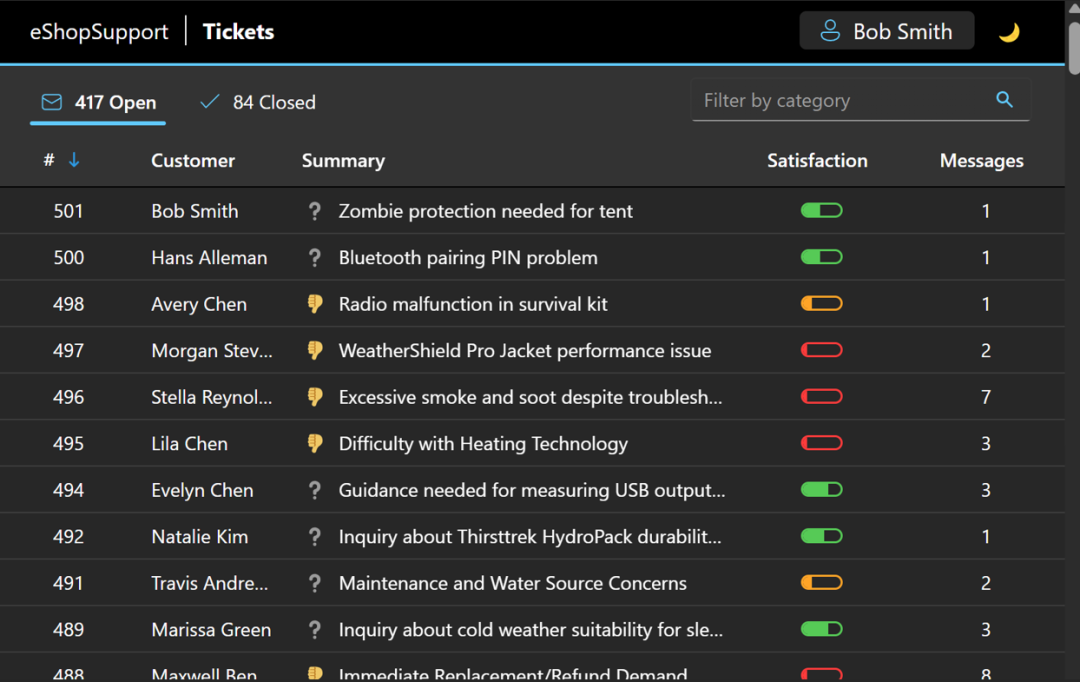
这个开源项目就使用了 Microsoft.Extensions.AI 作为和AI服务集成的抽象层,值得我们参考学习。
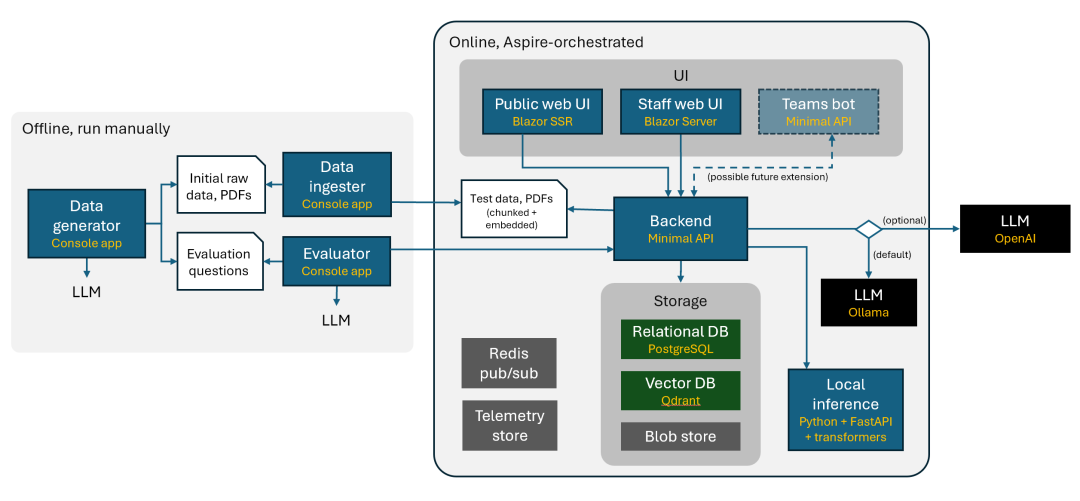
值得一提的是,它并没有说全部统一.NET技术栈,而是保留了Python作为机器学习模型训练和推理的,展示了技术异构在这个场景下的融合。
此外,基于Aspire来生成可观察和可靠的云原生应用也是这个项目带来的一个亮点,可以学习下。
小结
本文介绍了Microsoft.Extensions.AI的基本概念 和 基本使用,如果你也是.NET程序员希望参与AI应用的开发,那就快快了解和使用起来吧。
示例源码
GitHub:https://github.com/Coder-EdisonZhou/EDT.Agent.Demos
参考内容
mingupupu的文章:https://www.cnblogs.com/mingupupu/p/18651932
更多
Microsoft Learn: https://learn.microsoft.com/zh-cn/dotnet/ai/ai-extensions
eShopSupport: https://github.com/dotnet/eShopSupport

.NET程序员AI开发基座:Microsoft.Extensions.AI的更多相关文章
- 一名Delphi程序员的开发习惯
一名Delphi程序员的开发习惯 有关开发习惯的一些想法,如鲠在喉,不吐不快.究其发贴动机,当然不排除有骗取参与分的可能,但另一方面,也希望能给同行(念Xing)者提供一些 建议,或者参考(希望不是误 ...
- 程序员网站开发时应该注意的SEO问题
一.链接的统一性 搜索引擎排名最主要的因素就是网站内容和链接,假如网站内部链接不一致,在很大程度上直接影响着网站在搜索引擎中的排名.例如彩票专营店导航栏中的“首页”链接,程序员在开发时可能会有以下几种 ...
- Unity游戏设计与实现 南梦宫一线程序员的开发实例
图灵程序设计丛书 Unity游戏设计与实现:南梦宫一线程序员的开发实例(修订版) 加藤政树 (作者) 罗水东 (译者) c# 游戏 unity <内容提要>本书的作者是日本知 ...
- freecplus框架,Linux平台下C/C++程序员提高开发效率的利器
目录 一.freecplus框架简介 二.freecplus开源许可协议 三.freecplus框架内容 字符串操作 2.xml解析 3.日期时间 4.目录操作 5.文件操作 6.日志文件 7.参数文 ...
- .NET程序员项目开发必知必会—Dev环境中的集成测试用例执行时上下文环境检查(实战)
Microsoft.NET 解决方案,项目开发必知必会. 从这篇文章开始我将分享一系列我认为在实际工作中很有必要的一些.NET项目开发的核心技术点,所以我称为必知必会.尽管这一系列是使用.NET/C# ...
- JAVA程序员常用开发工具
1.JDK (Java Development Kit)Java开发工具集 SUN的Java不仅提了一个丰富的语言和运行环境,而且还提了一个免费的Java开发工具集(JDK).开发人员和最终用户可以利 ...
- 课程10:《黑马程序员_Hibernate开发资料》视频目录--没有细看
老师很厉害,讲得蛮详细的 \Hibernate视频教程\01_黑马程序员_Hibernate教程__Hibernate入门基础.avi; \Hibernate视频教程\02_黑马程序员_Hiberna ...
- 程序员便于开发的一些工具、网站、App。
http://www.kancloud.cn 关于文档,各种技术,框架的学习指南,API文档搜索方便. https://leetcode.com/ 程序员刷题面试网站,无聊的时候可以做一做.
- 程序员带你一步步分析AI如何玩Flappy Bird
以下内容来源于一次部门内部的分享,主要针对AI初学者,介绍包括CNN.Deep Q Network以及TensorFlow平台等内容.由于笔者并非深度学习算法研究者,因此以下更多从应用的角度对整个系统 ...
- Android Java 程序员必备开发工具
对于Java,有两种截然不同的观点:一种认为Java是最简单功能最强大的编程语言之一,另一种则表示这种编程语言既难用又复杂. 下面这些工具或许功能和作用不同,但是有着一个共同的主旨,那就是——它们都是 ...
随机推荐
- idea springboot 微服务批量启动
概要 在使用IDEA开发微服务的时候,微服务比较多,启动起来比较麻烦,下面介绍一下使用批量启动微服务的方法. 方法 编辑当前项目根目录下的 .idea\workspace.xml 文件. 找到 < ...
- 张高兴的 Raspberry Pi AI 开发指南:(三)将自定义模型编译为 Hailo NPU 的 .hef 模型
目录 Python 环境配置 转换 量化 编译 参考 在上一篇博客中,探讨了如何使用 Python 和 hailo_model_zoo 中预编译的模型来实现目标检测.本篇博客将深入介绍如何将用户自定义 ...
- PL/SQL中文乱码修正
我根据需求,,需要修改 数据库的部分表格的部分字段,然而在Update的时候,出现了中文乱码(Type字段). 此时,我用的是客户端,服务器没有安装,在另一台机器上,所以,我需要做的是修改客户端编码: ...
- QEMU固件模拟技术-stm32仿真分析及IRQ仿真实践
文章首发于 https://forum.butian.net/share/124 概述 上一篇文件介绍了luaqemu的实现,也提到luaqemu并没有对中断相关api进行封装,本节主要基于stm32 ...
- 【Amadeus原创】免费的FTP软件Filezilla终极使用方法
FTP是两台异地终端传输大文件的利器. 最火也是最好用的FTP软件,当属FileZilla. 使用方法: 一.安装FileZilla 服务器端安装server版,客户端安装正常版, 下载地址:http ...
- Smalltalk 和 VB
在水木看到一个帖为什么 Smalltalk 没落了?,提到两篇好文: http://www.wirfs-brock.com/allen/posts/914 https://gbracha.blogsp ...
- 对DenseTensor进行Transpose
ML.NET 是微软推出的为. NET 平台设计的深度学习库,通过这个东西(ModelBuilder)可以自己构建模型,并用于后来的推理与数据处理.虽然设计是很好的,但是由于现在的 AI 发展基本上都 ...
- P10952 聚会 题解
题目链接 题目大意 对于一棵树,求出一个点对于给定的三个点(以下简称 $x$,$y$,$z$ 且可以重复)距离最短. 题解 对于点的距离,不难想到 LCA 处理.而对于本题,则有两种情况. 第一问 三 ...
- Python的OCR工具pytesseract解决TesseractNotFoundError: tesseract is not installed or it's not in your PATH. See README file for more information环境变量问题
pytesseract是基于Python的OCR工具, 底层使用的是Google的Tesseract-OCR 引擎,支持识别图片中的文字,支持jpeg, png, gif, bmp, tiff等图片格 ...
- Qt数据库应用15-通用数据库同步
一.前言 数据库同步的主要功能是将本地的数据库记录同步到远程的数据库,其中数据库类型不限,比如本地是sqlite数据库,远程可以是mysql数据库,本地是mysql数据库,远程也可以是postgres ...