
html+css+js实现简单登陆注册页面
先看一下最终效果,登陆和注册
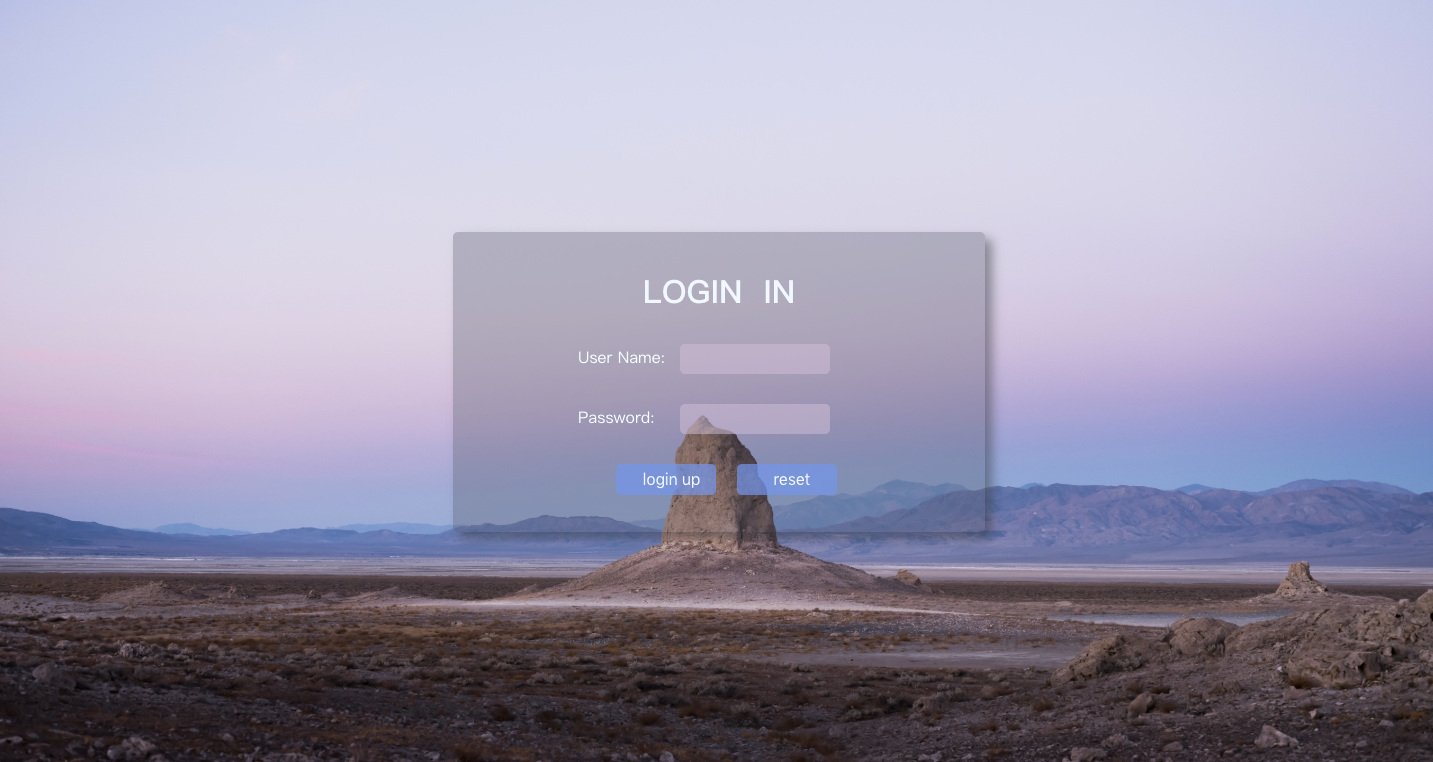
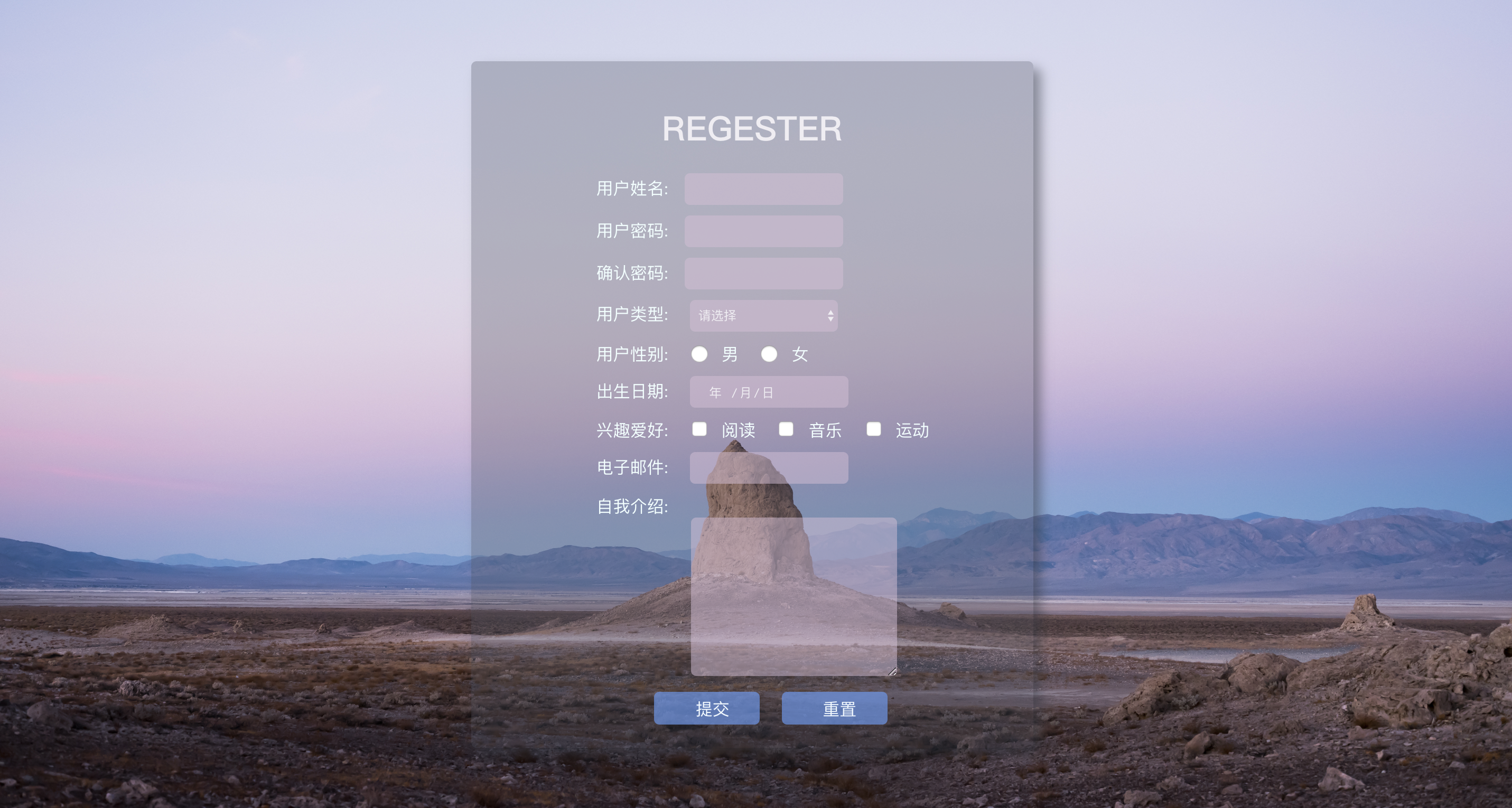
背景图片:

附源码:
login.html
<!DOCTYPE html>

<html lang="en">

<head>

    <meta charset="UTF-8">

    <title>login</title>

    <style>

        * {

            margin: 0;

            padding: 0;

        }

        html {

            height: 100%;

            width: 100%;

            overflow: hidden;

            margin: 0;

            padding: 0;

            background: url(Desert.jpg) no-repeat 0px 0px;

            background-repeat: no-repeat;

            background-size: 100% 100%;

            -moz-background-size: 100% 100%;

        }

        body {

            display: flex;

            align-items: center;

            justify-content: center;

            height: 100%;

        }

        #loginDiv {

            width: 37%;

            display: flex;

            justify-content: center;

            align-items: center;

            height: 300px;

            background-color: rgba(75, 81, 95, 0.3);

            box-shadow: 7px 7px 17px rgba(52, 56, 66, 0.5);

            border-radius: 5px;

        }

        #name_trip {

            margin-left: 50px;

            color: red;

        }

        p {

            margin-top: 30px;

            margin-left: 20px;

            color: azure;

        }

        input {

            margin-left: 15px;

            border-radius: 5px;

            border-style: hidden;

            height: 30px;

            width: 140px;

            background-color: rgba(216, 191, 216, 0.5);

            outline: none;

            color: #f0edf3;

            padding-left: 10px;

        }

        .button {

            border-color: cornsilk;

            background-color: rgba(100, 149, 237, .7);

            color: aliceblue;

            border-style: hidden;

            border-radius: 5px;

            width: 100px;

            height: 31px;

            font-size: 16px;

        }

    </style>

</head>

<body>

    <div id="loginDiv">

        <form action="" id="form">

            <h1 style="text-align: center;color: aliceblue;">LOGIN  IN</h1>

            <p>User Name:<input id="userNname" type="text"><label id="name_trip"></label></p>

            <p>Password:  <input id="password" type="password"><label id="password_trip"></label></p>

            <div style="text-align: center;margin-top: 30px;">

                <input type="submit" class="button" value="login up">

                <input type="reset" class="button" value="reset">

            </div>

        </form>

    </div>

</body>

</html>
register.html
 <!DOCTYPE html>

 <html lang="en">

 <head>

     <meta charset="UTF-8">

     <title>register</title>

     <style>

         * {

             margin: 0;

             padding: 0;

         }

         html {

             height: 100%;

             width: 100%;

             overflow: hidden;

             margin: 0;

             padding: 0;

             background: url(Desert.jpg) no-repeat 0px 0px;

             background-repeat: no-repeat;

             background-size: 100% 100%;

             -moz-background-size: 100% 100%;

         }

         body {

             display: flex;

             align-items: center;

             justify-content: center;

             height: 100%;

         }

         #loginDiv {

             width: 37%;

             display: flex;

             justify-content: center;

             align-items: center;

             height: 650px;

             background-color: rgba(75, 81, 95, 0.3);

             box-shadow: 7px 7px 17px rgba(52, 56, 66, 0.5);

             border-radius: 5px;

         }

         #name_trip {

             margin-left: 50px;

             color: red;

         }

         p,

         .sexDiv {

             margin-top: 10px;

             margin-left: 20px;

             color: azure;

         }

         .sexDiv>input,

         .hobby>input {

             width: 30px;

             height: 17px;

         }

         input,

         select {

             margin-left: 15px;

             border-radius: 5px;

             border-style: hidden;

             height: 30px;

             width: 140px;

             background-color: rgba(216, 191, 216, 0.5);

             outline: none;

             color: #f0edf3;

             padding-left: 10px;

         }

         .button {

             border-color: cornsilk;

             background-color: rgba(100, 149, 237, .7);

             color: aliceblue;

             border-style: hidden;

             border-radius: 5px;

             width: 100px;

             height: 31px;

             font-size: 16px;

         }

         .introduce {

             margin-left: 110px;

         }

         .introduce>textarea {

             background-color: rgba(216, 191, 216, 0.5);

             border-style: hidden;

             outline: none;

             border-radius: 5px;

         }

         h1 {

             text-align: center;

             margin-bottom: 20px;

             margin-top: 20px;

             color: #f0edf3;

         }

         b {

             margin-left: 50px;

             color: #FFEB3B;

             font-size: 10px;

             font-weight: initial;

         }

     </style>

 </head>

 <body>

     <div id="loginDiv">

         <form action="">

             <h1>REGESTER</h1>

             <p>用户姓名:<input id="userNname" type="text" autofocus required><label id="name_trip"></label></p>

             <p>用户密码:<input id="password" type="password" required><label id="password_trip"></label></p>

             <p>确认密码:<input id="surePassword" type="password" required><label id="surePassword_trip"></label></p>

             <p>

                 用户类型:

                 <select name="type" id="userType">

                     <option value="0">请选择</option>

                     <option value="1">普通类型</option>

                     <option value="2">VIP类型</option>

                 </select>

                 <label id="type_trip"></label>

             </p>

             <div class="sexDiv">

                 用户性别:

                 <input class="userSex" name="sex" value="boy" type="radio">男

                 <input class="userSex" name="sex" value="girl" type="radio">女

                 <label id="sex_trip"></label>

             </div>

             <p>

                 出生日期:

                 <input id="birthday" type="date">

                 <label id="birthday_trip"></label>

             </p>

             <p class="hobby">

                 兴趣爱好:

                 <input type="checkbox" name="hobby" value="read">阅读

                 <input type="checkbox" name="hobby" value="music">音乐

                 <input type="checkbox" name="hobby" value="sport">运动

                 <label id="hobby_trip"></label>

             </p>

             <p>

                 电子邮件:

                 <input id="email" type="email" required>

                 <label id="emil_trip"></label>

             </p>

             <p> 自我介绍:</p>

             <div class="introduce">

                 <textarea name="introduce" cols="30" id="introduceText" required rows="10"></textarea>

                 <label id="introduce_trip"></label>

             </div>

             <p style="text-align: center;">

                 <input type="submit" class="button" onblur="checkForm()" onclick="return submitT()" value="提交">

                 <input type="reset" class="button" value="重置">

             </p>

         </form>

     </div>

 </body>

 <script type="text/javascript">

     function trip(obj, trip) {

         document.getElementById(obj).innerHTML = "<b>" + trip + "</b>";

     }

     function checkSex() {

         var sexNum = document.getElementsByName("sex");

         var sex = "";

         for (let i = 0; i < sexNum.length; ++i) {

             if (sexNum[i].checked) {

                 sex = sexNum[i];

              }

          }

          if (sex == "") {

              trip("sex_trip", "ERROR!!");

              return false;

          } else {

              trip("sex_trip", "OK!!");

          }

     }

     function checkHobby() {

         var hobbyNum = document.getElementsByName("hobby");

         var hobby = "";

         for (let i = 0; i < hobbyNum.length; ++i) {

             if (hobbyNum[i].checked) {

                 hobby = hobbyNum[i];

             }

         }

         if (hobby == "") {

             trip("hobby_trip", "ERROR!!");

             return false;

         } else {

             trip("hobby_trip", "OK!!");

         }

     }

     function checkSelect() {

         var myselect = document.getElementById("userType");

         var index = myselect.selectedIndex;

         var checkValue = myselect.options[index].value;

         if (checkValue == 0) {

             trip("type_trip", "请选择!!");

             return false;

         } else {

             trip("type_trip", "OK!!");

         }

     }

     function checkForm() {

         checkSelect();

         checkHobby();

         checkSex();

         var trip = document.getElementsByName("em");

         var tripV = trip.innerHTML();

         //获取用户名输入项

         var userNname = document.getElementById("userNname");

         var uName = userNname.value;

         if (uName.length < 1 || uName.length > 10) {

             trip("name_trip", "账号长度为1-10位!!");

             return false;

         } else {

             trip("name_trip", "OK!!");

         }

         //密码长度大于6 和确认必须一致

         var password = document.getElementById("password");

         var userPass = password.value;

         if (userPass.length < 6) {

             trip("password_trip", "密码要>6位!!");

             return false;

         } else {

             trip("password_trip", "OK!!");

         }

         //获取确认密码框的值 var

         var surePassword = document.getElementById("surePassword");

         var surePass = surePassword.value;

         if (userPass != surePass) {

             trip("surePassword_trip", "两次密码不一致!!");

             return false;

         }

         //校验邮箱:/^([a-zA-Z0-9_-])+@([a-zA-Z0-9_-])+(\.[a-zA-Z0-9_-])+/

         var inputEmail = document.getElementById("email");

         var uEmail = inputEmail.value;

         if (!/^([a-zA-Z0-9_-])+@([a-zA-Z0-9_-])+(\.[a-zA-Z0-9_-])+/.test(uEmail)) {

             trip("emil_trip", "邮箱不合法!!");

             return false;

         } else {

             trip("emil_trip", "OK!!");

         }

         // 校验自我介绍

         var introduceText = document.getElementById("introduceText");

         var introduce = introduceText.value;

         if (introduce.length < 3 || uName.length > 60) {

             trip("introduce_trip", "长度为3-50字!!");

             return false;

         } else {

             trip("introduce_trip", "OK!!");

         }

         return true;

     }

     function submitT() {

         if (checkForm()) {

             return true;

         } else {

             return false;

         }

     }

 </script>

 </html>
html+css+js实现简单登陆注册页面的更多相关文章
- Android笔记-4-实现登陆页面并跳转和简单的注册页面
实现登陆页面并跳转和简单的注册页面 首先我们来看看布局的xml代码 login.xml <span style="font-family:Arial;font-size:18px; ...
- git冲突解决、线上分支合并、luffy项目后台登陆注册页面分析引入
今日内容概要 git冲突解决 线上分支合并 登陆注册页面(引入) 手机号是否存在接口 腾讯云短信申请 内容详细 1.git冲突解决 1.1 多人在同一分支开发,出现冲突 # 先将前端项目也做上传到 g ...
- 微信小程序-06-详解介绍.js 逻辑层文件-注册页面
上一篇介绍的是 app.js 逻辑层文件中注册程序,对应的每个分页面都会有的 js 文件中 page() 函数注册页面 微信小程序-06-详解介绍.js 逻辑层文件-注册页面 宝典官方文档: http ...
- Python tkinter 实现简单登陆注册 基于B/S三层体系结构,实现用户身份验证
Python tkinter 实现简单登陆注册 最终效果 开始界面 注册 登陆 源码 login.py # encoding=utf-8 from tkinter import * from ...
- js简单的注册页面
<!DOCTYPE html><html lang="en"><head> <meta charset="UTF-8" ...
- AJAX实现简单的注册页面异步请求
p { margin: 0px; padding: 0px } AJAX简介 (1)AJAX = 异步 JavaScript 和 XML. (2)AJAX 是一种用于创建快速动态网页的技术. (3)通 ...
- 使用Html和ashx文件实现其简单的注册页面
记得上一次博客中实现的是其登录页面,其实学会了登录页面,注册页面自然就知道怎么写啦,都是一个意思的,但是今天不知道怎么个情况,写一个注册页面程序 中 一直在出错,大的问题小的问题一直出错,似乎是不在状 ...
- java 24 - 11 GUI之制作登陆注册页面
简单说说,懒得发了... 步骤: A:首先写出登陆注册需要用到类以及代码(IO流) B:然后创建登陆窗口和注册窗口 C:各个监听事件: a:登录窗口 1.重置:把2个文本框的内容全部清空 2.注册:关 ...
- javaweb 登陆注册页面
视图的数据修改,表中也修改引用工具类用<%@ page import=""%> <%@ page import="java.util.Date" ...
随机推荐
- OpenCV-----Numpy数组
Nunmpy数组包含: 强大的N维数组对象 复杂的(广播)功能 集成C / C ++和Fortran代码的工具 有用的线性代数,傅立叶变换和随机数功能 遍历与修改数组中的所有像素点 #对所有像素进行循 ...
- IIS 发布网站出现<compilation debug="true" targetFramework="4.6.1">错误
参考:http://www.mamicode.com/info-detail-1180214.html 原因是环境只安装到.net Framework 4.5 的版本(.net版本向下兼容 ) 解决方 ...
- python实现不同条件下单据体的颜色不一样,比如直接成本分析表中关闭的细目显示为黄色
#引入clr运行库 import clr #添加对cloud插件开发的常用组件的引用 clr.AddReference('Kingdee.BOS') clr.AddReference('Kingdee ...
- Asp.Net MVC 5使用Identity之简单的注册和登陆
由于.Net MVC 5登陆和注册方式有很多种,但是Identity方式去实现或许会更简单更容易理解 首先新建一个项目 其次如下选择Empty和MVC的选项 然后打开NuGet包管理器分别安装几个包 ...
- 04.Linux-CentOS系统sudo权限配置
visudo权限配置普通用户的使用权限范围配置文件: (请根据自己公司需求配置) [root@localhost ~]# visudo ## Allow root to run any command ...
- Airbnb JavaScript 编码风格指南(2018年最新版)
原网址 : https://segmentfault.com/a/1190000013040555 类型 基本类型:直接存取 string number boolean null undefined ...
- CentOS7修改为国内yum源
备份源yum源 如果是国内下载的CentOS很可能国内YUM源已经设置好了. 备份/etc/yum.repos.d/下的*.repo文件. 在CentOS中配置使用网易和阿里的开源镜像 wget ht ...
- 【学习】005 线程池原理分析&锁的深度化
线程池 什么是线程池 Java中的线程池是运用场景最多的并发框架,几乎所有需要异步或并发执行任务的程序 都可以使用线程池.在开发过程中,合理地使用线程池能够带来3个好处. 第一:降低资源消耗.通过重复 ...
- ps:图层知识
如果我们要改变下左图上方的蓝色小球位置,就需要先创建一个符合小球大小的选区,这并不困难,可以使用椭圆选框工具来创建一个正圆的选区(可通过[空格 CTRL 单击图像]放大图像).之后使用移动工具移动选区 ...
- man arch
ARCH(1) Linux Programmer?. Manual/Linux程序员手册 ARCH(1) NAME/名称 arch - print machine arch ...