
html+css+js实现简单登陆注册页面
先看一下最终效果,登陆和注册
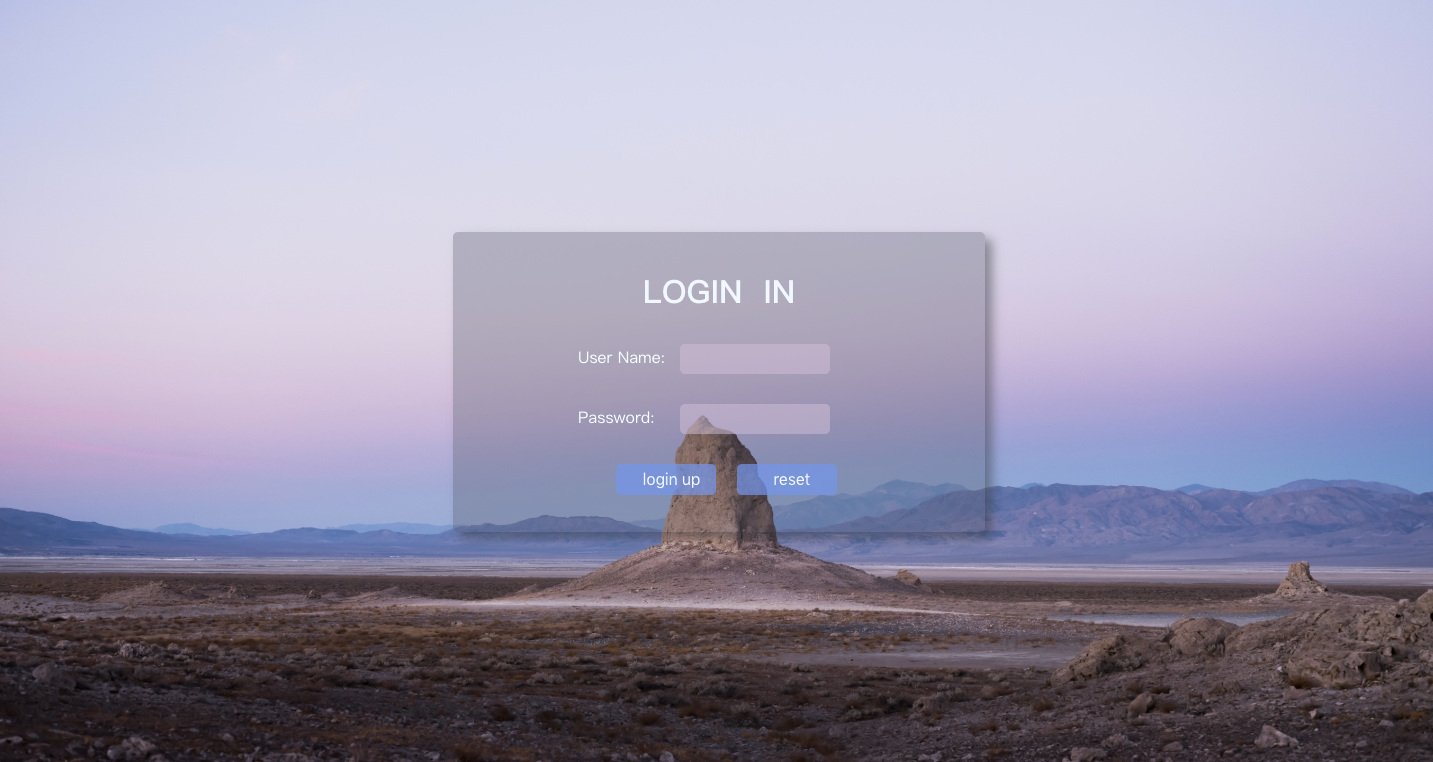
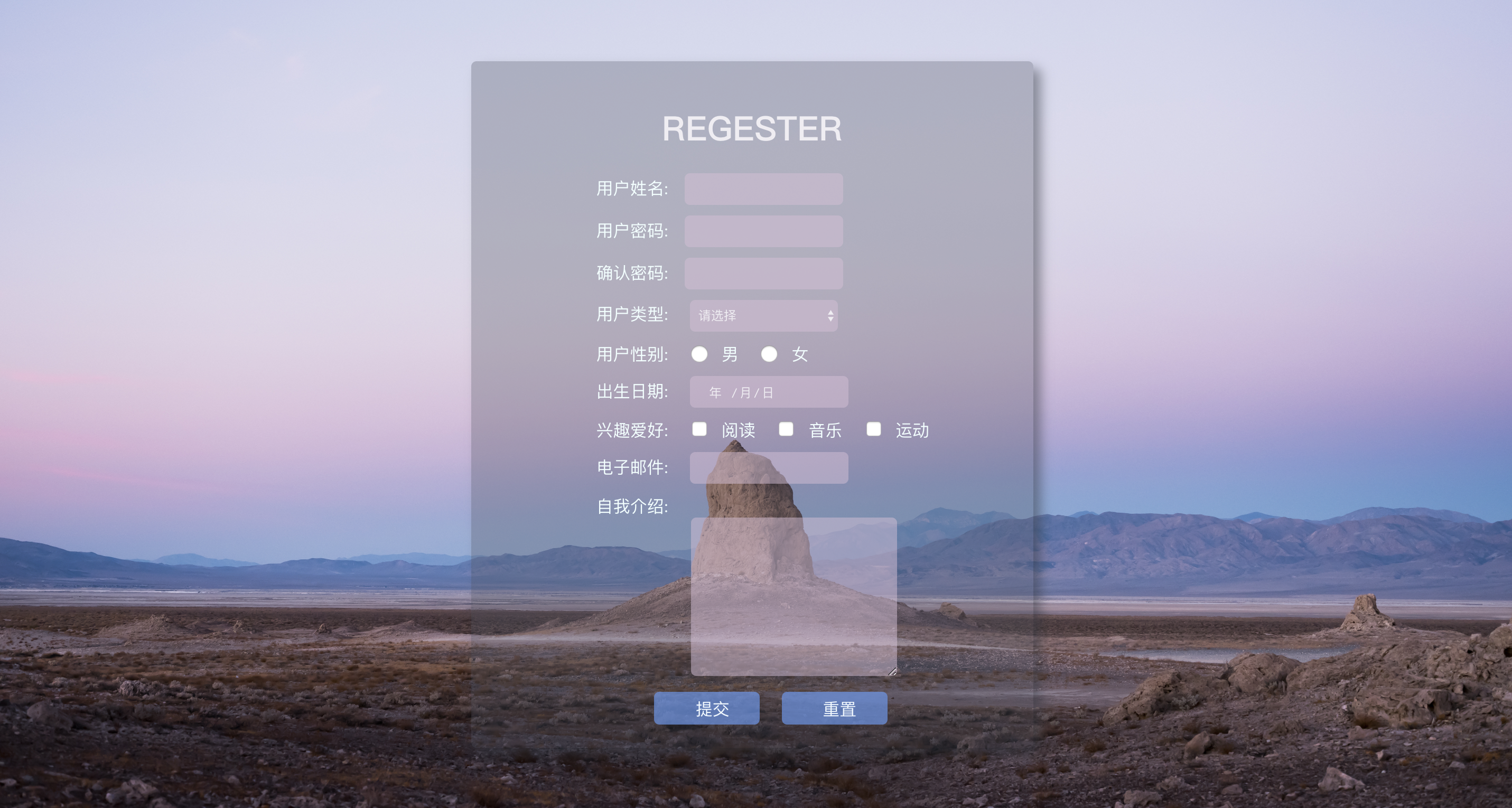
背景图片:

附源码:
login.html
<!DOCTYPE html>

<html lang="en">

<head>

    <meta charset="UTF-8">

    <title>login</title>

    <style>

        * {

            margin: 0;

            padding: 0;

        }

        html {

            height: 100%;

            width: 100%;

            overflow: hidden;

            margin: 0;

            padding: 0;

            background: url(Desert.jpg) no-repeat 0px 0px;

            background-repeat: no-repeat;

            background-size: 100% 100%;

            -moz-background-size: 100% 100%;

        }

        body {

            display: flex;

            align-items: center;

            justify-content: center;

            height: 100%;

        }

        #loginDiv {

            width: 37%;

            display: flex;

            justify-content: center;

            align-items: center;

            height: 300px;

            background-color: rgba(75, 81, 95, 0.3);

            box-shadow: 7px 7px 17px rgba(52, 56, 66, 0.5);

            border-radius: 5px;

        }

        #name_trip {

            margin-left: 50px;

            color: red;

        }

        p {

            margin-top: 30px;

            margin-left: 20px;

            color: azure;

        }

        input {

            margin-left: 15px;

            border-radius: 5px;

            border-style: hidden;

            height: 30px;

            width: 140px;

            background-color: rgba(216, 191, 216, 0.5);

            outline: none;

            color: #f0edf3;

            padding-left: 10px;

        }

        .button {

            border-color: cornsilk;

            background-color: rgba(100, 149, 237, .7);

            color: aliceblue;

            border-style: hidden;

            border-radius: 5px;

            width: 100px;

            height: 31px;

            font-size: 16px;

        }

    </style>

</head>

<body>

    <div id="loginDiv">

        <form action="" id="form">

            <h1 style="text-align: center;color: aliceblue;">LOGIN  IN</h1>

            <p>User Name:<input id="userNname" type="text"><label id="name_trip"></label></p>

            <p>Password:  <input id="password" type="password"><label id="password_trip"></label></p>

            <div style="text-align: center;margin-top: 30px;">

                <input type="submit" class="button" value="login up">

                <input type="reset" class="button" value="reset">

            </div>

        </form>

    </div>

</body>

</html>
register.html
 <!DOCTYPE html>

 <html lang="en">

 <head>

     <meta charset="UTF-8">

     <title>register</title>

     <style>

         * {

             margin: 0;

             padding: 0;

         }

         html {

             height: 100%;

             width: 100%;

             overflow: hidden;

             margin: 0;

             padding: 0;

             background: url(Desert.jpg) no-repeat 0px 0px;

             background-repeat: no-repeat;

             background-size: 100% 100%;

             -moz-background-size: 100% 100%;

         }

         body {

             display: flex;

             align-items: center;

             justify-content: center;

             height: 100%;

         }

         #loginDiv {

             width: 37%;

             display: flex;

             justify-content: center;

             align-items: center;

             height: 650px;

             background-color: rgba(75, 81, 95, 0.3);

             box-shadow: 7px 7px 17px rgba(52, 56, 66, 0.5);

             border-radius: 5px;

         }

         #name_trip {

             margin-left: 50px;

             color: red;

         }

         p,

         .sexDiv {

             margin-top: 10px;

             margin-left: 20px;

             color: azure;

         }

         .sexDiv>input,

         .hobby>input {

             width: 30px;

             height: 17px;

         }

         input,

         select {

             margin-left: 15px;

             border-radius: 5px;

             border-style: hidden;

             height: 30px;

             width: 140px;

             background-color: rgba(216, 191, 216, 0.5);

             outline: none;

             color: #f0edf3;

             padding-left: 10px;

         }

         .button {

             border-color: cornsilk;

             background-color: rgba(100, 149, 237, .7);

             color: aliceblue;

             border-style: hidden;

             border-radius: 5px;

             width: 100px;

             height: 31px;

             font-size: 16px;

         }

         .introduce {

             margin-left: 110px;

         }

         .introduce>textarea {

             background-color: rgba(216, 191, 216, 0.5);

             border-style: hidden;

             outline: none;

             border-radius: 5px;

         }

         h1 {

             text-align: center;

             margin-bottom: 20px;

             margin-top: 20px;

             color: #f0edf3;

         }

         b {

             margin-left: 50px;

             color: #FFEB3B;

             font-size: 10px;

             font-weight: initial;

         }

     </style>

 </head>

 <body>

     <div id="loginDiv">

         <form action="">

             <h1>REGESTER</h1>

             <p>用户姓名:<input id="userNname" type="text" autofocus required><label id="name_trip"></label></p>

             <p>用户密码:<input id="password" type="password" required><label id="password_trip"></label></p>

             <p>确认密码:<input id="surePassword" type="password" required><label id="surePassword_trip"></label></p>

             <p>

                 用户类型:

                 <select name="type" id="userType">

                     <option value="0">请选择</option>

                     <option value="1">普通类型</option>

                     <option value="2">VIP类型</option>

                 </select>

                 <label id="type_trip"></label>

             </p>

             <div class="sexDiv">

                 用户性别:

                 <input class="userSex" name="sex" value="boy" type="radio">男

                 <input class="userSex" name="sex" value="girl" type="radio">女

                 <label id="sex_trip"></label>

             </div>

             <p>

                 出生日期:

                 <input id="birthday" type="date">

                 <label id="birthday_trip"></label>

             </p>

             <p class="hobby">

                 兴趣爱好:

                 <input type="checkbox" name="hobby" value="read">阅读

                 <input type="checkbox" name="hobby" value="music">音乐

                 <input type="checkbox" name="hobby" value="sport">运动

                 <label id="hobby_trip"></label>

             </p>

             <p>

                 电子邮件:

                 <input id="email" type="email" required>

                 <label id="emil_trip"></label>

             </p>

             <p> 自我介绍:</p>

             <div class="introduce">

                 <textarea name="introduce" cols="30" id="introduceText" required rows="10"></textarea>

                 <label id="introduce_trip"></label>

             </div>

             <p style="text-align: center;">

                 <input type="submit" class="button" onblur="checkForm()" onclick="return submitT()" value="提交">

                 <input type="reset" class="button" value="重置">

             </p>

         </form>

     </div>

 </body>

 <script type="text/javascript">

     function trip(obj, trip) {

         document.getElementById(obj).innerHTML = "<b>" + trip + "</b>";

     }

     function checkSex() {

         var sexNum = document.getElementsByName("sex");

         var sex = "";

         for (let i = 0; i < sexNum.length; ++i) {

             if (sexNum[i].checked) {

                 sex = sexNum[i];

              }

          }

          if (sex == "") {

              trip("sex_trip", "ERROR!!");

              return false;

          } else {

              trip("sex_trip", "OK!!");

          }

     }

     function checkHobby() {

         var hobbyNum = document.getElementsByName("hobby");

         var hobby = "";

         for (let i = 0; i < hobbyNum.length; ++i) {

             if (hobbyNum[i].checked) {

                 hobby = hobbyNum[i];

             }

         }

         if (hobby == "") {

             trip("hobby_trip", "ERROR!!");

             return false;

         } else {

             trip("hobby_trip", "OK!!");

         }

     }

     function checkSelect() {

         var myselect = document.getElementById("userType");

         var index = myselect.selectedIndex;

         var checkValue = myselect.options[index].value;

         if (checkValue == 0) {

             trip("type_trip", "请选择!!");

             return false;

         } else {

             trip("type_trip", "OK!!");

         }

     }

     function checkForm() {

         checkSelect();

         checkHobby();

         checkSex();

         var trip = document.getElementsByName("em");

         var tripV = trip.innerHTML();

         //获取用户名输入项

         var userNname = document.getElementById("userNname");

         var uName = userNname.value;

         if (uName.length < 1 || uName.length > 10) {

             trip("name_trip", "账号长度为1-10位!!");

             return false;

         } else {

             trip("name_trip", "OK!!");

         }

         //密码长度大于6 和确认必须一致

         var password = document.getElementById("password");

         var userPass = password.value;

         if (userPass.length < 6) {

             trip("password_trip", "密码要>6位!!");

             return false;

         } else {

             trip("password_trip", "OK!!");

         }

         //获取确认密码框的值 var

         var surePassword = document.getElementById("surePassword");

         var surePass = surePassword.value;

         if (userPass != surePass) {

             trip("surePassword_trip", "两次密码不一致!!");

             return false;

         }

         //校验邮箱:/^([a-zA-Z0-9_-])+@([a-zA-Z0-9_-])+(\.[a-zA-Z0-9_-])+/

         var inputEmail = document.getElementById("email");

         var uEmail = inputEmail.value;

         if (!/^([a-zA-Z0-9_-])+@([a-zA-Z0-9_-])+(\.[a-zA-Z0-9_-])+/.test(uEmail)) {

             trip("emil_trip", "邮箱不合法!!");

             return false;

         } else {

             trip("emil_trip", "OK!!");

         }

         // 校验自我介绍

         var introduceText = document.getElementById("introduceText");

         var introduce = introduceText.value;

         if (introduce.length < 3 || uName.length > 60) {

             trip("introduce_trip", "长度为3-50字!!");

             return false;

         } else {

             trip("introduce_trip", "OK!!");

         }

         return true;

     }

     function submitT() {

         if (checkForm()) {

             return true;

         } else {

             return false;

         }

     }

 </script>

 </html>
html+css+js实现简单登陆注册页面的更多相关文章
- Android笔记-4-实现登陆页面并跳转和简单的注册页面
实现登陆页面并跳转和简单的注册页面 首先我们来看看布局的xml代码 login.xml <span style="font-family:Arial;font-size:18px; ...
- git冲突解决、线上分支合并、luffy项目后台登陆注册页面分析引入
今日内容概要 git冲突解决 线上分支合并 登陆注册页面(引入) 手机号是否存在接口 腾讯云短信申请 内容详细 1.git冲突解决 1.1 多人在同一分支开发,出现冲突 # 先将前端项目也做上传到 g ...
- 微信小程序-06-详解介绍.js 逻辑层文件-注册页面
上一篇介绍的是 app.js 逻辑层文件中注册程序,对应的每个分页面都会有的 js 文件中 page() 函数注册页面 微信小程序-06-详解介绍.js 逻辑层文件-注册页面 宝典官方文档: http ...
- Python tkinter 实现简单登陆注册 基于B/S三层体系结构,实现用户身份验证
Python tkinter 实现简单登陆注册 最终效果 开始界面 注册 登陆 源码 login.py # encoding=utf-8 from tkinter import * from ...
- js简单的注册页面
<!DOCTYPE html><html lang="en"><head> <meta charset="UTF-8" ...
- AJAX实现简单的注册页面异步请求
p { margin: 0px; padding: 0px } AJAX简介 (1)AJAX = 异步 JavaScript 和 XML. (2)AJAX 是一种用于创建快速动态网页的技术. (3)通 ...
- 使用Html和ashx文件实现其简单的注册页面
记得上一次博客中实现的是其登录页面,其实学会了登录页面,注册页面自然就知道怎么写啦,都是一个意思的,但是今天不知道怎么个情况,写一个注册页面程序 中 一直在出错,大的问题小的问题一直出错,似乎是不在状 ...
- java 24 - 11 GUI之制作登陆注册页面
简单说说,懒得发了... 步骤: A:首先写出登陆注册需要用到类以及代码(IO流) B:然后创建登陆窗口和注册窗口 C:各个监听事件: a:登录窗口 1.重置:把2个文本框的内容全部清空 2.注册:关 ...
- javaweb 登陆注册页面
视图的数据修改,表中也修改引用工具类用<%@ page import=""%> <%@ page import="java.util.Date" ...
随机推荐
- 29、前端知识点--session\cookie\token
Java Token的原理和生成使用机制 https://yq.aliyun.com/articles/594217 Cookies Session Token 三者区别及应用场景 https://w ...
- 第二讲shiro异常及执行流程
在认证过程中,有一个父异常为:AuthenticationException 该异常有几个子类,分别对应不同的异常情况: (1)DisabledAccountException:账户失效异常 (2)E ...
- time模块的time方法、perf_counter方法和process_time方法的区别
1. time.time()方法 返回自纪元以来的秒数作为浮点数,但是时期的具体日期和闰秒的处理取决于使用的平台.比如:在Windows和大多数Unix系统上,纪元是1970年1月1日00:00:00 ...
- linux 修改 rsyncd.conf 配置文件
[root@rsync-server-1 ~]# cat > /etc/rsyncd.conf << EOF #Rsync server #created by sunsky 00: ...
- MYSQL学习笔记——sql语句优化之索引
上一篇博客讲了可以使用慢查询日志定位耗时sql,使用explain命令查看mysql的执行计划,以及使用profiling工具查看语句执行真正耗时的地方,当定位了耗时之后怎样优化呢?这篇博客会介绍my ...
- linux基础知识(三)
添加用户 •useradd -d 家目录 -g 组名 -G 组集合(逗号间隔) -p 密码 -s 用户shell程序 用户名 •useradd -d /usr/local/nginx/ -g ngin ...
- generator (2)
generator 的使用 第一次调用next 时 传参没有任何意义 打印不出来任何结果 function * read(){ let a = yield 1; console.log(a); ...
- Oracle Internals Notes Redo Write Triggers
There are four conditions that cause LGWR to perform a redo write. When LGWR is idle, it sleeps on a ...
- hdu 6050: Funny Function (2017 多校第二场 1006) 【找规律】
题目链接 暴力打个表找下规律就好了,比赛时看出规律来了倒是,然而看这道题看得太晚了,而且高中的那些数列相关的技巧生疏了好多,然后推公式就比较慢..其实还是自身菜啊.. 公式是 #include< ...
- 【leetcode】870. Advantage Shuffle
题目如下: 解题思路:几千年前,一个古人曾经解过这个题目,他的名字叫做田忌,后人称他的解题思想叫做“田忌赛马”.言归正传,本题就是一个田忌赛马的问题,先将A与B进行排序,然后判断A[0]与B[0]的大 ...