
JarvisOJ 逆向Writeup
1. 爬楼梯
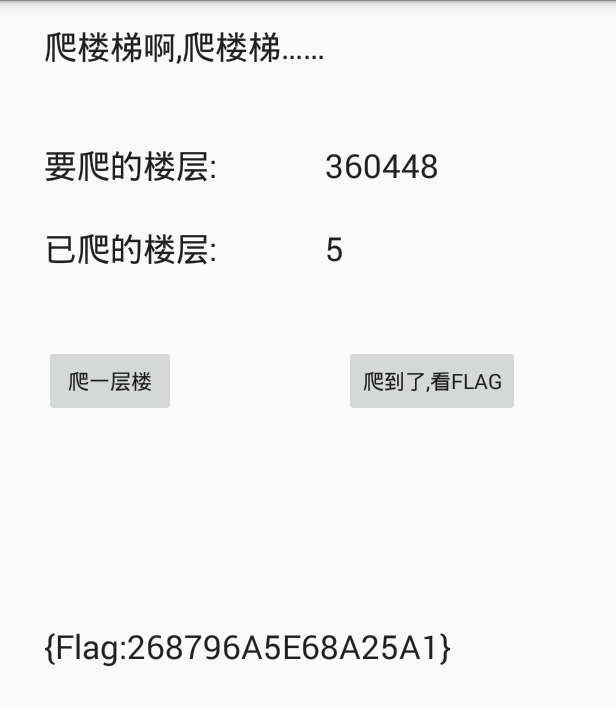
先运行apk,查看具体的功能

爬一层楼是可以点击的,爬到了,看FLAG是不可以点击的.我们可以大致的了解到到了具体的楼层才可以看到flag,多次打开软件,楼层数目是随机的.
用APKIDE反编译后,用jd-gui查看源码
package com.ctf.test.ctf_100;

import android.os.Bundle;

import android.os.Debug;

import android.support.v7.app.AppCompatActivity;

import android.view.View;

import android.widget.Button;

import android.widget.TextView;

import java.util.Random;

public class MainActivity

  extends AppCompatActivity

{

  public int has_gone_int;    //已经爬的楼层

  public int to_reach_int;    //要爬的楼层

  static

  {

    if (!Debug.isDebuggerConnected()) {

      System.loadLibrary("ctf");  //导入库文件

    }

  }

  public void Btn_up_onclick(View paramView)

  {

    this.has_gone_int += 1;    //每点击一次按钮,已经爬的楼层+1.

    paramView = "" + this.has_gone_int;

    ((TextView)findViewById(2131492948)).setText(paramView);

    if (this.to_reach_int <= this.has_gone_int) {    //如果已经爬的楼层 大于或等于要爬的楼层,设置按钮空间点击有效

      ((Button)findViewById(2131492950)).setClickable(true);

    }

  }

  public void btn2_onclick(View paramView)

  {

    ((TextView)findViewById(2131492951)).setText("{Flag:" + get_flag(this.to_reach_int) + "}");  //显示flag

  }

  public native String get_flag(int paramInt);

  protected void onCreate(Bundle paramBundle)  //创建

  {

    super.onCreate(paramBundle);

    setContentView(2130968601);

    ((Button)findViewById(2131492950)).setClickable(false);  //设置显示flag控件按钮点击无效.也就是说刚开始我们是不能点击的,需要一定的条件.
                                     //如果我们将此处改为true,那么开始的时候就可以点击了.

    this.has_gone_int = 0;      //设置已经爬的楼层的默认值为0

    paramBundle = new Random();

    for (this.to_reach_int = paramBundle.nextInt();; this.to_reach_int = paramBundle.nextInt())

    {

      if (this.to_reach_int < 0) {

        this.to_reach_int *= -1;

      }

      if (5 < this.to_reach_int)

      {

        this.to_reach_int %= 32;

        this.to_reach_int *= 16384;

        ((TextView)findViewById(2131492947)).setText("" + this.to_reach_int);

        ((TextView)findViewById(2131492951)).setText("");

        return;

      }

    }

  }

}
从源码中我们有非常多的思路来显示flag,因为APKIDE我无法回编译成功,所以用android killer来进行回编译成功了
查看smail源码,查看setclickable字符串,
    const/4 v3, 0x1

    invoke-virtual {v0, v3}, Landroid/widget/Button;->setClickable(Z)V
invoke-virtual {v0, v5}, Landroid/widget/Button;->setClickable(Z)V
有两处调用了setClickable函数,v3和v5的分别是0x0,0x1,这就是传参中的true和false.我们把上面中的false改为true.然后就可以获得flag
FindPass
用jadx打开apk,找到主要函数
    public void GetKey(View view) {

        String fkey = ((EditText) findViewById(R.id.editText1)).getText().toString();

        if (TextUtils.isEmpty(fkey.trim())) {    //如果输入的字符串为空,则输出下面的话

            Toast.makeText(this, "请输入key值!", 1).show();

            return;

        }

        char[] ekey = getResources().getString(R.string.fkey).toCharArray();  //从资源中获取字符串ekey

        int changdu = ekey.length;  //资源中的字符串长度

        char[] cha = new char[1024];  //新建一个1024长度的字符数组

        try {

            new InputStreamReader(getResources().getAssets().open("src.jpg")).read(cha);  //读取一张图片的数据到cha数组中

        } catch (Exception e) {

            e.printStackTrace();

        }

        for (int i = 0; i < changdu; i++) {

            int temp2 = cha[ekey[i]] % 10;

            if (i % 2 == 1) {

                ekey[i] = (char) (ekey[i] + temp2);

            } else {

                ekey[i] = (char) (ekey[i] - temp2);

            }

        }

        if (fkey.equals(new String(ekey))) {

            Toast.makeText(this, "恭喜您,输入正确!Flag==flag{Key}", 1).show();

        } else {

            Toast.makeText(this, "not right! lol。。。。", 1).show();

        }

    }
在这里也学到了一些新的知识,android用id定位某些资源,将这些资源都放在xml文件中.从中提取出来fkey字符串的值
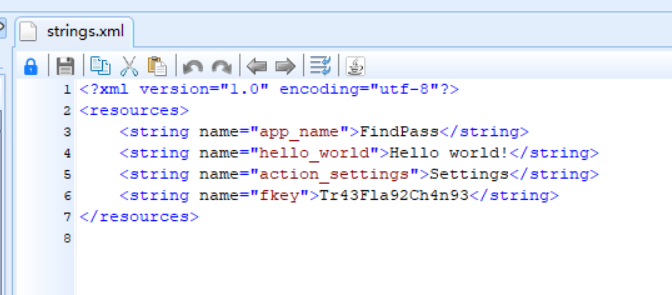
我们可以看到就是用图片的字节数据和资源中的字符串进行运算就可以得到flag.一直弄不出来,后来看别人的WP,写出来了.原来是数据类型的问题.InputStreamReader函数读取8位的字节流.也就是说是byte.它的取值范围从-128~127.而python的取值范围是0~255.所以flag中有一位出现错误,总是找不出来错误原因.贴上抄别人的代码.图片资源从解压的APK中获取.
 ekey='Tr43Fla92Ch4n93'

 changdu =len(ekey)

 cha =[]

 flag=''

 f =open('src.jpg','rb')

 f.seek(0,0)

 for i in range(0,1024):

     byte = f.read(1)

     cha.append(ord(byte))

 #print(cha)

 for i in range(len(ekey)):

     if cha[ord(ekey[i])]<128:

         temp2 = cha[ord(ekey[i])] % 10

     else :

         temp2 =(-(cha[ord(ekey[i])]%128))%10

     if i % 2 == 1:

         flag +=chr(ord(ekey[i]) + temp2)

     else:

         flag +=chr(ord(ekey[i]) -temp2)

 print(flag)

 #Qv49CmZB2Df4jB-
最后运行模拟器验证,发现终于对了.
Classical Crackme
先运行查看信息,发现一个输入框,查壳.用C#写的直接去看源码
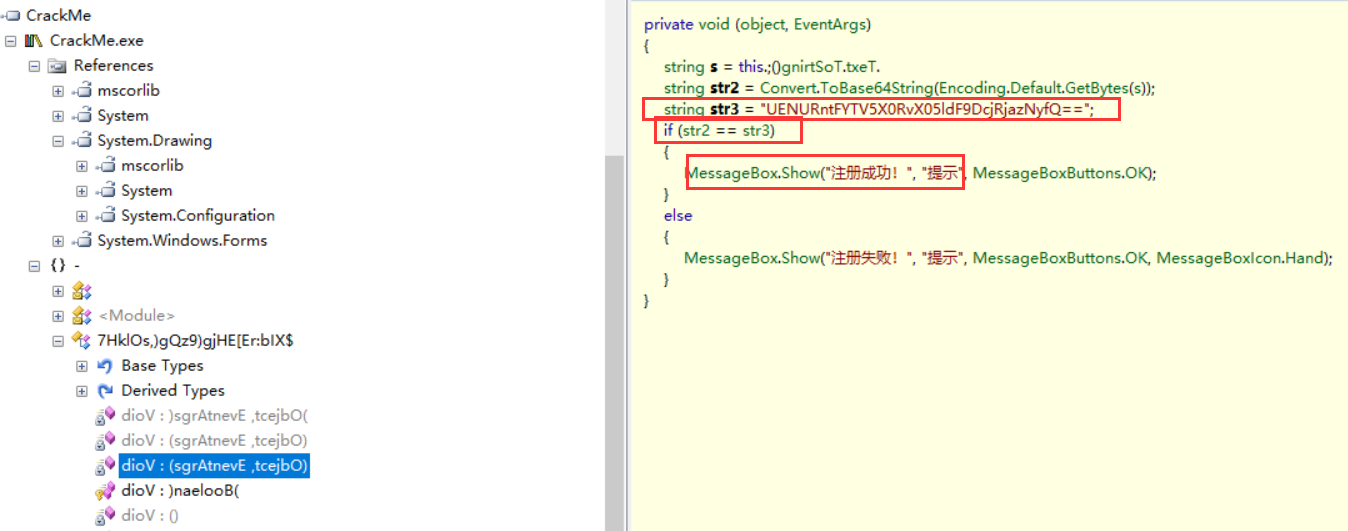
找到了关键信息,base64解密得到flag
JarvisOJ 逆向Writeup的更多相关文章
- 简单的Elf逆向Writeup
ElfCrackMe1 html,body,div,span,applet,object,iframe,h1,h2,h3,h4,h5,h6,p,blockquote,pre,a,abbr,acrony ...
- IDF-CTF-简单的Elf逆向Writeup
ElfCrackMe1 *:first-child { margin-top: 0 !important; } body>*:last-child { margin-bottom: 0 !imp ...
- IDF实验室-简单的ELF逆向 writeup
题目:http://ctf.idf.cn/index.php?g=game&m=article&a=index&id=39 下载得到ElfCrackMe1文件,直接用IDA打开 ...
- 社团的CTF逆向题WriteUp
最近社团弄了CTF比赛,然后我就帮忙写了逆向的题目,这里写一下WriteUp,题目和源码在附件中给出 一个简单的逆向:one_jmp_to_flag.exe 这题算是签到题,直接OD智能搜索就完事了, ...
- JarvisOJ平台Web题部分writeup
PORT51 题目链接:http://web.jarvisoj.com:32770/ 这道题本来以为是访问服务器的51号端口,但是想想又不太对,应该是本地的51号端口访问服务器 想着用linux下的c ...
- 【Data URL】【RE】【bugku】逆向入门writeup
在写wp之前先来了解一下Data URL是什么 Data URL 在浏览器向服务端发送请求来引用资源时,一般浏览器都有同一时间并发请求数不超过4个的限制.所以如果一个网页需要引用大量的服务端资源,就会 ...
- DDCTF2019逆向分析前俩题WriteUP
DDCTF2019 笔者做了前俩道题.冷不丁过去一个月了.现在在此做一下WriteUp:题目链接: 1:题目1 2:题目2 reverse1:writeup: 1.程序打开后如下所示 2.查壳结果为U ...
- 实验吧逆向catalyst-system Writeup
下载之后查看知道为ELF文件,linux中执行之后发现很慢: 拖入ida中查看发现有循环调用 sleep 函数: 这是已经改过了,edit -> patch program -> chan ...
- 南京邮电大学 CTF 逆向部分 Writeup
Hello,RE! 提示 IDA 中按 R . Google 到 IDA 中 R 快捷键是 Character ,转为字符串. 丢进 IDA(虽然我并不会使用 IDA 有个 strcmp 函数,比较 ...
随机推荐
- 诊断:MRP0: Background Media Recovery process shutdown with error ORA-19909
oracle12c data guard,从库无法应用日志,检查alert日至发现 2019-10-21T14:55:40.087819+08:00 MRP0: Background Media Re ...
- Codeforces 1093C (思维+贪心)
题面 传送门 题目大意: 有一个长n(n为偶数)的序列a 已知a满足 \(a_1≤a_2≤⋯≤a_n\) 给出一个长度为\(\frac{n}{2}\) 的序列b,定义\(b_i=a_i+a_{n-i+ ...
- python模块 __name=='__main__' 用法
python模块 __name=='__main__' 用法1.ceshi_mod1.pydef test1(): print('111111')def test2(): print('2222')i ...
- TCL环境检查
set w [open 1.txt w+] foreach a [info var] { if { [llength [array name $a]]==0 } { puts $w $a:[set $ ...
- MIT 6.824学习笔记1 MapReduce
本节内容:Lect 1 MapReduce框架的执行过程: master分发任务,把map任务和reduce任务分发下去 map worker读取输入,进行map计算写入本地临时文件 map任务完成通 ...
- BUUCTF--reverse3
测试文件:https://buuoj.cn/files/aa4f6c7e8d5171d520b95420ee570e79/a9d22a0e-928d-4bb4-8525-e38c9481469e.ra ...
- Saying goodbye to Flash in Chrome一代人的回忆FLASH
一早打开chorme就推送了这条FLASH将在2020年推出CHORME 想起了当年风靡全球的flash热潮,游戏视频动画,都由flash运行,最熟悉的童年游戏4399,小时候的天堂. 说起这个不得不 ...
- jquery+html实现前端的上传图片预览
就是这样的一个功能,点击加号,出现图片选择,然后选择好以后生成预览. input那么丑,UI看不惯,一定要改成加号 我就用了fa的图标,外部套一个bootstrap4中的class:borde ...
- while例子 求1到100的和
- (ACM模板)映射map
#include<iostream> #include<cstdio> #include<map> using namespace std; int main() ...