
Html5 学习笔记 【PC固定布局】 实战5 咨询页面 侧栏
最终效果图:
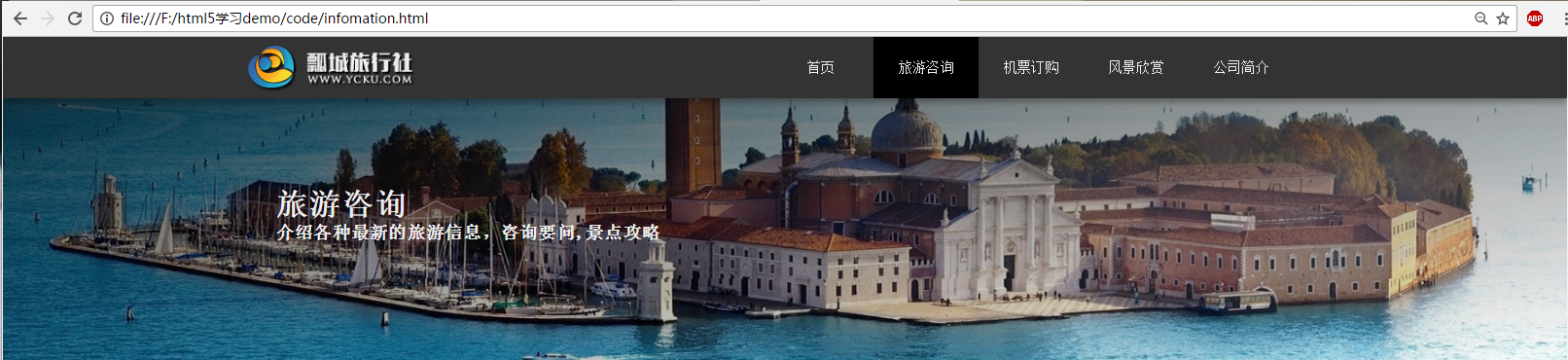
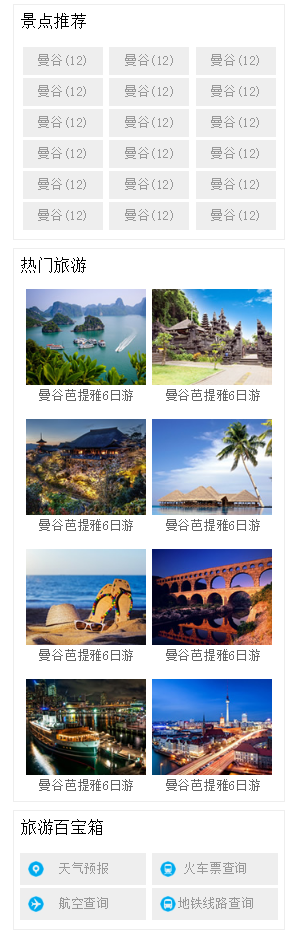
提出公共页脚和导航部分:
新建infomatino.html (旅游咨询)页面
<!DOCTYPE html>

<html lang="zh-cn">

<head>

    <meta charset="UTF-8">

    <title>项目实战 PC端固定布局</title>

    <link rel="stylesheet" href="css/basic.css">

    <link rel="stylesheet" href="css/column.css">

</head>

<body>

    <!-- 导航了部分 -->

    <!-- body nav section 需要h1~h6标题大纲 div header不需要  -->

    <header id="header">

        <div class="center">

            <!-- 一个页面最好就一个h1 让搜索引擎能更好的抓取关键字 -->

            <h1 class="logo">旅行社</h1>

            <nav class="link">

                <h2 class="none">网站导航</h2>

                <ul>

                    <li><a href="index.html">首页</a></li>

                    <li class="active"><a href="infomation.html">旅游咨询</a></li>

                    <li><a href="###">机票订购</a></li>

                    <li><a href="###">风景欣赏</a></li>

                    <li><a href="###">公司简介</a></li>

                </ul>

            </nav>

        </div>

    </header>

    <div id="headline">

        <div class="center">

            <hgroup>

                <h2>旅游咨询</h2>

                <h3>介绍各种最新的旅游信息,咨询要问,景点攻略</h3>

            </hgroup>

        </div>

    </div>

    <div id="container">

        <aside class="sidebar">

            <div class="sidebox recommend">

                <h2>景点推荐</h2>

                <div class="tag">

                    <a href="###">曼谷(12)</a>

                    <a href="###">曼谷(12)</a>

                    <a href="###">曼谷(12)</a>

                    <a href="###">曼谷(12)</a>

                    <a href="###">曼谷(12)</a>

                    <a href="###">曼谷(12)</a>

                    <a href="###">曼谷(12)</a>

                    <a href="###">曼谷(12)</a>

                    <a href="###">曼谷(12)</a>

                    <a href="###">曼谷(12)</a>

                    <a href="###">曼谷(12)</a>

                    <a href="###">曼谷(12)</a>

                    <a href="###">曼谷(12)</a>

                    <a href="###">曼谷(12)</a>

                    <a href="###">曼谷(12)</a>

                    <a href="###">曼谷(12)</a>

                    <a href="###">曼谷(12)</a>

                    <a href="###">曼谷(12)</a>

                </div>

            </div>

            <div class="sidebox hot">

                <h2>热门旅游</h2>

                <figure class="figure">

                    <img src="img/hot1.jpg" alt="曼谷芭提雅6日游">

                    <figcaption>曼谷芭提雅6日游</figcaption>

                </figure>

                <figure class="figure">

                    <img src="img/hot2.jpg" alt="曼谷芭提雅6日游">

                    <figcaption>曼谷芭提雅6日游</figcaption>

                </figure>

                <figure class="figure">

                    <img src="img/hot3.jpg" alt="曼谷芭提雅6日游">

                    <figcaption>曼谷芭提雅6日游</figcaption>

                </figure>

                <figure class="figure">

                    <img src="img/hot4.jpg" alt="曼谷芭提雅6日游">

                    <figcaption>曼谷芭提雅6日游</figcaption>

                </figure>

                <figure class="figure">

                    <img src="img/hot5.jpg" alt="曼谷芭提雅6日游">

                    <figcaption>曼谷芭提雅6日游</figcaption>

                </figure>

                <figure class="figure">

                    <img src="img/hot6.jpg" alt="曼谷芭提雅6日游">

                    <figcaption>曼谷芭提雅6日游</figcaption>

                </figure>

                <figure class="figure">

                    <img src="img/hot7.jpg" alt="曼谷芭提雅6日游">

                    <figcaption>曼谷芭提雅6日游</figcaption>

                </figure>

                <figure class="figure">

                    <img src="img/hot8.jpg" alt="曼谷芭提雅6日游">

                    <figcaption>曼谷芭提雅6日游</figcaption>

                </figure>

            </div>

            <div class="sidebox treasure">

                <h2>旅游百宝箱</h2>

                <div class="box">

                    <a href="###" class="trea1">天气预报</a>

                    <a href="###" class="trea2">火车票查询</a>

                    <a href="###" class="trea3">航空查询</a>

                    <a href="###" class="trea4">地铁线路查询</a>

                </div>

            </div>

        </aside>

        <div class="list">

            list

        </div>

    </div>

    <!-- 页脚部分 -->

    <footer id="footer">

        <div class="top">

            <div class="block left">

                <h2>合作伙伴</h2>

                <!-- 水平线 -->

                <hr>

                <ul>

                    <li>途牛旅游网</li>

                    <li>驴妈妈旅游网</li>

                    <li>携程旅游网</li>

                    <li>去哪旅游网</li>

                </ul>

            </div>

            <div class="block center">

                <h2>旅游咨询QA</h2>

                <!-- 水平线 -->

                <hr>

                <ul>

                    <li>旅游合同签订方式</li>

                    <li>儿童机票价格</li>

                    <li>旅游线路定制</li>

                    <li>单房差是什么</li>

                    <li>旅游保险种类</li>

                </ul>

            </div>

            <div class="block right">

                <h2>联系方式</h2>

                <!-- 水平线 -->

                <hr>

                <ul>

                    <li>微博:weibo.com/lvyou</li>

                    <li>邮件:lvyou@lvyou.com</li>

                    <li>地址:沈阳铁西金桂路123号</li>

                </ul>

            </div>

        </div>

        <div class="bottom">

            Copyright© jjjj | ICP 备 131313312112号 | 旅行社经营许可证 : L-YC-BB12313212

        </div>

    </footer>

</body>

</html>
页面column.css 内容:
@charset "utf-8";

/*-------------------------------咨询页面 侧栏主页---------------------------------------*/

#headline {

    width: 100%;

    /*缩小页面滚动条右侧出现白色区域*/

    min-width: 1263px;

    height: 300px;

    /*渐变 方位 颜色 透明度 rgba */

    /*向右下方 黑色渐变 透明度0.7 - 全透明*/

    background: linear-gradient(to right bottom, rgba(0,0,0,0.7), rgba(0,0,0,0)), url(../img/headline.jpg) no-repeat center;

}

#headline .center {

    width: 1263px;

    height: 300px;

    margin: 0 auto;

}

#headline hgroup {

    padding: 100px 0 0 50px;

}

#headline h2 {

    color: #eee;

    font-size: 36px;

    letter-spacing: 1px;

}

#headline h3 {

    color: #eee;

    font-size: 20px;

    letter-spacing: 1px;

}

#container {

    width: 1263px;

    margin: 30px auto;

}

#container .sidebar {

    width: 340px;

    /*background-color: #eee;*/

    float: right;

}

#container .sidebox {

    border: 1px solid #eee;

    /*下面的边距10px 上右下左*/

    margin: 0 0 10px 0;

    text-align: center;

}

#container .sidebox h2 {

    font-size: 20px;

    font-weight: normal;

    letter-spacing: 1px;

    /*首行缩进*/

    text-indent: 8px;

    height: 40px;

    line-height: 40px;

    background-color: #fafafa

    color: #666;

    text-align: left;

}

#container .tag {

    margin: 10px 0;

}

#container .tag a {

    background-color: #eee;

    display: inline-block;

    width: 100px;

    height: 35px;

    line-height: 35px;

    margin: 2px 0;

    color: #999;

}

#container .tag a:hover {

    background-color: #458b00;

    color: white;

}

#container .figure {

    padding: 10px 0;

}

#container figure {

    display: inline-block;

    padding: 4px;

    color: #666;

}

#container .box {

    margin: 10px 0;

}

#container .box a {

    background-color: #eee;

    display: inline-block;

    width: 157px;

    height: 40px;

    line-height: 40px;

    margin: 2px 0;

    color: #999;

}

#container .box a:hover {

    color: green;

}

/*旅游百宝箱背景图片*/

#container .box a.trea1 {

    background: #eee url(../img/trea1.png) no-repeat 10px center;

}

#container .box a.trea2 {

    background: #eee url(../img/trea2.png) no-repeat 10px center;

}

#container .box a.trea3 {

    background: #eee url(../img/trea3.png) no-repeat 10px center;

}

#container .box a.trea4 {

    background: #eee url(../img/trea4.png) no-repeat 10px center;

}

#container .list {

    width: 900px;

    /*background-color: #ccc;*/

    float: left;

}
抽取基础css文件内容 basic.css:
@charset "utf-8";

/*------------------------------------第一节 导航栏部分------------------------------------*/

/*本身外边距*/

body, h1, ul, h2, p, figure, h3{

    margin:;

    padding:;

}

ul {

    list-style: outside none none;

}

/* a 标签不需要下划线 */

a {

    text-decoration: none;

}

.none {

    display: none;

}

#header {

    width: 100%;

    min-width: 1263px;

    height: 70px;

    background: #333;

    /*header做个阴影*/

    box-shadow: 0 5px 10px rgba(0,0,0,0.3);

    position: relative;

    z-index:;

}

#header .center {

    width: 1263px;

    height: 70px;

    margin: 0 auto;

}

#header .logo {

    width: 240px;

    height: 70px;

    background-image: url(../img/logo.png);

    /* h1中的字向左移动到不能看到 */

    text-indent: -9999px;

    float: left;

}

#header .link {

    width: 650px;

    height: 70px;

    float: right;

    /* 字体淡灰 */

    color: #eee;

    /* 文字垂直居中 设定高度和 ul高度相同即可 */

    line-height: 70px;

}

#header .link li {

    width: 120px;

    /* li 文字横向铺平 */

    float: left;

    text-align: center;

}

#header .link a {

    color: #eee;

    display: block;

}

#header .link a:hover,

#header .active a {

    background-color: #000;

}

#footer {

    min-width: 1263px;

    height: 360px;

    background-color: #222;

    clear: both;

    position: relative;

    top: 20px;

}

#footer .top {

    width: 1263px;

    height: 280px;

    /*background-color: red;*/

    /*居中水平*/

    margin: 0 auto;

    text-align: center;

}

/*footer 合作伙伴等信息*/

#footer .left {

}

#footer .center {

}

#footer .right {

}

#footer .block {

    width: 410px;

    height: 280px;

    /*background-color: green;*/

    display: inline-block;

    text-align: left;

    color: #ccc;

    vertical-align: top;

}

#footer h2 {

    font-size: 24px;

    font-weight: normal;

    padding: 20px 0 0 20px;

}

#footer hr {

    width: 90%;

    border: 1px dashed;

}

#footer ul {

    font-size: 18px;

    color: #777;

    /*文本首行缩进*/

    text-indent: 20px;

    line-height:;

}

/*所有权*/

#footer .bottom {

    height: 80px;

    color: #777;

    text-align: center;

    line-height: 80px;

    background-color: #000;

    /*距上边框的一条线 好看*/

    border-top: 1px solid #444;

}
将style.css basic.css 抽取出来的部分进行删除
Html5 学习笔记 【PC固定布局】 实战5 咨询页面 侧栏的更多相关文章
- CSS学习笔记--Div+Css布局实战(入门)
基本页面布局 本教程带着大家做一个简单的页面布局 最重效果如下: 1.第一部,先创建上下左右4个DIV <!DOCTYPE html> <html> <head lang ...
- [html5] 学习笔记-响应式布局
1.响应式布局介绍 响应式布局是2010年5月份提出的一个概念,简而言之,就是一个网站能够兼容多个终端——而不是每一个终端做一个特定的版本.这个概念是为了兼容移动互联网浏览而诞生的,其目的是为用户提供 ...
- HTML5学习笔记(二):用于构建页面的语义元素
1.语义元素 大多数HTML5语义元素的用途是标识页面中的一个内容区块,为标注的内容赋予额外的含义,不真正做任何事. 2.使用语义元素的原因 容易修改和维护: 无障碍性(现代Web设计的一个重要主题) ...
- Html5 学习笔记 【PC固定布局】 实战7 风景欣赏 联系我们
风景欣赏最终效果: 关于公司最终效果: 风景欣赏Html代码: <!DOCTYPE html> <html lang="zh-cn"> <head&g ...
- Html5 学习笔记 【PC固定布局】 实战7 机票预订页面
最终实际效果: HTML代码: <!DOCTYPE html> <html lang="zh-cn"> <head> <meta char ...
- Html5 学习笔记 【PC固定布局】 实战6 咨询页面
最终效果: Html页面代码: <!DOCTYPE html> <html lang="zh-cn"> <head> <meta char ...
- amazeui学习笔记--css(布局相关3)--辅助类Utility
amazeui学习笔记--css(布局相关3)--辅助类Utility 一.总结 1.元素清除浮动: 添加 am-cf 这个 class 即可 2.水平滚动: .am-scrollable-horiz ...
- amazeui学习笔记--css(布局相关1)--网格Grid
amazeui学习笔记--css(布局相关1)--网格Grid 一.总结 基本使用 1.div+class布局:amaze里面采取的就是div+class的布局方式 <div class=&q ...
- html5学习笔记一
HTML5学习笔记 <video>标记:定义视频,Ogg.MPEG4.WebM三种格式 <video src=”movie.ogg” controls=”controls”> ...
随机推荐
- [暑假集训Day1T2]北极通讯网络
这题主要考察对“卫星电话”的理解,k个卫星电话相当于可以让k个联通块保持联通,因此我们只需要让原图连成k个联通块,然后给每个联通块的任意一个节点发一部卫星电话即可.因此我们需要连n-k条边,特别地,当 ...
- vmware linux root密码破解
centOS: 1.开机过程按上下箭头键,让系统不要进入到引导程序中, 2.按 'e' 进入到编辑模式 3.找到linux16开始的首行,在末尾加入'rw init=/bin/sh' (会出现修改密码 ...
- bzoj1897. tank 坦克游戏(决策单调性分治)
题目描述 有这样一款新的坦克游戏.在游戏中,你将操纵一辆坦克,在一个N×M的区域中完成一项任务.在此的区域中,将会有许多可攻击的目标,而你每摧毁这样的一个目标,就将获得与目标价值相等的分数.只有获得了 ...
- Linux常用命令操作文档
Ls命令:列出目录内容 选项 长选项 含义 -a --all 列出所有文件,包括隐藏的文件 -d --directory 指定一个目录 -F --classify 在每个列出的名字后面加上类型指示符( ...
- 贪心策略---买卖股票的最大收益 II
买卖股票的最大收益 II 122. Best Time to Buy and Sell Stock II (Easy) 题目描述: 可以进行多次交易,多次交易之间不能交叉进行,可以进行多次交易. ...
- 并行开发 1.Parallel
原文:8天玩转并行开发——第一天 Parallel的使用 随着多核时代的到来,并行开发越来越展示出它的强大威力,像我们这样的码农再也不用过多的关注底层线程的实现和手工控制, 要了解并行开发,需要先了解 ...
- 攻防世界--getit
测试文件:https://adworld.xctf.org.cn/media/task/attachments/8ef2f7ef55c240418f84b3c514a7a28a 准备 得知 64位文件 ...
- ORACLE数据字典DBA视图
select * from DBA_ALL_TABLES --显示数据库中所有表的描述 select * from DBA_CATALOG --列出所有数据库标,视图,同义词和序列 ...
- webpack的理解、总结
weabpck的基础应用 https://blog.zhangjd.me/2016/06/19/webpack-your-bags/ https://juejin.im/post/5cc26dfef2 ...
- centos 7 命令界面与GUI界面切换
一.需要重启生效 1. 命令模式 systemctl set-default multi-user.target 2. 图形模式 systemctl set-default graph ...