
Nginx环境部署
下载Nginx
wget nginx.tar.gz http://nginx.org/download/nginx-1.17.1.tar.gz
解压源码
tar -zxvf nginx-1.17.1.tar.gz

然后进入目录编译安装

cd nginx-1.11.3

./configure --prefix=/usr/local/nginx \

--with-http_ssl_module --with-http_v2_module \

--with-http_stub_status_module --with-pcre
--with-http_stub_status_module:支持nginx状态查询
--with-http_ssl_module:支持https
--with-http_v2_module:支持google的spdy,想了解请百度spdy,这个必须有ssl的支持
--with-pcre:为了支持rewrite重写功能,必须制定pcre
最后输出如下内容,表示configure OK了。
如果没有error信息,就可以执行下边的安装了:

make  //确定你的服务器有安装make,若没有安装,请执行 yum install make

make install
安装prce(重定向支持)和openssl(https支持,如果不需要https可以不安装。)
yum -y install pcre*

yum -y install openssl*
Nginx配置文件详情
启动nginx

./usr/local/nginx/sbin/nginx

重启或关闭进程:

./usr/local/nginx/sbin/nginx -s reload

./usr/local/nginx/sbin/nginx -s stop
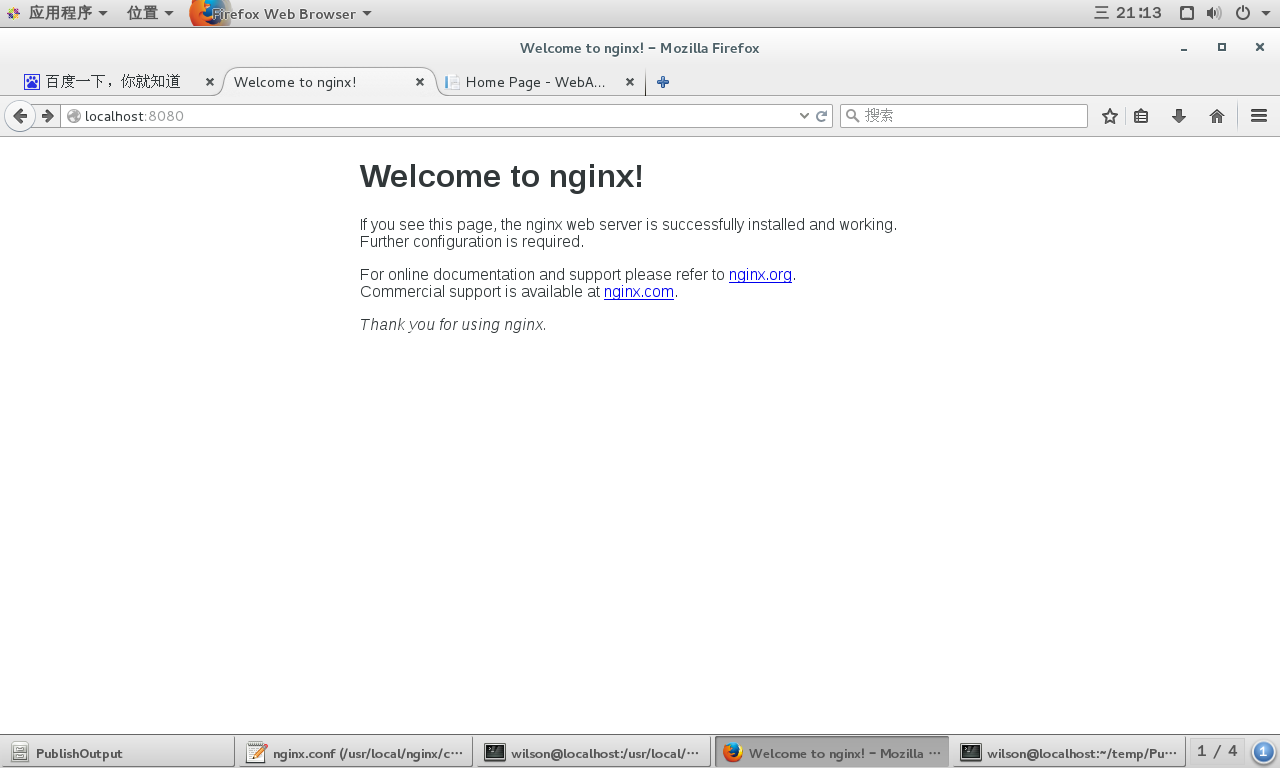
浏览器中输入http://localhost:80,效果如下
官方文档中的安装方法,设置源后直接安装,对于配置文件自动写入默认路径
1、设置安装源
To set up the yum repository for RHEL/CentOS, create the file named /etc/yum.repos.d/nginx.repo with the following contents:

[nginx]

name=nginx repo

baseurl=http://nginx.org/packages/OS/OSRELEASE/$basearch/

gpgcheck=0

enabled=1

Replace “OS” with “rhel” or “centos”, depending on the distribution used, and “OSRELEASE” with “5”, “6”, or “7”, for 5.x, 6.x, or 7.x versions, respectively.
具体文件内容为:
[nginx]

name=nginx repo

baseurl=http://nginx.org/packages/centos/7/$basearch/

gpgcheck=0

enabled=1
2、执行以下命令安装
sudo yum install nginx
3、启动、停止nginx服务
sudo nginx

sudo nginx -s stop
默认配置参数列表
Configure Arguments

Configure arguments common for nginx binaries from pre-built packages:

--prefix=/etc/nginx

--sbin-path=/usr/sbin/nginx

--conf-path=/etc/nginx/nginx.conf

--error-log-path=/var/log/nginx/error.log

--http-log-path=/var/log/nginx/access.log

--pid-path=/var/run/nginx.pid

--lock-path=/var/run/nginx.lock

--http-client-body-temp-path=/var/cache/nginx/client_temp

--http-proxy-temp-path=/var/cache/nginx/proxy_temp

--http-fastcgi-temp-path=/var/cache/nginx/fastcgi_temp

--http-uwsgi-temp-path=/var/cache/nginx/uwsgi_temp

--http-scgi-temp-path=/var/cache/nginx/scgi_temp

--user=nginx

--group=nginx

--with-http_ssl_module

--with-http_realip_module

--with-http_addition_module

--with-http_sub_module

--with-http_dav_module

--with-http_flv_module

--with-http_mp4_module

--with-http_gunzip_module

--with-http_gzip_static_module

--with-http_random_index_module

--with-http_secure_link_module

--with-http_stub_status_module

--with-http_auth_request_module

--with-threads

--with-stream

--with-stream_ssl_module

--with-http_slice_module

--with-mail

--with-mail_ssl_module

--with-file-aio

--with-http_v2_module

--with-ipv6
Nginx环境部署的更多相关文章
- CentOS+uwsgi+django+nginx 环境部署及分析
写在部署前 在线上部署django项目时,比较成熟的方案是:nginx + uWSGI + Django. nginx和Django 都比较熟悉了,uWSGI是什么呢?WSGI是一个协议,python ...
- centos7 nginx配置httpsCenos(6.6/7.1)下从源码安装Python+Django+uwsgi+nginx环境部署(二)
1.yum安装nginx 下载对应当前系统版本的nginx包(package) # wget http://nginx.org/packages/centos/7/noarch/RPMS/ngin ...
- 生产环境使用Nginx+uwsgi部署Django
在本地运行django应用相对来说还是挺方便的,使用自带的runserver启动即可.如果在生产环境部署django,就要多考虑一些问题了.比如静态文件处理,安全,效率等等 在网上找到了不错的部署的教 ...
- Django + Uwsgi + Nginx 的生产环境部署
使用runserver可以使我们的django项目很便捷的在本地运行起来,但这只能在局域网内访问,如果在生产环境部署django,就要多考虑一些问题了.比如静态文件处理,安全,效率等等,本篇文章总结归 ...
- 第四百零二节,Django+Xadmin打造上线标准的在线教育平台—生产环境部署,uwsgi安装和启动,nginx的安装与启动,uwsgi与nginx的配置文件+虚拟主机配置
第四百零二节,Django+Xadmin打造上线标准的在线教育平台—生产环境部署,uwsgi安装和启动,nginx的安装与启动,uwsgi与nginx的配置文件+虚拟主机配置 软件版本 uwsgi- ...
- keepalived+nginx+tomcat+redis集群环境部署
1.所需软件.jar包.配置文件下载:http://pan.baidu.com/s/1dFgntst 2.环境说明: centos6.5 64位 主节点:192.168.40.121 副节点:192 ...
- 学习项目部署Django+uwsgi+Nginx生产环境部署
绪论 项目生产环境部署,是很重的一个知识点.第一,Django自带的服务器很简陋,由于测试和开发环境尚可,无法用于生产环境,保障安全性和可靠性.以及性能.此外,学习部署方式,还有利于了解生产部署后的项 ...
- 在 CentOS 上部署 Nginx 环境
这里的案例主要通过虚拟机( vmware workstation (14) )的方式安装 Center OS 到本地环境 资源下载: vmware workstation / CentOS 本次 ...
- [部署开发环境]部署django的生成环境nginx+uwsgi+django
#教程 # ubuntu部署django项目 # 部署准备 - ubuntu操作系统 -- vagrant虚拟 - Nginx服务器 -- 安装在ubuntu的web服务器 - uWSGI应用协议服务 ...
随机推荐
- The list of list is modified unexpected, python
Be careful! The list of list is modified unexpected, python # code patch A: list = [1,2,3,4,5,6,7] p ...
- map接口详解
1.Map接口详解(1)映射(map)是一个存储键.键值对的对象,给定一个键,可以查询得到它的值,键和值都可以是对象(2)键必须是唯一的,值可以重复(Map接口映射唯一的键到值)(3)有些映射可以接收 ...
- RedHat Linux6.4下安装apache服务
一.换yum 原因:安装apache2.4是需要安装apr . apr-util .pcre.httpd四个包, 在安装pcre包时会报错: configure: error: You need a ...
- vim安装bundle和使用
一.准备工作 安装Git(因为下面我们选择的插件管理器需要使用到它)安装其他插件前首先需要选择一个Vim插件管理器,我这里选择的是Vundle,Vundle的工作过程中需要通过Git自动从远程创库同步 ...
- asp.net开发微信公众平台----目录汇总-持续更新
1.[c#]asp.net微信公众平台开发(1)数据库设计 2.[c#]asp.net微信公众平台开发(2)多层架构框架搭建和入口实现 3.[c#]asp.net微信公众平台开发(3)微信消息封装及反 ...
- EXP-00091和IMP-00010报错
原来导出表的库:database ORACLE_SID=TEST0221 版本: 11.2.0.4需要导进的库:database ORACLE_SID=PROD 版本:10.2.0.1因为字符集的问题 ...
- 问候 UEditor 的大爷
记录该日志的时间是2015年2月1日. 先给出 UEditor 项目的首页,它是一款由百度开发的开源富文本编辑器,关于它的介绍,大家可以查看百度百科. UEditor - 首页http://uedit ...
- 阿里云服务器 Ubuntu 安装 LNMP
1.设定实例化服务器IP密码. 2.设定安全组件端口 80 和 3306 系统默认提供端口 22. //阿里云需要设定安全组件端口必须设定. 3.安装一键lnmp系统. 教程地址 https://ln ...
- scrapy电影天堂实战(一)创建数据库
原文链接 这里的排版没微信公众号那么友好,建议查看公众号原文 创建数据库 首先我们需要创建数据库和表等来存储数据 创建mysql.cnf配置文件 oot@ubuntu:/mnt/test_scrapy ...
- day30—使用Flexbox和CSS Grid实现高效布局实践
转行学开发,代码100天——2018-04-15 (今天是代码开发的第30天,但是代码记录有些滞后,尽快补上.日后要严格执行,避免学习进度和内容相对滞后.) 今天,记录“前端大全”里分享的一篇关于利用 ...