
activiti网关
activiti中有两种网关:并行网关,排他网关。
排他网关用于任务选择等情况,流程图如下
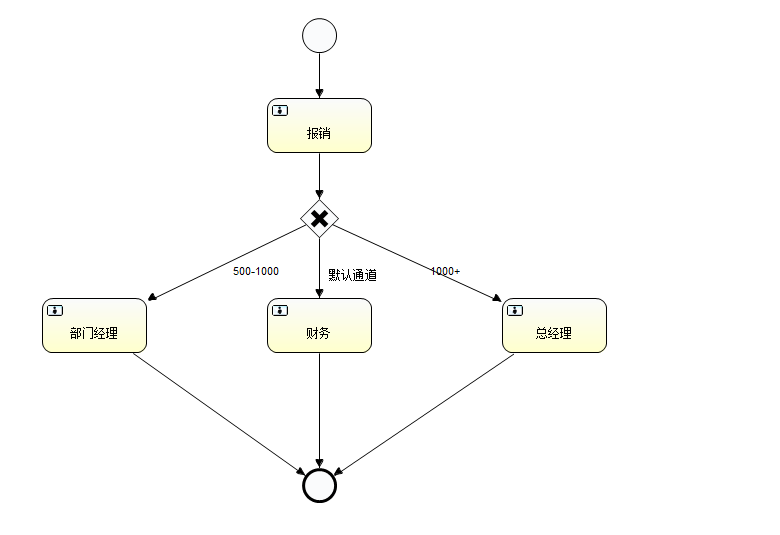
bpnm代码如下
<?xml version="1.0" encoding="UTF-8"?>

<definitions xmlns="http://www.omg.org/spec/BPMN/20100524/MODEL" xmlns:xsi="http://www.w3.org/2001/XMLSchema-instance" xmlns:activiti="http://activiti.org/bpmn" xmlns:bpmndi="http://www.omg.org/spec/BPMN/20100524/DI" xmlns:omgdc="http://www.omg.org/spec/DD/20100524/DC" xmlns:omgdi="http://www.omg.org/spec/DD/20100524/DI" typeLanguage="http://www.w3.org/2001/XMLSchema" expressionLanguage="http://www.w3.org/1999/XPath" targetNamespace="http://www.activiti.org/test">

  <process id="exclusiveGateWay" name="exclusiveGateWayProcess" isExecutable="true">

    <startEvent id="startevent1" name="Start"></startEvent>

    <userTask id="usertask1" name="费用报销申请" activiti:assignee="王小五"></userTask>

    <sequenceFlow id="flow1" sourceRef="startevent1" targetRef="usertask1"></sequenceFlow>

    <userTask id="usertask2" name="审批【部门经理】" activiti:assignee="赵小六"></userTask>

    <userTask id="usertask3" name="财务" activiti:assignee="胡小八"></userTask>

    <userTask id="usertask4" name="审批【总经理】" activiti:assignee="田小七"></userTask>

    <exclusiveGateway id="exclusivegateway1" name="Exclusive Gateway" default="默认执行财务"></exclusiveGateway>

    <sequenceFlow id="flow2" sourceRef="usertask1" targetRef="exclusivegateway1"></sequenceFlow>

    <sequenceFlow id="flow3" name="金额小于等于1000,大于等于500" sourceRef="exclusivegateway1" targetRef="usertask2">

      <conditionExpression xsi:type="tFormalExpression"><![CDATA[${money>=500 && money<=1000}]]></conditionExpression>

    </sequenceFlow>

    <sequenceFlow id="默认执行财务" name="默认执行财务" sourceRef="exclusivegateway1" targetRef="usertask3"></sequenceFlow>

    <sequenceFlow id="flow5" name="金额大于1000元" sourceRef="exclusivegateway1" targetRef="usertask4">

      <conditionExpression xsi:type="tFormalExpression"><![CDATA[${money>1000}]]></conditionExpression>

    </sequenceFlow>

    <endEvent id="endevent1" name="End"></endEvent>

    <sequenceFlow id="flow6" sourceRef="usertask2" targetRef="endevent1"></sequenceFlow>

    <sequenceFlow id="flow7" sourceRef="usertask3" targetRef="endevent1"></sequenceFlow>

    <sequenceFlow id="flow8" sourceRef="usertask4" targetRef="endevent1"></sequenceFlow>

  </process>

  <bpmndi:BPMNDiagram id="BPMNDiagram_exclusiveGateWay">

    <bpmndi:BPMNPlane bpmnElement="exclusiveGateWay" id="BPMNPlane_exclusiveGateWay">

      <bpmndi:BPMNShape bpmnElement="startevent1" id="BPMNShape_startevent1">

        <omgdc:Bounds height="35.0" width="35.0" x="340.0" y="50.0"></omgdc:Bounds>

      </bpmndi:BPMNShape>

      <bpmndi:BPMNShape bpmnElement="usertask1" id="BPMNShape_usertask1">

        <omgdc:Bounds height="55.0" width="105.0" x="305.0" y="140.0"></omgdc:Bounds>

      </bpmndi:BPMNShape>

      <bpmndi:BPMNShape bpmnElement="usertask2" id="BPMNShape_usertask2">

        <omgdc:Bounds height="55.0" width="105.0" x="80.0" y="390.0"></omgdc:Bounds>

      </bpmndi:BPMNShape>

      <bpmndi:BPMNShape bpmnElement="endevent1" id="BPMNShape_endevent1">

        <omgdc:Bounds height="35.0" width="35.0" x="340.0" y="560.0"></omgdc:Bounds>

      </bpmndi:BPMNShape>

      <bpmndi:BPMNShape bpmnElement="usertask3" id="BPMNShape_usertask3">

        <omgdc:Bounds height="55.0" width="105.0" x="305.0" y="390.0"></omgdc:Bounds>

      </bpmndi:BPMNShape>

      <bpmndi:BPMNShape bpmnElement="usertask4" id="BPMNShape_usertask4">

        <omgdc:Bounds height="55.0" width="105.0" x="550.0" y="380.0"></omgdc:Bounds>

      </bpmndi:BPMNShape>

      <bpmndi:BPMNShape bpmnElement="exclusivegateway1" id="BPMNShape_exclusivegateway1">

        <omgdc:Bounds height="40.0" width="40.0" x="337.0" y="260.0"></omgdc:Bounds>

      </bpmndi:BPMNShape>

      <bpmndi:BPMNEdge bpmnElement="flow1" id="BPMNEdge_flow1">

        <omgdi:waypoint x="357.0" y="85.0"></omgdi:waypoint>

        <omgdi:waypoint x="357.0" y="140.0"></omgdi:waypoint>

      </bpmndi:BPMNEdge>

      <bpmndi:BPMNEdge bpmnElement="flow2" id="BPMNEdge_flow2">

        <omgdi:waypoint x="357.0" y="195.0"></omgdi:waypoint>

        <omgdi:waypoint x="357.0" y="260.0"></omgdi:waypoint>

      </bpmndi:BPMNEdge>

      <bpmndi:BPMNEdge bpmnElement="flow3" id="BPMNEdge_flow3">

        <omgdi:waypoint x="357.0" y="300.0"></omgdi:waypoint>

        <omgdi:waypoint x="132.0" y="390.0"></omgdi:waypoint>

        <bpmndi:BPMNLabel>

          <omgdc:Bounds height="42.0" width="100.0" x="-117.0" y="-35.0"></omgdc:Bounds>

        </bpmndi:BPMNLabel>

      </bpmndi:BPMNEdge>

      <bpmndi:BPMNEdge bpmnElement="flow5" id="BPMNEdge_flow5">

        <omgdi:waypoint x="357.0" y="300.0"></omgdi:waypoint>

        <omgdi:waypoint x="602.0" y="380.0"></omgdi:waypoint>

        <bpmndi:BPMNLabel>

          <omgdc:Bounds height="14.0" width="84.0" x="16.0" y="-15.0"></omgdc:Bounds>

        </bpmndi:BPMNLabel>

      </bpmndi:BPMNEdge>

      <bpmndi:BPMNEdge bpmnElement="flow6" id="BPMNEdge_flow6">

        <omgdi:waypoint x="132.0" y="445.0"></omgdi:waypoint>

        <omgdi:waypoint x="357.0" y="560.0"></omgdi:waypoint>

      </bpmndi:BPMNEdge>

      <bpmndi:BPMNEdge bpmnElement="flow7" id="BPMNEdge_flow7">

        <omgdi:waypoint x="357.0" y="445.0"></omgdi:waypoint>

        <omgdi:waypoint x="357.0" y="560.0"></omgdi:waypoint>

      </bpmndi:BPMNEdge>

      <bpmndi:BPMNEdge bpmnElement="flow8" id="BPMNEdge_flow8">

        <omgdi:waypoint x="602.0" y="435.0"></omgdi:waypoint>

        <omgdi:waypoint x="357.0" y="560.0"></omgdi:waypoint>

      </bpmndi:BPMNEdge>

      <bpmndi:BPMNEdge bpmnElement="默认执行财务" id="BPMNEdge_默认执行财务">

        <omgdi:waypoint x="357.0" y="300.0"></omgdi:waypoint>

        <omgdi:waypoint x="357.0" y="390.0"></omgdi:waypoint>

        <bpmndi:BPMNLabel>

          <omgdc:Bounds height="14.0" width="72.0" x="10.0" y="0.0"></omgdc:Bounds>

        </bpmndi:BPMNLabel>

      </bpmndi:BPMNEdge>

    </bpmndi:BPMNPlane>

  </bpmndi:BPMNDiagram>

</definitions>
并行网关如下图所示
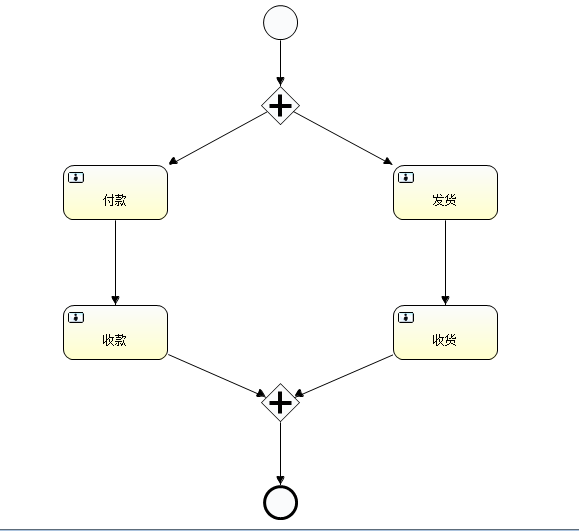
bpnm代码如下
<?xml version="1.0" encoding="UTF-8"?>

<definitions xmlns="http://www.omg.org/spec/BPMN/20100524/MODEL" xmlns:xsi="http://www.w3.org/2001/XMLSchema-instance" xmlns:activiti="http://activiti.org/bpmn" xmlns:bpmndi="http://www.omg.org/spec/BPMN/20100524/DI" xmlns:omgdc="http://www.omg.org/spec/DD/20100524/DC" xmlns:omgdi="http://www.omg.org/spec/DD/20100524/DI" typeLanguage="http://www.w3.org/2001/XMLSchema" expressionLanguage="http://www.w3.org/1999/XPath" targetNamespace="http://www.activiti.org/test">

  <process id="parallelGateWay" name="parallelGateWayProcess" isExecutable="true">

    <startEvent id="startevent1" name="Start"></startEvent>

    <userTask id="usertask1" name="付款" activiti:assignee="买家"></userTask>

    <userTask id="usertask2" name="发货" activiti:assignee="商家"></userTask>

    <userTask id="usertask3" name="收款" activiti:assignee="商家"></userTask>

    <userTask id="usertask4" name="收货" activiti:assignee="买家"></userTask>

    <endEvent id="endevent1" name="End"></endEvent>

    <parallelGateway id="parallelgateway1" name="Parallel Gateway"></parallelGateway>

    <sequenceFlow id="flow1" sourceRef="startevent1" targetRef="parallelgateway1"></sequenceFlow>

    <sequenceFlow id="flow2" sourceRef="parallelgateway1" targetRef="usertask1"></sequenceFlow>

    <sequenceFlow id="flow3" sourceRef="parallelgateway1" targetRef="usertask2"></sequenceFlow>

    <sequenceFlow id="flow4" sourceRef="usertask1" targetRef="usertask3"></sequenceFlow>

    <sequenceFlow id="flow5" sourceRef="usertask2" targetRef="usertask4"></sequenceFlow>

    <parallelGateway id="parallelgateway2" name="Parallel Gateway"></parallelGateway>

    <sequenceFlow id="flow6" sourceRef="usertask3" targetRef="parallelgateway2"></sequenceFlow>

    <sequenceFlow id="flow7" sourceRef="usertask4" targetRef="parallelgateway2"></sequenceFlow>

    <sequenceFlow id="flow8" sourceRef="parallelgateway2" targetRef="endevent1"></sequenceFlow>

  </process>

  <bpmndi:BPMNDiagram id="BPMNDiagram_parallelGateWay">

    <bpmndi:BPMNPlane bpmnElement="parallelGateWay" id="BPMNPlane_parallelGateWay">

      <bpmndi:BPMNShape bpmnElement="startevent1" id="BPMNShape_startevent1">

        <omgdc:Bounds height="35.0" width="35.0" x="380.0" y="50.0"></omgdc:Bounds>

      </bpmndi:BPMNShape>

      <bpmndi:BPMNShape bpmnElement="usertask1" id="BPMNShape_usertask1">

        <omgdc:Bounds height="55.0" width="105.0" x="180.0" y="210.0"></omgdc:Bounds>

      </bpmndi:BPMNShape>

      <bpmndi:BPMNShape bpmnElement="usertask2" id="BPMNShape_usertask2">

        <omgdc:Bounds height="55.0" width="105.0" x="510.0" y="210.0"></omgdc:Bounds>

      </bpmndi:BPMNShape>

      <bpmndi:BPMNShape bpmnElement="usertask3" id="BPMNShape_usertask3">

        <omgdc:Bounds height="55.0" width="105.0" x="180.0" y="350.0"></omgdc:Bounds>

      </bpmndi:BPMNShape>

      <bpmndi:BPMNShape bpmnElement="usertask4" id="BPMNShape_usertask4">

        <omgdc:Bounds height="55.0" width="105.0" x="510.0" y="350.0"></omgdc:Bounds>

      </bpmndi:BPMNShape>

      <bpmndi:BPMNShape bpmnElement="endevent1" id="BPMNShape_endevent1">

        <omgdc:Bounds height="35.0" width="35.0" x="380.0" y="530.0"></omgdc:Bounds>

      </bpmndi:BPMNShape>

      <bpmndi:BPMNShape bpmnElement="parallelgateway1" id="BPMNShape_parallelgateway1">

        <omgdc:Bounds height="40.0" width="40.0" x="377.0" y="130.0"></omgdc:Bounds>

      </bpmndi:BPMNShape>

      <bpmndi:BPMNShape bpmnElement="parallelgateway2" id="BPMNShape_parallelgateway2">

        <omgdc:Bounds height="40.0" width="40.0" x="377.0" y="427.0"></omgdc:Bounds>

      </bpmndi:BPMNShape>

      <bpmndi:BPMNEdge bpmnElement="flow1" id="BPMNEdge_flow1">

        <omgdi:waypoint x="397.0" y="85.0"></omgdi:waypoint>

        <omgdi:waypoint x="397.0" y="130.0"></omgdi:waypoint>

      </bpmndi:BPMNEdge>

      <bpmndi:BPMNEdge bpmnElement="flow2" id="BPMNEdge_flow2">

        <omgdi:waypoint x="397.0" y="170.0"></omgdi:waypoint>

        <omgdi:waypoint x="232.0" y="210.0"></omgdi:waypoint>

      </bpmndi:BPMNEdge>

      <bpmndi:BPMNEdge bpmnElement="flow3" id="BPMNEdge_flow3">

        <omgdi:waypoint x="397.0" y="170.0"></omgdi:waypoint>

        <omgdi:waypoint x="562.0" y="210.0"></omgdi:waypoint>

      </bpmndi:BPMNEdge>

      <bpmndi:BPMNEdge bpmnElement="flow4" id="BPMNEdge_flow4">

        <omgdi:waypoint x="232.0" y="265.0"></omgdi:waypoint>

        <omgdi:waypoint x="232.0" y="350.0"></omgdi:waypoint>

      </bpmndi:BPMNEdge>

      <bpmndi:BPMNEdge bpmnElement="flow5" id="BPMNEdge_flow5">

        <omgdi:waypoint x="562.0" y="265.0"></omgdi:waypoint>

        <omgdi:waypoint x="562.0" y="350.0"></omgdi:waypoint>

      </bpmndi:BPMNEdge>

      <bpmndi:BPMNEdge bpmnElement="flow6" id="BPMNEdge_flow6">

        <omgdi:waypoint x="232.0" y="405.0"></omgdi:waypoint>

        <omgdi:waypoint x="397.0" y="427.0"></omgdi:waypoint>

      </bpmndi:BPMNEdge>

      <bpmndi:BPMNEdge bpmnElement="flow7" id="BPMNEdge_flow7">

        <omgdi:waypoint x="562.0" y="405.0"></omgdi:waypoint>

        <omgdi:waypoint x="397.0" y="427.0"></omgdi:waypoint>

      </bpmndi:BPMNEdge>

      <bpmndi:BPMNEdge bpmnElement="flow8" id="BPMNEdge_flow8">

        <omgdi:waypoint x="397.0" y="467.0"></omgdi:waypoint>

        <omgdi:waypoint x="397.0" y="530.0"></omgdi:waypoint>

      </bpmndi:BPMNEdge>

    </bpmndi:BPMNPlane>

  </bpmndi:BPMNDiagram>

</definitions>
可以方便的使用流程设计器直接设计
activiti网关的更多相关文章
- Activiti网关--排他网关
排他网关 1.什么是排他网关 排他网关(也叫异或(XOR)网关,或叫基于数据的排他网关),用来在流程中实现决策. 当流程执行到这个网关,所有分支都会判断条件是否为true,如果为 true 则执行该分 ...
- Activiti网关--并行网关
1.什么是并行网关 并行网关允许将流程分成多条分支,也可以把多条分支汇聚到一起,并行网关的功能是基于进 入和外出顺序流的: fork 分支: 并行后的所有外出顺序流,为每个顺序流都创建一个并发分支. ...
- Activiti网关--包含网关
1.什么是包含网关 包含网关可以看做是排他网关和并行网关的结合体:和排他网关一样,你可以在外出顺序流上定义条件,包含网关会解析它们:但是主要的区别是包含网关可以选择多于一条顺序流,这和并行网关一样,包 ...
- activiti入门3排他网关,并行网管,包含网关,事件网关(转)
网关用来控制流程的流向 网关可以消费也可以生成token. 网关显示成菱形图形,内部有有一个小图标. 图标表示网关的类型. 基本分支 首先 利用 流程变量 写个带有分支的一个基本流程 流程图: 部署 ...
- Activiti第三篇【连接、排他网关、指定任务处理人、组任务】
连线 上面我们已将学过了流程变量了,可以在[任务服务.运行时服务.流程开始.完成某个任务时设置流程变量],而我们的连接就是流程变量的实际应用了-. 定义流程图 我们并不是所有的流程都是按一条的路径来走 ...
- activiti入门3排他网关,并行网管,包括网关,事件网关
网关用来控制流程的流向 网关能够消费也能够生成token. 网关显示成菱形图形,内部有有一个小图标. 图标表示网关的类型. 基本分支 首先 利用 流程变量 写个带有分支的一个基本流程 流程图: wa ...
- java中activiti框架中的排他网关使用方法,多条件判断
当排他网关的判断条件中出现多个条件时,需要注意,设置判断条件时,可能遇到,流向相同的任务,而判断条件的变量个数不同 那么,必须在后面的运行任务时,将所有的涉及到的变量都设置进任务中,只不过,如果这个任 ...
- activiti实战系列 并行网关(parallelGateWay)
流程图 13.2:部署流程定义+启动流程实例 13.3:查询我的个人任务 13.4:完成我的个人任务 说明: 1) 一个流程中流程实例只有1个,执行对象有多个 2) 并行网关的功能是基于进入和外出的 ...
- activiti实战系列 排他网关(ExclusiveGateWay)
流程图 12.2:部署流程定义+启动流程实例 12.3:查询我的个人任务 12.4:完成我的个人任务 说明: 1) 一个排他网关对应一个以上的顺序流 2) 由排他网关流出的顺序流都有个 ...
随机推荐
- DB2实例
实例是逻辑数据库管理环境,可以在此环境中对数据库进行编目和设置配置参数.根据需要, 可以在一台服务器上创建多个实例,该服务器为每个实例提供唯一的数据库服务器环境. 默认实例:DB2 显示实例: ...
- Win32 API 多线程编程——一个简单实例(含消息参数传递)
Win32 API进行程序设计具有很多优点:应用程序执行代码小,运行效率高,但是他要求程序员编写的代码较多,且需要管理所有系统提供给程序的资源,要求程序员对Windows系统内核有一定的了解,会占用程 ...
- Ubuntu命令行操作
一.文件/文件夹管理 ls 列出当前目录文件(不包括隐含文件) ls -a 列出当前目录文件(包括隐含文件) ls -l 列出当前目录下文件的详细信息 cd .. 回当前目录的上一级目录 cd - 回 ...
- springboot解决跨域
@Configuration public class WebMvcConfiguration implements WebMvcConfigurer { @Bean public CorsFilte ...
- 启动数据库报:ORA-03113
1启动数据库报:ORA-03113 2.查看oracle运行日志 tail -50 //home/app/oracle/diag/rdbms/orcl/orcl/trace/alert_orcl.l ...
- Cascade R-CNN目标检测
成功的因素: 1.级联而非并联检测器 2.提升iou阈值训练级联检测器的同时不带来负面影响 核心思想: 区分正负样本的阈值u取值影响较大,加大iou阈值直观感受是可以增加准确率的,但是实际上不是,因为 ...
- Spring data jpa 依赖配置
<properties> <project.build.sourceEncoding>UTF-8</project.build.sourceEncoding> &l ...
- Python--同步锁(互斥锁)、死锁(状态)、递归锁、信号量、Event对象
同步锁/互斥锁 (Lock) import time import threading def sub(): global num #在每个线程中都获取这个全局变量 #num-=1 temp=num ...
- Shell脚本并发及并发数的控制
https://www.jianshu.com/p/701952ffb755 正常情况下,Shell脚本是串行执行的,一条命令执行完才会执行接下来的命令.如下代码: # !/bin/bash for ...
- 【Linux】【sendmail】利用sendmail发送带附件的邮件及解决邮件中文标题乱码
#收件邮箱列表 TO_LIST=$1 #邮件标题 MAIL_TITLE=$2 #附件地址 LOG_PATH=$3 fromAdd="=?UTF-8?B?`echo $MAIL_TITLE | ...