
【归纳】Layui table.render里的json后台传入
在使用Layui的table元素时,传入的json的数据格式是有其自身定义的,需要另外添加一些字符,以正确传入。
为了传入符合前端格式的数据:
        table.render({

            elem: '#test'

            ,url:'http://localhost:8080/pictures'

            ,toolbar: '#toolbarDemo' //开启头部工具栏,并为其绑定左侧模板

            ,defaultToolbar: ['filter', 'exports', 'print', { //自定义头部工具栏右侧图标。如无需自定义,去除该参数即可

                title: '提示'

                ,layEvent: 'LAYTABLE_TIPS'

                ,icon: 'layui-icon-tips'

            }]

            ,title: '用户数据表'

            ,cols: [

                [

                {type: 'checkbox', fixed: 'left'}

                ,{field: 'id', title: 'ID', width:80, sort: true, fixed: 'left', totalRowText: '合计:'}

                ,{field: 'picname', title: '名字', width:200}

                ,{field: 'character', title: '属性', width:150}

                ,{field: 'home', title: '栖息地', width: 200}

                ,{field: 'url', title: 'url', width: 300}

                ,{fixed: 'right', title: '操作',width: 165, align:'center', toolbar: '#barDemo'}

            ]

            ]

            ,page: true

        });
在entity层,使用了transient 修饰符对字段进行限定:
@Data

@AllArgsConstructor

@NoArgsConstructor

@Entity(name="picture")

public class Picture {

    @Id

    @GeneratedValue(strategy = GenerationType.IDENTITY)

    @Column(name = "id")

    private Long id;

    @Column(name = "picname")

    private String picname;

    @Column(name = "type")

    private transient String type;

    @Column(name = "url")

    private String url;

    @Column(name = "userid")

    private transient Long userid;

    @Column(name = "englishname")

    private transient String englishname;

    @Column(name = "character")

    private String character;

    @Column(name = "home")

    private String home;

}
在传入中,为了满足Layui的格式要求,加上了一些头部:code、msg、count、data
    @RequestMapping("pictures")

    public String getPictures(HttpSession session){

        User user=(User)session.getAttribute("user");

        Long userid=user.getId();

        List<Picture> pictures;

        if(userid==1)

            pictures=picService.getAllPicture();

        else

            pictures=picMapper.getPicbyUserid(userid);

        String picstring=gson.toJson(pictures);

        log.info("  序列化结果:" + "{ \"code\": 0, \"msg\": \"\",\"count\": 15,\"data\": "+picstring+"}");

        picstring="{ \"code\": 0, \"msg\": \"\",\"count\": 10,\"data\": "+picstring+"}";

        return picstring;

    }
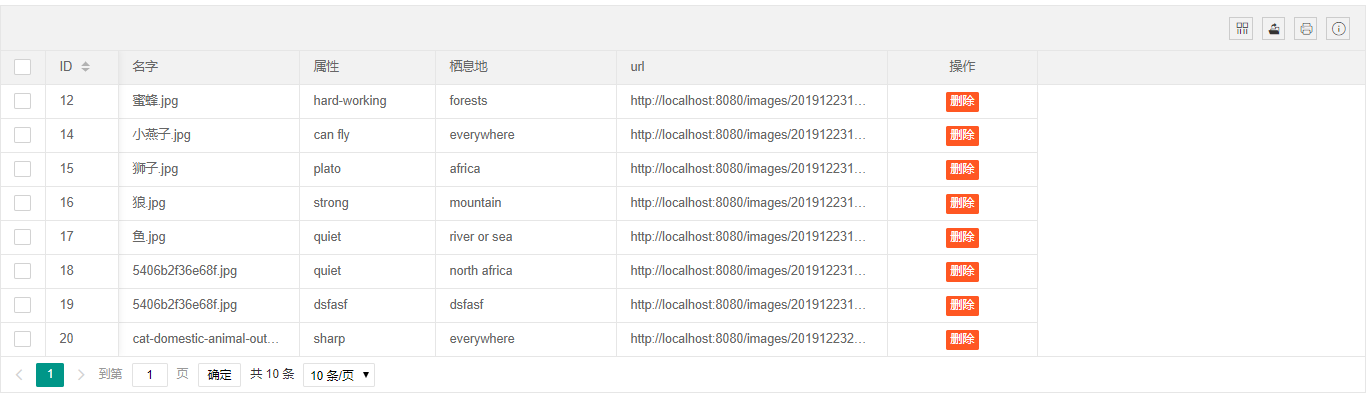
最终成功传入,显示:
【归纳】Layui table.render里的json后台传入的更多相关文章
- layui之table.render使用(含后台详细代码实现)
效果图如下: 前端实现代码如图(完整代码): <!DOCTYPE html> <html> <head> <meta charset="utf-8& ...
- layui.table前端+后台处理+分页
前端 注:监听工具条没有详细写,但路子一样的 @section head{ <script src="~/Content/jquery-easyui-1.5.5.4/jquery.ea ...
- layui 学习笔记一:layui table 查询、新增、编辑、删除
一.table数据的呈现(对应查询) 页面代码: @{ ViewBag.Title = "TableGrid"; } @section styles{ <link href= ...
- layui table 分页 记住之前勾选的数据
<!DOCTYPE html> <html lang="en"> <head> <meta charset="UTF-8&quo ...
- layui table表格详解
上次做table有些东西 忘记了 这次当作来个分析总结一下 跟大家共同学习 闲话不多说 直接上例子 代码: <form id="form1" runat="s ...
- 数据表格 layui.table
layui官网-表单 自动渲染 方法渲染 table.render,cols中的field是后台传递的data map.put("data",stuService.selectSt ...
- LayUI+SSM实现一个简单的后台管理系统
该后台管理系统是用于管理视频网站数据的,目前分5个菜单项,这篇博客主要讲述[影片管理]的具体功能和实现 后台代码结构和[影片管理]的界面如下图 该界面分为上下2部分,[搜索条件]和[影片列表],2部分 ...
- layui table数据表格reload where参数保留问题
layui table数据表格reload where参数保留问题 在使用layui过程中多多少少会遇到些问题 table reload 有个坑:reload时where参数会保留上次的参数,如果用 ...
- Layui table 组件的使用:初始化加载数据、数据刷新表格、传参数
背景 笔者之前一直使用 bootstrap table ,因为当前项目中主要使用 Layui 框架,于是也就随了 Layui table ,只是在使用的时候出现了一些问题,当然也是怪自己不熟悉的锅吧! ...
随机推荐
- Dubbo学习-4-dubbo简单案例-1
模拟一个需求,通过dubbo实现RPC调用: 这里用户服务模块的查询用户地址的功能,就是一个服务提供者,而订单服务模块的创建订单模块就是一个服务消费者: 1. 创建服务提供者的maven工程:user ...
- linux运维、架构之路-SaltStack快速入门
一.SaltStack介绍 SaltStack是一个服务器基础架构集中化管理平台,SaltStack基于Python语言实现,也是基于C/S架构,结合轻量级消息队列(ZeroMQ)与Py ...
- FFT IP核调用与仿真之SCALE压缩因子设置
关于FFT IP核的配置,网上有很多相关的资料可以参考,但是唯独涉及到scaled压缩因子设置这个参数,资料却非常匮乏,这是个什么参数,应该整么设置,设置后对结果输出会有什么影响,整样才能知道它设置的 ...
- 【2019 Multi-University Training Contest 10】
01: 02: 03:https://www.cnblogs.com/myx12345/p/11671692.html 04: 05:https://www.cnblogs.com/myx12345/ ...
- vu项目中按F5刷新element菜单没有根据路由匹配菜单解决办法
element组件的菜单中设置:default-active,这个是选择哪个菜单的 然后在created里边增加 因为每次刷新都是要经过这个的.注意data里边也要同步.
- 攻防世界 | string
#encoding=utf-8 #!usr/bin/python from pwn import * io = remote('111.198.29.45',42643) io.recvuntil(& ...
- Log4j log for java(java的日志) 的使用
log4j的使用,Log4j log for java(java的日志) 是java主流的日志框架,提供各种类型,各种存储,各种格式,多样化的日志服务. 可以再Apache官网下载得到. 我们下载lo ...
- centos 问题解决记录
在centos上用pip安装包,显示成功安装,但是用pip list去看发现实际上并没有安装? 安装用的是pip install xxx 是不行的,需要用sudo pip install xxx就可以 ...
- python实现堆栈与队列的方法
python实现堆栈与队列的方法 本文实例讲述了python实现堆栈与队列的方法.分享给大家供大家参考.具体分析如下: 1.python实现堆栈,可先将Stack类写入文件stack.py,在其它程序 ...
- Memecached 服务器安装(一)
Memecached 服务器安装(一) 前提:首先您的php环境已经安装完成,如若没有则参考 http://www.cnblogs.com/xulele/p/5264781.html 安装环境链接:h ...