
【归纳】Layui table.render里的json后台传入
在使用Layui的table元素时,传入的json的数据格式是有其自身定义的,需要另外添加一些字符,以正确传入。
为了传入符合前端格式的数据:
        table.render({

            elem: '#test'

            ,url:'http://localhost:8080/pictures'

            ,toolbar: '#toolbarDemo' //开启头部工具栏,并为其绑定左侧模板

            ,defaultToolbar: ['filter', 'exports', 'print', { //自定义头部工具栏右侧图标。如无需自定义,去除该参数即可

                title: '提示'

                ,layEvent: 'LAYTABLE_TIPS'

                ,icon: 'layui-icon-tips'

            }]

            ,title: '用户数据表'

            ,cols: [

                [

                {type: 'checkbox', fixed: 'left'}

                ,{field: 'id', title: 'ID', width:80, sort: true, fixed: 'left', totalRowText: '合计:'}

                ,{field: 'picname', title: '名字', width:200}

                ,{field: 'character', title: '属性', width:150}

                ,{field: 'home', title: '栖息地', width: 200}

                ,{field: 'url', title: 'url', width: 300}

                ,{fixed: 'right', title: '操作',width: 165, align:'center', toolbar: '#barDemo'}

            ]

            ]

            ,page: true

        });
在entity层,使用了transient 修饰符对字段进行限定:
@Data

@AllArgsConstructor

@NoArgsConstructor

@Entity(name="picture")

public class Picture {

    @Id

    @GeneratedValue(strategy = GenerationType.IDENTITY)

    @Column(name = "id")

    private Long id;

    @Column(name = "picname")

    private String picname;

    @Column(name = "type")

    private transient String type;

    @Column(name = "url")

    private String url;

    @Column(name = "userid")

    private transient Long userid;

    @Column(name = "englishname")

    private transient String englishname;

    @Column(name = "character")

    private String character;

    @Column(name = "home")

    private String home;

}
在传入中,为了满足Layui的格式要求,加上了一些头部:code、msg、count、data
    @RequestMapping("pictures")

    public String getPictures(HttpSession session){

        User user=(User)session.getAttribute("user");

        Long userid=user.getId();

        List<Picture> pictures;

        if(userid==1)

            pictures=picService.getAllPicture();

        else

            pictures=picMapper.getPicbyUserid(userid);

        String picstring=gson.toJson(pictures);

        log.info("  序列化结果:" + "{ \"code\": 0, \"msg\": \"\",\"count\": 15,\"data\": "+picstring+"}");

        picstring="{ \"code\": 0, \"msg\": \"\",\"count\": 10,\"data\": "+picstring+"}";

        return picstring;

    }
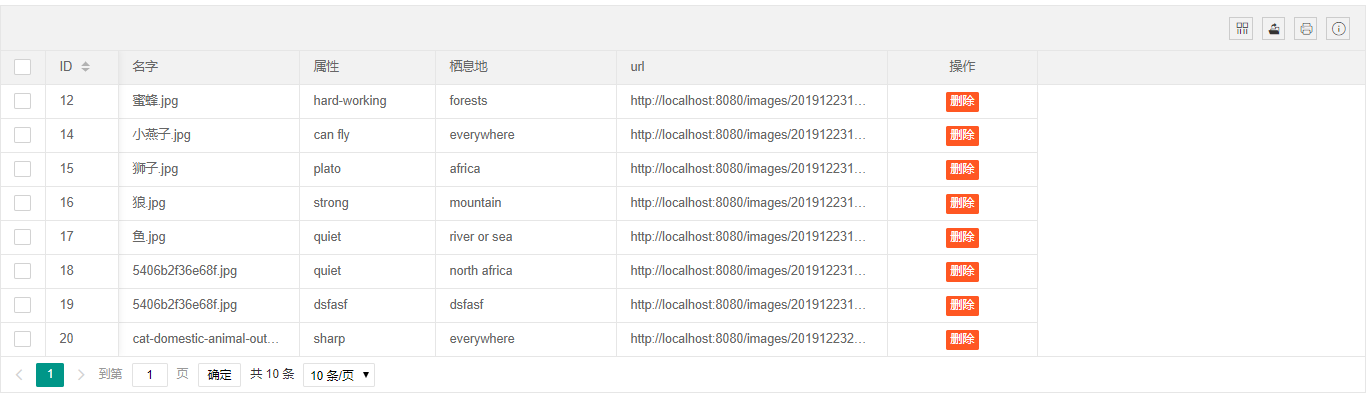
最终成功传入,显示:
【归纳】Layui table.render里的json后台传入的更多相关文章
- layui之table.render使用(含后台详细代码实现)
效果图如下: 前端实现代码如图(完整代码): <!DOCTYPE html> <html> <head> <meta charset="utf-8& ...
- layui.table前端+后台处理+分页
前端 注:监听工具条没有详细写,但路子一样的 @section head{ <script src="~/Content/jquery-easyui-1.5.5.4/jquery.ea ...
- layui 学习笔记一:layui table 查询、新增、编辑、删除
一.table数据的呈现(对应查询) 页面代码: @{ ViewBag.Title = "TableGrid"; } @section styles{ <link href= ...
- layui table 分页 记住之前勾选的数据
<!DOCTYPE html> <html lang="en"> <head> <meta charset="UTF-8&quo ...
- layui table表格详解
上次做table有些东西 忘记了 这次当作来个分析总结一下 跟大家共同学习 闲话不多说 直接上例子 代码: <form id="form1" runat="s ...
- 数据表格 layui.table
layui官网-表单 自动渲染 方法渲染 table.render,cols中的field是后台传递的data map.put("data",stuService.selectSt ...
- LayUI+SSM实现一个简单的后台管理系统
该后台管理系统是用于管理视频网站数据的,目前分5个菜单项,这篇博客主要讲述[影片管理]的具体功能和实现 后台代码结构和[影片管理]的界面如下图 该界面分为上下2部分,[搜索条件]和[影片列表],2部分 ...
- layui table数据表格reload where参数保留问题
layui table数据表格reload where参数保留问题 在使用layui过程中多多少少会遇到些问题 table reload 有个坑:reload时where参数会保留上次的参数,如果用 ...
- Layui table 组件的使用:初始化加载数据、数据刷新表格、传参数
背景 笔者之前一直使用 bootstrap table ,因为当前项目中主要使用 Layui 框架,于是也就随了 Layui table ,只是在使用的时候出现了一些问题,当然也是怪自己不熟悉的锅吧! ...
随机推荐
- 模拟安装redis5.0集群并通过Java代码访问redis集群
在虚拟机上模拟redis5.0的集群,由于redis的投票机制,一个集群至少需要3个redis节点,如果每个节点设置一主一备,一共需要六台虚拟机来搭建集群,此处,在一台虚拟机上使用6个redis实例来 ...
- vue 3.0 vue-cli项目搭建要点
一.使用vue-cli搭建项目(可使用vue ui图形化界面搭建项目,配置dist时,将名称设为项目名称) 二.项目搭建后 1.配置vue.config.js // 翻阅文档https://cli.v ...
- Win32下session和window station以及desktop一些介绍和应用
会话(session).工作站(WindowStation).桌面(Disktop).窗口(window) https://blog.csdn.net/hlswd/article/details/77 ...
- Windows命令学习
总: 1.window dos命令不区分大小写 2.指令参数 /a -a 等价 更倾向于 / 3.命令有疑问: CMD输入help 或者单条命令 /? help time /? 用到的实用命令总 ...
- SEC4 - MySQL语法规范
1.不区分大小写,但是建议关键字大写,表名.列名小写. 2.每条命令最好分号结尾 3.每条命令根据需要,可以进行缩进或者换行 4.注释 单行注释:#注释文字 单行注释:--注释文字 多行注释: /* ...
- 关于 pip disreubution setuptools(unable to locate package pip)
总是报找不到setuptools模块的错误 很是郁闷 安装pip的前提条件是要安装setuptools 或distribute. 安装distribute的方法: $ curl http://pyth ...
- python math 模块
数学模块 引入模块:import math 注意: 使用某个模块下的函数,必须先引入这个模块,否则无法正常使用. ceil() 向上取整操作 格式:math.ceil(数值) 返回值:整型 floor ...
- hacking 学习站
综合 idf实验室:http://ctf.idf.cn/ writeup: 部分参见本博 网络信息安全攻防学习平台:http://hackinglab.cn/ writeup: 部分参见本博 WeCh ...
- HTML5基本标签<搬运>
HTML语言基本标签: 创建一个HTML文档<html></html> 设置文档标题以及其他不在WEB网页上显示的信息<head></head> 设置文 ...
- [Bzoj1008][HNOI2008]越狱(组合计数)
题目链接:https://www.lydsy.com/JudgeOnline/problem.php?id=1008 组合计数的简单题,可能越狱的方案数等于总方案数-不可能越狱的方案数,则: 总方案数 ...