
用python编写简单爬虫
需求:抓取百度百科python词条相关词条网页的标题和简介,并将数据输出在一个html表格中
入口页:python的百度词条页 https://baike.baidu.com/item/Python/407313
词条页面URL:'/item/%E8%AE%A1%E7%AE%97%E6%9C%BA%E7%A8%8B%E5%BA%8F%E8%AE%BE%E8%AE%A1%E8%AF%AD%E8%A8%80' 注意:这不是一个完整的url,需要对之进行拼接
数据格式:
 -标题:<dd class="lemmaWgt-lemmaTitle-title"><h1>***</h1></dd>
 -简介:<div class='lemma-summary'>***</div>
 页面编码:UTF-8

实例代码:
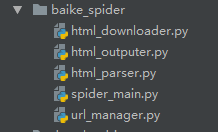
文件目录结构如图
入口文件(spider_main.py):
# coding:utf-8

import url_manager

import html_parser

import html_downloader

import html_outputer

class SpiderMain(object):

    def __init__(self):

        self.urls = url_manager.UrlManager()

        self.downloader = html_downloader.HtmlDownloader()

        self.parser = html_parser.HtmlParser()

        self.outputer = html_outputer.HtmlOutputer()

    def craw(self, root_url):

        count = 1

        self.urls.add_new_url(root_url)

        while self.urls.has_new_url():  # 如果有待爬取的url

            try:

                new_url = self.urls.get_new_url()  # 取一个待爬取的url

                print 'craw %d:%s' % (count, new_url)

                html_cont = self.downloader.download(new_url)  # 下载页面

                new_urls, new_data = self.parser.parse(new_url, html_cont)  # 解析页面得到新的url和一些数据

                self.urls.add_new_urls(new_urls)  # 将新得到的url添加到url管理器

                self.outputer.collect_data(new_data)  # 将获取到的数据添加到output文件中

                if count == 10:

                    break

                count += 1

            except Exception as e:

                print e

        self.outputer.output_html()

if __name__ == '__main__':

    obj_spider = SpiderMain()

    obj_spider.craw('https://baike.baidu.com/item/Python/407313')
url管理文件(url_manager.py):
# coding:utf-8

class UrlManager(object):

    def __init__(self):

        self.new_urls = set()

        self.old_urls = set()

    def add_new_url(self, url):

        if url is None:

            return

        if url not in self.new_urls and url not in self.old_urls:

            self.new_urls.add(url)

    def add_new_urls(self, urls):

        if urls is None or len(urls) == 0:

            return

        for url in urls:

            self.add_new_url(url)

    def has_new_url(self):

        return len(self.new_urls) != 0

    def get_new_url(self):

        new_url = self.new_urls.pop()  # 从列表中获取一个并且移除

        self.old_urls.add(new_url)

        return new_url
页面源码下载(html_downloader.py):
# coding:utf-8

import urllib2

class HtmlDownloader(object):

    def download(self, url):

        if url is None:

            return None

        response = urllib2.urlopen(url)

        if response.getcode() != 200:

            return None

        return response.read()
源码解析(html_parser.py):
# coding:utf-8

from bs4 import BeautifulSoup

import urlparse

import re

class HtmlParser(object):

    def _get_new_urls(self, page_url, soup):

        new_urls = set()

        # 页面中的链接格式:/item/xxx

        links = soup.find_all('a', href=re.compile(r"/item/(.*)"))  # 得到所有的url的标签

        for link in links:

            new_url = link['href']  # 获取所有的链接

            new_full_url = urlparse.urljoin(page_url, new_url)  # 让new_url按照page_url的格式拼接成一个完整的url

            new_urls.add(new_full_url)

        return new_urls

    def _get_new_data(self, page_url, soup):

        res_data = {}

        res_data['url'] = page_url

        # <dd class="lemmaWgt-lemmaTitle-title"><h1>Python</h1></dd>

        title_node = soup.find('dd', class_='lemmaWgt-lemmaTitle-title').find('h1')

        res_data['title'] = title_node.get_text()

        # <div class="lemma-summary" label-module="lemmaSummary">    简介的html

        summary_node = soup.find('div', class_='lemma-summary')

        res_data['summary'] = summary_node.get_text()

        return res_data

    def parse(self, page_url, html_cont):

        if page_url is None or html_cont is None:

            return

        soup = BeautifulSoup(html_cont, 'html.parser', from_encoding='utf-8')

        new_urls = self._get_new_urls(page_url, soup)

        new_data = self._get_new_data(page_url, soup)

        return new_urls, new_data
将爬取到的数据输出(html_output.py):
# coding:utf-8

class HtmlOutputer(object):

    def __init__(self):

        self.datas = []

    def collect_data(self, data):  # 收集数据

        if data is None:

            return

        self.datas.append(data)

    def output_html(self):  # 将数据输出为html

        fout = open('output.html', 'w')

        fout.write('<html>')

        fout.write('<body>')

        fout.write('<table>')

        for data in self.datas:

            fout.write('<tr>')

            fout.write('<td>%s</td>' % data['url'])

            fout.write('<td>%s</td>' % data['title'].encode('utf-8'))

            fout.write('<td>%s</td>' % data['summary'].encode('utf-8'))

            fout.write('</tr>')

        fout.write('</table>')

        fout.write('</body>')

        fout.write('</html>')
用python编写简单爬虫的更多相关文章
- Python 利用Python编写简单网络爬虫实例3
利用Python编写简单网络爬虫实例3 by:授客 QQ:1033553122 实验环境 python版本:3.3.5(2.7下报错 实验目的 获取目标网站“http://bbs.51testing. ...
- Python 利用Python编写简单网络爬虫实例2
利用Python编写简单网络爬虫实例2 by:授客 QQ:1033553122 实验环境 python版本:3.3.5(2.7下报错 实验目的 获取目标网站“http://www.51testing. ...
- Python开发简单爬虫 - 慕课网
课程链接:Python开发简单爬虫 环境搭建: Eclipse+PyDev配置搭建Python开发环境 Python入门基础教程 用Eclipse编写Python程序 课程目录 第1章 课程介绍 ...
- 使用Python编写简单的端口扫描器的实例分享【转】
转自 使用Python编写简单的端口扫描器的实例分享_python_脚本之家 http://www.jb51.net/article/76630.htm -*- coding:utf8 -*- #!/ ...
- python编写简单的html登陆页面(4)
python编写简单的html登陆页面(4) 1 在python编写简单的html登陆页面(2)的基础上在延伸一下: 可以将动态态分配数据,建立表格,存放学生信息 2 实现的效果如下: 3 动 ...
- python编写简单的html登陆页面(3)
1 在python编写简单的html登陆页面(2)的基础上在延伸一下: 可以将静态分配数据,建立表格,存放学生信息 2 加载到静态数据 3 html的编写直接在表格里添加一组数据就行了 4 V ...
- python编写简单的html登陆页面(2)
1 在python编写简单的html登陆页面(1)的基础上在延伸一下: 可以将动态分配数据,实现页面跳转功能: 2 跳转到新的页面:return render_template('home1.ht ...
- 用Python编写简单的发红包程序和计算器原理
用Python编写简单的发红包程序: 第一种解法:数轴方法解决 import random def red_packet(money,num): money = money * 100 #将钱数转换成 ...
- 使用Python编写简单网络爬虫抓取视频下载资源
我第一次接触爬虫这东西是在今年的5月份,当时写了一个博客搜索引擎.所用到的爬虫也挺智能的,起码比电影来了这个站用到的爬虫水平高多了! 回到用Python写爬虫的话题. Python一直是我主要使用的脚 ...
随机推荐
- "Entity Framework数据插入性能追踪"读后总结
园友莱布尼茨写了一篇<Entity Framework数据插入性能追踪>的文章,我感觉不错,至少他提出了问题,写了出来,引起了大家的讨论,这就是一个氛围.读完文章+评论,于是我自己也写了个 ...
- 编辑器上的vim插件,常用到的快捷件
[vim]常用到的插件命令 [Esc] 退出编辑(输入,插入)模式,回到命令模式中(常用)i, I进入插入模式(Insert mode):i 为『从目前光标所在处插入』, I 为『在目前所在行的第一个 ...
- chrome浏览器经常无响应
chrome浏览器(v68)安装一个fiddler证书导入后点击关闭,会出现无响应 有时候动不动会无响应,今天百度了一下,发现真正的"罪魁祸首"是搜狗输入法,升级一下就好了 万恶的 ...
- 三十九 Python分布式爬虫打造搜索引擎Scrapy精讲—elasticsearch(搜索引擎)的基本概念
elasticsearch的基本概念 1.集群:一个或者多个节点组织在一起 2.节点:一个节点是集群中的一个服务器,由一个名字来标识,默认是一个随机的漫微角色的名字 3.分片:将索引(相当于数据库)划 ...
- js监测滚动条到达最底边
scroll : function(){ $(window).scroll(function () { var scrollTop = $(this).scrollTop(); var scrollH ...
- Nginx优化思路
对于高性能网站 ,请求量大,如何支撑? 1方面,要减少请求 对于开发人员----合并css, 背景图片, 减少mysql查询等. 2: 对于运维 nginx的expires ,利用浏览器缓存等,减少查 ...
- 微信小程序如何在使用wx.request使用cookie
我主要是做asp.net mvc后端开发的,经常使用Jquery的ajax与后台的Web API进行数据交互. 最近公司要做一个小程序,要实现小程序与Web前端的通信,当然小程序是可以实现socket ...
- MySQL auto_increment介绍 以及 查询和修改auto_increment的方法
一.auto_increment使用方法 .创建table时设置auto_increment属性和初始值100 create table nonove ( id bigint unsigned not ...
- 机器学习(九)—FP-growth算法
本来老师是想让我学Hadoop的,也装了Ubuntu,配置了Hadoop,一时间却不知从何学起,加之自己还是想先看点自己喜欢的算法,学习Hadoop也就暂且搁置了,不过还是想问一下园子里的朋友有什么学 ...
- vs中删除nuget包
最近发现有些解决方案都是用来nuget包,这个偶尔能跑,但是有一个爱抽风的毛病,生成解决方案的时候报错:无法连接到远程服务器,真几把蛋疼.... 就是下图的情况 网上找了下不是很容易找到处理这个问题的 ...