
iOS:IOS项目集成ShareSDK实现第三方登录、分享、关注等功能。
原文链接:http://blog.csdn.net/daleiwang/article/details/34081231

(3)在项目的AppDelegate中一般情况下有三个操作,第一是注册ShareSDK,第二是注册各个平台的账号,第三是关于微信等应用的回调处理。
//

//  AppDelegate.m

//  ShareSDKTest

//

//  Created by wangdalei on .

//  Copyright (c). All rights reserved.

//

#import "AppDelegate.h"

#import "RootViewController.h"

#import <ShareSDK/ShareSDK.h>

#import "WeiboApi.h"

#import <TencentOpenAPI/QQApiInterface.h>

#import <TencentOpenAPI/TencentOAuth.h>

#import "WXApi.h"

#import <TencentOpenAPI/QQApiInterface.h>

#import <TencentOpenAPI/TencentOAuth.h>

@implementation AppDelegate

@synthesize rootVC;

- (BOOL)application:(UIApplication *)application didFinishLaunchingWithOptions:(NSDictionary *)launchOptions {

    self.window = [[UIWindow alloc] initWithFrame:[[UIScreen mainScreen] bounds]];

    if (self.rootVC==nil) {

        self.rootVC = [[RootViewController alloc]initWithNibName:@"RootViewController" bundle:nil];

    }

    UINavigationController *rootNav = [[UINavigationController alloc]initWithRootViewController:self.rootVC];

    self.window.rootViewController = rootNav;

    self.window.backgroundColor = [UIColor whiteColor];

    [self.window makeKeyAndVisible];

    <span style="color:#ff0000;">[ShareSDK registerApp:@"1a2e7ab5fb6c"];</span>

   <span style="color:#3366ff;"> //添加新浪微博应用 注册网址 http://open.weibo.com  wdl@pmmq.com 此处需要替换成自己应用的

    [ShareSDK connectSinaWeiboWithAppKey:@""

                               appSecret:@"0334252914651e8f76bad63337b3b78f"

                             redirectUri:@"http://appgo.cn"];

    //添加腾讯微博应用 注册网址 http://dev.t.qq.com wdl@pmmq.com 此处需要替换成自己应用的

    [ShareSDK connectTencentWeiboWithAppKey:@""

                                  appSecret:@"ae36f4ee3946e1cbb98d6965b0b2ff5c"

                                redirectUri:@"http://www.sharesdk.cn"

                                   wbApiCls:[WeiboApi class]];

    //添加QQ空间应用 注册网址  http://connect.qq.com/intro/login/ wdl@pmmq.com 此处需要替换成自己应用的

    [ShareSDK connectQZoneWithAppKey:@""

                           appSecret:@"aed9b0303e3ed1e27bae87c33761161d"

                   qqApiInterfaceCls:[QQApiInterface class]

                     tencentOAuthCls:[TencentOAuth class]];

    //此参数为申请的微信AppID wdl@pmmq.com 此处需要替换成自己应用的

    [ShareSDK connectWeChatWithAppId:@"wx4868b35061f87885" wechatCls:[WXApi class]];

    //添加QQ应用 该参数填入申请的QQ AppId wdl@pmmq.com 此处需要替换成自己应用的

    [ShareSDK connectQQWithQZoneAppKey:@""

                     qqApiInterfaceCls:[QQApiInterface class]

                       tencentOAuthCls:[TencentOAuth class]];</span>

    return YES;

}

- (void)applicationWillResignActive:(UIApplication *)application {

    // Sent when the application is about to move from active to inactive state. This can occur for certain types of temporary interruptions (such as an incoming phone call or SMS message) or when the user quits the application and it begins the transition to the background state.

    // Use this method to pause ongoing tasks, disable timers, and throttle down OpenGL ES frame rates. Games should use this method to pause the game.

}

- (void)applicationDidEnterBackground:(UIApplication *)application {

    // Use this method to release shared resources, save user data, invalidate timers, and store enough application state information to restore your application to its current state in case it is terminated later.

    // If your application supports background execution, this method is called instead of applicationWillTerminate: when the user quits.

}

- (void)applicationWillEnterForeground:(UIApplication *)application {

    // Called as part of the transition from the background to the inactive state; here you can undo many of the changes made on entering the background.

}

- (void)applicationDidBecomeActive:(UIApplication *)application {

    // Restart any tasks that were paused (or not yet started) while the application was inactive. If the application was previously in the background, optionally refresh the user interface.

}

- (void)applicationWillTerminate:(UIApplication *)application {

    // Called when the application is about to terminate. Save data if appropriate. See also applicationDidEnterBackground:.

}

<span style="color:#ff6600;">#pragma mark - WX回调

- (BOOL)application:(UIApplication *)application handleOpenURL:(NSURL *)url {

    return [ShareSDK handleOpenURL:url wxDelegate:self];

}

- (BOOL)application:(UIApplication *)application openURL:(NSURL *)url sourceApplication:(NSString *)sourceApplication annotation:(id)annotation {

    return [ShareSDK handleOpenURL:url sourceApplication:sourceApplication annotation:annotation wxDelegate:self];

}

#pragma mark - WXApiDelegate

/*! @brief 收到一个来自微信的请求,第三方应用程序处理完后调用sendResp向微信发送结果

 *

 * 收到一个来自微信的请求,异步处理完成后必须调用sendResp发送处理结果给微信。

 * 可能收到的请求有GetMessageFromWXReq、ShowMessageFromWXReq等。

 * @param req 具体请求内容,是自动释放的

 */

-(void) onReq:(BaseReq*)req{

}

/*! @brief 发送一个sendReq后,收到微信的回应

 *

 * 收到一个来自微信的处理结果。调用一次sendReq后会收到onResp。

 * 可能收到的处理结果有SendMessageToWXResp、SendAuthResp等。

 * @param resp具体的回应内容,是自动释放的

 */

-(void) onResp:(BaseResp*)resp{

}

@end
(4)信息分享。
-(IBAction)share:(id)sender{

    NSString *imagePath = [[NSBundle mainBundle] pathForResource:@"card"  ofType:@"png"];

    //构造分享内容

    id<ISSContent> publishContent = [ShareSDK content:@"分享内容测试"

                                       defaultContent:@"默认分享内容测试,没内容时显示"

                                                image:[ShareSDK imageWithPath:imagePath]

                                                title:@"pmmq"

                                                  url:@"http://www.sharesdk.cn"

                                          description:@"这是一条测试信息"

                                            mediaType:SSPublishContentMediaTypeNews];

    [ShareSDK showShareActionSheet:nil

                         shareList:nil

                           content:publishContent

                     statusBarTips:YES

                       authOptions:nil

                      shareOptions: nil

                            result:^(ShareType type, SSResponseState state, id<ISSPlatformShareInfo> statusInfo, id<ICMErrorInfo> error, BOOL end) {

                                if (state == SSResponseStateSuccess)

                                {

                                    NSLog(@"分享成功");

                                }

                                else if (state == SSResponseStateFail)

                                {

                                    NSLog(@"分享失败");

                                }

                            }];

}
(5)登录、登出、获取授权信息、关注制定微博
#import "LoginViewController.h"

#import <ShareSDK/ShareSDK.h>

@interface LoginViewController ()

-(IBAction)loginWithSina:(id)sender;

-(IBAction)loginWithQQ:(id)sender;

-(IBAction)loginoutWithSina:(id)sender;

-(IBAction)loginoutWithQQ:(id)sender;

-(IBAction)guanzhuUs:(id)sender;

-(void)reloadStateWithType:(ShareType)type;

@end

@implementation LoginViewController

- (id)initWithNibName:(NSString *)nibNameOrNil bundle:(NSBundle *)nibBundleOrNil {

    self = [super initWithNibName:nibNameOrNil bundle:nibBundleOrNil];

    if (self) {

    }

    return self;

}

- (void)viewDidLoad {

    [super viewDidLoad];

}

- (void)didReceiveMemoryWarning {

    [super didReceiveMemoryWarning];

}

- (IBAction)loginWithSina:(id)sender {

    [ShareSDK getUserInfoWithType:ShareTypeSinaWeibo authOptions:nil result:^(BOOL result, id<ISSPlatformUser> userInfo, id<ICMErrorInfo> error) {

        NSLog(@"%d",result);

        if (result) {

            //成功登录后,判断该用户的ID是否在自己的数据库中。

            //如果有直接登录,没有就将该用户的ID和相关资料在数据库中创建新用户。

            [self reloadStateWithType:ShareTypeSinaWeibo];

        }

    }];

}

-(IBAction)loginWithQQ:(id)sender{

    [ShareSDK getUserInfoWithType:ShareTypeQQSpace authOptions:nil result:^(BOOL result, id<ISSPlatformUser> userInfo, id<ICMErrorInfo> error) {

        NSLog(@"%d",result);

        if (result) {

            //成功登录后,判断该用户的ID是否在自己的数据库中。

            //如果有直接登录,没有就将该用户的ID和相关资料在数据库中创建新用户。

            [self reloadStateWithType:ShareTypeQQSpace];

        }

    }];

}

-(IBAction)loginoutWithSina:(id)sender{

    [ShareSDK cancelAuthWithType:ShareTypeSinaWeibo];

    [self reloadStateWithType:ShareTypeSinaWeibo];

}

-(IBAction)loginoutWithQQ:(id)sender{

    [ShareSDK cancelAuthWithType:ShareTypeQQSpace];

    [self reloadStateWithType:ShareTypeQQSpace];

}

-(void)reloadStateWithType:(ShareType)type{

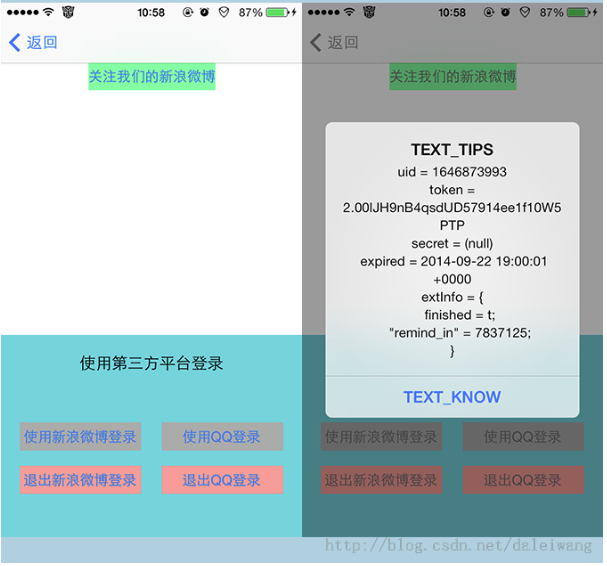
    //现实授权信息,包括授权ID、授权有效期等。

    //此处可以在用户进入应用的时候直接调用,如授权信息不为空且不过期可帮用户自动实现登录。

    id<ISSPlatformCredential> credential = [ShareSDK getCredentialWithType:type];

    UIAlertView *alertView = [[UIAlertView alloc] initWithTitle:NSLocalizedString(@"TEXT_TIPS", @"提示")

                                                        message:[NSString stringWithFormat:

                                                                 @"uid = %@\ntoken = %@\nsecret = %@\n expired = %@\nextInfo = %@",

                                                                 [credential uid],

                                                                 [credential token],

                                                                 [credential secret],

                                                                 [credential expired],

                                                                 [credential extInfo]]

                                                       delegate:nil

                                              cancelButtonTitle:NSLocalizedString(@"TEXT_KNOW", @"知道了")

                                              otherButtonTitles:nil];

    [alertView show];

}

//关注用户

-(IBAction)guanzhuUs:(id)sender{

    [ShareSDK followUserWithType:ShareTypeSinaWeibo         //平台类型

                           field:@"ShareSDK"                //关注用户的名称或ID

                       fieldType:SSUserFieldTypeName        //字段类型,用于指定第二个参数是名称还是ID

                     authOptions:nil                        //授权选项

                    viewDelegate:nil                        //授权视图委托

                          result:^(SSResponseState state, id<ISSPlatformUser> userInfo, id<ICMErrorInfo> error) {

                              if (state == SSResponseStateSuccess) {

                                  NSLog(@"关注成功");

                              } else if (state == SSResponseStateFail) {

                                  NSLog(@"%@", [NSString stringWithFormat:@"关注失败:%@", error.errorDescription]);

                              }

                          }];

}

@end
5)你可能会看到一些应用需要第三方登录的,一种是弹出webView加载的新浪微博或者qq的网页授权,还有一种是跳转到本地的已经安装的新浪微博应用或者qq应用进行授权。第二种授权方式较SSO授权,体验会比较好一些,因为不需要用户输入新浪微博或QQ的用户名与密码。
第二种授权方式需要在plist中配置Scheme。SSO默认是打开的不需要配置。在AppDelegate中实现回调。


DEMO下载地址:http://download.csdn.net/download/daleiwang/7734321
iOS:IOS项目集成ShareSDK实现第三方登录、分享、关注等功能。的更多相关文章
- IOS项目集成ShareSDK实现第三方登录、分享、关注等功能。
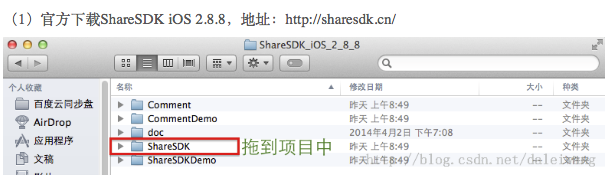
(1)官方下载ShareSDK iOS 2.8.8,地址:http://sharesdk.cn/ (2)根据实际情况,引入相关的库,参考官方文档. (3)在项目的AppDelegate中一般情况下有三 ...
- IOS项目集成ShareSDK实现第三方登录、分享、关注等功能(备用)
(1)官方下载ShareSDK iOS 2.8.8,地址:http://sharesdk.cn/ (2)根据实际情况,引入相关的库,参考官方文档. (3)在项目的AppDelegate中一般情况下有三 ...
- IOS项目集成ShareSDK实现第三方登录、分享、关注等功能
(1)官方下载ShareSDK iOS 2.8.8,地址:http://sharesdk.cn/ (2)根据实际情况,引入相关的库,参考官方文档. (3)在项目的AppDelegate中一般情况下有三 ...
- iOS开发---集成ShareSDK实现第三方登录、分享、关注等功能。
(1)官方下载ShareSDK IOS 2.9.6,地址:http://sharesdk.mob.com/Download (2)根据实际情况,引入相关的库,参考官方文档. (3)在项目的AppDel ...
- [iOS常见问题] 关于使用QQ做第三方登录的问题!
[iOS常见问题] 关于使用QQ做第三方登录的问题! 注意:QQ本身没有授权功能,所以想要使用QQ做第三方登录必须通过QQ空间来实现! 第一步:集成ShareSDK(步骤同集成分享的一样,如果已经集成 ...
- php+redis实现注册、删除、编辑、分页、登录、关注等功能
本文实例讲述了php+redis实现注册.删除.编辑.分页.登录.关注等功能.分享给大家供大家参考,具体如下: 主要界面 连接redis redis.php <?php //实例化 $red ...
- iOS原生项目集成React Native模块
今天周末,弄弄Native和React Native之间的交互.首先,先在iOS原生项目中集成React Native模块: 注意事项: 1.因为react native的版本问题,部分细节可能有所不 ...
- Django项目中使用qq第三方登录。
使用qq登录的前提是已经在qq互联官网创建网站应用并获取到QQ互联中网站应用的APP ID和APP KEY 1,建路由 # qq登录 path('loginQq/',qq.loginQq,name=' ...
- 利用ShareSDK进行第三方登录和分享
到相应开发者平台注册开发者账号,并添加你要进行分享和使用第三方登录应用的信息. 添加新浪微博应用 注册网址 http://open.weibo.com添加QQ应用 注册网址 http://mobil ...
随机推荐
- python基础===修改idle的输入风格
http://blog.csdn.net/aq_cainiao_aq/article/details/51701861
- Mac-安装itellij idea
1.安装解压 Unzip and copy JetbrainsCrack.jar to /Applications/CLion.app/Contents/bin/JetbrainsCrack.jar ...
- Javascript传参参考
可参考的细节: <!doctype html> <html lang="en"> <head> <meta charset="U ...
- 在oracle官网上,找到我们所需版本的jdk
oracle的官网,因为都是英文,而且内容还特别多,经常的找不到历史版本的JDK. 特地,将找历史版本JDK的方法记录下来. 访问:http://www.oracle.com/technetwork/ ...
- Python与Mysql交互
#转载请联系 在写内容之前,先放一张图,bling- 这张图算是比较详细的表达出了web开发都需要什么.用户访问网页,就是访问服务器的网页文件.这些网页文件由前端工程师编写的.服务器通常用nginx/ ...
- sqlserver中case when then用法
sql语句判断方法之一,Case具有两种格式,简单Case函数和Case搜索函数. --简单Case函数 (CASE sex WHEN '1' THEN '男' WHEN '2' THEN '女' E ...
- python基础之初识python
Python的发展史 1989年圣诞节期间,吉多·范罗苏姆为了打发时间,开发了python这门语言.真他妈牛逼. Python崇尚优美.清晰.简单,是一门优秀并广泛使用的语言.2007年在TIOBE榜 ...
- (十)MySQL日志
1)日志种类 error log:错误日志 拍错 /var/log/mysqld.log \这是yum安装mysqld生成error默认目录 bin blog 二进制日志 备份 增量备份,记录DDL, ...
- PHP serialize 和 JSON 解析与区别
PHP serialize 和 JSON 解析与区别 对于JSON(JavaScript Object Notation)大家应该不陌生,它是一种轻量级的数据交换格式.易于人阅读和编写.同时也易于机器 ...
- HSV做通道分离是出现的Vector内存越界错误
vector<Mat> hsvSplit; //因为我们读取的是彩色图,直方图均衡化需要在HSV空间做 split(imgHSV, hsvSplit); equalizeHist(hsvS ...