
flask-compress的使用方法以及对应的http头Vary、Content-Encoding的意思
参考:https://github.com/shengulong/flask-compress
1、Content-Encoding是HTTP协议的响应报文头,一般形式如:Content-Encoding:gzip,deflate,compress
deflate(RFC1951):一种压缩算法,使用LZ77和哈弗曼进行编码;
zlib(RFC1950):一种格式,是对deflate进行了简单的封装;
gzip(RFC1952):一种格式,也是对deflate进行的封装.
可以看出deflate是最核心的算法,而zlib和gzip格式的区别仅仅是头部和尾部不一样,而实际的内容都是deflate编码的,即:
gzip = gzip头(10字节) + deflate编码的实际内容 + gzip尾(8字节)
zlib = zlib头 + deflate编码的实际内容 + zlib尾
2、flask-compress是用来压缩响应内容的,当然更好的解决方案是使用nginx做代理,使用nginx的自动压缩静态文件压缩功能,需要对nginx进行配置
工作原理:flask-compress会给http响应增加两个http头:vary、content-encoding,并压缩响应的数据。
How it works
Flask-Compress both adds the various headers required for a compressed response and gzips the response data. This makes serving gzip compressed static files extremely easy.
Internally, every time a request is made the extension will check if it matches one of the compressible MIME types and will automatically attach the appropriate headers.
3、安装 pip install flask-compress
or, if you want the latest github version:
$ pip install git+git://github.com/libwilliam/flask-compress.gi
4、使用
 from flask import Flask

 from flask_compress import Compress

 app = Flask(__name__)

 Compress(app)
 from flask import Flask

 from flask_compress import Compress

 compress = Compress()

 def start_app():

     app = Flask(__name__)

     compress.init_app(app)

     return app
5、选项
Within your Flask application's settings you can provide the following settings to control the behavior of Flask-Compress. None of the settings are required.
| Option | Description | Default |
|---|---|---|
COMPRESS_MIMETYPES |
Set the list of mimetypes to compress here. | ['text/html','text/css','text/xml','application/json','application/javascript'] |
COMPRESS_LEVEL |
Specifies the gzip compression level. | 6 |
COMPRESS_MIN_SIZE |
Specifies the minimum file size threshold for compressing files. | 500 |
COMPRESS_CACHE_KEY |
Specifies the cache key method for lookup/storage of response data. | None |
COMPRESS_CACHE_BACKEND |
Specified the backend for storing the cached response data. | None |
COMPRESS_REGISTER |
Specifies if compression should be automatically registered. |
|
6、示例:
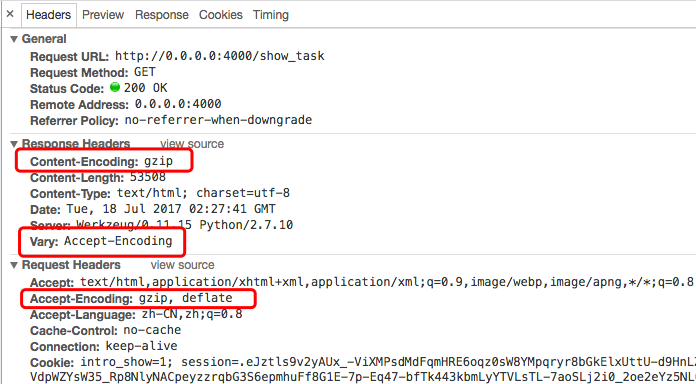
7、说下http头Vary的作用:指定Vary: Accept-Encoding标头可告诉代理服务器缓存两种版本的资源:压缩和非压缩,这有助于避免一些公共代理不能正确地检测Content-Encoding标头的问题
参考:1、http://blog.csdn.net/fupengyao/article/details/50915526
2、http://www.webkaka.com/blog/archives/how-to-set-Vary-Accept-Encoding-header.html
8、nginx配置gzip压缩
默认情况下,Nginx的gzip压缩是关闭的,也只对只对text/html进行压缩,需要在编辑nginx.conf文件,在http段加入一下配置,常用配置片段如下:
gzip on;
gzip_comp_level 6; # 压缩比例,比例越大,压缩时间越长。默认是1
gzip_types text/xml text/plain text/css application/javascript
application/x-javascript application/rss+xml; # 哪些文件可以被压缩
gzip_disable "MSIE [1-6]\."; # IE6无效
9、http的vary头在nginx中的配置方法
gzip_vary on
flask-compress的使用方法以及对应的http头Vary、Content-Encoding的意思的更多相关文章
- Content encoding error问题解决方法
A few people have been experiencing the following error. UPDATE: The reason for it happening is beca ...
- python flask实现小项目方法
本文目的是为了完成一个项目用到的flask基本知识,例子会逐渐加深.最好对着源码,一步一步走. 下载源码,运行 pip install -r requirements.txt 建立环境 python ...
- Flask关于request一些方法和属性的整理(持续更新)
前提:基于纯后端服务, post 请求 (Content-Type: application/json,) 1.获取未经处理过的原始数据而不管内容类型,如果数据格式是json的,则取得的是json字符 ...
- Flask学习 4 http方法
服务端端 #!/usr/bin/env python # encoding: utf-8 """ @version: v1.0 @author: cxa @file: f ...
- 用 Flask 来写个轻博客 (10) — M(V)C_Jinja 常用过滤器与 Flask 特殊变量及方法
Blog 项目源码:https://github.com/JmilkFan/JmilkFan-s-Blog 目录 目录 前文列表 Jinja 中常用的过滤器 default float int len ...
- Flask—路由的注册方法
第一种注册方法 from flask import Flask app = Flask(__name__) @app.route("/hello") # 第一种注册方法 def h ...
- Flask(3)- Flask 中的 HTTP 方法
查看 app.route() 源代码 def route(self, rule: str, **options: t.Any) -> t.Callable: """ ...
- flask自定义处理错误方法
自定义错误处理方法: 当客户端访问浏览器是,得到相对应的状态码,服务器通过状态码给用户相对应的页面. @app.errorhandler(404) def handle_404_error(err): ...
- 在pycharm_2018.2版本中开启Flask的debug的方法 (不要用命令:python **.py启动)
断点后,先ctl+c关闭控制台程序,再点击debuger调试 问题描述:在pycharm_2018.2版本中,我明确开启了debug,代码如下所示: from flask import Flask a ...
随机推荐
- 【洛谷 P1645】 序列 (差分约束)
题目链接 差分约束. 设\(s[i]\)表示前\(i\)个位置有多少个数,那么对于一个限制条件\((L,R,C)\),显然有 \[s[R]-s[L-1]>=C\] 于是连一条\(L-1\)到\( ...
- [bzoj2049][Sdoi2008]Cave 洞穴勘测——lct
Brief Description 给定一个森林,您需要支持两种操作: 链接两个节点. 断开两个节点之间的链接. Algorithm Design 对于树上的操作,我们现在已经有了树链剖分可以处理这些 ...
- bzoj 1042 DP+容斥原理
我们可以先DP预处理出W[I]代表买I的东西,每种钞票的个数 不做限制的方案数,那么对于每一组数据的限制,我们可以知道 W[S-C[I]*(D[I]+1)]C为面值,D为数量,这个代表第I种钞票一定 ...
- hashlib,suprocess,configparser模块
十 hashlib模块 1.什么叫hash:hash是一种算法,该算法接受传入的内容,经过运算得到一串hash值 2.hash值的特点是: 2.1 只要传入的内容一样,得到的hash值必然一样==== ...
- 操作MySQL数据库相关代码
注意事项: 1.导入驱动包,如我导的是mysql-connector-java-5.1.26-bin.jar 2.修改下面代码中的用户名和密码 3.其中URL为"jdbc:mysql://数 ...
- python memcache 常用操作
add() 添加一条键值对,如果key已存在,重复执行add操作会报异常 mc.add('name2', 'lisi') print(mc.get('name2')) # lisi replace 修 ...
- react-slick无法显示预期效果问题
目前学习react来做新项目,我要做一个图片的轮播,是那种一次可以展示几张图片的循环轮播,在我们使用的antd里面没有,然后前辈叫我使用react-slick插件,于是我就使用npm命令安装了reac ...
- BZOJ 3038 上帝造题的七分钟二
无题目 但是百度会发现题目和3211基本一致 所以看上一篇博文的上一篇博文呢
- 【SQL】持久性存储模块PSM
1. 创建PSM函数和过程 创建过程: CREATE PROCEDURE 名字 (参数) 局部声明: 过程体: 创建函数: CREATE FUNCTION 名字 (参数) RETURNS 类型 局部声 ...
- 通过文件配置:firewalld.service(5)
firewalld.service Name firewalld.service — firewalld service configuration files Synopsis /etc/firew ...