
flask-compress的使用方法以及对应的http头Vary、Content-Encoding的意思
参考:https://github.com/shengulong/flask-compress
1、Content-Encoding是HTTP协议的响应报文头,一般形式如:Content-Encoding:gzip,deflate,compress
deflate(RFC1951):一种压缩算法,使用LZ77和哈弗曼进行编码;
zlib(RFC1950):一种格式,是对deflate进行了简单的封装;
gzip(RFC1952):一种格式,也是对deflate进行的封装.
可以看出deflate是最核心的算法,而zlib和gzip格式的区别仅仅是头部和尾部不一样,而实际的内容都是deflate编码的,即:
gzip = gzip头(10字节) + deflate编码的实际内容 + gzip尾(8字节)
zlib = zlib头 + deflate编码的实际内容 + zlib尾
2、flask-compress是用来压缩响应内容的,当然更好的解决方案是使用nginx做代理,使用nginx的自动压缩静态文件压缩功能,需要对nginx进行配置
工作原理:flask-compress会给http响应增加两个http头:vary、content-encoding,并压缩响应的数据。
How it works
Flask-Compress both adds the various headers required for a compressed response and gzips the response data. This makes serving gzip compressed static files extremely easy.
Internally, every time a request is made the extension will check if it matches one of the compressible MIME types and will automatically attach the appropriate headers.
3、安装 pip install flask-compress
or, if you want the latest github version:
$ pip install git+git://github.com/libwilliam/flask-compress.gi
4、使用
 from flask import Flask

 from flask_compress import Compress

 app = Flask(__name__)

 Compress(app)
 from flask import Flask

 from flask_compress import Compress

 compress = Compress()

 def start_app():

     app = Flask(__name__)

     compress.init_app(app)

     return app
5、选项
Within your Flask application's settings you can provide the following settings to control the behavior of Flask-Compress. None of the settings are required.
| Option | Description | Default |
|---|---|---|
COMPRESS_MIMETYPES |
Set the list of mimetypes to compress here. | ['text/html','text/css','text/xml','application/json','application/javascript'] |
COMPRESS_LEVEL |
Specifies the gzip compression level. | 6 |
COMPRESS_MIN_SIZE |
Specifies the minimum file size threshold for compressing files. | 500 |
COMPRESS_CACHE_KEY |
Specifies the cache key method for lookup/storage of response data. | None |
COMPRESS_CACHE_BACKEND |
Specified the backend for storing the cached response data. | None |
COMPRESS_REGISTER |
Specifies if compression should be automatically registered. |
|
6、示例:
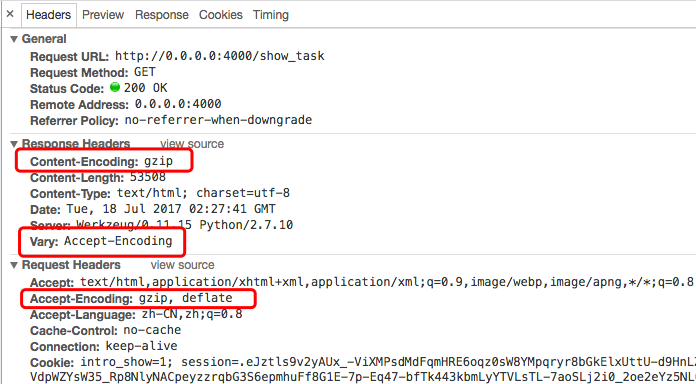
7、说下http头Vary的作用:指定Vary: Accept-Encoding标头可告诉代理服务器缓存两种版本的资源:压缩和非压缩,这有助于避免一些公共代理不能正确地检测Content-Encoding标头的问题
参考:1、http://blog.csdn.net/fupengyao/article/details/50915526
2、http://www.webkaka.com/blog/archives/how-to-set-Vary-Accept-Encoding-header.html
8、nginx配置gzip压缩
默认情况下,Nginx的gzip压缩是关闭的,也只对只对text/html进行压缩,需要在编辑nginx.conf文件,在http段加入一下配置,常用配置片段如下:
gzip on;
gzip_comp_level 6; # 压缩比例,比例越大,压缩时间越长。默认是1
gzip_types text/xml text/plain text/css application/javascript
application/x-javascript application/rss+xml; # 哪些文件可以被压缩
gzip_disable "MSIE [1-6]\."; # IE6无效
9、http的vary头在nginx中的配置方法
gzip_vary on
flask-compress的使用方法以及对应的http头Vary、Content-Encoding的意思的更多相关文章
- Content encoding error问题解决方法
A few people have been experiencing the following error. UPDATE: The reason for it happening is beca ...
- python flask实现小项目方法
本文目的是为了完成一个项目用到的flask基本知识,例子会逐渐加深.最好对着源码,一步一步走. 下载源码,运行 pip install -r requirements.txt 建立环境 python ...
- Flask关于request一些方法和属性的整理(持续更新)
前提:基于纯后端服务, post 请求 (Content-Type: application/json,) 1.获取未经处理过的原始数据而不管内容类型,如果数据格式是json的,则取得的是json字符 ...
- Flask学习 4 http方法
服务端端 #!/usr/bin/env python # encoding: utf-8 """ @version: v1.0 @author: cxa @file: f ...
- 用 Flask 来写个轻博客 (10) — M(V)C_Jinja 常用过滤器与 Flask 特殊变量及方法
Blog 项目源码:https://github.com/JmilkFan/JmilkFan-s-Blog 目录 目录 前文列表 Jinja 中常用的过滤器 default float int len ...
- Flask—路由的注册方法
第一种注册方法 from flask import Flask app = Flask(__name__) @app.route("/hello") # 第一种注册方法 def h ...
- Flask(3)- Flask 中的 HTTP 方法
查看 app.route() 源代码 def route(self, rule: str, **options: t.Any) -> t.Callable: """ ...
- flask自定义处理错误方法
自定义错误处理方法: 当客户端访问浏览器是,得到相对应的状态码,服务器通过状态码给用户相对应的页面. @app.errorhandler(404) def handle_404_error(err): ...
- 在pycharm_2018.2版本中开启Flask的debug的方法 (不要用命令:python **.py启动)
断点后,先ctl+c关闭控制台程序,再点击debuger调试 问题描述:在pycharm_2018.2版本中,我明确开启了debug,代码如下所示: from flask import Flask a ...
随机推荐
- 我在一个前端项目中用js整理的一些通用方法,其中使用到的思想,主要就是约定了。
把名称和后台来的json数据约定起来,可以达到的效果就是可以将东西统一化,减少差异,提升模块等的通用性,此后就可以实现具体不同模块内容可以自动或拷贝赋值的方式 2016.7.18 refactor s ...
- openstack中region、az、host aggregate、cell 概念
1. region 更像是一个地理上的概念,每个region有自己独立的endpoint,regions之间完全隔离,但是多个regions之间共享同一个keystone和dashboard.(注:目 ...
- 创建第一个maven项目的那些坑
1.记事本方式: class所在的目录结构: class的代码书写: package com.imooc.maven01.mode1; public class HelloWorld { public ...
- Tkinter 计算器
from tkinter import * master = Tk() frame = Frame(master) frame.pack(padx=10,pady=10) v1 = StringVar ...
- synchronized 修饰static方法
•1.依靠对象锁锁定 初始化一个对象时,自动有一个 对象锁. synchronized {普通方法}依靠对象锁工作,多线程访问synchronized方法,一旦某个进程抢得锁之后,其他的进程只有排队对 ...
- java Class.forName()
Java程序在运行时,Java运行时系统一直对所有的对象进行所谓的运行时类型标识.这项信息纪录了每个对象所属的类. 虚拟机通常使用运行时类型信息选准正确方法去执行,用来保存这些类型信息的类是Class ...
- 网关协议:CGI、FastCGI、WSGI
CGI就像是一座桥,把网页和WEB服务器中的执行程序连接起来,它把HTML接收的指令传递给服务器的执行程序,再把服务器执行程序的结果返还给HTML页. CGI CGI即通用网关接口(Common Ga ...
- (十)MySQL日志
1)日志种类 error log:错误日志 拍错 /var/log/mysqld.log \这是yum安装mysqld生成error默认目录 bin blog 二进制日志 备份 增量备份,记录DDL, ...
- (二)centos7安装zabbix agentd端
关闭防火墙和selinux systemctl stop firewalld systemctl disable firewalld sed -ri '/^SELINUX=/cSELINUX=disa ...
- centos /home/ 目录下的中文名文件夹改为英文
$ export LANG=en_US $ xdg-user-dirs-gtk-update 在弹出的窗口中询问是否将目录转化为英文路径,同意并关闭 在终端中输入命令: export LANG=zh_ ...