
测试social_navigation_layers
目标:测试social_navigation_layers
方法:
使用move_base接口启动costmap_2d
这样就能直接用configure方法来进行测试不用自己写代码
一、启动move_base
1、launch file
<launch>

  <!-- Launch move_base and load all navigation parameters -->

  <include file="$(find costmap_test)/config/move_base_config/move_base.xml"/>

  <!-- Run the map server with a blank map -->

  <node name="map_server" pkg="map_server" type="map_server" args="$(find pioneer_xtion)/stage_config/maps/blank_map.yaml" />

  <!--costmap 必须的tf变换 看http://wiki.ros.org/costmap_2d#tf Required tf Transforms-->

  <!--global costmap -->

  <node name="static_tf0" pkg="tf" type="static_transform_publisher" args="2 0 0 0 0 0 /map /base_link 100"/>

  <!--local costmap -->

  <node name="static_tf1" pkg="tf" type="static_transform_publisher" args="0 0 0 0 0 0 /odom /map 100"/>

  <!--发布people msgs-->

  <node name = "people" pkg="people_velocity_tracker" type="static.py" args="2 2 1 1"/>

  <node name="rviz" pkg="rviz" type="rviz" args="-d $(find costmap_test)/rviz/single_robot.rviz" />

</launch>
2、movebase config,common costmap config,local costmap config,global costmap config
<launch>

<!--

  Example move_base configuration. Descriptions of parameters, as well as a full list of all amcl parameters, can be found at http://www.ros.org/wiki/move_base.

-->

  <node pkg="move_base" type="move_base" respawn="false" name="move_base_node" output="screen">

    <param name="footprint_padding" value="0.01" />

    <param name="controller_frequency" value="10.0" />

    <param name="controller_patience" value="3.0" />

    <param name="oscillation_timeout" value="30.0" />

    <param name="oscillation_distance" value="0.5" />

    <param name="base_local_planner" value="dwa_local_planner/DWAPlannerROS" />

  <!-- ns = global costmap 加载参数到 global costmap这个node里-->

    <rosparam file="$(find costmap_test)/config/move_base_config/costmap_common_params.yaml" command="load" ns="global_costmap" />

    <rosparam file="$(find costmap_test)/config/move_base_config/costmap_common_params.yaml" command="load" ns="local_costmap" />

    <rosparam file="$(find costmap_test)/config/move_base_config/local_costmap_params.yaml" command="load" />

    <rosparam file="$(find costmap_test)/config/move_base_config/global_costmap_params.yaml" command="load" />

    <rosparam file="$(find costmap_test)/config/move_base_config/base_local_planner_params.yaml" command="load" />

    <rosparam file="$(find costmap_test)/config/move_base_config/dwa_local_planner_params.yaml" command="load" />

  </node>

</launch>
common costmap config
#This file contains common configuration options for the two costmaps used in the navigation stack for more details on the parameters in this file, and a full list of the parameters used by the costmaps, please see http://www.ros.org/wiki/costmap_2d

#For this example we'll configure the costmap in voxel-grid mode

map_type: voxel

#Voxel grid specific parameters

origin_z: 0.0

z_resolution: 0.2

z_voxels: 10

unknown_threshold: 9

mark_threshold: 0

#Set the tolerance we're willing to have for tf transforms

transform_tolerance: 0.5

#Obstacle marking parameters

obstacle_range: 2.5

max_obstacle_height: 2.0

raytrace_range: 3.0

#The footprint of the robot and associated padding

#footprint: [[-0.325, -0.325], [-0.325, 0.325], [0.325, 0.325], [0.46, 0.0], [0.325, -0.325]]

robot_radius: 0.2

footprint_padding: 0.01

#Cost function parameters

inflation_radius: 0.5

cost_scaling_factor: 0.1

#The cost at which a cell is considered an obstacle when a map is read from the map_server

lethal_cost_threshold: 100

#Configuration for the sensors that the costmap will use to update a map

#configuration for plugins

plugins:

    - {name: static_map,       type: "costmap_2d::StaticLayer"}

    - {name: obstacles,        type: "costmap_2d::VoxelLayer"}

    - {name: proxemicLayer,       type: "social_navigation_layers::ProxemicLayer"}
global costmap config
#Independent settings for the global planner's costmap. Detailed descriptions of these parameters can be found at http://www.ros.org/wiki/costmap_2d

<!--global costmap config 如果global_costmap改成其他名字,则param名字也会改-->

global_costmap:

  #Set the global and robot frames for the costmap

  global_frame: map

  robot_base_frame: base_link

  #Set the update and publish frequency of the costmap

  update_frequency: 2.0

  publish_frequency: 0.0

  #We'll use a map served by the map_server to initialize this costmap

  static_map: true

  rolling_window: false

  footprint_padding: 0.02
local costmap config
#Independent settings for the local planner's costmap. Detailed descriptions of these parameters can be found at http://www.ros.org/wiki/costmap_2d

local_costmap:

  #We'll publish the voxel grid used by this costmap

  publish_voxel_map: true

  #Set the global and robot frames for the costmap

  global_frame: odom

  robot_base_frame: base_link

  #Set the update and publish frequency of the costmap

  update_frequency: 2.0

  publish_frequency: 2.0

  #We'll configure this costmap to be a rolling window... meaning it is always

  #centered at the robot

  static_map: false

  rolling_window: true

  width: 6.0

  height: 6.0

  resolution: 0.01

  origin_x: 0.0

  origin_y: 0.0
二、发布people_msgs
使用
http://wiki.ros.org/people_velocity_tracker?distro=kinetic
people_velocity_tracker
static.py
效果图
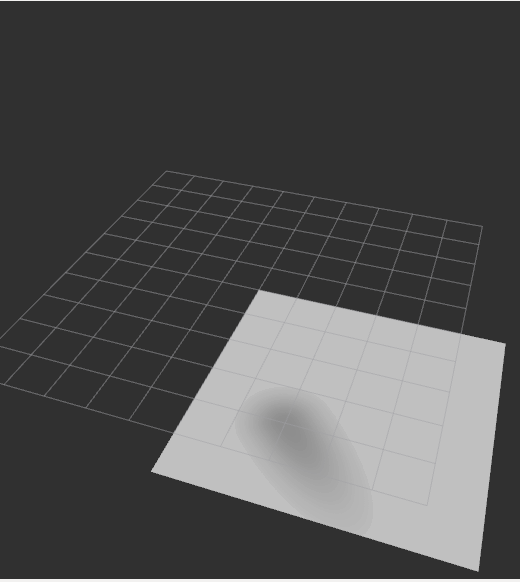
往速度方向增长代价
测试social_navigation_layers的更多相关文章
- SignalR系列续集[系列8:SignalR的性能监测与服务器的负载测试]
目录 SignalR系列目录 前言 也是好久没写博客了,近期确实很忙,嗯..几个项目..头要炸..今天忙里偷闲.继续我们的小系列.. 先谢谢大家的支持.. 我们来聊聊SignalR的性能监测与服务器的 ...
- Apache Ignite之集群应用测试
集群发现机制 在Ignite中的集群号称是无中心的,而且支持命令行启动和嵌入应用启动,所以按理说很简单.而且集群有自动发现机制感觉对于懒人开发来说太好了,抱着试一试的心态测试一下吧. 在Apache ...
- 测试一下StringBuffer和StringBuilder及字面常量拼接三种字符串的效率
之前一篇里写过字符串常用类的三种方式<java中的字符串相关知识整理>,只不过这个只是分析并不知道他们之间会有多大的区别,或者所谓的StringBuffer能提升多少拼接效率呢?为此写个简 ...
- TechEmpower 13轮测试中的ASP.NET Core性能测试
应用性能直接影响到托管服务的成本,因此公司在开发应用时需要格外注意应用所使用的Web框架,初创公司尤其如此.此外,糟糕的应用性能也会影响到用户体验,甚至会因此受到相关搜索引擎的降级处罚.在选择框架时, ...
- .NET Core系列 :4 测试
2016.6.27 微软已经正式发布了.NET Core 1.0 RTM,但是工具链还是预览版,同样的大量的开源测试库也都是至少发布了Alpha测试版支持.NET Core, 这篇文章 The Sta ...
- 渗透测试工具BurpSuite做网站的安全测试(基础版)
渗透测试工具BurpSuite做网站的安全测试(基础版) 版权声明:本文为博主原创文章,未经博主允许不得转载. 学习网址: https://t0data.gitbooks.io/burpsuite/c ...
- 在ubuntu16.10 PHP测试连接MySQL中出现Call to undefined function: mysql_connect()
1.问题: 测试php7.0 链接mysql数据库的时候发生错误: Fatal error: Uncaught Error: Call to undefined function mysqli_con ...
- 【初学python】使用python调用monkey测试
目前公司主要开发安卓平台的APP,平时测试经常需要使用monkey测试,所以尝试了下用python调用monkey,代码如下: import os apk = {'j': 'com.***.test1 ...
- CoreCRM 开发实录——Travis-CI 实现 .NET Core 程度在 macOS 上的构建和测试 [无水干货]
上一篇文章我提到:为了使用"国货",我把 Linux 上的构建和测试委托给了 DaoCloud,而 Travis-CI 不能放着不用啊.还好,这货支持 macOS 系统.所以就把 ...
随机推荐
- java对数组的操作
1 拷贝数组 数组全拷贝 数组定位拷贝 2 判断数组是否相等(每个元素都对应相等) 3 数组和集合的相互转化 import java.util.Arrays; import java.util.Lis ...
- Spring Data学习(一):初识
目录 前言 添加Spring Data 配置pom.xml 配置数据库相关信息(application.properties) 配置数据库信息 配置自动根据实体类在数据库创建表 创建User.java ...
- 201621123033 《Java程序设计》第14周学习总结
1. 本周学习总结 1.1 以你喜欢的方式(思维导图或其他)归纳总结与数据库相关内容. 2. 使用数据库技术改造你的系统 2.1 简述如何使用数据库技术改造你的系统.要建立什么表?截图你的表设计. 2 ...
- Vue组件间通信:一个例子学会Vue组件-Vue.js学习总结)(转载)
详情请点击 http://www.jianshu.com/p/9ad1ba89a04b
- window+kafka
window环境搭建zookeeper,kafka集群 为了演示集群的效果,这里准备一台虚拟机(window 7),在虚拟机中搭建了单IP多节点的zookeeper集群(多IP节点的也是同理的),并且 ...
- POJ 3801/HDU 3157 Crazy Circuits | 有下界的最小流
题目: POJ最近总是炸 所以还是用HDU吧http://acm.hdu.edu.cn/showproblem.php?pid=3157 题解: 题很长,但其实就是给个有源汇带下界网络流(+是源,-是 ...
- 微信小程序使用原生WebSokcet实现断线重连及数据拼接
以前做小程序为了应急找了个插件去链接WebSokcet,文章传送门. 回过头在新项目中再次使用时出现了些许问题,不一一赘述.遂决定好好用一下原生的WebSokcet. 一.说明 1.小程序原生的Web ...
- 关于 WizTools.org RESTClient的使用
今天分享一个很好用的测试service的工具,很好用 提供两种方法使用这个东东. 第一种方法 通过cmd命令窗口. (1)cd C:\Users\li_weifeng\Desktop\c4d2(文件存 ...
- Codeforces Round #348 (VK Cup 2016 Round 2, Div. 2 Edition) A
A. Little Artem and Presents time limit per test 2 seconds memory limit per test 256 megabytes input ...
- URAL1277 Cops and Thieves(最小割)
Cops and Thieves Description: The Galaxy Police (Galaxpol) found out that a notorious gang of thieve ...