
Spring总结五:小结 使用spring访问servlet
使用spring访问servlet
首先先建一个web项目,并在pom.xml中引入依赖包:spring-context和jsp servlet相关包,以及tomcat插件
其次建一个spring的配置文件applicationContext.xml,并在配置中开启注解扫描:
<?xml version="1.0" encoding="UTF-8"?>

<beans xmlns="http://www.springframework.org/schema/beans"

       xmlns:context="http://www.springframework.org/schema/context"

       xmlns:xsi="http://www.w3.org/2001/XMLSchema-instance"

       xsi:schemaLocation="

       http://www.springframework.org/schema/beans

       http://www.springframework.org/schema/beans/spring-beans.xsd

       http://www.springframework.org/schema/context

       http://www.springframework.org/schema/context/spring-context.xsd

">

    <!--开启扫描-->

    <context:component-scan base-package="com.zy"></context:component-scan>

</beans>
注意我们先演示一个有问题的方式:
我们模拟从index.jsp 访问 LoginServlet:
UserService
public interface UserService {

    public boolean login();

}

@Service("userService")//使用注解

public class UserServiceImpl implements UserService {

    public UserServiceImpl() {

        System.out.println("userService 构造方法...");

    }

    @Override

    public boolean login() {

        System.out.println("service  login...");

        return true;

    }

}
index.jsp
<%@ page contentType="text/html; charset=utf-8" language="java" isELIgnored="false" %>

<html>

<body>

<h2>Hello World!</h2>

<a href="${pageContext.request.contextPath}/HelloServlet">helloservlet</a>

</body>

</html>
LoginServlet
public class LoginServlet extends HttpServlet {

    protected void doPost(HttpServletRequest request, HttpServletResponse response) throws ServletException, IOException {

        ApplicationContext ac = new ClassPathXmlApplicationContext("applicationContext.xml");

        UserService service = ac.getBean("userService", UserService.class);//spring容器创建service对象

        boolean isOk = service.login();

        response.setContentType("text/html;charset=utf-8");

        if (isOk) {

            response.getWriter().print("登录成功,3秒跳转index页面");

            response.setHeader("refresh", "3;url=" + request.getContextPath() + "/index.jsp");

        }else {

            response.getWriter().print("登录失败");

        }

    }

    protected void doGet(HttpServletRequest request, HttpServletResponse response) throws ServletException, IOException {

        doPost(request, response);

    }

}
运行tomcat点击了两次index页面上的超链接(访问了两次LoginServlet),后台输出为:
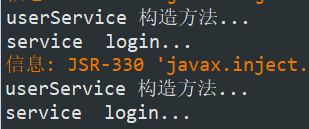
前台页面也显示登录成功,可以看出访问servlet是成功了,但是有一个问题:
问题是每次访问servlet都会重新创建UserService对象,现在我们只有一个对象,如果以后有很多个对象,那每次访问servlet的时候,
ApplicationContext ac = new ClassPathXmlApplicationContext("applicationContext.xml");
这句代码都会把对象创建出来,会很浪费资源,那么怎么解决这个问题呢?
现在我们演示正确的方式:
添加监听器,用来监听程序启动,当启动的时候,把所有的对象都创建出来,以后再用的之后直接用,不再创建:
web.xml
<!DOCTYPE web-app PUBLIC

 "-//Sun Microsystems, Inc.//DTD Web Application 2.3//EN"

 "http://java.sun.com/dtd/web-app_2_3.dtd" >

<web-app>

  <display-name>Archetype Created Web Application</display-name>

  <!--告诉监听器spring配置文件是谁-->

  <context-param>

    <param-name>contextConfigLocation</param-name>

    <param-value>classpath:applicationContext.xml</param-value>

  </context-param>

  <!--配置监听器-->

  <listener>

    <listener-class>org.springframework.web.context.ContextLoaderListener</listener-class>

  </listener>

  <servlet>

    <servlet-name>HelloServlet</servlet-name>

    <servlet-class>com.zy.web.LoginServlet</servlet-class>

  </servlet>

  <servlet-mapping>

    <servlet-name>HelloServlet</servlet-name>

    <url-pattern>/HelloServlet</url-pattern>

  </servlet-mapping>

</web-app>
上面配置监听器的ContextLoaderListener,需要在pom.xml中引入下面这个包:
<!--web.xml中需要配置监听器,这里就需要导入这个包-->

<dependency>

    <groupId>org.springframework</groupId>

    <artifactId>spring-web</artifactId>

    <version>4.1.3.RELEASE</version>

</dependency>
这次我们加上dao层:
public interface UserDao {

    public boolean login();

}

@Repository("userDao")

public class UserDaoImpl implements UserDao {

    public UserDaoImpl() {

        System.out.println("userDao 构造方法...");

    }

    @Override

    public boolean login() {

        System.out.println("dao login...");

        return true;

    }

}
service:
public interface UserService {

    public boolean login();

}

@Service("userService")

public class UserServiceImpl implements UserService {

    @Value("#{userDao}")//注入UserDao

    private UserDao userDao;

    public UserServiceImpl() {

        System.out.println("userService 构造方法...");

    }

    @Override

    public boolean login() {

        System.out.println("service  login...");

        return userDao.login();

    }

}
配置完成以后,LoginServlet中获取ApplicationContext的方式改变一下:
public class LoginServlet extends HttpServlet {

    protected void doPost(HttpServletRequest request, HttpServletResponse response) throws ServletException, IOException {

        //ApplicationContext ac = new ClassPathXmlApplicationContext("applicationContext.xml");

        //使用下面的方法 从工具类中获取ApplicationContext 需要把当前servlet的ServletContext当做参数传进去

        ApplicationContext ac = WebApplicationContextUtils.getWebApplicationContext(this.getServletContext());

        UserService service = ac.getBean("userService", UserService.class);

        boolean isOk = service.login();

        response.setContentType("text/html;charset=utf-8");

        if (isOk) {

            response.getWriter().print("登录成功,3秒跳转index页面");

            response.setHeader("refresh", "3;url=" + request.getContextPath() + "/index.jsp");

        } else {

            response.getWriter().print("登录失败");

        }

    }

    protected void doGet(HttpServletRequest request, HttpServletResponse response) throws ServletException, IOException {

        doPost(request, response);

    }

}
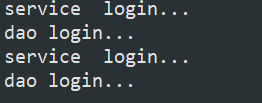
当程序启动的时候,两个实现类都被创建出来了:

这样,每次访问LoginServlet的时候,就不会重复创建对象了,只会调用对象的方法(访问了两次):
Spring总结五:小结 使用spring访问servlet的更多相关文章
- Spring(五):Spring&Struts2&Hibernate整合后,实现查询Employee信息
背景: 基于之前两篇文章<Spring(三):Spring整合Hibernate>.<Spring(四):Spring整合Hibernate,之后整合Struts2>,了解了如 ...
- Spring Boot2(五):使用Spring Boot结合Thymeleaf模板引擎使用总结
一.Thymeleaf概述 一般来说,常用的模板引擎有JSP.Velocity.Freemarker.Thymeleaf . SpringBoot推荐的 Thymeleaf – 语法更简单,功能更强大 ...
- 学习spring第五天 mybatis+spring的整合(maven多模块数据查询使用了分页和连接池),以及aop
mybatis+spring的整合: 导入的依赖:1.数据库连接:mysql-connector-java 2.连接池:druid 3.servlet:javax.servlet-api 4.jstl ...
- Spring第五弹—–配置Spring管理的bean的作用域和生命周期
singleton (默认方式) 在每个Spring IoC容器中一个bean定义只有一个对象实例.默认情况下会在容器启动时初始化bean,但我们可以指定bean节点的lazy-init=“true” ...
- Spring ( 五 )Spring之数据访问与事务管理
个人博客网:https://wushaopei.github.io/ (你想要这里多有) 一.Spring之数据访问 1.Spring数据访问工程环境搭建 jdbc.properties配置 ...
- spring的webutils包。适用于访问httpservletrequest和httpservletresponse
WebUtils位 于 org.springframework.web.util 包中的 WebUtils 是一个非常好用的工具类,它对很多 Servlet API 提供了易用的代理方法,降低了访问 ...
- 【Java EE 学习 53】【Spring学习第五天】【Spring整合Hibernate】【Spring整合Hibernate、Struts2】【问题:整合hibernate之后事务不能回滚】
一.Spring整合Hibernate 1.如果一个DAO 类继承了HibernateDaoSupport,只需要在spring配置文件中注入SessionFactory就可以了:如果一个DAO类没有 ...
- Java框架之Spring(五)
本文主要介绍Spring中, 1 Spring JDBC 2 使用注解方式管理事务的传播行为 3 采用XML 方式配置事务 4 SH 整合 5 SSH 整合 一.Spring JDBC 1) 导包 , ...
- 【Spring学习笔记-MVC-14】Spring MVC对静态资源的访问
作者:ssslinppp 参考链接: http://www.cnblogs.com/luxh/archive/2013/03/14/2959207.html http://www.cnb ...
随机推荐
- 基于Python和Tornado的WEB Terminal
https://github.com/liftoff/GateOne 亮点有以下: ↪ Clientless ↪ Multi-User and Multi-Session ↪ Multi-Auth a ...
- mysql中delete的表别名使用方法
在 mapper.xml 中的 dynamicWhere 动态查询中使用了表别名,Delete 语句引用了动态查询,如下: <delete id="delete" param ...
- php之opcodes
opcode是一种php脚本编译之后的语言. 例如: <?php echo "Hello World"; $a = 1 + 1; echo $a; ?> php执行这段 ...
- PHP 去掉文文文件中的回车与空格
文本文件fff.txt中去除回车与空格: $aa = file_get_contents('./fff.txt'); $bb = str_replace(array("\r\n", ...
- 在Git远程管理项目
新建repository 本地目录下,在命令行里新建一个代码仓库(repository) 里面只有一个README.md 命令如下: touch README.md git init 初 ...
- rest_framework使用完之后的简单总结
首先先大致概括一下使用流程,因为还不是对这个框架很熟悉(其实有很多知识可以对比formModel的) 其实还是遵循django的MTV的模式,还是得从url开始 1.rest_framework有一个 ...
- (转)WebApi 上传文件
本文转载自:http://www.cnblogs.com/zj1111184556/p/3494502.html public class FileUploadController : ApiCont ...
- HTML5视频直播及H5直播扫盲
章来源:http://geek.csdn.net/news/detail/95188 分享内容简介: 目前视频直播,尤其是移动端的视频直播已经火到不行了,基本上各大互联网公司都有了自己的直播产品,所以 ...
- OBS第三方推流直播教程
第三方推流使用场景 1.当使用YY客户端进行直播遇到问题,暂无解决方法的时候,可以使用第三方直播软件OBS进行推流. 2.对OBS情有独钟的主播. OBS简介: OBS是一款比较好用的开源直播软件,目 ...
- java代码练习======每隔5行打印数字
总结:当我们感觉数字排列横排,竖排不好看的时候,学会空几行在排列,哎呦,效果不错喔 package com.aa; public class West2 { public static void ma ...