
CSS垂直水平居中方法总结
在布局的时候经常能用到居中,在此总结一下
html结构:
<div class="wrap">

    <div class="content"></div>

</div>
1.水平居中:margin:auto;
.wrap{

    width: 400px;

    height: 400px;

    background-color: lightblue;

}

.content{

    width: 200px;

    height: 200px;

    background-color: lightcoral;

    /*margin:auto只能水平居中*/

        margin: auto;

}
此方法简单只需一行代码,但是只能水平居中,至于为什么垂直居中不起作用呢:默认宽度继承父级宽度,而高度不能继承可以由内容撑开,居中计算时是相对父级计算因此垂直居中不起作用
效果如下:

2.垂直居中:table-cell
width: 400px;
height: 400px;
background-color: lightblue;
/* 将父元素的display设置为table-cell*/
display: table-cell;
vertical-align: middle;
}
.content{
width: 200px;
height: 200px;
background-color: lightcoral;
}
这里要强调一点就是display:table-cell是对父元素设置的,在表格单元中,vertical-align属性会设置单元格框中的单元格内容的对齐方式。这里设置为middle居中对齐,有兴趣的小伙伴也可以试试其他值如:top,bottom等。
效果如下:

3.一个水平居中,一个垂直居中放在一起是不是就可以垂直水平居中了
.wrap{

    width: 400px;

    height: 400px;

    background-color: lightblue;

    display: table-cell;

    vertical-align: middle;

}

.content{

    width: 200px;

    height: 200px;

    background-color: lightcoral;

    margin: auto;

}
效果图:
 bingo就是这么完美
4.绝对定位(高度未知)
.wrap{

    width: 400px;

    height: 400px;

    background-color: lightblue;

    /*父元素相对定位*/

    position: relative;

}

.content{

    width: 200px;

    height: 200px;

    background-color: lightcoral;

    /*子元素绝对定位*/

    position: absolute;

    /*子元素分别相对top,left偏移50%*/

    top:50%;

    left: 50%;

    /*子元素相对自身top,left分别移动-50%*/

    transform: translate(-50%,-50%);

}
效果图:

上面两种方法优点在于可以在高度未知的情况下使用,下面这种方法就要知道子元素高度
5.绝对定位(已知子元素宽高的情况下) 调整负margin值
.wrap{

    width: 400px;

    height: 400px;

    background-color: lightblue;

    /*父元素相对定位*/

    position: relative;

}

.content{

    width: 200px;

    height: 200px;

    background-color: lightcoral;

    /*子元素绝对定位*/

    position: absolute;

    /*子元素分别相对top,left偏移50%*/

    top:50%;

    left: 50%;

    /*子元素相对自身top,left分别移动负100像素*/

   margin-top:-100px;

   margin-left:-100px;

}
效果图与上面一种方法一样就不在放了。
6.弹性盒模型:display:flex;
.wrap{

    width: 400px;

    height: 400px;

    background-color: lightblue;

    display:flex;

}

.content{

    width: 200px;

    height: 200px;

    background-color: lightcoral;

   margin:auto;

}
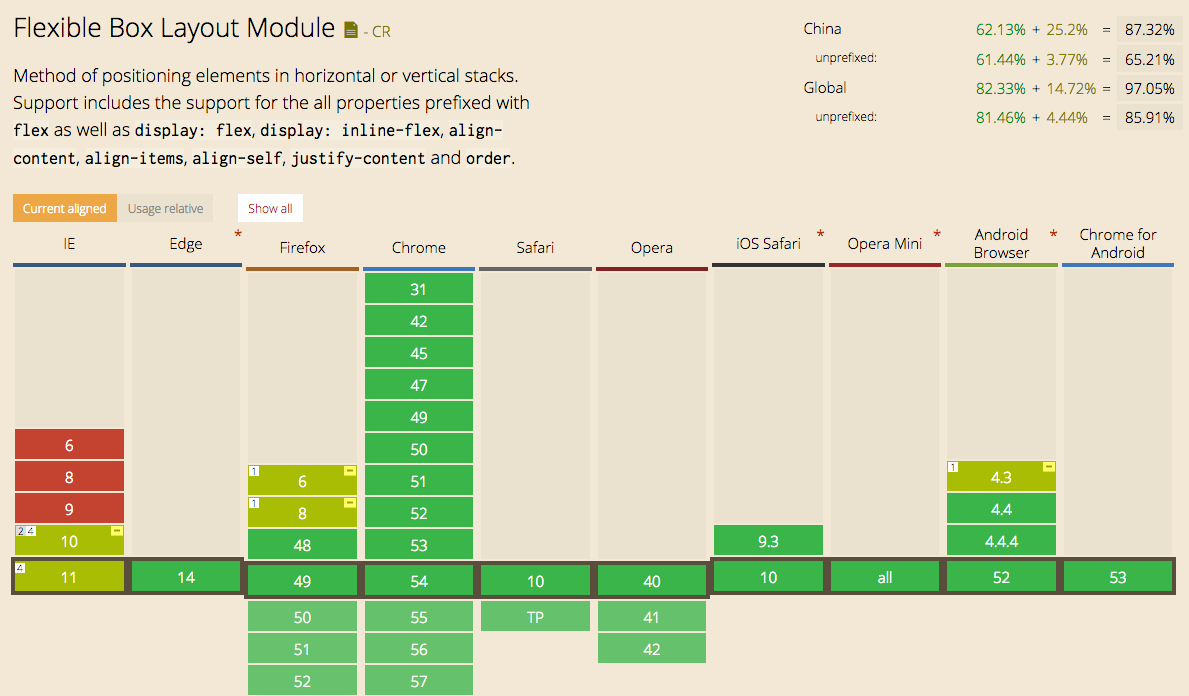
flex兼容性问题可参考下图:
7.单行文本居中:line-height
html结构:
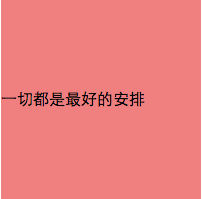
<div class="content">一切都是最好的安排</div>
css样式:
.content{

    width: 200px;

    height: 200px;

    background-color: lightcoral;

    line-height: 200px;

}
效果图:
8.多行文本就不能用line-height了,还可以用上面table-cell方法来使多行文本居中
.content{

    width: 200px;

    height: 200px;

    background-color: lightcoral;

    display:table-cell;

    vertical-align:middle;

}
可以直接在div(.content)中输入文本或者文本输入在一个标签里
更新与2016-12-30
9.text-align:center+inline-block文本居中
text-align属性用于控制文字的对其与显示,从其渲染与解析上来看,其主要是用来控制inline水平元素或inline-block元素的对齐与显示的,例如嵌套行内标签的文字、图片、input表单控件等;而对block水平的元素是没有作用的。
  *{

             margin:;

             padding:;

         }

         div{

             width:400px;

             height:400px;

             background-color: #00AA88;

         }

         ul{

             font-size:;

             /*因为li标签inline-block后li之间默认有3px间隙,font-size设为0去除间隙*/

             text-align: center;

         }

         li{

             font-size: 16px;

             display: inline-block;

             border:1px solid #000;

         }
效果如下:

稍加修改可以作为分页标签来使用。
CSS垂直水平居中方法总结的更多相关文章
- CSS垂直水平居中方法整理
CSS定位中常常用到垂直居中,比如覆盖层上的弹框. 兼容性比较好的方法: <!DOCTYPE html PUBliC "-//W3C//DTD XHTML 1.0 Transition ...
- 关于css垂直水平居中的几种方式
css中元素的垂直水平居中是比较常见及较常使用的,在这里向大家介绍一下几种方式. 1.水平居中 margin: 0 auto; 效果图: 而文字的垂直水平居中也比较简单,加上line-height: ...
- css 垂直+水平居中
垂直+水平居中是一个老生常谈的问题了,现在就固定高度和不固定高度两种情况去讨论 1.父盒子固定高度[定位] 实现1: father-box: position:relative child-box:p ...
- CSS之垂直水平居中方法
//居中方法1 position: absolute; top: 0; left: 0; right: 0; bottom: 0; margin: auto; width: 346px; height ...
- css 垂直水平居中总结
一.前言: 垂直居中有很多方式,我们要做的不是写出完美代码,而是在合适的情况下根据需求选择合适方式. 主要方式: line-height 绝对定位 表格 display:table-cell 主要需求 ...
- css垂直水平居中方案
1. 水平居中 如果是inline元素:在父元素上面设置text-align:center; 如果是block元素:设置宽度和margin:0 auto; 如果是多块级元素:在父元素上面设置text- ...
- (转载)css垂直水平居中的整理
方法一 .demo1 { width:180px; height:180px; line-height:180px; *font-size:160px; border:1px solid #ddd; ...
- CSS垂直水平居中
小小的总结一下:行内元素水平居中用text-align: center;块级元素水平居中用margin-left: auto; margin-right: auto; 首先讨论一下单行时的情况. 毫无 ...
- div块元素垂直水平居中方法总结
1.已知块级元素的宽和高,使用绝对定位+外边距设定水平垂直居中. 父元素position:relative,子元素position:absolute;top:50%;left:50%;margin-t ...
随机推荐
- 更改WAS Profiles的概要文件的server1的SDK版本
WebSphere只能使用IBM JDK 哦,不能使用sun的JDK哦.不过如果只是改jdk的版本的话可以参考如下步骤:(以集群为例,假设具有管理节点Dmgr01,应用概要AppSrv01) 1. 确 ...
- MyEclipse做一个注册页面,需要注意的地方。
- 【python】tarfile的路径问题
假设有路径/home/somebody/test1/test2/test3/ 该路径下有3个文件,a.txt, b.txt, c.txt 在目录/home/somebody下有如下代码,希望打包a.t ...
- 记录NS_ASSUME_NONNULL_BEGIN和NS_ASSUME_NONNULL_END。
Nonnull区域设置(Audited Regions) 如果需要每个属性或每个方法都去指定nonnull和nullable,是一件非常繁琐的事.苹果为了减轻我们的工作量,专门提供了两个宏:NS_AS ...
- RakNet基本教程
官方网址:http://www.jenkinssoftware.com/raknet/manual/tutorialsample3.html Tutorial code sample 3 Remote ...
- MySQL 5.7 安装教程
自序:最近又要重新用上Mysql,在有道笔记找了以前自己记录怎么安装mysql5.7的笔记,发现那个时候记得笔记比较随意,看的比较费劲,现在决定重新在博客记录一下,以便以后自己查阅的时候更加方便. 1 ...
- MFC操作注册表
1.创建和修改注册表 BOOL CTestToolCtr::GetHkey(CString strHkey, HKEY& hkey) { == strHkey.CompareNoCase(_T ...
- php多态简单示例
<?php //多态由不同的人执行而产生不同的结果: //一个人通过不同的状态执行同一种动作,产生不同的结果也可称为多态 //多态的原理,就是类都写好了,不要去修改它,只要在类外的的调用参数的更 ...
- Docker和Docker-compose安装教程以及docker-elk,docker-storm安装教程
此安装教程仅供我自己安装配置时查看,其他的人不可以偷看!!! 安装Docker 1. Update package information, ensure that APT works with th ...
- 关闭电脑SSD的磁盘碎片整理
小白往往会把机械硬盘时代的习惯带进固态硬盘时代,比如碎片整理.机械硬盘时代砖家最喜欢告诉小白:“系统慢了吧?赶紧碎片整理撒.”小白屁颠屁颠地整理去了.殊不知碎片整理对于SSD来说完全就是种折磨.这种“ ...