
grafana使用Prometheus数据源监控mongo数据库
数据库改用mongo后,监控需求就需要整合进grafana里,由于一直在坚持docker化部署,那么此次也不例外。
1. 安装Prometheus:
What is Prometheus?
Prometheus is an open-source systems monitoring and alerting toolkit originally built at SoundCloud. Since its inception in 2012, many companies and organizations have adopted Prometheus, and the project has a very active developer and user community. It is now a standalone open source project and maintained independently of any company. To emphasize this, and to clarify the project's governance structure, Prometheus joined the Cloud Native Computing Foundation in 2016 as the second hosted project, after Kubernetes.
主要的意思就是Prometheus是一个开源的系统监控和告警工具包,通过HTTP endpoints来收集要监控的系统的指标。跟着官网的first step,只需要下载最新版本,配置prometheus.yml,启动即可,比较的简单, 因此我们docker化安装也较为容易。
1) 安装镜像
[root@vhost18 prometheus]# docker search prometheus

NAME                                          DESCRIPTION                                     STARS               OFFICIAL            AUTOMATED

prom/prometheus                                                                                                                    [OK]

basi/prometheus-swarm                         A sample image that can be used as a base fo…                                          [OK]

infinityworks/prometheus-rancher-exporter     Exposes Service/Stack/Host status from the R…                                          [OK]

linuxtips/prometheus_alpine                   Image to run Prometheus on Alpine Linux. #VA…                                          [OK]

sscaling/jmx-prometheus-exporter              A docker image containing a released version…                                          [OK]

argussecurity/cassandra-prometheus            Docker Official Cassandra image, with Promet…                                          [OK]
安装STARS最多的那个就是了。
2)编写配置文件,参考官网
# my global config

global:

  scrape_interval:     15s # Set the scrape interval to every  seconds. Default is every  minute.

  evaluation_interval: 15s # Evaluate rules every  seconds. The default is every  minute.

  # scrape_timeout is set to the global default (10s).

# Alertmanager configuration

alerting:

  alertmanagers:

  - static_configs:

    - targets:

      # - alertmanager:

# Load rules once and periodically evaluate them according to the global 'evaluation_interval'.

rule_files:

  # - "first_rules.yml"

  # - "second_rules.yml"

# A scrape configuration containing exactly one endpoint to scrape:

# Here it's Prometheus itself.

scrape_configs:

  # The job name is added as a label `job=<job_name>` to any timeseries scraped from this config.

  - job_name: 'prometheus'

    # metrics_path defaults to '/metrics'

    # scheme defaults to 'http'.

    static_configs:

    - targets: ['localhost:9090']
3)启动容器
docker run -d --name prom -p : -v /data/prometheus/:/etc/prometheus/ prom/prometheus
4)看下日志是否启动成功
docker logs -f prom

level=info ts=--11T11::.73690446Z caller=main.go: msg="Starting Prometheus" version="(version=2.5.0, branch=HEAD, revision=67dc912ac8b24f94a1fc478f352d25179c94ab9b)"

level=info ts=--11T11::.737024426Z caller=main.go: build_context="(go=go1.11.1, user=root@578ab108d0b9, date=20181106-11:40:44)"

level=info ts=--11T11::.737054274Z caller=main.go: host_details="(Linux 3.10.0-693.5.2.el7.x86_64 #1 SMP Fri Oct 20 20:32:50 UTC 2017 x86_64 72be1c67c847 (none))"

level=info ts=--11T11::.737077772Z caller=main.go: fd_limits="(soft=1048576, hard=1048576)"

level=info ts=--11T11::.737095504Z caller=main.go: vm_limits="(soft=unlimited, hard=unlimited)"

level=info ts=--11T11::.757770232Z caller=main.go: msg="Starting TSDB ..."

level=info ts=--11T11::.757939887Z caller=web.go: component=web msg="Start listening for connections" address=0.0.0.0:

level=info ts=--11T11::.769272192Z caller=main.go: msg="TSDB started"

level=info ts=--11T11::.769349241Z caller=main.go: msg="Loading configuration file" filename=/etc/prometheus/prometheus.yml

level=info ts=--11T11::.772044947Z caller=main.go: msg="Completed loading of configuration file" filename=/etc/prometheus/prometheus.yml

level=info ts=--11T11::.77209973Z caller=main.go: msg="Server is ready to receive web requests."
5) 访问http://ip:9090
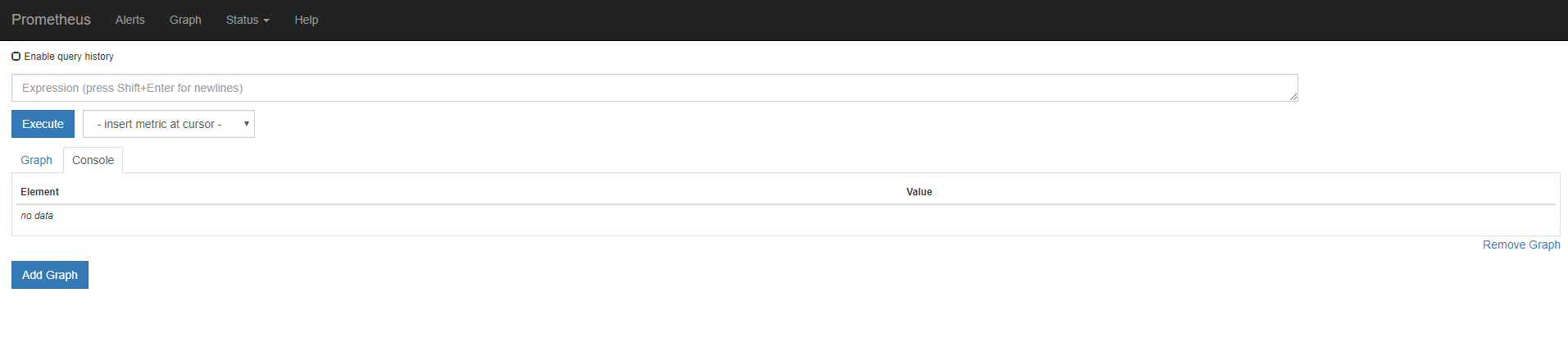
成功的话会出现以下页面
2. 安装mongodb_exporter
刚说到Prometheus是根据endpoints来获取指标数据的,由于grafana没有直接的插件来获取mongo数据库的指标数据,这时候就可以用得上mongodb_exporter了,参考1,参考2。
1)安装镜像
可以直接build刚刚参考1和参考2的Dockerfile,也可以像安装Prometheus一样直接search,我这边为了简单采用直接search的方式,方式重复不累赘描述。
2)启动镜像
docker run -d --name mongo-explorer -p : eses/mongodb_exporter --mongodb.uri mongodb://monitor:monitor@ip:port
参数需要的mongo地址直接命令传入,无需export 。
如何知道端口和参数呢,一种是看官方说明,另一种直接启动一个空镜像看日志就知道了。
3) 检查下日志
[root@vhost18 prometheus]# docker logs -f mongo-explorer

### Warning: the exporter is in beta/experimental state and field names are very

### likely to change in the future and features may change or get removed!

### See: https://github.com/percona/mongodb_exporter for updates

mongodb_exporter version: unknown, git commit hash: unknown

Listening on :
4)访问http://ip:9090
成功的话会出现以下页面

3. mongodb_exporter整合进Prometheus
1) 修改配置
只需要在prometheus.yml上添加如下框

2) 重启prometheus
docker restart prom
3) 检查
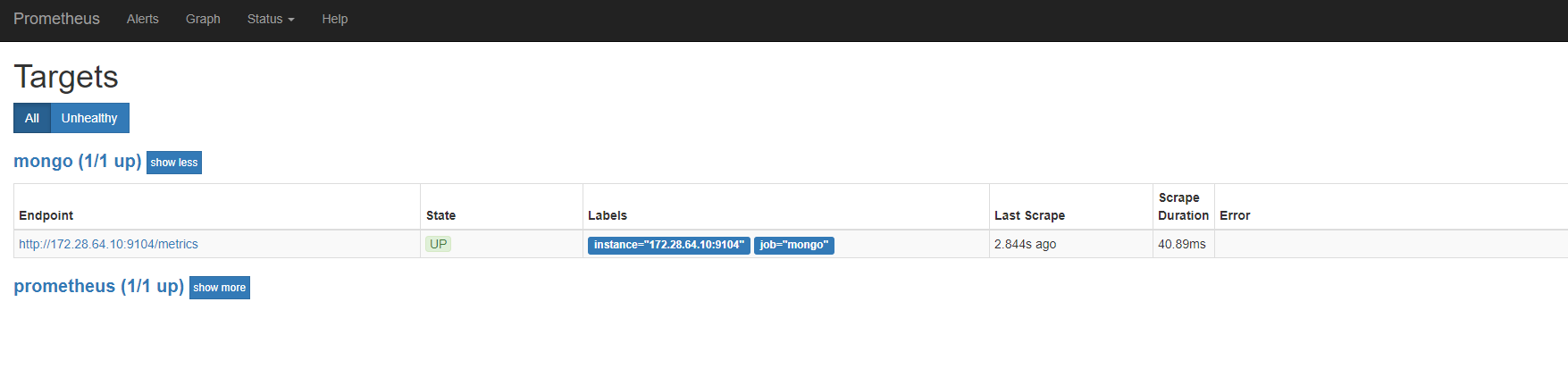
访问http://172.28.64.10:9090/targets,能看到数据源就表示成功了。
4. grafana中添加数据源

5. 安装仪表盘
到grafana官网直接搜mongo,找到自己需要的仪表盘就可以了,后续在自己改造。
grafana使用Prometheus数据源监控mongo数据库的更多相关文章
- grafana使用json数据源监控数据
功能实现完后有部分数据一直在波动,就产生了想把这个数据波动集成到grafana形成可视化界面的监控,但grafana不支持mongo数据库又懒得去用其他工具转换,特意看了下grafana的databa ...
- mongo数据库相关目录
mongodb的docker化安装 mongodb的windows系统下安装 grafana使用Prometheus数据源监控mongo数据库 mongodb副本集的docker化安装 mongodb ...
- 使用 Docker 部署 Grafana + Prometheus 监控 MySQL 数据库
一.背景 在平时开发过程当中需要针对 MySQL 数据库进行监控,这里我们可以使用 Grafana 和 Prometheus 来实现监控功能.Grafana 是一款功能强大的仪表盘面板,支持多种数据源 ...
- Grafana+Zabbix+Prometheus 监控系统
环境说明 软件 版本 操作系统 IP地址 Grafana 5.4.3-1 Centos7.5 192.168.18.231 Prometheus 2.6.1 Centos7.5 192.168.18. ...
- Grafana+Prometheus+node_exporter监控,Grafana无法显示数据的问题
环境搭建: 被测linux机器上部署了Grafana,Prometheus,node_exporter,并成功启动了它们. Grafana中已经创建了Prometheus数据源,并测试通过,并且导入了 ...
- windows下部署Grafana +prometheus平台监控
1.Prometheus简介 Prometheus基于Golang编写,编译后的软件包,不依赖于任何的第三方依赖.用户只需要下载对应平台包,解压并且添加基本的配置即可正常启Prometheus S ...
- Grafana、Prometheus、mtail-日志监控
一:日志如何监控 在上一篇博客Grafana.Prometheus-监控平台中,简单了解了Grafana与Prometheus对项目做特定的监控打点,可视化的配置操作. 但是对于没有设置监控或者不容易 ...
- Prometheus MySQL监控+grafana展示
前言 最近爱上了研究各种杂七杂八的技术. Prometheus是现如今最火的监控软件之一.做为一个运维DBA,不会这个可就OUT了. 本篇博客,演示一下prometheus之通过mysql expor ...
- 【集群监控】Docker上部署Prometheus+Alertmanager+Grafana实现集群监控
Docker部署 下载 sudo yum-config-manager --add-repo https://download.docker.com/linux/centos/docker-ce.re ...
随机推荐
- javascript实现数据结构:稀疏矩阵的十字链表存储表示
当矩阵的非零个数和位置在操作过程中变化大时,就不宜采用顺序存储结构来表示三元组的线性表.例如,在作“将矩阵B加到矩阵A上”的操作时,由于非零元的插入或删除将会引起A.data中元素的移动.为此,对这种 ...
- 关于Java中的线程安全(线程同步)
java中的线程安全是什么: 就是线程同步的意思,就是当一个程序对一个线程安全的方法或者语句进行访问的时候,其他的不能再对他进行操作了,必须等到这次访问结束以后才能对这个线程安全的方法进行访问 什么叫 ...
- 【起航计划 032】2015 起航计划 Android APIDemo的魔鬼步伐 31 App->Search->Invoke Search 搜索功能 Search Dialog SearchView SearchRecentSuggestions
Search (搜索)是Android平台的一个核心功能之一,用户可以在手机搜索在线的或是本地的信息.Android平台为所有需要提供搜索或是查询功能的应用提 供了一个统一的Search Framew ...
- SQL专题
1. 值为null的字段,假如update table set a=a+1,则会报sql错误 2. //todo
- cJSON库源码分析
本文采用以下协议进行授权: 自由转载-非衍生-保持署名|Creative Commons BY-NC-ND 3.0 ,转载请注明作者及出处. cJSON是一个超轻巧,携带方便,单文件,简单的可以作为A ...
- 让免费版MarkdownPad2使用Pro版本的功能
让免费版MarkdownPad2使用Pro版本的功能 找到配置文件 启用Markdown扩展模式 Markdown处理器:Github风格 语法检查设置 自动保存设置 找到配置文件 一般在用户的数据目 ...
- 异常:Caused by: java.lang.NoSuchMethodError: javax.persistence.OneToMany.orphanRemoval()Z
Spring3.0 + Hibernate3.5:启动服务器报:Caused by: java.lang.NoSuchMethodError: javax.persistence.OneToMany. ...
- Android(java)学习笔记29:泛型类的概述和使用
1. 泛型类的概述和使用 泛型类用法一: 下面我们首先定义泛型类: package cn.itcast_04; /* * 泛型类:把泛型定义在类上 */ public class ObjectTool ...
- 常用PowerShell命令
查看版本: 文件重命名: 别名查看: 当前路径:(别名pwd) 切换路径:(别名cd) 子列表:(别名ls -Force可查看隐藏项) 查看用户:(可显示隐藏) 资源管理器打开当前目录:(cmd亦可 ...
- html5中event获取data和class
获取data和class var tare=$(e.relatedTarget).data("id");var tar=event.target;console.log(tare) ...