
让C#语言充当自身脚本!——.NET中的动态编译
代码的动态编译并执行是.NET平台提供给我们的很强大的一个工具,用以灵活扩展(当然是面对内部开发人员)复杂而无法估算的逻辑,并通过一些额外的代码来扩展我们已有 的应用程序。这在很大程度上给我们提供了另外一种扩展的方式(当然这并不能算是严格意义上的扩展,但至少为我们提供了一种思路)。
动态代码执行可以应用在诸如模板生成,外加逻辑扩展等一些场合。一个简单的例子,为了网站那的响应速度,HTML静态页面往往是我们最好的选择,但基于数据驱动的网站往往又很难用静态页面实现,那么将动态页面生成html的工作或许就是一个很好的应用场合。另外,对于一些模板的套用,我们同样可以用它来做。另外这本身也是插件编写的方式。
最基本的动态编译
.Net为我们提供了很强大的支持来实现这一切我们可以去做的基础,主要应用的两个命名空间是:System.CodeDom.Compiler和Microsoft.CSharp或Microsoft.VisualBasic。另外还需要用到反射来动态执行你的代码。动态编译并执行代码的原理其实在于将提供的源代码交予CSharpCodeProvider来执行编译(其实和CSC没什么两样),如果没有任何编译错误,生成的IL代码会被编译成DLL存放于于内存并加载在某个应用程序域(默认为当前)内并通过反射的方式来调用其某个方法或者触发某个事件等。之所以说它是插件编写的一种方式也正是因为与此,我们可以通过预先定义好的借口来组织和扩展我们的程序并将其交还给主程序去触发。一个基本的动态编译并执行代码的步骤包括:
将要被编译和执行的代码读入并以字符串方式保存
声明CSharpCodeProvider对象实例
调用CSharpCodeProvider实例的CompileAssemblyFromSource方法编译
用反射生成被生成对象的实例(Assembly.CreateInstance)
调用其方法
以下代码片段包含了完整的编译和执行过程:
using System;

using System.Collections.Generic;

using System.ComponentModel;

using System.Data;

using System.Drawing;

using System.Linq;

using System.Text;

using System.Windows.Forms;

using Microsoft.CSharp;

using System.CodeDom.Compiler;

using System.Reflection;

namespace DynamicCompileBase

{

    public partial class Form1 : Form

    {

        public Form1()

        {

            InitializeComponent();

        }

        private void button1_Click(object sender, EventArgs e)

        {

            //get the code to compile

            string strSourceCode = this.txtSource.Text;

            // 1.Create a new CSharpCodePrivoder instance

            CSharpCodeProvider objCSharpCodePrivoder = new CSharpCodeProvider();

            // 2.Sets the runtime compiling parameters by crating a new CompilerParameters instance

            CompilerParameters objCompilerParameters = new CompilerParameters();

            objCompilerParameters.ReferencedAssemblies.Add("System.dll");

            objCompilerParameters.ReferencedAssemblies.Add("System.Windows.Forms.dll");

            objCompilerParameters.GenerateInMemory = true;

            // 3.CompilerResults: Complile the code snippet by calling a method from the provider

            CompilerResults cr = objCSharpCodePrivoder.CompileAssemblyFromSource(objCompilerParameters, strSourceCode);

            if (cr.Errors.HasErrors)

            {

                string strErrorMsg = cr.Errors.Count.ToString() + " Errors:";

                for (int x = 0; x < cr.Errors.Count; x++)

                {

                    strErrorMsg = strErrorMsg + "/r/nLine: " +

                                 cr.Errors[x].Line.ToString() + " - " +

                                 cr.Errors[x].ErrorText;

                }

                this.txtResult.Text = strErrorMsg;

                MessageBox.Show("There were build erros, please modify your code.", "Compiling Error");

                return;

            }

            // 4. Invoke the method by using Reflection

            Assembly objAssembly = cr.CompiledAssembly;

            object objClass = objAssembly.CreateInstance("Dynamicly.HelloWorld");

            if (objClass == null)

            {

                this.txtResult.Text = "Error: " + "Couldn't load class.";

                return;

            }

            object[] objCodeParms = new object[1];

            objCodeParms[0] = "Allan.";

            string strResult = (string)objClass.GetType().InvokeMember(

                       "GetTime", BindingFlags.InvokeMethod, null, objClass, objCodeParms);

            this.txtResult.Text = strResult;

        }

    }

}
需要解释的是,这里我们在传递编译参数时设置了GenerateInMemory为true,这表明生成的DLL会被加载在内存中(随后被默认引用入当前应用程序域)。在调用GetTime方法时我们需要加入参数,传递object类型的数组并通过Reflection的InvokeMember来调用。在创建生成的Assembly中的对象实例时,需要注意用到的命名空间是你输入代码的真实命名空间。以下是我们输入的测试代码(为了方便,所有的代码都在外部输入,动态执行时不做调整):
using System;

namespace Dynamicly

{

    public class HelloWorld

    {

        public string GetTime(string strName)

        {

            return  "Welcome " + strName + ", Check in at " + System.DateTime.Now.ToString();

        }

    }

}
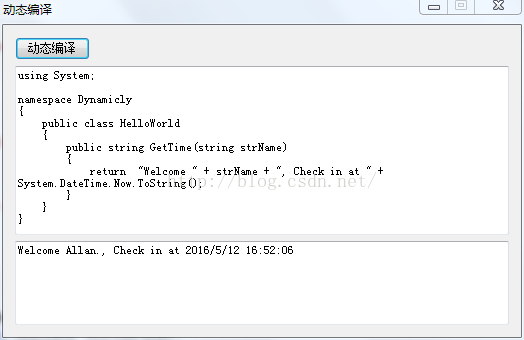
运行附件中提供的程序,可以很容易得到以下结果:
改进的执行过程
现在一切看起来很好,我们可以编译代码并把代码加载到当前应用程序域中来参与我们的活动,但你是否想过去卸载掉这段程序呢?更好的去控制程序呢?另外,当你运行这个程序很多遍的时候,你会发现占用内存很大,而且每次执行都会增大内存使用。是否需要来解决这个问题呢?当然需要,否则你会发现这个东西根本没用,我需要执行的一些大的应用会让我的服务器crzay,不堪重负而疯掉的。
要解决这个问题我们需要来了解一下应用程序域。.NET Application Domain是.NET提供的运行和承载一个活动的进程(Process)的容器,它将这个进程运行所需的代码和数据,隔离到一个小的范围内,称为Application Domain。当一个应用程序运行时,Application Domains将所有的程序集/组件集加载到当前的应用程序域中,并根据需要来调用。而对于动态生成的代码/程序集,我们看起来好像并没有办法去管理它。其实不然,我们可以用Application Domain提供的管理程序集的办法来动态加载和移除Assemblies来达到我们的提高性能的目的。具体怎么做呢,在前边的基础上增加以下步骤:
创建另外一个Application Domain
动态创建(编译)代码并保存到磁盘
创建一个公共的远程调用接口
创建远程调用接口的实例。并通过这个接口来访问其方法。
换句话来讲就是将对象加载到另外一个AppDomain中并通过远程调用的方法来调用。所谓远程调用其实也就是跨应用程序域调用,所以这个对象(动态代码)必须继承于MarshalByRefObject类。为了复用,这个接口被单独提到一个工程中,并提供一个工厂来简化每次的调用操作:
using System;

using System.Collections.Generic;

using System.Linq;

using System.Text;

using System.Reflection;

namespace RemoteAccess

{

    /// <summary>

    /// Interface that can be run over the remote AppDomain boundary.

    /// </summary>

    public interface IRemoteInterface

    {

        object Invoke(string lcMethod, object[] Parameters);

    }

    /// <summary>

    /// Factory class to create objects exposing IRemoteInterface

    /// </summary>

    public class RemoteLoaderFactory : MarshalByRefObject

    {

        private const BindingFlags bfi = BindingFlags.Instance | BindingFlags.Public | BindingFlags.CreateInstance;

        public RemoteLoaderFactory() { }

        public IRemoteInterface Create(string assemblyFile, string typeName, object[] constructArgs)

        {

            return (IRemoteInterface)Activator.CreateInstanceFrom(

                     assemblyFile, typeName, false, bfi, null, constructArgs,

                     null, null, null).Unwrap();

        }

    }

}
接下来在原来基础上需要修改的是:
将编译成的DLL保存到磁盘中。
创建另外的AppDomain。
获得IRemoteInterface接口的引用。(将生成的DLL加载到额外的AppDomain)
调用InvokeMethod方法来远程调用。
可以通过AppDomain.Unload()方法卸载程序集。
以下是完整的代码,演示了如何应用这一方案。
using System;

using System.Collections.Generic;

using System.ComponentModel;

using System.Data;

using System.Drawing;

using System.Linq;

using System.Text;

using System.Windows.Forms;

using Microsoft.CSharp;

using System.CodeDom.Compiler;

using System.Reflection;

using RemoteAccess;

namespace DynamicCompileAppDomain

{

    public partial class Form1 : Form

    {

        public Form1()

        {

            InitializeComponent();

        }

        private void button1_Click(object sender, EventArgs e)

        {

            // get the code to compile

            string strSourceCode = this.txtSource.Text;

            // 0. Create an addtional AppDomain

            AppDomainSetup objSetup = new AppDomainSetup();

            objSetup.ApplicationBase = AppDomain.CurrentDomain.BaseDirectory;

            AppDomain objAppDomain = AppDomain.CreateDomain("MyAppDomain", null, objSetup);

            // 1.Create a new CSharpCodePrivoder instance

            CSharpCodeProvider objCSharpCodePrivoder = new CSharpCodeProvider();

            // 2.Sets the runtime compiling parameters by crating a new CompilerParameters instance

            CompilerParameters objCompilerParameters = new CompilerParameters();

            objCompilerParameters.ReferencedAssemblies.Add("System.dll");

            objCompilerParameters.ReferencedAssemblies.Add("System.Windows.Forms.dll");

            // Load the remote loader interface

            objCompilerParameters.ReferencedAssemblies.Add("RemoteAccess.dll");

            // Load the resulting assembly into memory

            objCompilerParameters.GenerateInMemory = false;

            objCompilerParameters.OutputAssembly = "DynamicalCode.dll";

            // 3.CompilerResults: Complile the code snippet by calling a method from the provider

            CompilerResults cr = objCSharpCodePrivoder.CompileAssemblyFromSource(objCompilerParameters, strSourceCode);

            if (cr.Errors.HasErrors)

            {

                string strErrorMsg = cr.Errors.Count.ToString() + " Errors:";

                for (int x = 0; x < cr.Errors.Count; x++)

                {

                    strErrorMsg = strErrorMsg + "/r/nLine: " +

                                 cr.Errors[x].Line.ToString() + " - " +

                                 cr.Errors[x].ErrorText;

                }

                this.txtResult.Text = strErrorMsg;

                MessageBox.Show("There were build erros, please modify your code.", "Compiling Error");

                return;

            }

            // 4. Invoke the method by using Reflection

            RemoteLoaderFactory factory = (RemoteLoaderFactory)objAppDomain.CreateInstance("RemoteAccess", "RemoteAccess.RemoteLoaderFactory").Unwrap();

            // with help of factory, create a real 'LiveClass' instance

            object objObject = factory.Create("DynamicalCode.dll", "Dynamicly.HelloWorld", null);

            if (objObject == null)

            {

                this.txtResult.Text = "Error: " + "Couldn't load class.";

                return;

            }

            // *** Cast object to remote interface, avoid loading type info

            IRemoteInterface objRemote = (IRemoteInterface)objObject;

            object[] objCodeParms = new object[1];

            objCodeParms[0] = "Allan.";

            string strResult = (string)objRemote.Invoke("GetTime", objCodeParms);

            this.txtResult.Text = strResult;

            //Dispose the objects and unload the generated DLLs.

            objRemote = null;

            AppDomain.Unload(objAppDomain);

            System.IO.File.Delete("DynamicalCode.dll");

        }

    }

}
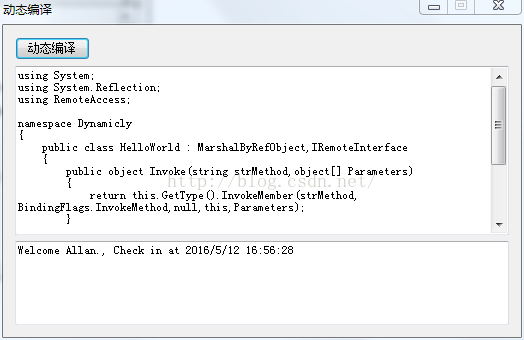
对于客户端的输入程序,我们需要继承于MarshalByRefObject类和IRemoteInterface接口,并添加对RemoteAccess程序集的引用。以下为输入:
using System;

using System.Reflection;

using RemoteAccess;

namespace Dynamicly

{

    public class HelloWorld : MarshalByRefObject,IRemoteInterface

    {

        public object Invoke(string strMethod,object[] Parameters)

        {

            return this.GetType().InvokeMember(strMethod, BindingFlags.InvokeMethod,null,this,Parameters);

        }

        public string GetTime(string strName)

        {

            return  "Welcome " + strName + ", Check in at " + System.DateTime.Now.ToString();

        }

    }

}
这样,你可以通过适时的编译,加载和卸载程序集来保证你的程序始终处于一个可控消耗的过程,并且达到了动态编译的目的,而且因为在不同的应用程序域中,让你的本身的程序更加安全和健壮。
最后附上示例程序源代码:
http://pan.baidu.com/s/1skSPQ3b
示例程序共有4个项目:
DynamicCompile是http://blog.csdn.net/clb929/article/details/51371363这篇文章的练习程序
DynamicCompileBase是本文无应用程序域动态编译的例子(无法释放内存)
RemoteAccess是远程调用应用程序域的库
DynamicCompileAppDomain是远程调用应用程序域动态编译的示例程序(能够将C#代码编译为临时DLL,动态加载并执行,然后释放,最后删除临时DLL)
让C#语言充当自身脚本!——.NET中的动态编译的更多相关文章
- C语言引用连接脚本lds中的符号——清除bss段,c实现方式
之前我们的启动文件清除bss和拷贝都是通过汇编的方式的实现,但是,我们能够使用C语言,就不使用汇编: 先看连接脚本: SECTIONS { . = 0x30000000; __code_start = ...
- .NET中的动态编译
代码的动态编译并执行是一个.NET平台提供给我们的很强大的工具用以灵活扩展(当然是面对内部开发人员)复杂而无法估算的逻辑,并通过一些额外的代码来扩展我们已有 的应用程序.这在很大程度上给我们提供了另外 ...
- Unity3D中脚本的执行顺序和编译顺序
http://www.cnblogs.com/champ/p/execorder.html 在Unity中可以同时创建很多脚本,并且可以分别绑定到不同的游戏对象上,它们各自都在自己的生命周期中运行.与 ...
- 【转】Unity3D中脚本的执行顺序和编译顺序(vs工程引用关系)
http://www.cnblogs.com/champ/p/execorder.html 在Unity中可以同时创建很多脚本,并且可以分别绑定到不同的游戏对象上,它们各自都在自己的生命周期中运行.与 ...
- Linux 桌面玩家指南:06. 优雅地使用命令行及 Bash 脚本编程语言中的美学与哲学
特别说明:要在我的随笔后写评论的小伙伴们请注意了,我的博客开启了 MathJax 数学公式支持,MathJax 使用$标记数学公式的开始和结束.如果某条评论中出现了两个$,MathJax 会将两个$之 ...
- (转)Unity3D中脚本的执行顺序和编译顺序(vs工程引用关系)
自:http://www.cnblogs.com/champ/p/execorder.html 在Unity中可以同时创建很多脚本,并且可以分别绑定到不同的游戏对象上,它们各自都在自己的生命周期中运行 ...
- 【转】Unity3D中脚本的执行顺序和编译顺序
支持原文,原文请戳: Unity3D中脚本的执行顺序和编译顺序 在Unity中可以同时创建很多脚本,并且可以分别绑定到不同的游戏对象上,它们各自都在自己的生命周期中运行.与脚本有关的也就是编译和执行啦 ...
- JDK1.7新特性(3):java语言动态性之脚本语言API
简要描述:其实在jdk1.6中就引入了支持脚本语言的API.这使得java能够很轻松的调用其他脚本语言.具体API的使用参考下面的代码: package com.rampage.jdk7.chapte ...
- Linux Bash脚本编程语言中的美学与哲学
我承认,我再一次地当了标题党.但是不可否认,这一定是一篇精华随笔.在这一篇中,我将探讨Bash脚本语言中的美学与哲学. 这不是一篇Bash脚本编程的教程,但是却能让人更加深入地了解Bash脚本编程,更 ...
随机推荐
- cocos2d-x 3.x游戏开发学习笔记(1)--mac下配置cocos2d-x 3.x开发环境
打开用户文件夹下.bash_profile文件,配置环境 vim ~/.bash_profile //按键i,进行插入编辑(假设输错d进行删除一行) 环境配置过程例如以下: 1.首先配置下androi ...
- Could not find action or result: There is no Action mapped for namespace [/] and action name [GetG
Could not find action or result: /car/GetGpsDataAction There is no Action mapped for namespace [/] ...
- Codeforces Round 363 Div. 1 (A,B,C,D,E,F)
Codeforces Round 363 Div. 1 题目链接:## 点击打开链接 A. Vacations (1s, 256MB) 题目大意:给定连续 \(n\) 天,每天为如下四种状态之一: 不 ...
- Garbage Collection Optimization for High-Throughput and Low-Latency Java Applications--转载
原文地址:https://engineering.linkedin.com/garbage-collection/garbage-collection-optimization-high-throug ...
- FTP中的授权规则
在授权规则中,你可以管理自己的FTP站点以怎样的方式进行访问,比如每个进入站点的人都需要输入用户名密码.正则可以在授权规则中删除默认的配置“允许匿名用户读取”的规则. 也可以在此处,对不同的组或用户进 ...
- cpu信息
在linux系统下能够通过cat /proc/cpuinfo来查看本机上cpu的相关信息,通过processor能够推断逻辑cpu的个数,physical id能够推断物理cpu的个数,通过cpu c ...
- html实现返回上一页的几种方法(javaScript:history.go(-1);)
html实现返回上一页的几种方法(javaScript:history.go(-1);) 一.总结: 1.javaScript:history.go(-1); 二.方法 1.通过超链接返回到上一页 & ...
- 简介及环境搭建跑通Hello
简介及环境搭建跑通Hello Spring Spring是一个开放源代码的设计层面框架,他解决的是业务逻辑层和其他各层的松耦合问题,因此它将面向接口的编程思想贯穿整个系统应用.是为了解决企业应用程序开 ...
- 使用doxygen为C/C++程序生成中文文档
文章来自:http://www.fmddlmyy.cn/text21.html 依照约定的格式凝视源码,用工具处理凝视过的源码产生文档.通过这样的方式产生文档至少有下面优点: 便于代码和文档保持同步. ...
- [spark]spark 编程教程
参考: 英文:https://spark.apache.org/docs/latest/programming-guide.html 中文:http://www.cnblogs.com/lujin ...