
[React] Recompose: Theme React Components Live with Context
SASS Bootstrap allows us to configure theme or branding variables that affect all components (e.g. Primary Color or Link Color). When we isolate our styles inside React components we lose the ability to theme them. To get round this we can put our theme variables on the context of our app and then read them from individual components in order to make styling decisions. Recompose allows us to create the helper functions we need to do this yielding concise, functional declarative UI components. These components will respond in real time to changes in the theme.
We have a default theme file:
export default {

    color: {

        keyColor: '#3f8bae',

        textLight: '#fff',

    },

    number: {

        buttonRadius: 5

    },

    string: {

        mainFontFamily: 'sans-serif'

    }

}
We want Component get defualt theme according to the file.
We will build an interface to update theme according to user input.
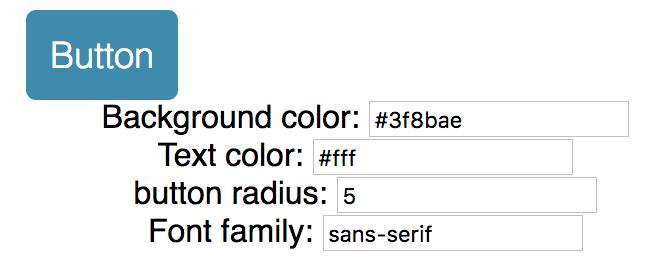
We can import theme file into the App.js compoent and pass down to the custom component. The problem is that, if we have hunders components, it is not ideal to passdown the props hundres times.
That's why we need context.
We can use 'recompose' to do that:
import React, { Component } from 'react';

import {compose, withState} from 'recompose';

import myDefaultTheme from './themes/default';

import Button from './components/Button';

class App extends Component {

    static childContextTypes = {

        theme: React.PropTypes.object

    };

    getChildContext() {

        return {theme: this.props.theme}

    }

    render() {

        const {theme, updateTheme} = this.props;

        return (

            <div className="App">

                <main className="container">

                    ...

                </main>

            </div>

        );

    }

}

const enhance = compose(

    withState('theme', 'updateTheme', myDefaultTheme)

);

export default enhance(App);
So for this part of code:
const enhance = compose(

    withState('theme', 'updateTheme', myDefaultTheme)

);
export default enhance(App);
We wrap our App component with 'enhance' to update component props.
widthState function: Passes two additional props to the base component: a state value, and a function to update that state value. so 'updateTheme' will take nextProps to udpate current props.
    static childContextTypes = {

        theme: React.PropTypes.object

    };

    getChildContext() {

        return {theme: this.props.theme}

    }
Those code helps us to pass 'theme' down to children components.
Also need to create a file called "hocs.js" which means high order component. This file contains reusable methods to update the custom component.
To get context from 'App.js', we need 'getContext' method form 'recompose':
export const getTheme = getContext({

                                       theme: PropTypes.shape({

                                                                  color: PropTypes.object,

                                                                  number: PropTypes.object,

                                                                  string: PropTypes.object

                                                              })

                                   });
We also need a 'themeStyle' method to update style:
export const themeStyle = mapThemeToStyle => mapProps(

    props => {

        const { theme, style } = props;

        return {

            ...props,

            style: [

                mapThemeToStyle(theme, props),

                style

            ]

        };

    }

);
It takes a updater function called 'mapThemeToStyle' which can map theme to style according to different components needs.
Now in the custom component, let compose those:
import React from 'react';

import {

    mapProps,

    compose,

    defaultProps,

    setDisplayName,

    componentFromProp

} from 'recompose';

import Radium from 'radium';

import {

    getTheme,

    themeStyle,

    addStyle

} from './hocs';

const mapThemeToStyle = ({

                            color,

                            number,

                            string

                         }) => {

    return {

        ...(color.keyColor &&

            {backgroundColor: color.keyColor} || {}

        ),

        color: color.textLight,

        borderRadius: number.buttonRadius,

        fontFamily: string.mainFontFamily

    };

};

const style = {

    backgroundColor: 'red',

    borderWidth: ,

    borderStyle: 'solid',

    boxSizing: 'border-box',

    fontFamily: 'sans-serif',

    fontSize: ,

    borderRadius: ,

    fontWeight: ,

    padding: ,

    verticalAlign: 'middle',

    whiteSpace: 'nowrap',

    color: 'white',

    alignItems: 'center',

    justifyContent: 'center',

    textDecoration: 'none',

    display: 'flex',

    flex: ,

    cursor: 'pointer',

    ':hover': {

        backgroundColor: 'purple'

    }

};

const enhance = compose(

    getTheme, // using the container's defined theme

    themeStyle(mapThemeToStyle), // apply the default theme to the component

    addStyle(style),

    setDisplayName('Button'),

    defaultProps({

        element: 'button'

                 }),

    Radium

);

export default enhance(componentFromProp('element'));
[React] Recompose: Theme React Components Live with Context的更多相关文章
- [React] Render Text Only Components in React 16
In this session we create a comment component to explore how to create components that only render t ...
- react初探索--react + react-router + ant-design 后台管理系统配置
首先确认安装了node环境,Node >= 6. 如果对react 及 ant-design 一无所知,建议去阅读下api文档,react 可以在 codePen 在线练习. react Api ...
- react新特性 react hooks
本文介绍的是react新特性react hooks,本文面向的是有一定react开发经验的小伙伴,如果你对react还不是很熟悉的话我建议你先学习react并多多联系. 首先我们都知道react有3种 ...
- [react] 细数 React 的原罪
Props & onChange 的原罪 .「props & onChange 接口规范」它不是一个典型的「程序接口规范」. 当你拿到一个可视组件的 ref,却没有类似 setProp ...
- React笔记:React基础(2)
1. JSX JSX是一种拥有描述UI的JavaScript扩展语法,React使用这种语法描述组件的UI. 1.1 基本语法 JSX可以嵌套多个HTML标签,可以使用大部分符号HTML规范的属性. ...
- 【React Native】React Native项目设计与知识点分享
闲暇之余,写了一个React Native的demo,可以作为大家的入门学习参考. GitHub:https://github.com/xujianfu/ElmApp.git GitHub:https ...
- react聊天室|react+redux仿微信聊天IM实例|react仿微信界面
一.项目概况 基于react+react-dom+react-router-dom+redux+react-redux+webpack2.0+react-photoswipe+swiper等技术混合开 ...
- React源码 React.Component
React中最重要的就是组件,写的更多的组件都是继承至 React.Component .大部分同学可能都会认为 Component 这个base class 给我们提供了各种各样的功能.他帮助我们去 ...
- WHAT IS THE DIFFERENCE BETWEEN REACT.JS AND REACT NATIVE?
Amit Ashwini - 09 SEPTEMBER 2017 React.js was developed by Facebook to address its need for a dynami ...
随机推荐
- 【Codeforces Round #452 (Div. 2) D】Shovel Sale
[链接] 我是链接,点我呀:) [题意] 在这里输入题意 [题解] 让N乘2->a 然后看一下位数是多少. 假设有x位(x>=2) 则(0..(a%10-1) ) + (99..9)[x- ...
- 用PHP 去掉所有html标签里的部分属性
用PHP 去掉所有html标签里的部分属性 http://zhidao.baidu.com/question/418471924.html 用PHP 去掉所有html标签里的部分属性 tppabs & ...
- invalid syntax 无效语法
python用的是spyder编译器, 再出现上一行少了个括号的时候. 在下一行显示有错误.
- 学习笔记:Vue——动态组件&异步组件
动态组件 01.在动态组件上使用keep-alive,保持组件的状态,以避免反复重渲染导致的性能问题. <!-- 失活的组件将会被缓存!--> <keep-alive> < ...
- [python]bug和debug
bug:代码中存在的语法或者逻辑问题 debug:自查和解决代码中的问题 (coding五分钟,debug两小时) 一.出现bug原因的四大类型 1.粗心 1)错误案例 上面这个错误就是因为 if语句 ...
- 洛谷—— P1118 [USACO06FEB]数字三角形Backward Digit Su…
https://www.luogu.org/problem/show?pid=1118#sub 题目描述 FJ and his cows enjoy playing a mental game. Th ...
- 好记性不如烂笔头——datagridview相关
DataGridViewTextBoxColumn dgv_IDY = new DataGridViewTextBoxColumn(); dgv_IDY.Visible = false; dgv_ID ...
- 使用mingw制作dll文件
使用mingw制作dll文件 安装mingw 准备math.c文件 //math.c #include<stdio.h> int add(int a,int b){ return a+b; ...
- [React Intl] Render Content with Placeholders using react-intl FormattedMessage
Learn how to use react-intl to set dynamic values into your language messages. We’ll also learn how ...
- Redis学习笔记(六)---List
1.ArrayList与LinkList的区别 ArrayList的使用数组存入的方式,所以根据索引查询数据速度快,而增删元素是比较慢的,它需要将数据一位一位的移动,知道达到要求. LinkList使 ...