
Apache Sqoop - Overview——Sqoop 概述
Apache Sqoop - Overview
Apache Sqoop 概述
使用Hadoop来分析和处理数据需要将数据加载到集群中并且将它和企业生产数据库中的其他数据进行结合处理。从生产系统加载大块数据到Hadoop中或者从大型集群的map reduce应用中获得数据是个挑战。用户必须意识到确保数据一致性,消耗生产系统资源,供应下游管道的数据预处理这些细节。用脚本来转化数据是低效和耗时的方式。使用map reduce应用直接去获取外部系统的数据使得应用变得复杂和增加了生产系统来自集群节点过度负载的风险。
这就是Apache Sqoop能够做到的。Aapche Sqoop 目前是Apache软件会的孵化项目。更多关于这个项目的信息可以在http://incubator.apache.org/sqoop查看
Sqoop能够使得像关系型数据库、企业数据仓库和NoSQL系统那样简单地从结构化数据仓库中导入导出数据。你可以使用Sqoop将数据从外部系统加载到HDFS,存储在Hive和HBase表格中。Sqoop配合Ooozie能够帮助你调度和自动运行导入导出任务。Sqoop使用基于支持插件来提供新的外部链接的连接器。
当你运行Sqoop的时候看起来是非常简单的,但是表象底层下面发生了什么呢?数据集将被切片分到不同的partitions和运行一个只有map的作业来负责数据集的某个切片。因为Sqoop使用数据库的元数据来推断数据类型所以每条数据都以一种类型安全的方式来处理。
在这篇文章其余部分中我们将通过一个例子来展示Sqoop的各种使用方式。这篇文章的目标是提供Sqoop操作的一个概述而不是深入高级功能的细节。
导入数据
下面的命令用于将一个MySQL数据库中名为ORDERS的表中所有数据导入到集群中
---
$ sqoop import --connect
jdbc:mysql://localhost/acmedb \
--table ORDERS --username test
--password ****
---
在这条命令中的各种选项解释如下:
- import: 指示Sqoop开始导入
- --connect <connect
string>, --username <user name>, --password <password>: 这些都是连接数据库时需要的参数。这跟你通过JDBC连接数据库时所使用的参数没有区别 - --table <table
name>: 指定要导入哪个表
导入操作通过下面Figure1所描绘的那两步来完成。第一步,Sqoop从数据库中获取要导入的数据的元数据。第二步,Sqoop提交map-only作业到Hadoop集群中。第二步通过在前一步中获取的元数据做实际的数据传输工作。
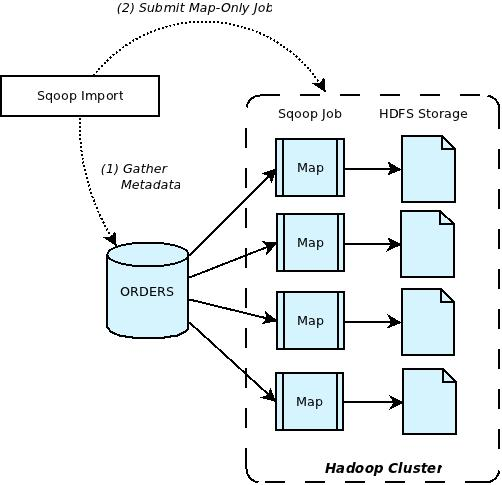
Figure 1: Sqoop Import
Overview
导入的数据存储在HDFS目录下。正如Sqoop大多数操作一样,用户可以指定任何替换路径来存储导入的数据。
默认情况下这些文档包含用逗号分隔的字段,用新行来分隔不同的记录。你可以明确地指定字段分隔符和记录结束符容易地实现文件复制过程中的格式覆盖。
Sqoop也支持不同数据格式的数据导入。例如,你可以通过指定 --as-avrodatafile 选项的命令行来简单地实现导入Avro
格式的数据。
There
are many other options that Sqoop provides which can be used to further tune
the import operation to suit your specific requirements.
Sqoop提供许多选项可以用来满足指定需求的导入操作。
导入数据到 Hive
在许多情况下,导入数据到Hive就跟运行一个导入任务然后使用Hive创建和加载一个确定的表和partition。手动执行这个操作需要你要知道正确的数据类型映射和其他细节像序列化格式和分隔符。Sqoop负责将合适的表格元数据填充到Hive 元数据仓库和调用必要的指令来加载table和partition。这些操作都可以通过简单地在命令行中指定--hive-import 来实现。
----
$ sqoop import --connect jdbc:mysql://localhost/acmedb \
--table ORDERS --username test --password **** --hive-import
----
当你运行一个Hive import时,Sqoop将会将数据的类型从外部数据仓库的原生数据类型转换成Hive中对应的类型,Sqoop自动地选择Hive使用的本地分隔符。如果被导入的数据中有新行或者有其他Hive分隔符,Sqoop允许你移除这些字符并且获取导入到Hive的正确数据。
一旦导入操作完成,你就像Hive其他表格一样去查看和操作。
导入数据到 HBase
你可以使用Sqoop将数据插入到HBase表格中特定列族。跟Hive导入操作很像,可以通过指定一个额外的选项来指定要插入的HBase表格和列族。所有导入到HBase的数据将转换成字符串并以UTF-8字节数组的格式插入到HBase中
----
$ sqoop import --connect jdbc:mysql://localhost/acmedb \
--table ORDERS --username test --password **** \
--hbase-create-table --hbase-table ORDERS --column-family mysql
----
下面是命令行中各种选项的解释:
- --hbase-create-table: 这个选项指示Sqoop创建HBase表.
- --hbase-table: 这个选项指定HBase表格的名字.
- --column-family: T这个选项指定列族的名字.
剩下的选项跟普通的导入操作一样。
导出数据
在一些情况中,通过Hadoop pipelines来处理数据可能需要在生产系统中运行额外的关键业务函数来提供帮助。Sqoop可以在必要的时候用来导出这些的数据到外部数据仓库。还是使用上面的例子,如果Hadoop
pieplines产生的数据对应数据库OREDERS表格中的某些地方,你可以使用下面的命令行:
----
$ sqoop export --connect
jdbc:mysql://localhost/acmedb \
--table ORDERS --username test
--password **** \
--export-dir /user/arvind/ORDERS
----
下面是各种选项的解释:
- export: 指示Sqoop开始导出
- --connect
<connect string>, --username <user name>, --password
<password>:这些都是连接数据库时需要的参数。这跟你通过JDBC连接数据库时所使用的参数没有区别 - --table
<table name>: 指定要被填充的表格 - --export-dir
<directory path>: 导出路径.
导入操作通过下面Figure2所描绘的那两步来完成。第一步,从数据库中获取要导入的数据的元数据,第二步则是数据的传输。Sqoop将输入数据集分割成片然后用map任务将片插入到数据库中。为了确保最佳的吞吐量和最小的资源使用率,每个map任务通过多个事务来执行这个数据传输。

Figure 2: Sqoop Export Overview
一些连接器支持临时表格来帮助隔离那些任何原因导致的作业失败而产生的生产表格。一旦所有的数据都传输完成,临时表格中的数据首先被填充到map任务和合并到目标表格。
Sqoop 连接器
使用专门连接器,Sqoop可以连接那些拥有优化导入导出基础设施的外部系统,或者不支持本地JDBC。连接器是插件化组件基于Sqoop的可扩展框架和可以添加到任何当前存在的Sqoop。一旦连接器安装好,Sqoop可以使用它在Hadoop和连接器支持的外部仓库之间进行高效的传输数据。
默认情况下,Sqoop包含支持各种常用数据库例如MySQL,PostgreSQL,Oracle,SQLServer和DB2的连接器。它也包含支持MySQL和PostgreSQL数据库的快速路径连接器。快速路径连接器是专门的连接器用来实现批次传输数据的高吞吐量。Sqoop也包含一般的JDBC连接器用于连接通过JDBC连接的数据库
跟内置的连接不同的是,许多公司会开发他们自己的连接器插入到Sqoop中,从专门的企业仓库连接器到NoSQL数据库。
总结
在这篇文档中可以看到大数据集在Hadoop和外部数据仓库例如关系型数据库的传输是多么的简单。除此之外,Sqoop提供许多高级提醒如不同数据格式、压缩、处理查询等等。我们建议你多尝试Sqoop并给我们提供反馈。
更多关于Sqoop的信息可以在下面路径找到:
Project
Website: http://incubator.apache.org/sqoop
Wiki: https://cwiki.apache.org/confluence/display/SQOOP
Project Status:
http://incubator.apache.org/projects/sqoop.html
Mailing
Lists: https://cwiki.apache.org/confluence/display/SQOOP/Mailing+Lists
下面是原文
Apache Sqoop - Overview
Using Hadoop for analytics and data processing requires loading
data into clusters and processing it in conjunction with other data that often
resides in production databases across the enterprise. Loading bulk data into
Hadoop from production systems or accessing it from map reduce applications
running on large clusters can be a challenging task. Users must consider
details like ensuring consistency of data, the consumption of production system
resources, data preparation for provisioning downstream pipeline. Transferring
data using scripts is inefficient and time consuming. Directly accessing data
residing on external systems from within the map reduce applications
complicates applications and exposes the production system to the risk of
excessive load originating from cluster nodes.
This is where Apache Sqoop fits in. Apache
Sqoop is currently undergoing incubation at Apache Software Foundation. More
information on this project can be found at http://incubator.apache.org/sqoop.
Sqoop allows easy import and export of data
from structured data stores such as relational databases, enterprise data
warehouses, and NoSQL systems. Using Sqoop, you can provision the data from
external system on to HDFS, and populate tables in Hive and HBase. Sqoop
integrates with Oozie, allowing you to schedule and automate import and export
tasks. Sqoop uses a connector based architecture which supports plugins that
provide connectivity to new external systems.
What happens underneath the covers when you
run Sqoop is very straightforward. The dataset being transferred is sliced up
into different partitions and a map-only job is launched with individual
mappers responsible for transferring a slice of this dataset. Each record of
the data is handled in a type safe manner since Sqoop uses the database
metadata to infer the data types.
In the rest of this post we will walk through
an example that shows the various ways you can use Sqoop. The goal of this post
is to give an overview of Sqoop operation without going into much detail or
advanced functionality.
Importing Data
The following command is used to import all data from a table
called ORDERS from a MySQL database:
---
$ sqoop import
--connect jdbc:mysql://localhost/acmedb \
--table
ORDERS --username test --password ****
---
In this command the various options specified
are as follows:
- import: This is the sub-command that instructs Sqoop to initiate an
import. - --connect
<connect string>, --username <user name>, --password
<password>: These are connection
parameters that are used to connect with the database. This is no
different from the connection parameters that you use when connecting to
the database via a JDBC connection. - --table
<table name>: This parameter specifies the
table which will be imported.
- import: This is the sub-command that instructs Sqoop to initiate an
The import is done in two steps as depicted
in Figure 1 below. In the first Step Sqoop introspects the database to gather
the necessary metadata for the data being imported. The second step is a map-only
Hadoop job that Sqoop submits to the cluster. It is this job that does the
actual data transfer using the metadata captured in the previous step.

Figure
1: Sqoop Import Overview
The imported data is saved in a
directory on HDFS based on the table being imported. As is the case with most
aspects of Sqoop operation, the user can specify any alternative directory
where the files should be populated.
By default these files contain comma delimited fields, with
new lines separating different records. You can easily override the format in
which data is copied over by explicitly specifying the field separator and
record terminator characters.
Sqoop also supports different data formats for importing
data. For example, you can easily import data in Avro data format by simply
specifying the option --as-avrodatafile with the import command.
There are many other options that Sqoop provides which can be
used to further tune the import operation to suit your specific requirements.
Importing Data into Hive
In most cases, importing data into Hive
is the same as running the import task and then using Hive to create and load a
certain table or partition. Doing this manually requires that you know the
correct type mapping between the data and other details like the serialization
format and delimiters. Sqoop takes care of populating the Hive metastore with
the appropriate metadata for the table and also invokes the necessary commands
to load the table or partition as the case may be. All of this is done by simply
specifying the option --hive-import with the import command.
----
$ sqoop import --connect
jdbc:mysql://localhost/acmedb \
--table ORDERS --username
test --password **** --hive-import
----
When you run a Hive import, Sqoop converts the data from the
native datatypes within the external datastore into the corresponding types
within Hive. Sqoop automatically chooses the native delimiter set used by Hive.
If the data being imported has new line or other Hive delimiter characters in
it, Sqoop allows you to remove such characters and get the data correctly
populated for consumption in Hive.
Once the import is complete, you can see and operate on the
table just like any other table in Hive.
Importing Data into HBase
You can use Sqoop to populate data in a
particular column family within the HBase table. Much like the Hive import,
this can be done by specifying the additional options that relate to the HBase
table and column family being populated. All data imported into HBase is
converted to their string representation and inserted as UTF-8 bytes.
----
$ sqoop import --connect
jdbc:mysql://localhost/acmedb \
--table ORDERS --username test
--password **** \
--hbase-create-table --hbase-table ORDERS
--column-family mysql
----
In this command the various options specified are as
follows:
- --hbase-create-table: This option instructs Sqoop to create the HBase table.
- --hbase-table: This option specifies the table name to use.
- --column-family: This option specifies the column family name to use.
The rest of the options are the same as that for regular import
operation.
Exporting Data
In some cases data processed by Hadoop
pipelines may be needed in production systems to help run additional critical
business functions. Sqoop can be used to export such data into external
datastores as necessary. Continuing our example from above - if data generated
by the pipeline on Hadoop corresponded to the ORDERS table in a database
somewhere, you could populate it using the following command:
----
$ sqoop export
--connect jdbc:mysql://localhost/acmedb \
--table ORDERS
--username test --password **** \
--export-dir
/user/arvind/ORDERS
----
In this command the various options specified are as follows:
- export: This is the sub-command that instructs Sqoop to initiate an
export. - --connect
<connect string>, --username <user name>, --password
<password>: These are connection
parameters that are used to connect with the database. This is no
different from the connection parameters that you use when connecting to
the database via a JDBC connection. - --table
<table name>: This parameter specifies the
table which will be populated. - --export-dir
<directory path>: This is the directory from
which data will be exported.
- export: This is the sub-command that instructs Sqoop to initiate an
Export is done in two steps as depicted in
Figure 2. The first step is to introspect the database for metadata, followed
by the second step of transferring the data. Sqoop divides the input dataset
into splits and then uses individual map tasks to push the splits to the
database. Each map task performs this transfer over many transactions in order
to ensure optimal throughput and minimal resource utilization.

Figure 2: Sqoop Export Overview
Some connectors support staging tables that help isolate
production tables from possible corruption in case of job failures due to any reason.
Staging tables are first populated by the map tasks and then merged into the
target table once all of the data has been delivered it.
Sqoop Connectors
Using specialized connectors, Sqoop can connect with external
systems that have optimized import and export facilities, or do not support
native JDBC. Connectors are plugin components based on Sqoop’s extension
framework and can be added to any existing Sqoop installation. Once a connector
is installed, Sqoop can use it to efficiently transfer data between Hadoop and
the external store supported by the connector.
By default Sqoop includes connectors for
various popular databases such as MySQL, PostgreSQL, Oracle, SQL Server and
DB2. It also includes fast-path connectors for MySQL and PostgreSQL databases.
Fast-path connectors are specialized connectors that use database specific
batch tools to transfer data with high throughput. Sqoop also includes a
generic JDBC connector that can be used to connect to any database that is
accessible via JDBC.
Apart from the built-in connectors, many
companies have developed their own connectors that can be plugged into Sqoop.
These range from specialized connectors for enterprise data warehouse systems
to NoSQL datastores.
Wrapping Up
In this post you saw how easy it is to transfer large datasets
between Hadoop and external datastores such as relational databases. Beyond
this, Sqoop offers many advance features such as different data formats,
compression, working with queries instead of tables etc. We encourage you to
try out Sqoop and give us your feedback.
More information regarding Sqoop can be found
at:
Project Website: http://incubator.apache.org/sqoop
Wiki: https://cwiki.apache.org/confluence/display/SQOOP
Project Status: http://incubator.apache.org/projects/sqoop.html
Mailing Lists: https://cwiki.apache.org/confluence/display/SQOOP/Mailing+Lists
Apache Sqoop - Overview——Sqoop 概述的更多相关文章
- Apache Sqoop - Overview Apache Sqoop 概述
使用Hadoop来分析和处理数据需要将数据加载到集群中并且将它和企业生产数据库中的其他数据进行结合处理.从生产系统加载大块数据到Hadoop中或者从大型集群的map reduce应用中获得数据是个挑战 ...
- Sqoop之 Sqoop 1.4.6 安装
1. sqoop数据迁移 1.1 概述 sqoop是apache旗下一款“Hadoop和关系数据库服务器之间传送数据”的工具. 导入数据:MySQL,Oracle导入数据到Hadoop的HDFS.HI ...
- [Sqoop]利用sqoop对mysql运行DML操作
业务背景 利用sqoop对mysql进行查询.加入.删除等操作. 业务实现 select操作: sqoop eval \ --connect jdbc:mysql://127.0.0.1:3306/m ...
- Photon——Feature Overview 功能概述
Photon——Feature Overview 功能概述 Feature Overview 功能概述 Photon is a real-time socket server and ...
- Unity Lighting - Lighting overview 照明概述
Lighting overview 照明概述 In order to calculate the shading of a 3D object, Unity needs to know the ...
- Sqoop修改sqoop元信息实现job的增量导入
最简单方式是按主键增量导入:http://blog.csdn.net/ggz631047367/article/details/50185319 以下方法只做存档 需求:redis缓存的数据隔段时间往 ...
- ASP.NET Core Module overview模块概述
原文地址:ASP.NET Core Module overview By Tom Dykstra, Rick Strahl, and Chris Ross ASP.NET Core模块(ANCM)让你 ...
- Apache nifi 第一篇(概述)
1.什么是Apache NiFi? 简单地说,NiFi是为了自动化系统之间的数据流.虽然数据流这种形式很容易理解,但我们在此使用它来表示系统之间的自动化和不同系统之间数据的流转.企业拥有多个系统,其中 ...
- apache mpms和php概述
当设置一个Apache + PHP服务器来运行你的PHP应用程序时,有许多配置参数需要处理. 最重要的是php服务器Api(server api:sapi),它决定了Apache将如何运行PHP脚本. ...
随机推荐
- sphinx搜索实例
多个关键词搜索一个字段的几种方式测试 @proname "ygm" "磨粉机" "2" //搜索结果proname字段必须同时包含3个词,有 ...
- BOM DOM Event事件笔记....
js//获取文件标题 document.body //body document.title //网页标题 document.doctype//文档对象 document.url//路径 //服务器相 ...
- eclipse tomcat add and remove工程异常
1 eclipse导入工程后,右击server add and remove工程时,there are no resource: 解决方案:右击工程->单击property->选择pro ...
- 谈 CSS 模块化
以前看过模块化的相关资料以及解释,对模块化有了一个表皮的了解,自己也做了一些相关的实践,由于接触到的项目交小,所以也没能更好的去体现和理解模块化,但总体还是有那么一些感悟,但是如果要说怎么才能算是好的 ...
- Java调用批处理或可执行文件
import java.io.BufferedReader; import java.io.InputStreamReader; public class Test { public static v ...
- swiper的初步使用
1.引入文件,顺序引入(此处基于jquery,且版本至少1.7以上) <link rel="stylesheet" href="path/to/swiper-3.4 ...
- Java 用LinkdeList实现52张扑克牌
用LinkdeList实现52张扑克牌(不含大小王)的洗牌功能.提示:花色 ,和数字分别用数组存储. import java.util.LinkedList; import java.util.Ran ...
- *HDU3398 数学
String Time Limit: 4000/2000 MS (Java/Others) Memory Limit: 32768/32768 K (Java/Others)Total Subm ...
- sqlmap用户手册 | WooYun知识库
sqlmap用户手册 说明:本文为转载,对原文中一些明显的拼写错误进行修正,并标注对自己有用的信息. 原文:http://drops.wooyun.org/tips/143 ============ ...
- 利用sql注入
INSERT查询中实现注入攻击 1. 思路就是在含有insert语句的页面插入目标值信息.经常包含的是一个子查询. 2. 注意在insert过程中,左边的注入点和右边的注入点会有不同 3. 在mysq ...