
[Angular] Component architecture and Reactive Forms
It it recommeded that when deals with form component, we can create a container component to hold state, and then create a stateless component to enpower the form.
For example:
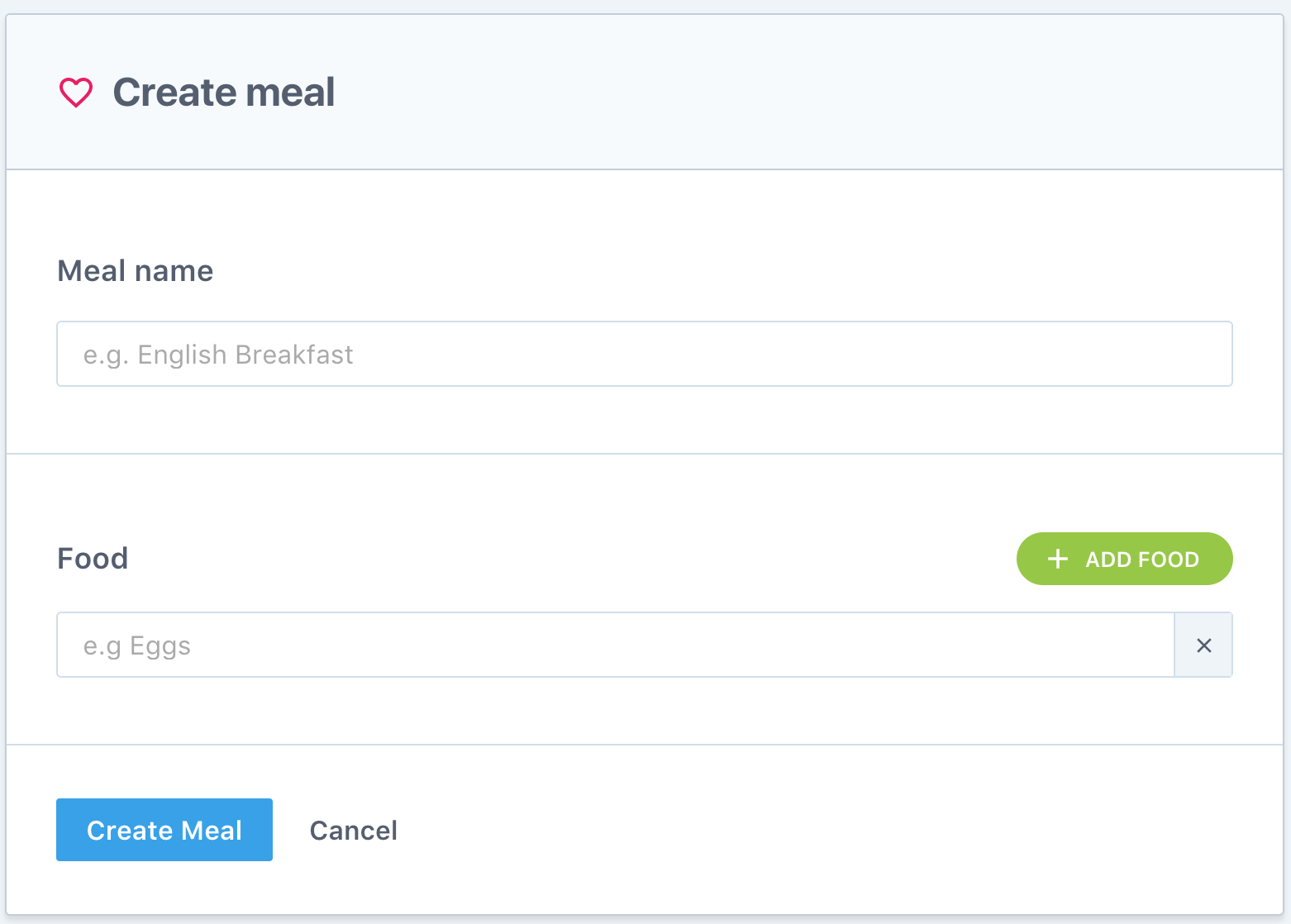
In the example has two components, one is container component 'meal.component.ts', another is statless component 'meal-form.component.ts'.
For the container component, it talks to service:
import {Component} from '@angular/core';

import {Meal} from '../../../shared/services/meals/meals.service';

@Component({

  selector: 'meal',

  styleUrls: ['meal.component.scss'],

  template: `

    <div class="meal">

      <div class="meal__title">

        <h1>

          <img src="/img/food.svg" alt="Food">

          <span>Create meal</span>

        </h1>

      </div>

      <div>

        <meal-form

          (create)="addMeal($event)"

        ></meal-form>

      </div>

    </div>

  `

})

export class MealComponent {

  constructor() {

  }

  addMeal(meal: Meal) {

    console.log("meal", JSON.stringify(meal, null, 2))

  }

}
So 'addMeal' function will dispatch action to talk to the service.
For statless component:
import {ChangeDetectionStrategy, Component, EventEmitter, Output} from '@angular/core';

import {FormBuilder, FormArray, FormGroup, FormControl, Validators} from '@angular/forms';

import {Meal} from '../../../shared/services/meals/meals.service';

@Component({

  selector: 'meal-form',

  changeDetection: ChangeDetectionStrategy.OnPush,

  styleUrls: ['meal-form.component.scss'],

  template: `

    <div class="meal-form">

      <form [formGroup]="form">

        <div class="meal-form__name">

          <label>

            <h3>Meal name</h3>

            <input type="text"

                   formControlName="name"

                   placeholder="e.g. English Breakfast">

            <div class="error" *ngIf="required">

              Workout name is required

            </div>

          </label>

        </div>

        <div class="meal-form__food">

          <div class="meal-form__subtitle">

            <h3>Food</h3>

            <button

              type="button"

              (click)="addIngredient()"

              class="meal-form__add">

              <img src="/img/add-white.svg" alt="Add food">

              Add food

            </button>

          </div>

          <div formArrayName="ingredients">

            <label *ngFor="let c of ingredients.controls; index as i;">

              <input type="text" [formControlName]="i" placeholder="e.g Eggs">

              <span

                class="meal-form__remove"

                (click)="removeIngredient(i)"

              ></span>

            </label>

          </div>

        </div>

        <div class="meal-form__submit">

          <div>

            <button type="button" class="button" (click)="createMeal()">

              Create Meal

            </button>

            <a

              [routerLink]="['../']"

              class="button button--cancel">

              Cancel

            </a>

          </div>

        </div>

      </form>

    </div>

  `

})

export class MealFormComponent {

  @Output()

  create = new EventEmitter<Meal>();

  form = this.fb.group({

    name: ['', Validators.required],

    ingredients: this.fb.array([''])

  });

  get ingredients () {

    // Type check for ingredients, mark as FormArray

    // Therefore when we use 'ingredients',

    // We can get auto complete

    return this.form.get('ingredients') as FormArray;

  }

  get required() {

    return (

      this.form.get('name').hasError('required') &&

        this.form.get('name').touched

    );

  }

  constructor(private fb: FormBuilder) {

  }

  createMeal() {

    if (this.form.valid) {

      this.create.emit(this.form.value);

    }

  }

  addIngredient() {

    // Add a new FormControl to FormArray

    this.ingredients.push(new FormControl(''));

  }

  removeIngredient(i: number) {

    this.ingredients.removeAt(i);

  }

}
It uses ReactiveForm to create form.
Things to be notice:
1. Add type check for form array:
  get ingredients () {

    // Type check for ingredients, mark as FormArray

    // Therefore when we use 'ingredients',

    // We can get auto complete

    return this.form.get('ingredients') as FormArray;

  }
Then whenever you use 'this.ingredients', it will show auto complete.
2. FormArray method:
  addIngredient() {

    // Add a new FormControl to FormArray

    this.ingredients.push(new FormControl(''));

  }

  removeIngredient(i: number) {

    this.ingredients.removeAt(i);

  }
[Angular] Component architecture and Reactive Forms的更多相关文章
- Angular Reactive Forms -- Model-Driven Forms响应式表单
Angular 4.x 中有两种表单: Template-Driven Forms - 模板驱动式表单 (类似于 AngularJS 1.x 中的表单 ) 官方文档:https://v2.angul ...
- [Angular] Create a custom validator for reactive forms in Angular
Also check: directive for form validation User input validation is a core part of creating proper HT ...
- Angular开发实践(三):剖析Angular Component
Web Component 在介绍Angular Component之前,我们先简单了解下W3C Web Components 定义 W3C为统一组件化标准方式,提出Web Component的标准. ...
- Angular之响应式表单 ( Reactive Forms )
项目结构 一 首页 ( index.html ) <!doctype html> <html lang="en"> <head> <met ...
- ng2响应式表单-翻译与概括官网REACTIVE FORMS页面
本文将半翻译半总结的讲讲ng2官网的另一个未翻译高级教程页面. 原文地址. 文章目的是使用ng2提供的响应式表单技术快速搭出功能完善丰富的界面表单组件. 响应式表单是一项响应式风格的ng2技术,本文将 ...
- Angular2响应式表单-翻译与概括官网REACTIVE FORMS页面
本文将半翻译半总结的讲讲ng2官网的另一个未翻译高级教程页面. 原文地址. 文章目的是使用ng2提供的响应式表单技术快速搭出功能完善丰富的界面表单组件. 响应式表单是一项响应式风格的ng2技术,本文将 ...
- Angular 2 Architecture Overview
Module 简单来说模块(module)就是完成共同目的的代码块,export一些内容例如一个类.函数.或值变量. component就是一个基本的Angular块,一个component类其实也是 ...
- [Angular] Refactor Angular Component State Logic into Directives
Allow the base toggle to be a tag (<toggle>) or attribute (<div toggle>). The <toggle ...
- [Angular] Component's dependency injection
An Angular service registered on the NgModule is globally visible on the entire application. Moreove ...
随机推荐
- 【java】itoo项目实战之大数据查询之使用 new map 优化hibernate之级联查询
在我的上一篇博客<[java]itoo项目实战之hibernate 懒载入优化性能>中,我曾提到过学生数据有2万条,查询数据十分的慢,这是让人非常受不了的事情.看着页面进度条一直转着圈圈, ...
- Redis学习手冊(事务)
一.概述: 和众多其他数据库一样,Redis作为NoSQL数据库也相同提供了事务机制. 在Redis中,MULTI/EXEC/DISCARD/WATCH这四个命令是我们实现事务的基石. 相 ...
- Socket编程中的强制关闭与优雅关闭及相关socket选项
以下描述主要是针对windows平台下的TCP socket而言. 首先需要区分一下关闭socket和关闭TCP连接的区别,关闭TCP连接是指TCP协议层的东西,就是两个TCP端之间交换了一些协议包( ...
- POJ 2459 模拟
题意: 思路: 按照题意模拟即可 //By SiriusRen #include <cstdio> using namespace std; int c,f1,f2,d,xx,yy,vis ...
- 基于Linux平台Softimage XSI 演示
2009年底上映的<阿凡达>是电影特效的巅峰之作,就在本月初上映的变形金刚3每次观看之后看得眼花缭乱总能让我热血沸腾,要是自己能做出那样的特效该多好,Linux下研究Maya已经有一段日 ...
- Kinect 开发 —— 显示骨骼用户插件
public partial class SkeletonViewer : UserControl { private readonly Brush[] _SkeletonBrushes = new ...
- 【DRF认证】
目录 认证组件的详细用法 本文详细讲述了DRF认证组件的原理以及用法. @ * 源码剖析** 上一篇博客讲解DRF版本的时候我们都知道了,在dispatch方法里执行了initial方法来初始化我们的 ...
- Linux 内建命令和系统命令
shell内建命令是指bash(或其它版本)工具集中的命令.一般都会有一个与之同名的系统命令,比如bash中的echo命令与/bin/echo是两个不同的命令,尽管他们行为大体相仿.当在bash中键入 ...
- 如何优雅的写UI——(5)选项卡功能实现
先在我们的选项卡可以说能用了,每个标签页都能点进去,但是这还远远没到能用的地步,比如说你把窗口最大化后. 立马就露出马脚了,所以这篇我们要先讲讲tabctrl的最基本的功能实现 改变选项卡大小 上图的 ...
- iOS报错 -pie can only be used when targeting iOS 4.2 or later
近期,使用师兄的project时.突然报错之前没发现这个错误.信息例如以下: ld: -pie can only be used when targeting iOS 4.2 or later cla ...