
Android笔记---Intent实现Activity跳转
学了之前的Android控件以及布局,我们就能够做一些UI的设计了,这里我结合之前的知识。以一个小的登录项目来解说下Activity之间跳转。
先看下效果图:
1.登录界面:

2.点击登录按钮跳转到另外一个Activity的界面,这个界面非常easy,就一个TextView:
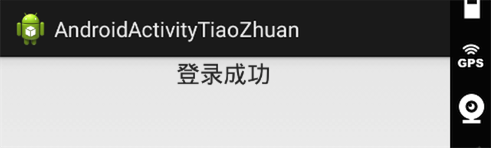
首先我们须要建好两个Activity和两个xml布局文件,android程序启动会载入開始默认指定的MainActivity.java以及activity_main.xml。我们首先要做的是分别在两个Activity文件里设置好须要载入的xml布局以及须要处理的事情。
这里先直接给出两个xml布局文件的代码,用的是相对布局。须要自己熟悉这样的布局并进行对应的调整,能够參考我之前的博客:
activity_main.xml代码:
<RelativeLayout xmlns:android="http://schemas.android.com/apk/res/android"

    xmlns:tools="http://schemas.android.com/tools"

    android:layout_width="match_parent"

    android:layout_height="match_parent">

    <TextView

        android:id="@+id/tv1"

        android:layout_width="wrap_content"

        android:layout_height="wrap_content"

        android:text="username"

        android:textSize="25sp"/>

    <EditText

        android:id="@+id/et1"

        android:layout_width="match_parent"

        android:layout_height="wrap_content"

        android:layout_toRightOf="@id/tv1"

        android:layout_alignBottom ="@id/tv1"

        android:hint="请输入username"

        android:singleLine="true"/>

    <TextView

        android:id="@+id/tv2"

        android:layout_width="wrap_content"

        android:layout_height="wrap_content"

        android:layout_below="@id/tv1"

        android:layout_alignRight="@id/tv1"

        android:layout_alignLeft="@id/tv1"

        android:gravity="center"

        android:text="password"

        android:textSize="25sp"/>

    <EditText

        android:id="@+id/et2"

        android:layout_width="match_parent"

        android:layout_height="wrap_content"

        android:layout_toRightOf="@id/tv2"

        android:layout_alignBottom ="@id/tv2"

        android:hint="请输入password"

        android:password="true"

        android:singleLine="true"/>

    <Button

        android:id="@+id/bt1"

        android:layout_width="match_parent"

        android:layout_height="wrap_content"

        android:layout_below="@id/tv2"

        android:text="登录"/>

</RelativeLayout>activity_main.xml2代码:
<RelativeLayout xmlns:android="http://schemas.android.com/apk/res/android"

    xmlns:tools="http://schemas.android.com/tools"

    android:layout_width="match_parent"

    android:layout_height="match_parent">

    <TextView

        android:id="@+id/bv3"

        android:layout_width="match_parent"

        android:layout_height="wrap_content"

        android:gravity="center"

        android:textSize="20sp"

        android:text="登录成功" />

</RelativeLayout>
然后对于2个Activity,先在 AndroidManifest.xml 中为 SecondActivity进行注冊:
这里给出AndroidManifest.xml中的代码:
<?xml version="1.0" encoding="utf-8"?>

<manifest xmlns:android="http://schemas.android.com/apk/res/android"

    package="com.example.androidactivitytiaozhuan"

    android:versionCode="1"

    android:versionName="1.0" >

    <uses-sdk

        android:minSdkVersion="16"

        android:targetSdkVersion="22" />

    <application

        android:allowBackup="true"

        android:icon="@drawable/ic_launcher"

        android:label="@string/app_name"

        android:theme="@style/AppTheme" >

        <activity

            android:name=".MainActivity"

            android:label="@string/app_name" >

            <intent-filter>

                <action android:name="android.intent.action.MAIN" />

                <category android:name="android.intent.category.LAUNCHER" />

            </intent-filter>

        </activity>

        //注冊SecondActivity,因为不是主活动,因此不须要配置intent-filter标签里的内容

        <activity

            android:name=".SecondActivity" >

        </activity>

    </application>

</manifest>
接下来我们学习了解下Intent。
Intent是Android程序中各组件之间进行交互的一种重要方式,它不仅能够指明当前组件想要运行的动作,还能够在不同组件之间传递数据。Intent 一般可被用于启动活动、启动服务、以及发送广播等场景, 这里先仅仅讲下用Intent实现界面的跳转。
有非常多方法实现Activity之间的跳转,这里我仅仅给出一种使用显示的Intent(通过指定Intent组件名称来实现的,它一般用在知道目标组件名称的前提下,通常是在同样的应用程序内部实现的。
)方式,很多其它的能够參考浅谈显示Intent和隐式Intent。我们首先构建出了一个 Intent,传入MainActivity.this作为上下文,传入SecondActivity.class 作为目标活动,这样我们的“意图”就非常明显了,即在 MainActivity 这个活动的基础上打 开 SecondActivity 这个活动。
然后通过 startActivity()方法来运行这个 Intent。以下给出两个Activity中的代码。
MainActivity.java代码例如以下:
package com.example.androidactivitytiaozhuan;

import android.app.Activity;

import android.content.Intent;

import android.os.Bundle;

import android.view.View;

import android.view.View.OnClickListener;

import android.widget.Button;

public class MainActivity extends Activity {

    private Button button;

    @Override

    protected void onCreate(Bundle savedInstanceState) {

        super.onCreate(savedInstanceState);

        setContentView(R.layout.activity_main);

        button = (Button) findViewById(R.id.bt1);

        button.setOnClickListener(new OnClickListener() {

            @Override

            public void onClick(View v) {

                //显示方式声明Intent。直接启动SecondActivity

                Intent intent = new Intent(MainActivity.this, SecondActivity.class);

                startActivity(intent);

            }

        });

    }

}
SecondActivity.java代码例如以下:
package com.example.androidactivitytiaozhuan;

import android.app.Activity;

import android.os.Bundle;

public class SecondActivity extends Activity {

    @Override

    protected void onCreate(Bundle savedInstanceState) {

        super.onCreate(savedInstanceState);

        setContentView(R.layout.activity_main2);

    }

}
Android笔记---Intent实现Activity跳转的更多相关文章
- Android - 通过Intent启动Activity
通过Intent启动Activity 本文地址: http://blog.csdn.net/caroline_wendy 为了动态关联Activity界面,使用Intent启动.能够灵活绑定. 在In ...
- Android组件系列----当前Activity跳转到另一个Activity的详细过程
[声明] 欢迎转载,但请保留文章原始出处→_→ 生命壹号:http://www.cnblogs.com/smyhvae/ 文章来源:http://www.cnblogs.com/smyhvae/p/3 ...
- Android之Intent和Activity
Intent能够说是Android的灵魂,程序跳转和传递数据的时候基本上就是靠Intent了.Intent在Android应用中是相当重要的,理解Intent相应用编程非常有帮助.在Android的官 ...
- Android 笔记 Intent and Bundle day7
学习了Intent与Bundle的使用,进行应用中的交互 package com.example.intent; import android.app.Activity; import android ...
- Android学习手记(1) Activity跳转
新建Project,并将主页命名为MainActivity. 创建一个Activity 在App上“右键->New->Activity->Empty Activity”, 将新建的A ...
- [转]android笔记--Intent和IntentFilter详解
Intent用于启动Activity, Service, 以及BroadcastReceiver三种组件, 同时还是组件之间通信的重要媒介. 使用Intent启动组件的优势1, Intent为组件的启 ...
- android笔记--Intent和IntentFilter详解
本文转载自:https://www.cnblogs.com/liushengjie/archive/2012/08/30/2663066.html 本文转载自:https://www.cnblogs. ...
- Android 笔记-Fragment 与 Activity之间传递数据
Fragment 与 Activity之间传递数据有两种方法.一种是使用setArgument,一种是使用接口回调.以下先学习第一种方法. (1)使用setArgument方法: 为了便于理解,我在这 ...
- android笔记5——同一个Activity中Fragment的切换
今天来模拟一个注冊的界面过程: 点击"下一步"之后: watermark/2/text/aHR0cDovL2Jsb2cuY3Nkbi5uZXQvZW5zb24xNjg1NQ==/f ...
随机推荐
- hiho 1613 - 墨水滴 - bfs+优先队列 *
题目链接 小Ho有一张白纸,上面有NxN个格子.小Ho可以选择一个格子(X, Y),在上面滴一滴墨水.如果这滴墨水的颜色深度是G,那么这个格子也会被染成深度为G的格子.同时周围的格子也会被这滴墨水浸染 ...
- django框架-DRF工程之权限功能
1.相对于flask,原生而言django,DRF做的则更加的合理化,想要给予用户相应的权限,首先需要在settings中进行配置 REST_FRAMEWORK = { 'DEAFAULT_PERMI ...
- C语言静态库与动态库(Windows下测试)
转载于:https://zhidao.baidu.com/question/1946953913764139388.html,原文为Linux上测试,本文为在Windows上编译测试 我们通常把一些公 ...
- 《Linux 进程间通信》命名管道:FIFO
命名管道的主要用途:不相关的进程之间交换数据. 命令行上创建命名管道: $ mkfifo filename 程序中创建命名管道: #include <sys/types.h> #incl ...
- C++容器(五):set类型
set类型 map容器是键-值对的集合,好比以任命为键的地址和电话号码.而set容器只是单纯的键的集合.当只想知道一个值是否存在时,使用set容器是最适合. 使用set容器必须包含set头文件: #i ...
- DBCA创建数据库ORA-01034 ORACLE not available
SYMPTOMS 在利用dbca创建数据库时,当设置完毕全部參数.開始装时 跑到2% 就报错 ORA-01034 ORACLE not available, 例如以下图 watermark/2/tex ...
- C++的hashmap和Java的hashmap
C++里面是这样的:typedef std::unordered_map<std::string,std::string> stringmap; std::unordered_map< ...
- 用Go语言写了一个电脑搜索文件的小东西
package main import ( "bytes" "fmt" "os" "os/exec" "pat ...
- java 基本类型、包装类、字符串之间的转换
1.基本类型和包装类 基本类型和包装类可通过自动装箱和拆箱实现. int i = 24; Integer a = new Integer(i); //手动装箱 Integer b = i; //自动装 ...
- 【我们都爱Paul Hegarty】斯坦福IOS8公开课个人笔记3 Xcode、Auto Layout及MVC
继续上一话中的计算器Demo.上一话讲到类必须被初始化.类中的属性也必须被初始化,所以你不能仅仅声明而不给它一个处置,那么问题来了,我们从storyboard中拖拽的@IBOutlet为什么仅仅有声明 ...