
页面元素的定位:getBoundingClientRect()和document.documentElement.scrollTop
1.document.documentElement.getBoundingClientRect
MSDN对此的解释是:
Syntax
oRect = object.getBoundingClientRect()
Return Value
Returns a TextRectangle object. Each rectangle has four integer properties (top, left, right, and bottom) that represent a coordinate of the rectangle, in pixels.
Remarks
This method retrieves an object that exposes the left, top, right, and bottom coordinates of the union of rectangles relative to the client's upper-left corner. In Microsoft Internet Explorer 5, the window's upper-left is at 2,2 (pixels) with respect to the true client.
翻译成中文是:该方法获得页面中某个元素的左,上,右和下分别相对浏览器视窗的位置。下面用图说明下。
该方法已经不再只是适用IE了,FF3.0+和Opera9.5+已经支持了该方法,可以说在获得页面元素位置上效率能有很大的提高,在以前版本的Opera和Firefox中必须通过循环来获得元素在页面中的绝对位置。

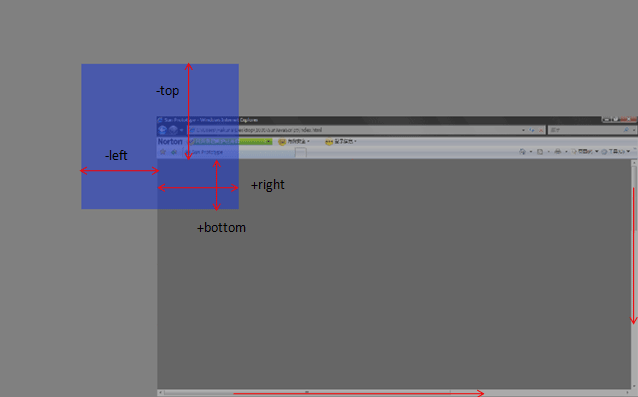
下面的代码举了个简单的例子,可以滚动滚动条之后点红色区域看各个值的变化。
<!DOCTYPE html PUBLIC "-//W3C//DTD XHTML 1.0 Transitional//EN" "http://www.w3.org/TR/xhtml1/DTD/xhtml1-transitional.dtd">

<html xmlns="http://www.w3.org/1999/xhtml">

<head>

<meta http-equiv="Content-Type" content="text/html; charset=utf-8" />

<title>Demo</title>

</head>

<body style="width:2000px; height:1000px;">

    <div id="demo" style="position:absolute; left:518px; right:100px; width:500px; height:500px; background:#CC0000; top: 114px;">Demo为了方便就直接用绝对定位的元素</div>

</body>

</html>

<script>

        document.getElementById('demo').onclick=function (){

        if (document.documentElement.getBoundingClientRect) {

            alert("left:"+this.getBoundingClientRect().left)

            alert("top:"+this.getBoundingClientRect().top)

            alert("right:"+this.getBoundingClientRect().right)

            alert("bottom:"+this.getBoundingClientRect().bottom)

            var X= this.getBoundingClientRect().left+document.documentElement.scrollLeft;

            var Y = this.getBoundingClientRect().top+document.documentElement.scrollTop;

            alert("Demo的位置是X:"+X+";Y:"+Y)

         }

       }

</script>
有了这个方法,获取页面元素的位置就简单多了,
 var X= this.getBoundingClientRect().left+document.documentElement.scrollLeft;
 var Y =this.getBoundingClientRect().top+document.documentElement.scrollTop;

2.要获取当前页面的滚动条纵坐标位置,用:
      document.documentElement.scrollTop
而不是
     document.body.scrollTop
documentElement 对应的是 html 标签,而 body 对应的是 body 标签。
在标准w3c下,document.body.scrollTop恒为0,需要用document.documentElement.scrollTop来代替.
如果你想定位鼠标相对于页面的绝对位置时,你会发现google里面1000篇文章里面有999.99篇会让你使用event.clientX+document.body.scrollLeft,event.clientY+document.body.scrollTop
,如果你发现你的鼠标定位偏离了你的想象,请不要奇怪,这是再正常不过的事情。
ie5.5之后已经不支持document.body.scrollX对象了。
所以在编程的时候,请加上这样的判断
if (document.body && document.body.scrollTop && document.body.scrollLeft)
{
   top  = document.body.scrollTop;
   left = document.body.scrollleft;
}
if (document.documentElement && document.documentElement.scrollTop && document.documentElement.scrollLeft)
{
   top  =  document.documentElement.scrollTop;
   left =  document.documentElement.scrollLeft;
}
页面元素的定位:getBoundingClientRect()和document.documentElement.scrollTop的更多相关文章
- sellenium页面元素的定位方法
1.findElements函数可用于多个元素定位 (1)使用ID定位:driver.findElement(By.id("ID值")); 例:HTML代码: 定位语句代码:Web ...
- Python3 Selenium自动化web测试 ==> 第二节 页面元素的定位方法 <上>
前置步骤: 上一篇的Python单元测试框架unittest,我认为相当于功能测试测试用例设计中的用例模板,在自动化用例的设计过程中,可以封装一个模板,在新建用例的时候,把需要测试的步骤添加上去即可: ...
- input屏蔽历史记录 ;function($,undefined) 前面的分号是什么用处 JSON 和 JSONP 两兄弟 document.body.scrollTop与document.documentElement.scrollTop兼容 URL中的# 网站性能优化 前端必知的ajax 简单理解同步与异步 那些年,我们被耍过的bug——has
input屏蔽历史记录 设置input的扩展属性autocomplete 为off即可 ;function($,undefined) 前面的分号是什么用处 ;(function($){$.ex ...
- document.body.scrollTop or document.documentElement.scrollTop
用Javascript获取DOM节点相对于页面的绝对坐标时,需要计算当前页面的滚动距离,而这个值的获取又取决于浏览器. 在Firefox或Chrome浏览器的控制台可以查看document.bod ...
- document.documentElement.scrollTop(获取滚动条位置)
要获取当前页面的滚动条纵坐标位置,用:document.documentElement.scrollTop;而不是:document.body.scrollTop;documentElement 对应 ...
- document.documentElement.scrollTop
要获取当前页面的滚动条纵坐标位置, 用: document.documentElement.scrollTop; 而不是: document.body.scrollTop; doc ...
- 火狐、谷歌、IE关于document.body.scrollTop和document.documentElement.scrollTop 以及值为0的问题
一.先遇到document.body.scrollTop值为0的问题 做页面的时候可能会用到位置固定的层,读取document.body.scrollTop来设置层的位置,像这样, window.on ...
- document.body.scrollTop与document.documentElement.scrollTop兼容
这两天在写一个JS的网页右键菜单,在实现菜单定位的时候发现了这个问题:chrome居然不认识document.documentElement.scrollTop! 看前辈们的文章,纷纷表示如果有文档声 ...
- js中的document.body.scrollTop与document.documentElement.scrollTop
获取当前页面滚动条纵坐标的位置:document.body.scrollTop与document.documentElement.scrollTop获取当前页面滚动条横坐标的位置:document.b ...
随机推荐
- swap空间可以有效缓解内存压力
不太了解底层的人对swap空间的概念也很模糊,这里我简单举例,看看swap空间的作用 查看当前swap空间:3个方式 [root@localhost /home/xxx/kirin/os_diagno ...
- 正则表达式和豆瓣Top250的爬取练习
datawhale任务2-爬取豆瓣top250 正则表达式 豆瓣250页面分析 完整代码 参考资料 正则表达式 正则表达式的功能用于实现字符串的特定模式精确检索或替换操作. 常用匹配模式 常用修饰符 ...
- 可序列化serializable的作用是什么
什么情况下需要序列化:a)当你想把的内存中的对象写入到硬盘的时候:b)当你想用套接字在网络上传送对象的时候: 为什么要序列化: 为了将对象可以以流的方式传输到其他位置,就必须要将该对象定义为可序列化的 ...
- Web安全扫描工具
使用 Ibm security appscan 进行WEB安全扫描. 1.SQL注入: 2.发现内部IP泄露模式: 3.已解密的登录请求: 4.HTML注释敏感信息泄露:
- [Beginning SharePoint Designer 2010]Chapter5 主题和样式
本章概要: 1.什么是CSS 2.样式表的组成 3.如何管理CSS适应SPD的工具和特性 4.被SPS使用的关键的CSS类别 5.使用SPD应用样式到你的站点上
- 使用SecueCRT在本地主机与远程主机之间交互文件
名词解释 本地主机:执行SecueCRT,以管理远程Linux或Unix的机器(一般为Windows系统) 远程主机:被SecueCRT进行管理控制的机器(一般为Linux或Unix) 1.开启SFT ...
- Tween动画TranslateAnimation细节介绍
Tween动画有下面这几种: Animation 动画 AlphaAnimation 渐变透明度 RotateAnimation 画面旋转 ScaleAnimation 渐变尺寸缩放 Transl ...
- SDUT OJ 1124 飞越原野 (三维BFS练习)
飞跃原野 nid=24#time" title="C.C++.go.haskell.lua.pascal Time Limit5000ms Memory Limit 65536K ...
- linux中设置TAB键的宽度
对于编程的人员来说,常常须要排版代码,这时候就须要TAB键,但TAB键的宽度太大,非常有可能代码太长,延伸到下一行,这个时候你就须要设置TAB键的宽度了. linux下设置TAB键的宽度,做法例如以下 ...
- BroadcastReceiver类
java.lang.Object ↳ android.content.BroadcastReceiver 已知直接子类 AppWidgetProvider DeviceAdminReceiver ...