
R语言实战读书笔记(六)基本图形
#安装vcd包,数据集在vcd包中
library(vcd)
counts <- table(Arthritis$Improved)
counts
# 垂直
barplot(counts, main = "Simple Bar Plot", xlab = "Improvement",
ylab = "Frequency")
# 改为水平
barplot(counts, main = "Horizontal Bar Plot", xlab = "Frequency",
ylab = "Improvement", horiz = TRUE)
# 两个列
counts <- table(Arthritis$Improved, Arthritis$Treatment)
counts
# 堆砌条形图
barplot(counts, main = "Stacked Bar Plot", xlab = "Treatment",
ylab = "Frequency", col = c("red", "yellow", "green"),
legend = rownames(counts))

#分组条形图
barplot(counts, main = "Grouped Bar Plot", xlab = "Treatment",
ylab = "Frequency", col = c("red", "yellow", "green"),
legend = rownames(counts),
beside = TRUE)

states <- data.frame(state.region, state.x77)
means <- aggregate(states$Illiteracy, by = list(state.region), FUN = mean)
means
means <- means[order(means$x), ]
means
barplot(means$x, names.arg = means$Group.1)
title("Mean Illiteracy Rate")

library(vcd)
attach(Arthritis)
counts <- table(Treatment, Improved)
#棘状图
spine(counts, main = "Spinogram Example")
detach(Arthritis)

#屏幕分成2行2列,可以放4副图
par(mfrow = c(2, 2))
#图1中的数据
slices <- c(10, 12, 4, 16, 8)
#图1中的文字
lbls <- c("US", "UK", "Australia", "Germany", "France")
#饼图1
pie(slices, labels = lbls, main = "Simple Pie Chart")
#图2中的数据,是图1中数据的百分比
pct <- round(slices/sum(slices) * 100)
lbls2 <- paste(lbls, " ", pct, "%", sep = "")
pie(slices, labels = lbls2, col = rainbow(length(lbls)), main = "Pie Chart with Percentages")
#三维饼图
library(plotrix)
pie3D(slices, labels = lbls, explode = 0.1, main = "3D Pie Chart ")
#
mytable <- table(state.region)
lbls <- paste(names(mytable), "\n", mytable, sep = "")
pie(mytable, labels = lbls, main = "Pie Chart from a Table\n (with sample sizes)")

#扇形图
par(opar)
library(plotrix)
slices <- c(10, 12, 4, 16, 8)
lbls <- c("US", "UK", "Australia", "Germany", "France")
fan.plot(slices, labels = lbls, main = "Fan Plot")

#直方图
#2行2列
par(mfrow = c(2, 2))
#普通的直方图
hist(mtcars$mpg)
#指定12组
hist(mtcars$mpg, breaks = 12, col = "red",xlab = "Miles Per Gallon", main = "Colored histogram with 12 bins")
#freq=FALSE表示密度直方图
hist(mtcars$mpg, freq = FALSE, breaks = 12, col = "red", xlab = "Miles Per Gallon", main = "Histogram, rug plot, density curve")
#jitter是添加一些噪声,rug是在坐标轴上标出元素出现的频数。出现一次,就会画一个小竖杠。从rug的疏密可以看出变量是什么地方出现的次数多,什么地方出现的次数少。
#轴须图是实际数据值的一种一维呈现方式。如果数据中有很多结(相同的值),可以使用如下代码将数据打散布,会向每个数据点添加一个小的随机值,以避免重叠点产生的影响。
rug(jitter(mtcars$mpg))
#画密度线
lines(density(mtcars$mpg), col = "blue", lwd = 2)
# Histogram with Superimposed Normal Curve
x <- mtcars$mpg
h <- hist(x, breaks = 12, col = "red", xlab = "Miles Per Gallon", main = "Histogram with normal curve and box")
xfit <- seq(min(x), max(x), length = 40)
#正态分布
yfit <- dnorm(xfit, mean = mean(x), sd = sd(x))
yfit <- yfit * diff(h$mids[1:2]) * length(x)
lines(xfit, yfit, col = "blue", lwd = 2)
#添加一个框
box()

par(mfrow = c(2, 1))
d <- density(mtcars$mpg)
plot(d)
d <- density(mtcars$mpg)
plot(d, main = "Kernel Density of Miles Per Gallon")
#画多边形
polygon(d, col = "red", border = "blue")
#添加棕色轴须图
rug(mtcars$mpg, col = "brown")

#双倍线宽
par(lwd = 2)
library(sm)
attach(mtcars)
#产生一个因子cyl.f,cyl是mtcars的一个列
cyl.f <- factor(cyl, levels = c(4, 6, 8),labels = c("4 cylinder", "6 cylinder", "8 cylinder"))
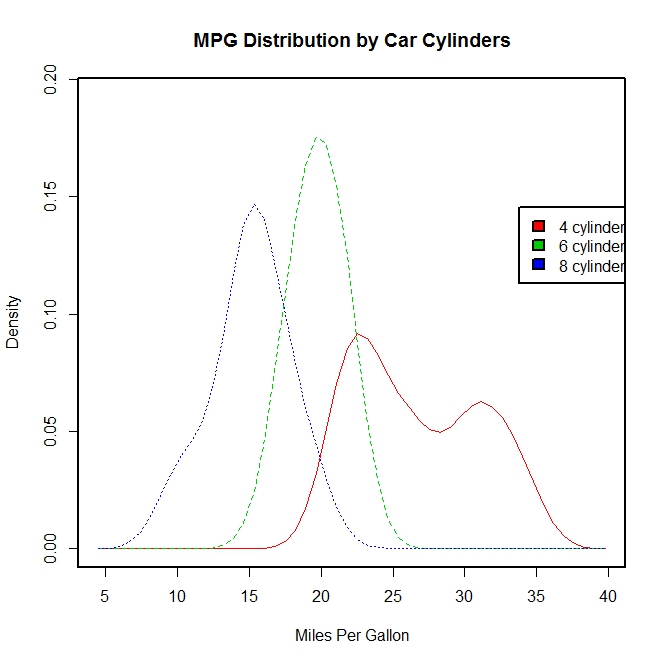
sm.density.compare(mpg, cyl, xlab = "Miles Per Gallon")
title(main = "MPG Distribution by Car Cylinders")
#指定颜色值
colfill <- c(2:(2 + length(levels(cyl.f))))
cat("Use mouse to place legend...", "\n\n")
#locator表示在鼠标点击的位置上添加图例
legend(locator(1), levels(cyl.f), fill = colfill)
detach(mtcars)
par(lwd = 1)
boxplot(mpg ~ cyl, data = mtcars, main = "Car Milage Data", xlab = "Number of Cylinders", ylab = "Miles Per Gallon")

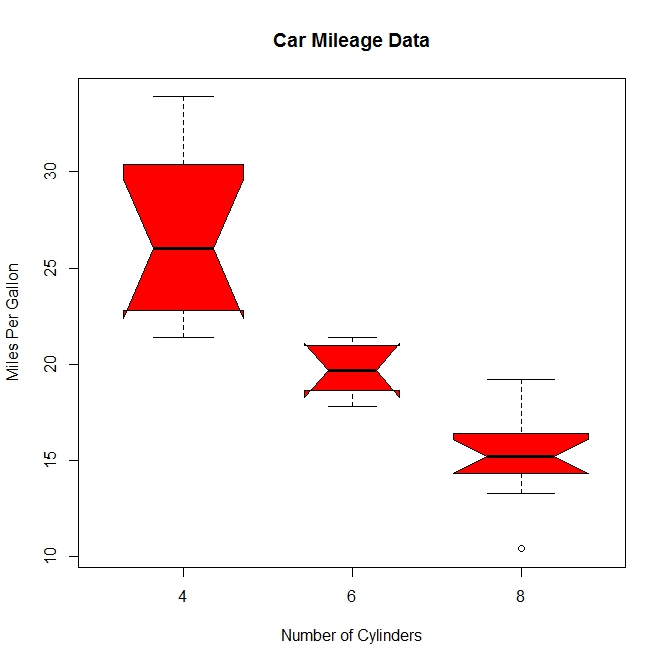
#notch=TRUE含凹槽的箱线图,有凹槽不重叠,表示中位数有显著差异,如下图,都有明显差异,
boxplot(mpg ~ cyl, data = mtcars, notch = TRUE, varwidth = TRUE, col = "red", main = "Car Mileage Data", xlab = "Number of Cylinders", ylab = "Miles Per Gallon")
mtcars$cyl.f <- factor(mtcars$cyl, levels = c(4, 6, 8), labels = c("4", "6", "8"))
mtcars$am.f <- factor(mtcars$am, levels = c(0, 1), labels = c("auto", "standard"))
boxplot(mpg ~ am.f * cyl.f, data = mtcars, varwidth = TRUE, col = c("gold", "darkgreen"), main = "MPG Distribution by Auto Type", xlab = "Auto Type")
#如下图,再一次清晰显示油耗随着缸数下降而减少,对于四和六缸,标准变速箱的油耗更高。对于八缸车型,油耗似乎没有差别
#也可以从箱线图的宽度看出,四缸标准变速成箱的车型和八缸自动变速箱的车型在数据集中最常见

dotchart(mtcars$mpg, labels = row.names(mtcars), cex = 0.7, main = "Gas Milage for Car Models", xlab = "Miles Per Gallon")

x <- mtcars[order(mtcars$mpg), ]
x$cyl <- factor(x$cyl)
x$color[x$cyl == 4] <- "red"
x$color[x$cyl == 6] <- "blue"
x$color[x$cyl == 8] <- "darkgreen"
dotchart(x$mpg, labels = row.names(x), cex = 0.7,
pch = 19, groups = x$cyl,
gcolor = "black", color = x$color,
main = "Gas Milage for Car Models\ngrouped by cylinder",
xlab = "Miles Per Gallon")

R语言实战读书笔记(六)基本图形的更多相关文章
- R语言实战读书笔记(三)图形初阶
这篇简直是白写了,写到后面发现ggplot明显更好用 3.1 使用图形 attach(mtcars)plot(wt, mpg) #x轴wt,y轴pgabline(lm(mpg ~ wt)) #画线拟合 ...
- R语言实战读书笔记(二)创建数据集
2.2.2 矩阵 matrix(vector,nrow,ncol,byrow,dimnames,char_vector_rownames,char_vector_colnames) 其中: byrow ...
- R语言实战读书笔记1—语言介绍
第一章 语言介绍 1.1 典型的数据分析步骤 1.2 获取帮助 help.start() help("which") help.search("which") ...
- R语言实战读书笔记(八)回归
简单线性:用一个量化验的解释变量预测一个量化的响应变量 多项式:用一个量化的解决变量预测一个量化的响应变量,模型的关系是n阶多项式 多元线性:用两个或多个量化的解释变量预测一个量化的响应变量 多变量: ...
- R语言实战读书笔记2—创建数据集(上)
第二章 创建数据集 2.1 数据集的概念 不同的行业对于数据集的行和列叫法不同.统计学家称它们为观测(observation)和变量(variable) ,数据库分析师则称其为记录(record)和字 ...
- R语言实战读书笔记(五)高级数据管理
5.2.1 数据函数 abs: sqrt: ceiling:求不小于x的最小整数 floor:求不大于x的最大整数 trunc:向0的方向截取x中的整数部分 round:将x舍入为指定位的小数 sig ...
- R语言实战读书笔记(四)基本数据管理
4.2 创建新变量 几个运算符: ^或**:求幂 x%%y:求余 x%/%y:整数除 4.3 变量的重编码 with(): within():可以修改数据框 4.4 变量重命名 包reshape中有个 ...
- R语言实战读书笔记(一)R语言介绍
1.3.3 工作空间 getwd():显示当前工作目录 setwd():设置当前工作目录 ls():列出当前工作空间中的对象 rm():删除对象 1.3.4 输入与输出 source():执行脚本
- R语言实战读书笔记(十三)广义线性模型
# 婚外情数据集 data(Affairs, package = "AER") summary(Affairs) table(Affairs$affairs) # 用二值变量,是或 ...
随机推荐
- GoF23种设计模式之结构型模式之享元模式
一.概述 运用共享技术有效地支持大量细粒度的对象. 二.适用性 1.当一个应用程序使用了大量的对象的时候. 2.由于使用大量的独享而造成很大的存储开销的时候. 3.对象的大多数状态都可变为外部状态的 ...
- 使用TensorFlow的卷积神经网络识别手写数字(1)-预处理篇
功能: 将文件夹下的20*20像素黑白图片,根据重心位置绘制到28*28图片上,然后保存.经过预处理的图片有利于数字的准确识别.参见MNIST对图片的要求. 此处可下载已处理好的图片: https:/ ...
- JAVA基础篇—基本数据类型
Java8种基本数据类型:4个整型byte 1字节 8bit 范围-128~127 short 2字节 16bit 范围-2^15 -1~2^15 -1 int 4字节 32bit 范围-2^31-1 ...
- poj 2229 拆数问题 dp算法
题意:一个n可以拆成 2的幂的和有多少种 思路:先看实例 1 1 2 1+1 2 3 1+1+1 1+2 4 1+1+1+1 1+1+2 2+2 4 5 ...
- 数据结构和算法(What Why How)
数据结构和算法是什么? 从广义上讲,数据结构就是指一组数据的存储结构.算法就是操作数据的一组方法. 从狭义上讲,是指某些著名的数据结构和算法,比如队列.堆.栈.二分查找.动态规划等. 数据结构和算法有 ...
- source insight
关于source inlight的版本 http://www.camnpr.com/archives/559.html 最新版本 http://www.sourceinsight.com/upda ...
- 更改activity切换方式
overridePendingTransition(enterAnim, exitAnim); Intent intent =new Intent(this,item2.class); startAc ...
- mysql PacketTooBigException 的处理方式
SHOW VARIABLES LIKE '%max_allowed_packet%'; set global max_allowed_packet = 2*1024*1024*1000
- luogu2393 yyy loves Maths II
使用long double #include <iostream> #include <cstdio> using namespace std; long double ans ...
- LRESULT CALLBACK WndProc 窗口程序的 重点
LRESULT CALLBACK WndProc Windows程序所作的一切,都是回应发送给窗口消息处理程序的消息.这是概念上的主要难点之一,在开始写作Windows程序之前,必须先搞清楚. 窗口消 ...