
Flutter实战视频-移动电商-16.补充_保持页面状态
16.补充_保持页面状态
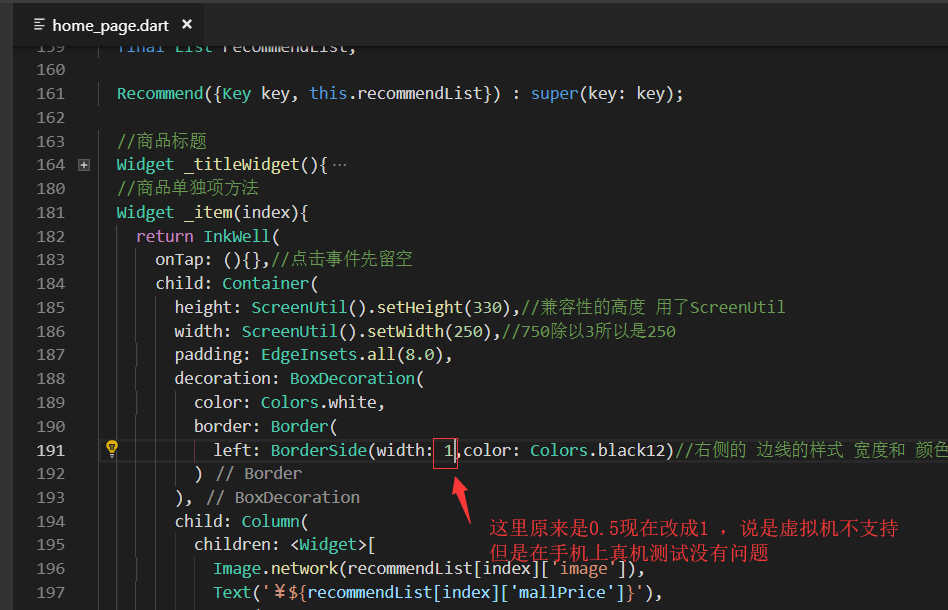
修正一个地方:
设置了item的高度为380
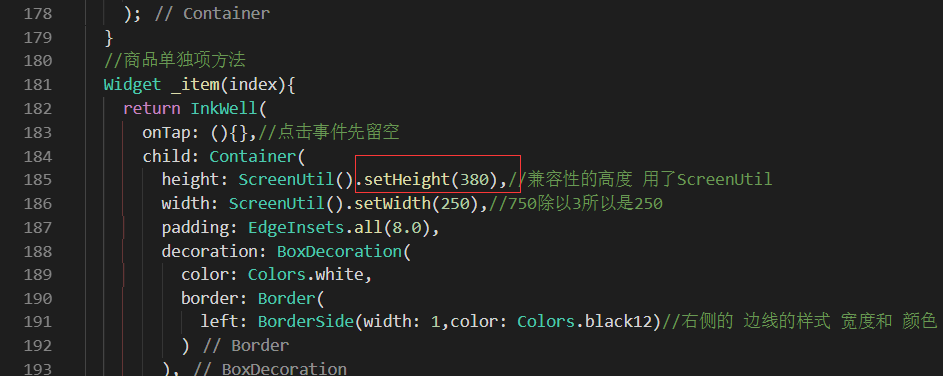
横向列表为380、最终build的高度也增加了50为430.

增加了上面的高度以后,下面那个横线划掉的价格可以显示出来了。
但是还是有超出的问题。

保持首页页面状态
每次点击底部的tab标签。再点击首页,首页的数据就会重新加载。
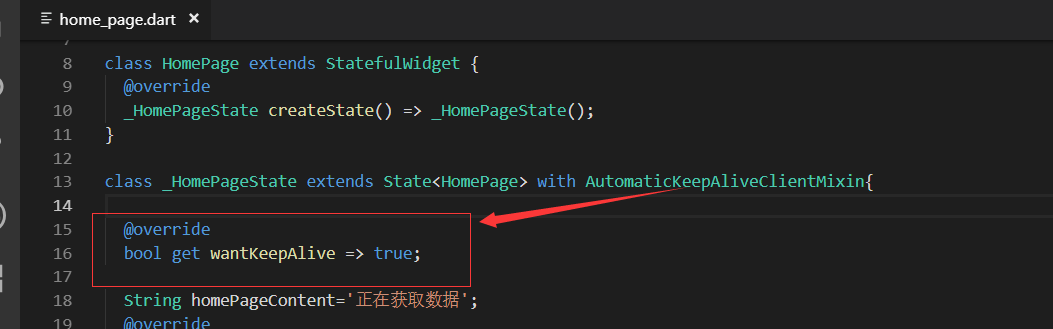
这里就用到了混入,在页面上进行混入:with AutomaticKeepAliveClientMixin

混入之后必须主要三点:
第一,添加混入
第二:重写wantKeepAlive方法,返回为true
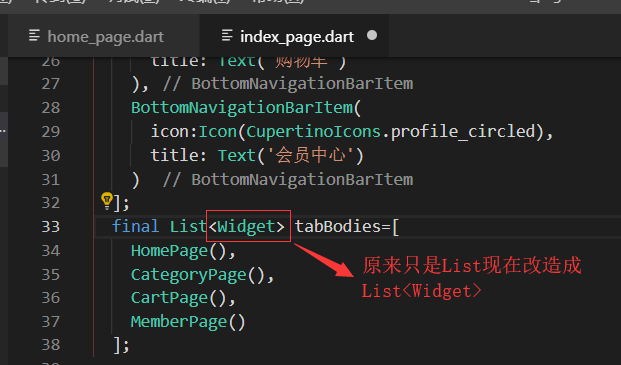
第三,改造indexPage
改造indexPage
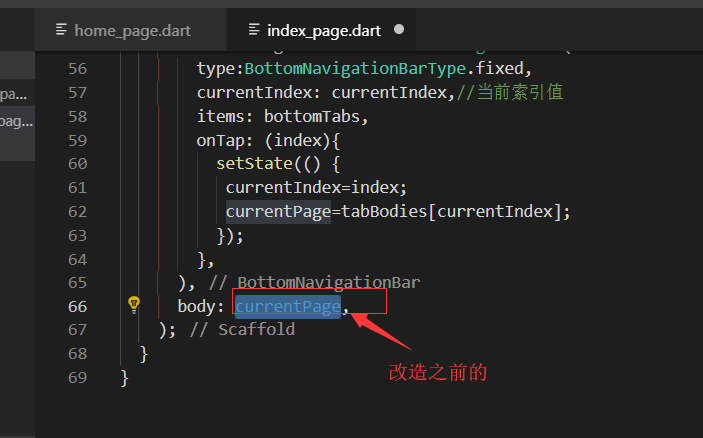
最终body里面返回的是:IndexedStack
参数1是索引值就是当前的索引
第二个children因为类型是widget类型的数组 所以改造了tabBodies这个List对象为Widget类型的
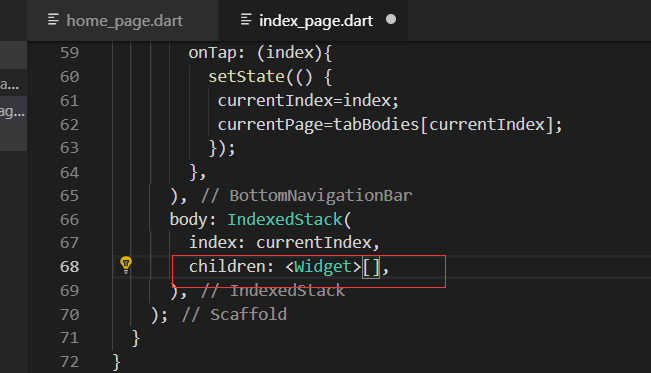
改造之后的

homePage页面重写initState方法 打印出来一句话,来判断当前的页面是否加载了数据
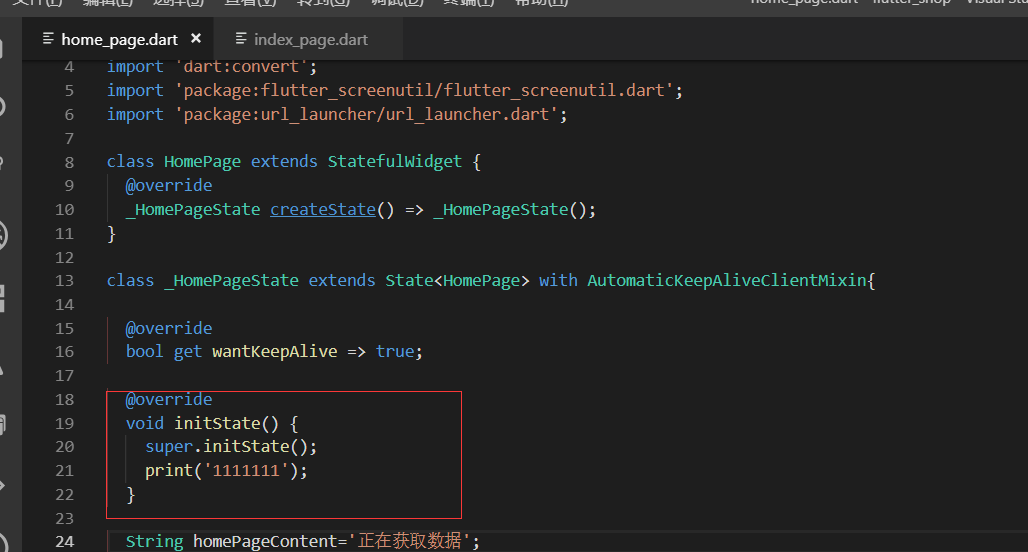
效果展示
从别的tab切回来,页面状态就保持住了

最终代码
import 'package:flutter/material.dart';

import '../service/service_method.dart';

import 'package:flutter_swiper/flutter_swiper.dart';

import 'dart:convert';

import 'package:flutter_screenutil/flutter_screenutil.dart';

import 'package:url_launcher/url_launcher.dart';

class HomePage extends StatefulWidget {

  @override

  _HomePageState createState() => _HomePageState();

}

class _HomePageState extends State<HomePage> with AutomaticKeepAliveClientMixin{

  @override

  bool get wantKeepAlive => true;

  @override

  void initState() {

    super.initState();

    print('');

  }

  String homePageContent='正在获取数据';

  @override

  Widget build(BuildContext context) {

    return Scaffold(

      appBar: AppBar(title: Text('百姓生活+')),

      body: FutureBuilder(

        future: getHomePageContent(),

        builder: (context, snapshot) {

          if(snapshot.hasData){

            var data=json.decode(snapshot.data.toString());

            List<Map> swiper=(data['data']['slides'] as List).cast();

            List<Map> navigatorList=(data['data']['category'] as List).cast();

            String adPicture=data['data']['advertesPicture']['PICTURE_ADDRESS'];

            String leaderImage=data['data']['shopInfo']['leaderImage'];

            String leaderPhone=data['data']['shopInfo']['leaderPhone'];

            List<Map> recommendList=(data['data']['recommend'] as List).cast();

            return SingleChildScrollView(

              child: Column(

                children: <Widget>[

                  SwiperDiy(swiperDateList: swiper),

                  TopNavigator(navigatorList:navigatorList ,),

                  AdBanner(adPicture:adPicture),

                  LeaderPhone(leaderImage: leaderImage,leaderPhone: leaderPhone,),

                  Recommend(recommendList:recommendList)

                ],

              ),

            );

          }else{

            return Center(child: Text('加载中....'));

          }

        },

      ),

    );

  }

}

//首页轮播插件

class SwiperDiy extends StatelessWidget {

  final List swiperDateList;

  //构造函数

  SwiperDiy({this.swiperDateList});

  @override

  Widget build(BuildContext context) {

    // print('设备的像素密度:${ScreenUtil.pixelRatio}');

    // print('设备的高:${ScreenUtil.screenWidth}');

    // print('设备的宽:${ScreenUtil.screenHeight}');

    return Container(

      height: ScreenUtil().setHeight(),//

      width:ScreenUtil().setWidth(),

      child: Swiper(

        itemBuilder: (BuildContext context,int index){

          return Image.network("${swiperDateList[index]['image']}",fit: BoxFit.fill,);

        },

        itemCount: swiperDateList.length,

        pagination: SwiperPagination(),

        autoplay: true,

      ),

    );

  }

}

class TopNavigator extends StatelessWidget {

  final List navigatorList;

  TopNavigator({Key key, this.navigatorList}) : super(key: key);

  Widget _gridViewItemUI(BuildContext context,item){

    return InkWell(

      onTap: (){print('点击了导航');},

      child: Column(

        children: <Widget>[

          Image.network(item['image'],width: ScreenUtil().setWidth()),

          Text(item['mallCategoryName'])

        ],

      ),

    );

  }

  @override

  Widget build(BuildContext context) {

    if(this.navigatorList.length>){

      this.navigatorList.removeRange(,this.navigatorList.length);//从第十个截取,后面都截取掉

    }

    return Container(

      height: ScreenUtil().setHeight(),//只是自己大概预估的一个高度,后续可以再调整

      padding: EdgeInsets.all(3.0),//为了不让它切着屏幕的边缘,我们给它一个padding

      child: GridView.count(

        crossAxisCount: ,//每行显示5个元素

        padding: EdgeInsets.all(5.0),//每一项都设置一个padding,这样他就不挨着了。

        children: navigatorList.map((item){

          return _gridViewItemUI(context,item);

        }).toList(),

      ),

    );

  }

}

class AdBanner extends StatelessWidget {

  final String adPicture;

  AdBanner({Key key, this.adPicture}) : super(key: key);

  @override

  Widget build(BuildContext context) {

    return Container(

      child: Image.network(adPicture),

    );

  }

}

//店长电话模块

class LeaderPhone extends StatelessWidget {

  final String leaderImage;//店长图片

  final String leaderPhone;//店长电话

  LeaderPhone({Key key, this.leaderImage,this.leaderPhone}) : super(key: key);

  @override

  Widget build(BuildContext context) {

    return Container(

      child: InkWell(

        onTap: _launchURL,

        child: Image.network(leaderImage),

      ),

    );

  }

  void _launchURL() async {

    String url = 'tel:'+leaderPhone;

    //String url = 'http://jspang.com';

    if(await canLaunch(url)){

      await launch(url);

    }else{

      throw 'url不能进行访问,异常';

    }

  }

}

//商品推荐

class Recommend extends StatelessWidget {

  final List recommendList;

  Recommend({Key key, this.recommendList}) : super(key: key);

  //商品标题

  Widget _titleWidget(){

    return Container(

      alignment: Alignment.centerLeft,//局长靠左对齐

      padding: EdgeInsets.fromLTRB(10.0, 2.0, , 5.0),//左上右下

      decoration: BoxDecoration(

        color: Colors.white,

        border: Border(

          bottom: BorderSide(width: 0.5,color: Colors.black12) //设置底部的bottom的边框,Black12是浅灰色

        ),

      ),

      child: Text(

        '商品推荐',

        style:TextStyle(color: Colors.pink)

      ),

    );

  }

  //商品单独项方法

  Widget _item(index){

    return InkWell(

      onTap: (){},//点击事件先留空

      child: Container(

        height: ScreenUtil().setHeight(),//兼容性的高度 用了ScreenUtil

        width: ScreenUtil().setWidth(),//750除以3所以是250

        padding: EdgeInsets.all(8.0),

        decoration: BoxDecoration(

          color: Colors.white,

          border: Border(

            left: BorderSide(width: ,color: Colors.black12)//右侧的 边线的样式 宽度和 颜色

          )

        ),

        child: Column(

          children: <Widget>[

            Image.network(recommendList[index]['image']),

            Text('¥${recommendList[index]['mallPrice']}'),

            Text(

              '¥${recommendList[index]['price']}',

              style: TextStyle(

                decoration: TextDecoration.lineThrough,//删除线的样式

                color: Colors.grey//浅灰色

              ),

            ),

          ],

        ),

      ),

    );

  }

  //横向列表方法

  Widget _recommendList(){

    return Container(

      height: ScreenUtil().setHeight(),

      child: ListView.builder(

        scrollDirection: Axis.horizontal,//横向的

        itemCount: recommendList.length,

        itemBuilder: (context,index){

          return _item(index);

        },

      ),

    );

  }

  @override

  Widget build(BuildContext context) {

    return Container(

      height: ScreenUtil().setHeight(),//列表已经设置为330了因为还有上面标题,所以要比330高,这里先设置为380

      margin: EdgeInsets.only(top: 10.0),

      child: Column(

       children: <Widget>[

          _titleWidget(),

          _recommendList()

       ],

      ),

    );

  }

}
home_page.dart
import 'package:flutter/material.dart';

import 'package:flutter/cupertino.dart';

import 'home_page.dart';

import 'category_page.dart';

import 'cart_page.dart';

import 'member_page.dart';

import 'package:flutter_screenutil/flutter_screenutil.dart';

class IndexPage extends StatefulWidget {

  @override

  _IndexPageState createState() => _IndexPageState();

}

class _IndexPageState extends State<IndexPage> {

  final List<BottomNavigationBarItem> bottomTabs=[

    BottomNavigationBarItem(

      icon:Icon(CupertinoIcons.home),//这里使用IOS风格的

      title: Text('首页')

    ),

    BottomNavigationBarItem(

      icon:Icon(CupertinoIcons.search),

      title: Text('分类')

    ),

    BottomNavigationBarItem(

      icon:Icon(CupertinoIcons.shopping_cart),

      title: Text('购物车')

    ),

    BottomNavigationBarItem(

      icon:Icon(CupertinoIcons.profile_circled),

      title: Text('会员中心')

    )

  ];

  final List<Widget> tabBodies=[

    HomePage(),

    CategoryPage(),

    CartPage(),

    MemberPage()

  ];

  int currentIndex=;//当前索引

  var currentPage;

 @override

  void initState() {

    currentPage=tabBodies[currentIndex];//默认页面数组内索引值为0的页面

    super.initState();

  }

  @override

  Widget build(BuildContext context) {

     ScreenUtil.instance = ScreenUtil(width: ,height: )..init(context);

    return Scaffold(

      backgroundColor: Color.fromRGBO(, , , 1.0),//颜色固定死,比白色稍微灰一点

      bottomNavigationBar: BottomNavigationBar(

        type:BottomNavigationBarType.fixed,

        currentIndex: currentIndex,//当前索引值

        items: bottomTabs,

        onTap: (index){

          setState(() {

           currentIndex=index;

           currentPage=tabBodies[currentIndex];

          });

        },

      ),

      body: IndexedStack(

        index: currentIndex,

        children: tabBodies,

      ),

    );

  }

}
index_page.dart
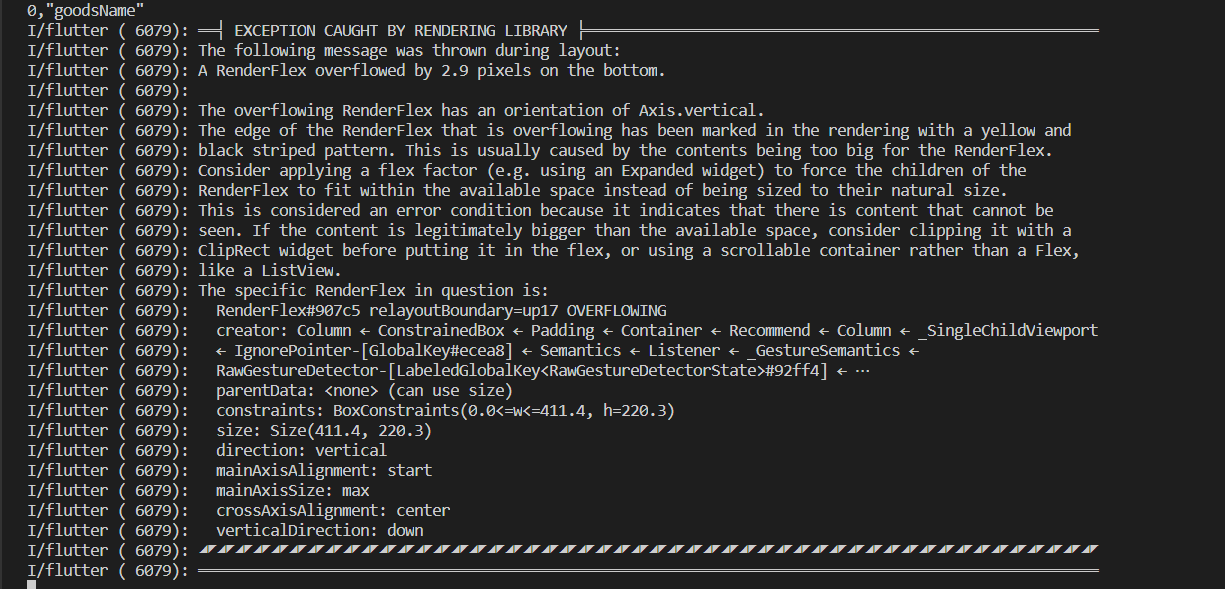
超出边界的错误
I/flutter ( 6079): ══╡ EXCEPTION CAUGHT BY RENDERING LIBRARY ╞═════════════════════════════════════════════════════════
I/flutter ( 6079): The following message was thrown during layout:
I/flutter ( 6079): A RenderFlex overflowed by 2.9 pixels on the bottom.
I/flutter ( 6079):
I/flutter ( 6079): The overflowing RenderFlex has an orientation of Axis.vertical.
I/flutter ( 6079): The edge of the RenderFlex that is overflowing has been marked in the rendering with a yellow and
I/flutter ( 6079): black striped pattern. This is usually caused by the contents being too big for the RenderFlex.
I/flutter ( 6079): Consider applying a flex factor (e.g. using an Expanded widget) to force the children of the
I/flutter ( 6079): RenderFlex to fit within the available space instead of being sized to their natural size.
I/flutter ( 6079): This is considered an error condition because it indicates that there is content that cannot be
I/flutter ( 6079): seen. If the content is legitimately bigger than the available space, consider clipping it with a
I/flutter ( 6079): ClipRect widget before putting it in the flex, or using a scrollable container rather than a Flex,
I/flutter ( 6079): like a ListView.
I/flutter ( 6079): The specific RenderFlex in question is:
I/flutter ( 6079): RenderFlex#907c5 relayoutBoundary=up17 OVERFLOWING
I/flutter ( 6079): creator: Column ← ConstrainedBox ← Padding ← Container ← Recommend ← Column ← _SingleChildViewport
I/flutter ( 6079): ← IgnorePointer-[GlobalKey#ecea8] ← Semantics ← Listener ← _GestureSemantics ←
I/flutter ( 6079): RawGestureDetector-[LabeledGlobalKey<RawGestureDetectorState>#92ff4] ← ⋯
I/flutter ( 6079): parentData: <none> (can use size)
I/flutter ( 6079): constraints: BoxConstraints(0.0<=w<=411.4, h=220.3)
I/flutter ( 6079): size: Size(411.4, 220.3)
I/flutter ( 6079): direction: vertical
I/flutter ( 6079): mainAxisAlignment: start
I/flutter ( 6079): mainAxisSize: max
I/flutter ( 6079): crossAxisAlignment: center
I/flutter ( 6079): verticalDirection: down
I/flutter ( 6079): ◢◤◢◤◢◤◢◤◢◤◢◤◢◤◢◤◢◤◢◤◢◤◢◤◢◤◢◤◢◤◢◤◢◤◢◤◢◤◢◤◢◤◢◤◢◤◢◤◢◤◢◤◢◤◢◤◢◤◢◤◢◤◢◤◢◤◢◤◢◤◢◤◢◤◢◤◢◤◢◤◢◤◢◤◢◤◢◤◢◤◢◤◢◤◢◤◢◤◢◤
群里面也有遇到这个问题的:先自己解决,不行可以问问这个人
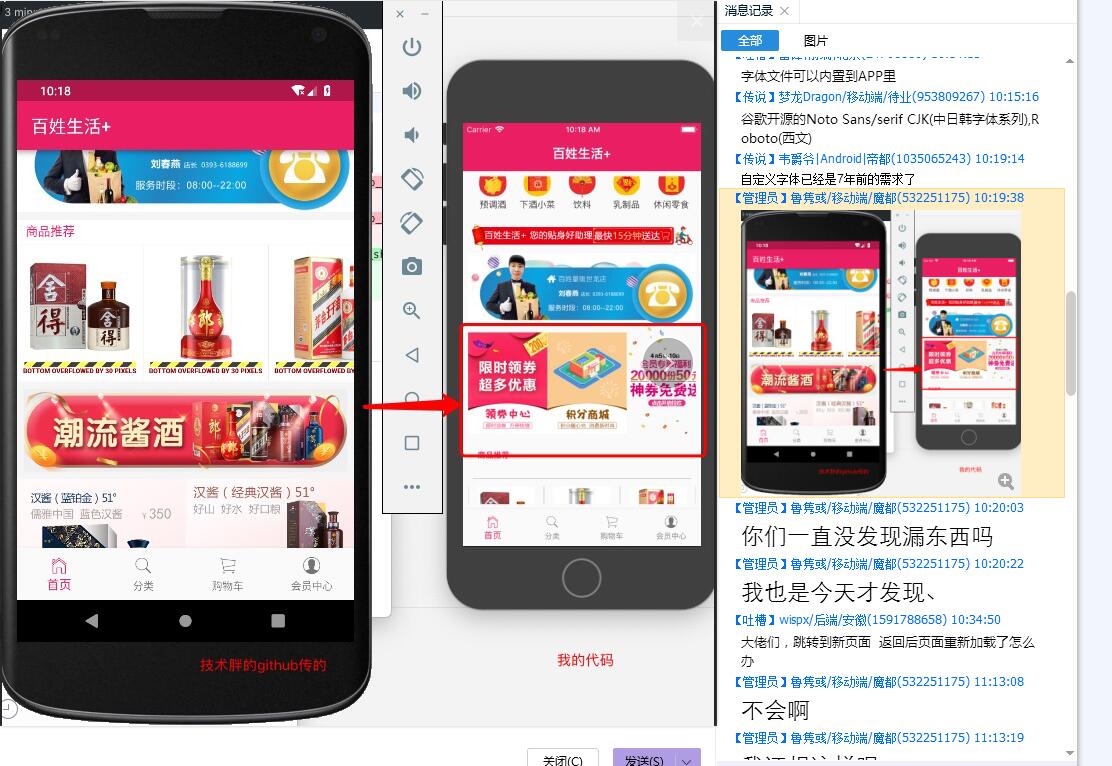
2019年4月8日-wjw
我以为是SingleChildScrollView引起的这个问题,所以去掉了这个SingleChildScrollView,还是用直接Column,发现还是不行,黄条显示的更多了。
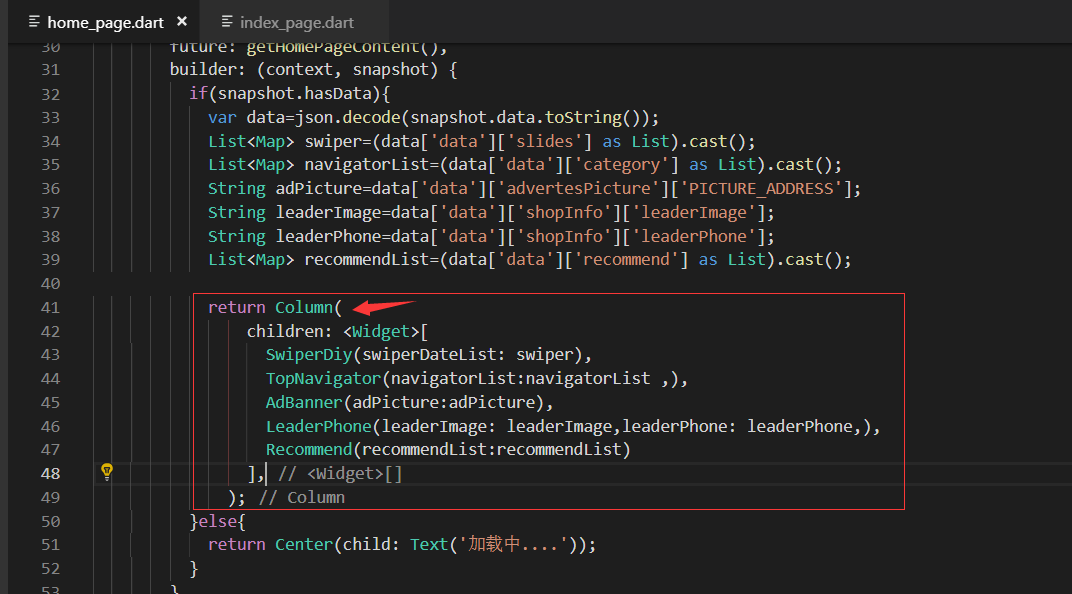
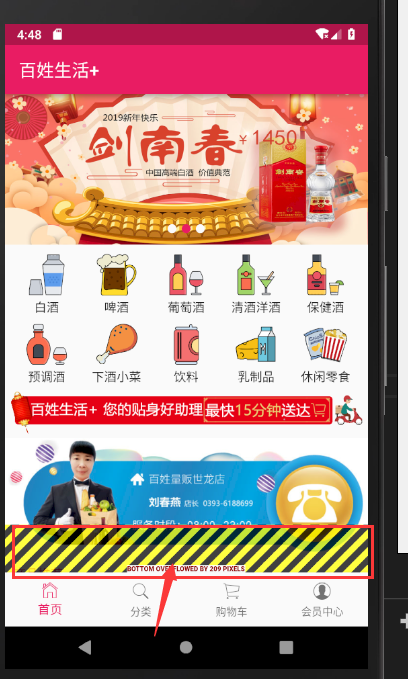
不起作用,恢复原来的代码:

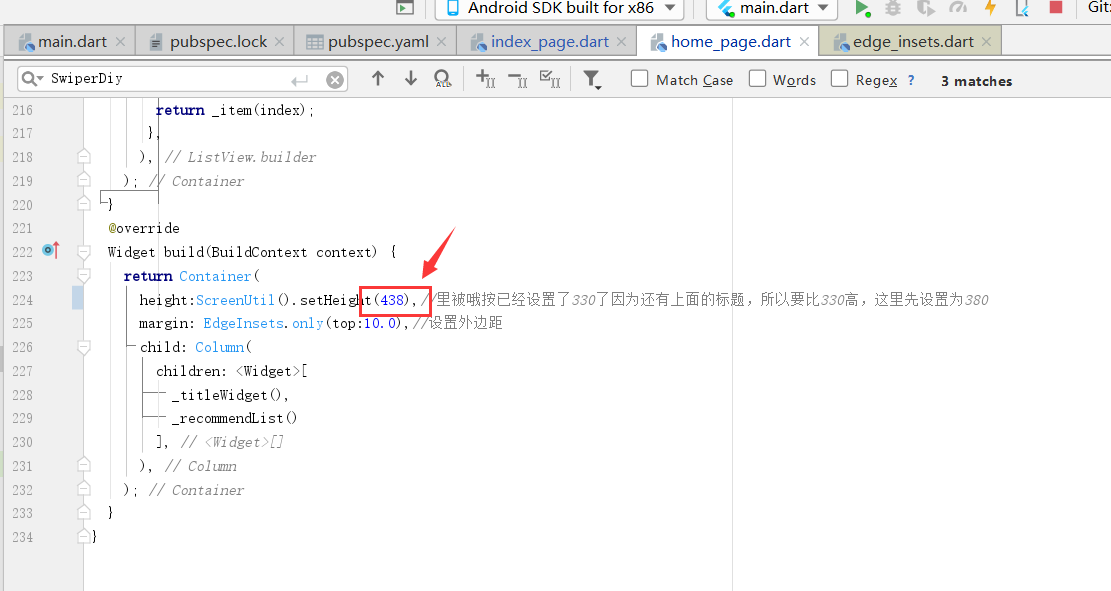
修复Recommend商品推荐超出边界的问题
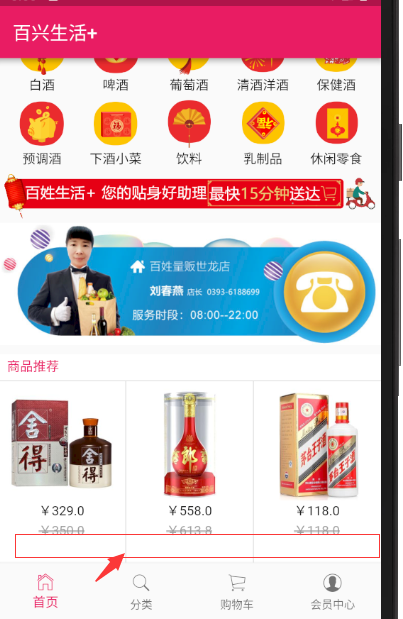
把最终Recommend的build里面的高度本来是430,这里改成了438就可以了。
结束
Flutter实战视频-移动电商-16.补充_保持页面状态的更多相关文章
- Flutter实战视频-移动电商-09.首页_项目结构建立和获取数据
09.首页_项目结构建立和获取数据 在config下创建service_url.dart 用来配置我们后端接口的配置文件 一个变量存 接口地址,一个接口方法地址 所有后天请求数据的方法都放在这个文件夹 ...
- Flutter实战视频-移动电商-11.首页_屏幕适配方案讲解
11.首页_屏幕适配方案讲解 国人写的屏幕适配插件: https://github.com/OpenFlutter/flutter_screenutil 最新版本是0.5.1 在pubspec.yam ...
- Flutter实战视频-移动电商-13.首页_广告Banner组件制作
13.首页_广告Banner组件制作 主要是做这个小广告条. 其实就是读取一个图片做一个widget放到这里 使用stlessW快速生成 定义一个变量存放图片的url地址: 这样我们的广告条就写完了 ...
- Flutter实战视频-移动电商-15.首页_商品推荐模块编写
15.首页_商品推荐模块编写 商品推荐,我们做成可以横向滚动的 分析: 上面是标题,下面是ListView,里面是一个Column, column分三层,第一是图片,第二是价格,第三是市场价格 小细节 ...
- Flutter实战视频-移动电商-17.首页_楼层组件的编写技巧
17.首页_楼层组件的编写技巧 博客地址: https://jspang.com/post/FlutterShop.html#toc-b50 楼层的效果: 标题 stlessW快速生成: 接收一个St ...
- Flutter实战视频-移动电商-18.首页_火爆专区后台接口调试
18.首页_火爆专区后台接口调试 楼层结束之后有个火爆专区.到地图有个上拉加载的效果 lib/config/service_url.dart 首先找到我们的接口配置文件,增加接口的配置 lib/ser ...
- Flutter实战视频-移动电商-19.首页_火爆专区界面布局编写
19.首页_火爆专区界面布局编写 看一下图片的效果 一个标题栏,下面是多行两列.里面可以用column布局,外面用Warp流式布局 有得小伙伴说这里可以用网格布局,网格布局的话还是有一定的效率问题.这 ...
- Flutter实战视频-移动电商-20.首页_火爆专区上拉加载效果
20.首页_火爆专区上拉加载效果 上拉加载的插件比较都.没有一个一枝独秀的 可以自定义酷炫的header和footer 一直在更新 推荐使用这个插件: https://github.com/xuelo ...
- Flutter实战视频-移动电商-52.购物车_数据模型建立和Provide修改
52.购物车_数据模型建立和Provide修改 根据json数据生成模型类 {,"price":830.0,"images":"http://imag ...
随机推荐
- Shell 研究
清空文件 https://blog.csdn.net/u011192270/article/details/47804951 写入多行内容到文件 vi rewrite.sh, <<EOF ...
- C语言各种keyword
1.register 在函数内定义变量时.默认是 auto 类型,变量存储在内存中,当程序用到该变量时,由控制器发出指令将内存中该变量的值送到运算器,计算结束后再从运算器将数据送到内存.假设一个变量用 ...
- 模式识别之不变矩---SIFT和SURF的比较
- 多项式相乘快速算法原理及相应C代码实现---用到fft
最近认真研究了一下算法导论里面的多项式乘法的快速计算问题,主要是用到了FFT,自己也实现了一下,总结如下. 1.多项式乘法 两个多项式相乘即为多项式乘法,例如:3*x^7+4*x^5+1*x^2+5与 ...
- php CURL 模拟 POST 提交数据
<?php function liansuo_post($url,$data){ // 模拟提交数据函数 $curl = curl_init(); // 启动一个CURL会话 curl_seto ...
- 【BZOJ3566】[SHOI2014]概率充电器 期望+树形DP
[BZOJ3566][SHOI2014]概率充电器 Description 著名的电子产品品牌 SHOI 刚刚发布了引领世界潮流的下一代电子产品——概率充电器:“采用全新纳米级加工技术,实现元件与导线 ...
- Collection of Boot Sector Formats for ISO 9660 Images
http://bazaar.launchpad.net/~libburnia-team/libisofs/scdbackup/view/head:/doc/boot_sectors.txt Colle ...
- hdu 3415 单调队列
Max Sum of Max-K-sub-sequence Time Limit: 2000/1000 MS (Java/Others) Memory Limit: 32768/32768 K ...
- Linux环境下安装MySQL(yum方式)
1.下载mysql源安装包shell> wget http://dev.mysql.com/get/mysql57-community-release-el7-8.noarch.rpm 安装my ...
- pdf文件的作成
Dim Report As New crProgressList Report.PrintOptions.PaperSize = CrystalDecisions.Shared.PaperSize.P ...