
ssh整合思想 Spring分模块开发 crud参数传递 解决HTTP Status 500 - Write operations are not allowed in read-only mode (FlushMode.MANUAL): Turn your Session into FlushMode.COMMIT/AUTO or(增加事务)
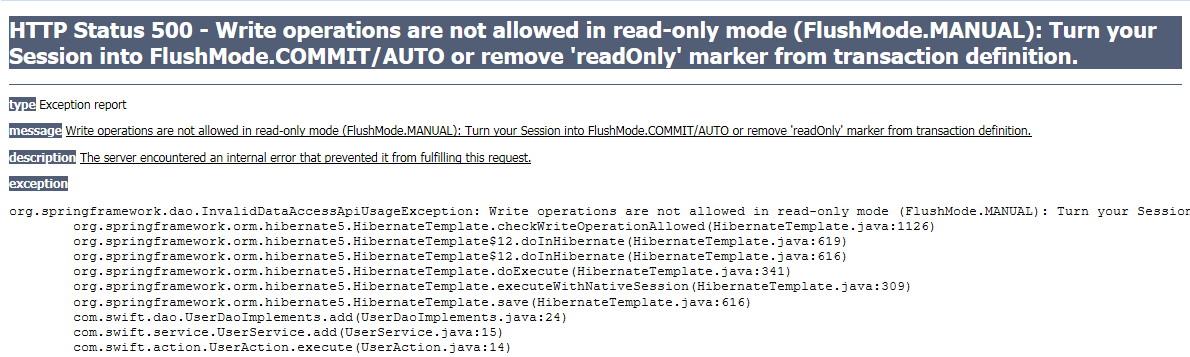
在Spring核心配置文件中没有增加事务方法,导致以上问题
Action类UserAction
package com.swift.action;

import com.opensymphony.xwork2.ActionSupport;

import com.swift.service.UserService;

public class UserAction extends ActionSupport {

    private UserService userService;

    public void setUserService(UserService userService) {

        this.userService = userService;

    }

    @Override

    public String execute() throws Exception {

        System.out.println("action..................");

        userService.add("fly","War of Mercenaries");

        userService.add("big-dog","War of Mercenaries");

        userService.add("ram","War of Mercenaries");

        userService.add("rabbit","War of Mercenaries");

        userService.add("hama","War of Mercenaries");

        userService.add("shiguan","War of Mercenaries");

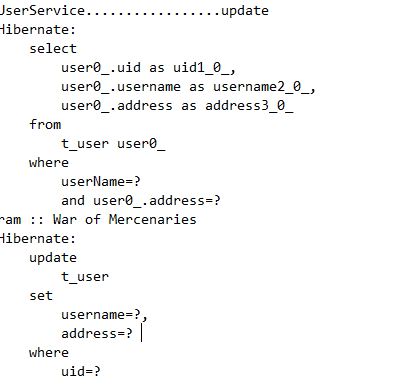
        userService.update("ram","War of Mercenaries","公羊","佣兵的战争");

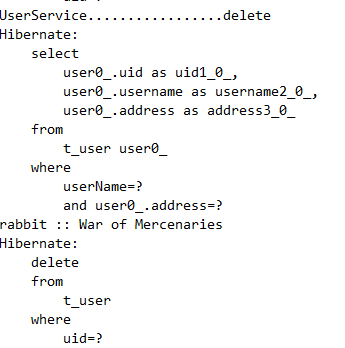
        userService.delete("rabbit","War of Mercenaries");

        userService.getOne(2);

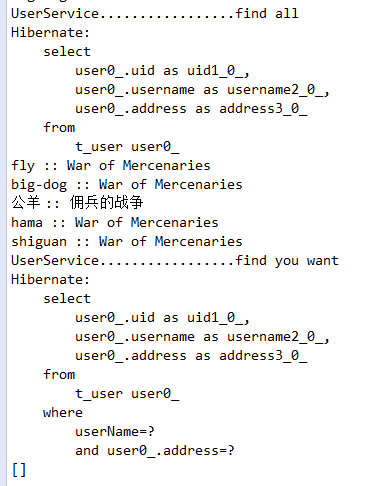
        userService.findAll();

        userService.findYouWant("ram","War of Mercenaries");

        return NONE;

    }

}
UserService类
package com.swift.service;

import org.springframework.transaction.annotation.Transactional;

import com.swift.dao.UserDao;

@Transactional

public class UserService {

    private UserDao userDao;

    public void setUserDao(UserDao userDao) {

        this.userDao = userDao;

    }

    public void add(String userName,String address) {

        System.out.println("UserService.................add");

        userDao.add(userName,address);

    }

    public void update(String userName,String address,String modifyName,String modifyAddress) {

        System.out.println("UserService.................update");

        userDao.update(userName,address,modifyName,modifyAddress);

    }

    public void delete(String userName,String address) {

        System.out.println("UserService.................delete");

        userDao.delete(userName,address);

    }

    public void getOne(int number) {

        System.out.println("UserService.................get the number of");

        userDao.getOne(number);

    }

    public void findAll() {

        System.out.println("UserService.................find all");

        userDao.findAll();

    }

    public void findYouWant(String userName,String address) {

        System.out.println("UserService.................find you want");

        userDao.findYouWant(userName,address);

    }

}
UserDao接口
package com.swift.dao;

public interface UserDao {

    public void add(String userName,String address);

    public void update(String userName,String address,String modifyName,String modifyAddress);

    public void delete(String userName,String address);

    public void getOne(int number);

    public void findAll();

    public void findYouWant(String userName,String address);

}
UserDaoImplements类
package com.swift.dao;

import java.util.List;

import org.springframework.orm.hibernate5.HibernateTemplate;

import com.swift.entity.User;

public class UserDaoImplements implements UserDao {

    private HibernateTemplate hibernateTemplate;

    private User user;

    public void setHibernateTemplate(HibernateTemplate hibernateTemplate) {

        this.hibernateTemplate = hibernateTemplate;

    }

    public void setUser(User user) {

        this.user = user;

    }

    @Override

    public void add(String userName, String address) {

        // 增加

        user.setUsername(userName);

        user.setAddress(address);

        hibernateTemplate.save(user);

    }

    @Override

    public void update(String userName, String address, String modifyName, String modifyAddress) {

        List<User> list = (List<User>) hibernateTemplate.find("from User where userName=? and address=?", userName,

                address);

        if (list != null) {

            for (User user : list) {

                System.out.println(user.getUsername() + " :: " + user.getAddress());

                user.setUsername(modifyName);

                user.setAddress(modifyAddress);

                hibernateTemplate.update(user);

            }

        } else {

            System.out.println("您要更新的记录不存在!!!!!");

        }

    }

    @Override

    public void delete(String userName, String address) {

        List<User> list = (List<User>) hibernateTemplate.find("from User where userName=? and address=?", userName,

                address);

        if (list != null) {

            for (User user : list) {

                System.out.println(user.getUsername() + " :: " + user.getAddress());

                hibernateTemplate.delete(user);

            }

        } else {

            System.out.println("您要删除的记录不存在!!!!!");

        }

    }

    @Override

    public void getOne(int number) {

        User user = hibernateTemplate.get(User.class, number);

        System.out.println(user.getUsername() + " :: " + user.getAddress());

    }

    @Override

    public void findAll() {

        List<User> list = (List<User>) hibernateTemplate.find("from User");

        for (User user : list) {

            System.out.println(user.getUsername() + " :: " + user.getAddress());

        }

    }

    @Override

    public void findYouWant(String userName, String address) {

        List<User> list = (List<User>) hibernateTemplate.find("from User where userName=? and address=?", userName,

                address);

        System.out.println(list.toString());

        for (User user : list) {

            System.out.println(user.getUsername() + " :: " + user.getAddress());

        }

    }

}
User实体类:
package com.swift.entity;

public class User {

    private Integer uid;

    private String username;

    private String address;

    public Integer getUid() {

        return uid;

    }

    public void setUid(Integer uid) {

        this.uid = uid;

    }

    public String getUsername() {

        return username;

    }

    public void setUsername(String username) {

        this.username = username;

    }

    public String getAddress() {

        return address;

    }

    public void setAddress(String address) {

        this.address = address;

    }

    public User(String username, String address) {

        this.username = username;

        this.address = address;

    }

    public User(Integer uid, String username, String address) {

        this.uid = uid;

        this.username = username;

        this.address = address;

    }

    public User() {

        super();

        // TODO Auto-generated constructor stub

    }

}
web.xml 自动启动监听和过滤器
<?xml version="1.0" encoding="UTF-8"?>

<web-app xmlns:xsi="http://www.w3.org/2001/XMLSchema-instance" xmlns="http://xmlns.jcp.org/xml/ns/javaee" xsi:schemaLocation="http://xmlns.jcp.org/xml/ns/javaee http://xmlns.jcp.org/xml/ns/javaee/web-app_3_1.xsd" id="WebApp_ID" version="3.1">

  <display-name>2018-01-03_Spring_Hibernate</display-name>

  <context-param>

  <param-name>contextConfigLocation</param-name>

  <param-value>classpath:bean.xml</param-value>

  </context-param>

  <listener>

  <listener-class>org.springframework.web.context.ContextLoaderListener</listener-class>

  </listener>

  <filter>

  <filter-name>struts2</filter-name>

  <filter-class> org.apache.struts2.dispatcher.ng.filter.StrutsPrepareAndExecuteFilter</filter-class>

  </filter>

  <filter-mapping>

  <filter-name>struts2</filter-name>

  <url-pattern>/*</url-pattern>

  </filter-mapping>

  <welcome-file-list>

    <welcome-file>index.html</welcome-file>

    <welcome-file>index.htm</welcome-file>

    <welcome-file>index.jsp</welcome-file>

    <welcome-file>default.html</welcome-file>

    <welcome-file>default.htm</welcome-file>

    <welcome-file>default.jsp</welcome-file>

  </welcome-file-list>

</web-app>
Spring核心配置文件bean.xml 通过引入各个分模块
<?xml version="1.0" encoding="UTF-8"?>

<beans xmlns="http://www.springframework.org/schema/beans"

    xmlns:xsi="http://www.w3.org/2001/XMLSchema-instance" xmlns:context="http://www.springframework.org/schema/context"

    xmlns:aop="http://www.springframework.org/schema/aop" xmlns:tx="http://www.springframework.org/schema/tx"

    xsi:schemaLocation="

        http://www.springframework.org/schema/beans http://www.springframework.org/schema/beans/spring-beans.xsd

        http://www.springframework.org/schema/context http://www.springframework.org/schema/context/spring-context.xsd

        http://www.springframework.org/schema/aop http://www.springframework.org/schema/aop/spring-aop.xsd

        http://www.springframework.org/schema/tx http://www.springframework.org/schema/tx/spring-tx.xsd">

    <!-- c3p0连接池得到dataSource -->

    <bean id="dataSource" class="com.mchange.v2.c3p0.ComboPooledDataSource">

        <property name="driverClass" value="com.mysql.jdbc.Driver"></property>

        <property name="jdbcUrl" value="jdbc:mysql://localhost:3306/sw_database"></property>

        <property name="user" value="root"></property>

        <property name="password" value="root"></property>

    </bean>

    <!-- 创建hibernate事务管理器 -->

    <bean id="hibernateTransactionManager" class="org.springframework.orm.hibernate5.HibernateTransactionManager">

    <property name="sessionFactory" ref="sessionFactory"></property>

    </bean>

    <!-- 启动Hibernate事务管理器 -->

    <tx:annotation-driven transaction-manager="hibernateTransactionManager"></tx:annotation-driven>

    <!-- 引入分模块 -->

    <import resource="classpath:User.xml"/>

</beans>
分模块User.xml 只负责Action部分
<?xml version="1.0" encoding="UTF-8"?>

<beans xmlns="http://www.springframework.org/schema/beans"

    xmlns:xsi="http://www.w3.org/2001/XMLSchema-instance" xmlns:context="http://www.springframework.org/schema/context"

    xmlns:aop="http://www.springframework.org/schema/aop" xmlns:tx="http://www.springframework.org/schema/tx"

    xsi:schemaLocation="

        http://www.springframework.org/schema/beans http://www.springframework.org/schema/beans/spring-beans.xsd

        http://www.springframework.org/schema/context http://www.springframework.org/schema/context/spring-context.xsd

        http://www.springframework.org/schema/aop http://www.springframework.org/schema/aop/spring-aop.xsd

        http://www.springframework.org/schema/tx http://www.springframework.org/schema/tx/spring-tx.xsd">

    <bean id="userAction" class="com.swift.action.UserAction" scope="prototype">

    <property name="userService" ref="userService"></property>

    </bean>

    <bean id="sessionFactory" class="org.springframework.orm.hibernate5.LocalSessionFactoryBean">

    <!-- Hibernate核心配置文件没有连接数据库,所以需要注入 -->

    <property name="dataSource" ref="dataSource"></property>

    <!-- Hibernate核心配置文件的位置 -->

    <property name="configLocations" value="classpath:hibernate.cfg.xml"></property>

    </bean>

    <bean id="userService" class="com.swift.service.UserService">

    <property name="userDao" ref="userDaoImplements"></property>

    </bean>

    <bean id="userDaoImplements" class="com.swift.dao.UserDaoImplements">

    <property name="hibernateTemplate" ref="hibernateTemplate"></property>

    <property name="user" ref="user"></property>

    </bean>

    <bean id="hibernateTemplate" class="org.springframework.orm.hibernate5.HibernateTemplate">

       <!-- 前一个sessionFactory是HibernateTemplate类内部的 -->

    <property name="sessionFactory" ref="sessionFactory"></property>

    </bean>

    <bean id="user" class="com.swift.entity.User"></bean>

</beans>
Hibernate核心配置文件hibernate.cfg.xml
<?xml version="1.0" encoding='UTF-8'?>

<!DOCTYPE hibernate-configuration PUBLIC

          "-//Hibernate/Hibernate Configuration DTD 3.0//EN"

          "http://hibernate.sourceforge.net/hibernate-configuration-3.0.dtd">

<hibernate-configuration>

    <session-factory>

   <!-- <property name="hibernate.connection.driver_class">com.mysql.jdbc.Driver</property>

        <property name="hibernate.connection.url">jdbc:mysql://localhost:3306/sw_database</property>

        <property name="hibernate.connection.username">root</property>

        <property name="hibernate.connection.password">root</property> -->

        <property name="hibernate.dialect">org.hibernate.dialect.MySQL5Dialect</property> <!-- 方言的数字很重要一定找到该项目名的连接类 -->

        <property name="hibernate.show_sql">true</property>

        <property name="hibernate.format_sql">true</property><!-- 别处复制过来的代码要重新在Eclipse中一点点输入否则会出错 -->

        <!-- create: 先删表,再建表。 create-drop: 启动时建表,退出前删表。 update: 如果表结构不一致,就创建或更新。

            validate: 启动时验证表结构,如果不致就抛异常。 -->

        <property name="hibernate.hbm2ddl.auto">update</property>

        <!--指定映射文件,可映射多个映射文件 -->

        <mapping resource="User.hbm.xml"></mapping>

    </session-factory>

</hibernate-configuration>
Hibernate映射文件
<?xml version="1.0" encoding='UTF-8'?>

<!DOCTYPE hibernate-mapping PUBLIC

    "-//Hibernate/Hibernate Mapping DTD 3.0//EN"

    "http://hibernate.sourceforge.net/hibernate-mapping-3.0.dtd">

    <!-- 实体类映射文件 -->

<hibernate-mapping>

    <class name="com.swift.entity.User" table="t_user">

        <!-- 主键 -->

        <id name="uid">

            <generator class="native"></generator>

        </id>

        <!-- 其他属性 -->

        <property name="username"/>

        <property name="address"/>

    </class>

</hibernate-mapping>
struts2的Action配置文件
<?xml version="1.0" encoding="UTF-8"?>

<!DOCTYPE struts PUBLIC

    "-//Apache Software Foundation//DTD Struts Configuration 2.3//EN"

    "http://struts.apache.org/dtds/struts-2.3.dtd">

<struts>

    <package name="default" extends="struts-default" namespace="/">

    <!-- action的class不要写全名会创建两个对象,而写Spring配置文件中id的内容,只建一个对象

                  前提有struts2-spring-plugin-2.3.4.1.jar -->

        <action name="userAction" class="userAction">

        </action>

    </package>

</struts>
浏览器操作

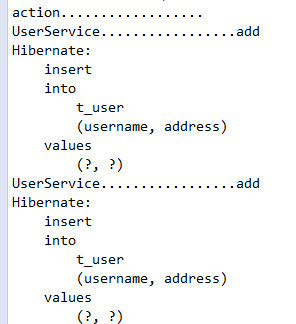
控制台显示
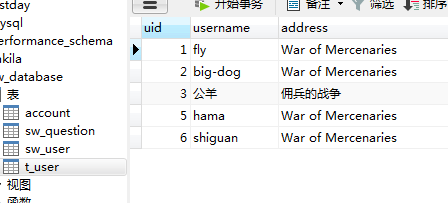
数据库显示
ssh整合思想 Spring分模块开发 crud参数传递 解决HTTP Status 500 - Write operations are not allowed in read-only mode (FlushMode.MANUAL): Turn your Session into FlushMode.COMMIT/AUTO or(增加事务)的更多相关文章
- spring整合问题分析之-Write operations are not allowed in read-only mode (FlushMode.MANUAL): Turn your Session into FlushMode.COMMIT/AUTO or remove 'readOnly' marker from transaction definition.
1.异常分析 Write operations are not allowed in read-only mode (FlushMode.MANUAL): Turn your Session into ...
- spring整合之后运行报什么只读错误。Write operations are not allowed in read-only mode (FlushMode.MANUAL): Turn your Session into FlushMode.COMMIT/AUTO or remove 'readOnly' marker from transaction definition.
解决办法, 再大dao的实现类上添加注解: @Transactional(readOnly = false ) 不让它只读就行了
- ssh中的 Write operations are not allowed in read-only mode (FlushMode.MANUAL): Turn your Session into FlushMode.COMMIT/AUTO or remove 'readOnly' marker from transaction definition.
这个错误我整理了 半天才发现问题的存在. 尝试了网上的很多办法,但是最后都没有达到效果. 包括这两种: 第一种: web.xml种的配置 <filter> <filter-name ...
- ssh整合思想 Spring与Hibernate的整合 项目在服务器启动则自动创建数据库表
Spring整合Hibernate Spring的Web项目中,web.xml文件会自动加载,以出现欢迎首页.也可以在这个文件中对Spring的配置文件进行监听,自启动配置文件, 以及之前Struts ...
- ssh整合思想 Spring与Hibernate和Struts2的action整合 调用action添加数据库 使用HibernateTemplate的save(entity)方法 update delete get 等方法crud操作
UserAction类代码: package com.swift.action; import com.opensymphony.xwork2.ActionSupport; import com.sw ...
- ssh整合思想 Spring与Hibernate的整合ssh整合相关JAR包下载 .MySQLDialect方言解决无法服务器启动自动update创建表问题
除之前的Spring相关包,还有structs2包外,还需要Hibernate的相关包 首先,Spring整合其他持久化层框架的JAR包 spring-orm-4.2.4.RELEASE.jar ( ...
- spring分模块开发
- Spring_day04--HibernateTemplate介绍_整合其他方式_Spring分模块开发
HibernateTemplate介绍 1 HibernateTemplate对hibernate框架进行封装, 直接调用HibernateTemplate里面的方法实现功能 2 HibernateT ...
- Maven02——回顾、整合ssh框架、分模块开发、私服
1 回顾 1.1 Maven的好处 节省空间 对jar包做了统一管理 依赖管理 一键构建 可跨平台 应用在大型项目可提高开发效率 1.2 Maven安装部署配置 1.3 Maven的仓库 本地仓库 远 ...
随机推荐
- 洛谷P3190 [HNOI2007]神奇游乐园(插头dp)
传送门 大概是算第一道自己做出来的插头dp? (虽然都是照着抄板子的) (虽然有个地方死活没调出来最后只能看题解才发现自己错在哪里的) 我就当你们都会插头dp了…… 因为必须得是一条路径,所以扫描线上 ...
- katalon studio配置git与git项目创建
katalon 是一款在2015年诞生的可以安装在windows.macOS.linux操作系统上,基于selenium 和 Appium 测试框架,并集成了这些框架的优点的自动化测试工具.关于这个工 ...
- block size大小
1.用tune2fs查看block size大小: 1 2 tune2fs -l /dev/sda1 |grep "Block size" Block size: 1024 2.用 ...
- docker 开启remote api
docker官方文档上有相关说明(Configure and run Docker on various distributions),ubuntu上是可行的 sudo vi /etc/default ...
- ES6:string.raw浅析
当前正学习ES6 ,遇到string.raw费心思,现将试验后的结果整理如下: 网上得来的试验: 语法 String.raw`templateStr`; String.raw(obj, ...subs ...
- Spark Mllib里使用贝氏二元分类时如何将数值特征字段用StandardScaler进行标准化(图文详解)
不多说,直接上干货! NaiveBayes数值特征字段一定要大于0,所以加入下述命令将负数转换为0. 朴素贝叶斯分类算法在进行数据标准化时,参数withMean必须设置为false. 具体,见 Had ...
- nginx错误Upstream timed out
Upstream timed out (110: Connection timed out) while reading response header from upstream 这种情况主要在下面 ...
- 《java学习二》并发编程
多线程创建方式 1.继承thread类,重写run方法 CreateThread createThread = new CreateThread(); ------createThread ...
- 报错:Could not reserve enough space for object heap error
windows命令行运行某个命令时出现: 解决办法: 设置开始->控制面板->系统和安全->系统->高级系统设置->环境变量->系统变量->新建: 变量名: ...
- c# 串口操作
public class CommPort : IDisposable { public string Port = ""; ///<summary> ///波特率96 ...