
阿里云服务器 centos 7 安装postgresql 11
Postgresql简介
官方网站:https://www.postgresql.org/
简介参考zhihu文章 https://www.zhihu.com/question/20010554
关于框架+DB的一些性能参考性能测试(仅供参考) http://www.techempower.com/benchmarks/#section=data-r15&hw=ph&test=fortune
一、更新rpm源
1、打开官网https://yum.postgresql.org/repopackages.php

2、复制上图链接添加rpm源
$ yum install https://download.postgresql.org/pub/repos/yum/reporpms/EL-7-x86_64/pgdg-redhat-repo-latest.noarch.rpm
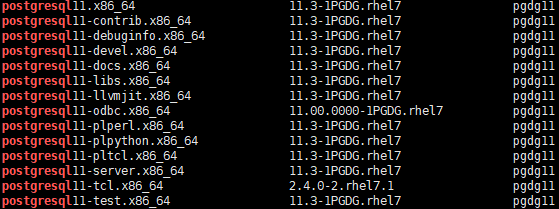
3、查看可以安装的postgresql版本,此命令会稍微慢一些
$ yum list | grep postgresql
二、安装postgresql
1、注意下安装版本
yum install postgresql11-contrib postgresql11-server -y
以下是安装日志
Dependencies Resolved

===============================================================================================================

 Package                           Arch                Version                       Repository           Size

===============================================================================================================

Installing:

 postgresql11-contrib              x86_64              11.3-1PGDG.rhel7              pgdg11              616 k

 postgresql11-server               x86_64              11.3-1PGDG.rhel7              pgdg11              4.7 M

Installing for dependencies:

 libicu                            x86_64              50.1.2-17.el7                 base                6.9 M

 libxslt                           x86_64              1.1.28-5.el7                  base                242 k

 postgresql11                      x86_64              11.3-1PGDG.rhel7              pgdg11              1.7 M

 postgresql11-libs                 x86_64              11.3-1PGDG.rhel7              pgdg11              360 k

Transaction Summary

===============================================================================================================

Install  2 Packages (+4 Dependent packages)

Total download size: 14 M

Installed size: 55 M

Downloading packages:

(1/6): libxslt-1.1.28-5.el7.x86_64.rpm                                                  | 242 kB  00:00:00

(2/6): libicu-50.1.2-17.el7.x86_64.rpm                                                  | 6.9 MB  00:00:00

warning: /var/cache/yum/x86_64/7/pgdg11/packages/postgresql11-contrib-11.3-1PGDG.rhel7.x86_64.rpm: Header V4 DSA/SHA1 Signature, key ID 442df0f8: NOKEY

Public key for postgresql11-contrib-11.3-1PGDG.rhel7.x86_64.rpm is not installed

(3/6): postgresql11-contrib-11.3-1PGDG.rhel7.x86_64.rpm                                 | 616 kB  00:01:03

(4/6): postgresql11-libs-11.3-1PGDG.rhel7.x86_64.rpm                                    | 360 kB  00:00:55

postgresql11-server-11.3-1PGDG FAILED                                          2.6 kB/s | 9.4 MB  00:32:32 ETA

https://download.postgresql.org/pub/repos/yum/11/redhat/rhel-7-x86_64/postgresql11-server-11.3-1PGDG.rhel7.x86_64.rpm: [Errno 12] Timeout on https://download.postgresql.org/pub/repos/yum/11/redhat/rhel-7-x86_64/postgresql11-server-11.3-1PGDG.rhel7.x86_64.rpm: (28, 'Operation too slow. Less than 1000 bytes/sec transferred the last 30 seconds')

Trying other mirror.

(5/6): postgresql11-11.3-1PGDG.rhel7.x86_64.rpm                                         | 1.7 MB  00:06:11

(6/6): postgresql11-server-11.3-1PGDG.rhel7.x86_64.rpm                                  | 4.7 MB  00:06:45

---------------------------------------------------------------------------------------------------------------

Total                                                                           19 kB/s |  14 MB  00:12:57

Retrieving key from file:///etc/pki/rpm-gpg/RPM-GPG-KEY-PGDG

Importing GPG key 0x442DF0F8:

 Userid     : "PostgreSQL RPM Building Project <pgsqlrpms-hackers@pgfoundry.org>"

 Fingerprint: 68c9 e2b9 1a37 d136 fe74 d176 1f16 d2e1 442d f0f8

 Package    : pgdg-redhat-repo-42.0-4.noarch (installed)

 From       : /etc/pki/rpm-gpg/RPM-GPG-KEY-PGDG

Running transaction check

Running transaction test

Transaction test succeeded

Running transaction

  Installing : postgresql11-libs-11.3-1PGDG.rhel7.x86_64                                                   1/6

  Installing : libicu-50.1.2-17.el7.x86_64                                                                 2/6

  Installing : postgresql11-11.3-1PGDG.rhel7.x86_64                                                        3/6

  Installing : libxslt-1.1.28-5.el7.x86_64                                                                 4/6

  Installing : postgresql11-contrib-11.3-1PGDG.rhel7.x86_64                                                5/6

  Installing : postgresql11-server-11.3-1PGDG.rhel7.x86_64                                                 6/6

  Verifying  : postgresql11-11.3-1PGDG.rhel7.x86_64                                                        1/6

  Verifying  : postgresql11-server-11.3-1PGDG.rhel7.x86_64                                                 2/6

  Verifying  : libicu-50.1.2-17.el7.x86_64                                                                 3/6

  Verifying  : libxslt-1.1.28-5.el7.x86_64                                                                 4/6

  Verifying  : postgresql11-libs-11.3-1PGDG.rhel7.x86_64                                                   5/6

  Verifying  : postgresql11-contrib-11.3-1PGDG.rhel7.x86_64                                                6/6

Installed:

  postgresql11-contrib.x86_64 0:11.3-1PGDG.rhel7         postgresql11-server.x86_64 0:11.3-1PGDG.rhel7

Dependency Installed:

  libicu.x86_64 0:50.1.2-17.el7                       libxslt.x86_64 0:1.1.28-5.el7

  postgresql11.x86_64 0:11.3-1PGDG.rhel7              postgresql11-libs.x86_64 0:11.3-1PGDG.rhel7

Complete!
查看是否安装成功
rpm -aq| grep postgres

安装成功后Postgresql安装目录是/usr/pgsql-11 文件目录是 /var/lib/pgsql/11/data 如图:

2、初始化数据库
$ /usr/pgsql-11/bin/postgresql-11-setup initdb

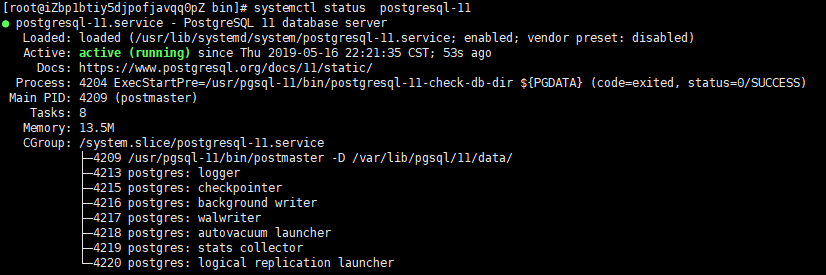
3、设置自动启动,并查看启动状态
$ systemctl enable postgresql-11

$ systemctl start postgresql-11

$ systemctl status postgresql-11
三、配置postgresql
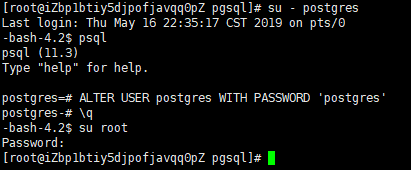
1、登录postgresql并设置密码
su - postgres
进入数据库
psql
更改密码
ALTER USER postgres WITH PASSWORD 'postgres'
退出,并并切换回root账户,重新输入密码即可
\q

su root
2、修改访问策略,默认是不允许远程登录
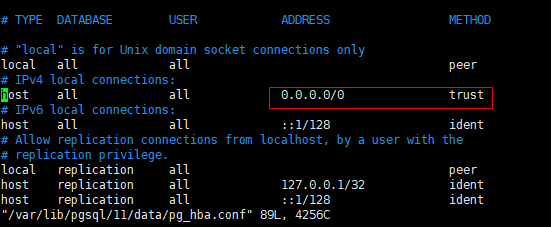
搜索pg_hba.conf文件
find / -name pg_hba.conf
复制文件路径修改pg_hba.conf
vim /var/lib/pgsql/11/data/pg_hba.conf
ADDRESS:修改为samenet(匹配服务器所在子网中的任何地址) 或 0.0.0.0/0 (任意IP地址) 或 指定的IP地址
METHOD:修改为trust (可信任)
3、修改远程访问IP
搜索postgresql.conf文件
find / -name postgresql.conf
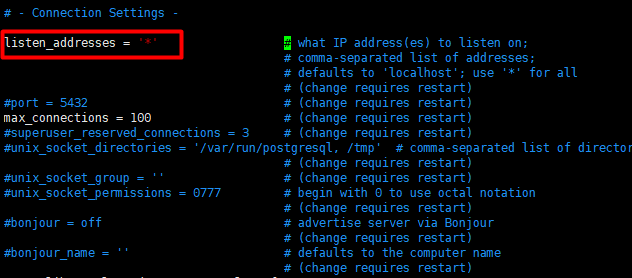
复制文件路径用vim修改,取消listen_addresses前面的#注释,并修改地址为* (所有IP) 或者线上外网IP地址,如图
线上环境#port = 5432最好取消注释,端口一并调整
vim /var/lib/pgsql/11/data/postgresql.conf
4、重启postgresql-11
systemctl restart postgresql-11
四、连接postgresql
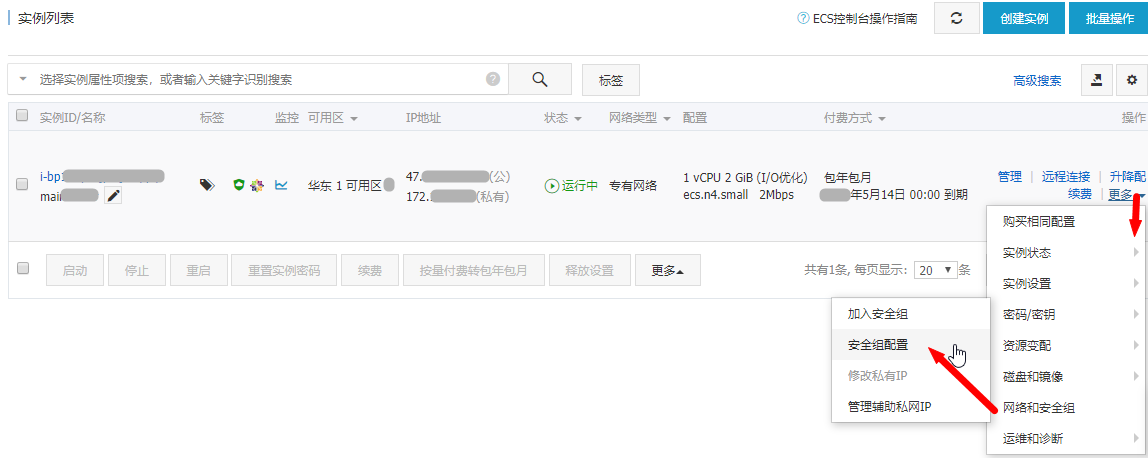
1、如果是阿里云服务器记得打开对应的端口,否则无法连接,如果是虚拟机测试环境可忽略
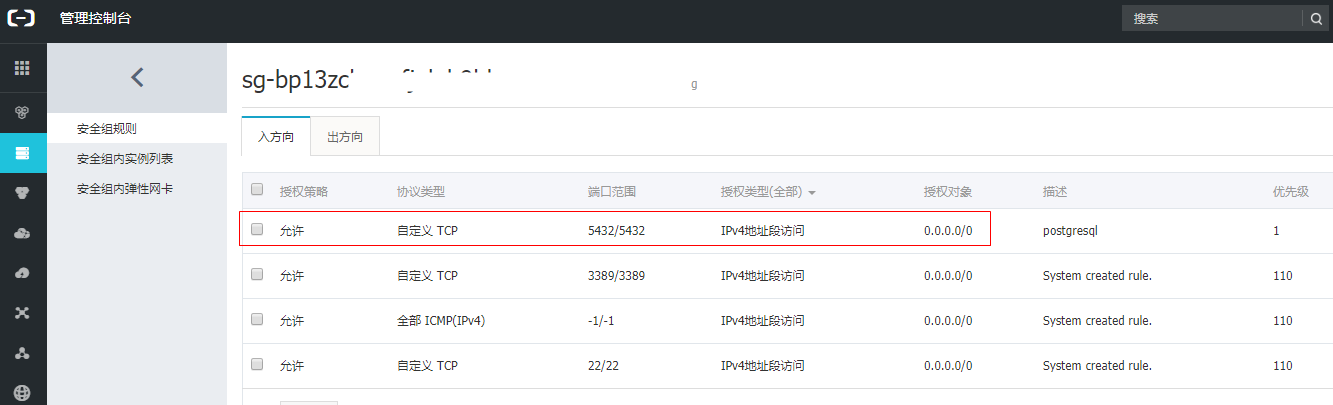
2、注意检查下防火墙是否开启&端口是否打开,也会影响远程连接
firewall-cmd --permanent --add-port=5432/tcp

systemctl restart firewalld
3、连接测试
navicat 官网自行下载https://www.navicat.com.cn/
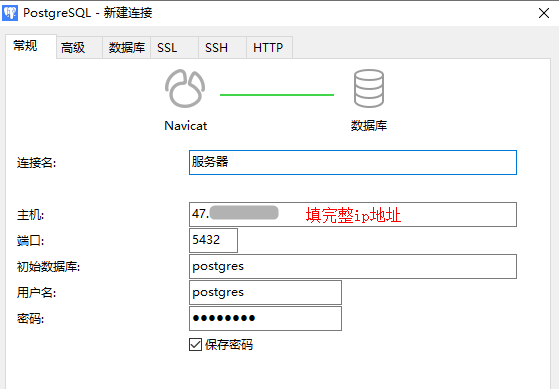
pgadmin 官网自行下载https://www.pgadmin.org/download/

阿里云服务器 centos 7 安装postgresql 11的更多相关文章
- 阿里云服务器centos下安装配置svn服务器
阿里云服务器centos下安装配置svn服务器 1.安装svn服务器端yum install subversion 从镜像下载安装svn服务器端中间会提示是否ok,输入y,确认安装成功提 ...
- 阿里云服务器---centos编译安装ffmpeg
环境 系统环境:CentOS release 6.7 (Final) 需求 编译安装ffmpeg 获取依赖 安装依赖包 yum install -y autoconf automake cmake f ...
- 阿里云服务器Centos 7安装PHP
网上各种别人写的博客 我自己配置了一下php 开始安装的是压缩包 结果php -version 无显示 然后查找各种资料 请教了很多人 需要的环境一一配置了,但是虽然出现了安装成功,但是还是无法查看版 ...
- 阿里云服务器centos5.10安装lamp环境
==相关命令== 查看linux版本:cat /etc/redhat-release ==配置修改== 一.Apache配置 ------------------------------------- ...
- 阿里云服务器CentOS 5.7(64位)安装配置LAMP服务器(Apache+PHP5+MySQL)
一.快速安装Apache+PHP5+MySql ----------------------------------------------------- 补充:由于163的yum源上只有php5.1 ...
- 阿里云服务器CentOS7.5安装RabbitMQ
RabbitMQ是实现了高级消息队列协议(AMQP)的开源消息代理软件(亦称面向消息的中间件).RabbitMQ服务器是用Erlang语言编写的,而集群和故障转移是构建在开放电信平台框架上的. 为什么 ...
- 阿里云服务器CentOS6.9安装Mysql
上篇讲了CentOS6.9安装tomcat,这篇来讲mysql的安装 1.查看CentOS是否安装了MySQL yum list installed | grep mysql //查看CentOS是否 ...
- 阿里云服务器CentOS6.9安装Tomcat
上篇讲了CentOS6.9安装jdk,这篇来讲Tomcat的安装,本来准备使用yum命令安装的,但是通过 yum search tomcat 发现只有tomcat6,所以就在官网下了一个tomcat8 ...
- 阿里云服务器 centos7 ftp安装
昨天租了阿里云服务器一个月,想玩一下linux系统,结果想用ftp上传本地文件的时候,发现用不了,结果在安装配置的时候折腾了几个小时,在网上查了无数的资料,有的说要改配置文件,有的说要关防火墙,说啥的 ...
随机推荐
- 下载速度更加快的 SourceForge 镜像
http://www.mirrorservice.org/sites/download.sourceforge.net/pub/sourceforge/是 University of Kent的镜像, ...
- 1022 D进制的A+B (20)(20 分)
1022 D进制的A+B (20)(20 分) 输入两个非负10进制整数A和B(<=\(2^{30}-1\)),输出A+B的D (1 < D <= 10)进制数. 输入格式: 输入在 ...
- android静默安装和智能安装(转)
Android 静默安装和智能安装的实现方法 http://blog.csdn.net/fuchaosz/article/details/51852442 Android静默安装实现方案,仿360手机 ...
- Docker背后的内核知识(二)
cgroups资源限制 上一节中Docker背后的内核知识(一),我们了解了Docker背后使用的资源隔离技术namespace,通过系统调用构建了一个相对隔离的shell环境,也可以称之为简单的“容 ...
- Jquery 实现层的拖动,支持回调函数
最近在写一个CMS内容管理系统,前台基本是用ajax异步请求服务器,通过ashx处理,返回json格式处理.由于需要更加人性化的界面,所以采用到了拖动层的操作. 以下是拖动层的主要核心方法,本来想写成 ...
- 59、小米电视安装apk(无u盘操作)
第一步 打开电视或者盒子,找到应用商店 第二步 打开应用商店 第三步.打开应用商店后,找到用户,别切换到快捷安装 第四步.记住地址,使用在同一网络下的电脑打开此网页 第五步.页面效果如图 第六步.找到 ...
- leetcode 【 Swap Nodes in Pairs 】python 实现
题目: Given a linked list, swap every two adjacent nodes and return its head. For example,Given 1-> ...
- 理解机器为什么可以学习(一)---Feasibility of learning
主要讲解内容来自机器学习基石课程.主要就是基于Hoeffding不等式来从理论上描述使用训练误差Ein代替期望误差Eout的合理性. PAC : probably approximately corr ...
- backpropagation算法示例
backpropagation算法示例 下面举个例子,假设在某个mini-batch的有样本X和标签Y,其中\(X\in R^{m\times 2}, Y\in R^{m\times 1}\),现在有 ...
- Python数据分析基础——读写CSV文件
1.基础python代码: #!/usr/bin/env python3 # 可以使脚本在不同的操作系统之间具有可移植性 import sys # 导入python的内置sys模块,使得在命令行中向脚 ...