
C#知识点-StopWatch-计时
目录
简单介绍
Stopwatch 可以测量一个时间间隔的运行时间,也可以测量多个时间间隔的总运行时间。一般用来测量代码执行所用的时间或者计算性能数据,在优化代码性能上可以使用Stopwatch来测量时间。
基本用法
使用的时候需要引用 System.Diagnostics 命名空间。先调用 Start 方法,然后调用 Stop 方法,最后使用 Elapsed 属性或者使用 ElapsedMilliseconds 属性得到运行时间(这两个属性的区别是前者得到的是TimeSpan实例,后者得到的是毫秒)。使用 IsRunning 可以确定 Stopwatch 的当前状态是正在运行还是已经停止。每次调用 Start 时开始累计运行时间计数;每次调用 Stop 时结束当前时间间隔测量,并冻结累计运行时间值。 使用 Reset 方法可以清除现有 Stopwatch 实例中的累计运行时间。
下面的示例演示如何使用 Stopwatch 类来确定应用程序的执行时间:
            Stopwatch stopwatch = new Stopwatch();

            //第一次计时

            stopwatch.Start();

            Console.WriteLine("Stopwatch is running:{0}",stopwatch.IsRunning);//判断当前Stopwatch的状态

            System.Threading.Thread.Sleep();//耗时操作

            stopwatch.Stop();

            Console.WriteLine("Using Elapsed output runTime:{0}", stopwatch.Elapsed.ToString());//这里使用时间差来输出

            Console.WriteLine("Using ElapsedMilliseconds output runTime:{0}", stopwatch.ElapsedMilliseconds);//这里面使用毫秒来输出

            Console.WriteLine("===================================================");

            //第二次计时

            stopwatch.Start();

            System.Threading.Thread.Sleep();//耗时操作

            stopwatch.Stop();

            Console.WriteLine("The second RunTime:{0}", stopwatch.ElapsedMilliseconds);//这里面使用毫秒来输出

            Console.WriteLine("===================================================");

            //第三次计时(这里使用了Restart)

            stopwatch.Restart();//这里使用Restart来启动计时(会把前面的时间清空)

            System.Threading.Thread.Sleep();//耗时操作

            stopwatch.Stop();

            Console.WriteLine("Using Restart, so runTime:{0}", stopwatch.ElapsedMilliseconds);//这里面使用毫秒来输出

            Console.ReadKey();
运行结果:

备注:程序中我 Sleep 了1000ms 但是输入结果是第一次是1002 第二次是2003 最后是1000,有一定的误差跟电脑性能和当前CPU的状态有关系(这里我是猜测的)。
在实际的项目中,有时候我们无法使用Console.WriteLine() 或者 MessageBox.Show()来得到运行时间,这时候我们就需要把时间写进一个文本文件中。
下面的示例演示如何使用 Stopwatch 类来确定应用程序的执行时间并把时间输出到文本文件中(这里我为了简单使用的是 StreamWriter):
            const string path = @"D:\StopwatchDemo.txt";

            using (StreamWriter streamWriter = new StreamWriter(path, true, Encoding.UTF8))

            {

                streamWriter.WriteLine("Start");

                streamWriter.Flush();

                Stopwatch stopwatch = Stopwatch.StartNew();

                System.Threading.Thread.Sleep();//耗时操作

                stopwatch.Stop();

                streamWriter.WriteLine("RunTime:{0}", stopwatch.ElapsedMilliseconds);//以毫秒的形式写进文件

                streamWriter.Flush();

            }
运行结果:
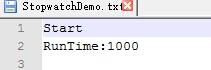
结尾
C#中用于计时的操作不只是 Stopwatch 还有其他的如 Timer、TimeSpan 等。我这里只是用Stopwatch来举个例子。
C#知识点-StopWatch-计时的更多相关文章
- C# Stopwatch计时统计
using System; using System.Collections.Generic; using System.Diagnostics; using System.Linq; using S ...
- C#中精确计时的一点收获 Stopwatch
http://www.cnblogs.com/jintianhu/archive/2010/09/01/1815031.html 参考: https://www.cnblogs.com/kissdod ...
- C#中精确计时的一点收获 【转】
C#中精确计时的一点收获 [转] 以下所有代码运行环境:Windows 2003, Intel(R) Core(TM) 2 Duo CPU E8400 @ 3.00GHz 2.99GHz,2.96G ...
- System.Diagnostics.Stopwatch
System.Diagnostics.Stopwatch 注意:此类在 .NET Framework 2.0 版中是新增的.MSDN Stopwatch 实例可以测量一个时间间隔的运行时间,也可以测量 ...
- C#中精确计时的一点收获
以下所有代码运行环境:Windows 2003, Intel(R) Core(TM) 2 Duo CPU E8400 @ 3.00GHz 2.99GHz,2.96GB内存 根据综合网上的一些文章,精 ...
- Stopwatch 和TimeSpan介绍【转】
1.使用 Stopwatch 类 (System.Diagnostics.Stopwatch) Stopwatch 实例可以测量一个时间间隔的运行时间,也可以测量多个时间间隔的总运行时间.在典型的 S ...
- C#中各种计时器 Stopwatch、TimeSpan
1.使用 Stopwatch 类 (System.Diagnostics.Stopwatch)Stopwatch 实例可以测量一个时间间隔的运行时间,也可以测量多个时间间隔的总运行时间.在典型的 St ...
- C# Stopwatch 类
命名空间:System.Diagnostics Stopwatch 实例可以测量一个时间间隔的运行时间,也可以测量多个时间间隔的总运行时间.在典型的 Stopwatch 方案中,先调用 Start 方 ...
- C# Stopwatch详解
namespace System.Diagnostics { // // 摘要: // 提供一组方法和属性,可用于准确地测量运行时间. public class Stopwatch { // // 摘 ...
- .NET中System.Diagnostics.Stopwatch、System.Timers.Timer、System.Threading.Timer 的区别
1.System.Diagnostics.Stopwatch Stopwatch 实例可以测量一个时间间隔的运行时间,也可以测量多个时间间隔的总运行时间. 在典型的 Stopwatch 方案中,先调用 ...
随机推荐
- 数据结构与算法(5)----->二叉树
1. 概念 二叉树节点的结构: class Node{ int value; // value表示二叉树的节点值 Node left; Node right; // left和right表示二叉树的 ...
- warning: conflicting types for built-in function 'puts'
warning: conflicting types for built-in function 'puts' [编译器版本] arm-linux-gcc 3.4.1 [问题描述] 在做嵌入式底层开发 ...
- 点阵字体显示系列之一:ASCII码字库的显示
http://blog.csdn.net/subfate/article/details/6444578 起因: 早在阅读tslib源代码时就注意到里面有font_8x8.c和font_8x16.c两 ...
- android TextView selector点击样式改变
1.selector 从单词的意思来说:选择器,就是对你的目标的控制.selector主要是用在ListView的item单击样式和TextView和Button的点击样式. 2.主要属性介绍: an ...
- Tomcat访问程序外的上传文件
自己在编写程序时,把图片上传到程序根目录下,但是页面使用<img> 没有显示.但是,当我刷新项目下文件夹后,页面刷新可以显示. 我通过网上查询,当在Tomcat下的server.xml配置 ...
- Http协议-报文
2013的双12即将到来,网上购物是大家所熟悉的.看中小米电视时,可以先下订单然后再付款,电商根据订单将小米电视正确安全的送达给我们.包裹包含电视的基本信息及电视的使用说明书,使我们能够初步的了解它的 ...
- C# Andriod AES 加密算法
android端: package com.kingmed.http; import java.io.UnsupportedEncodingException; import javax.crypto ...
- Hibernate的auto-import属性详解
auto-import是什么意思呢? 我们经常会写这样一个HQL语句: from User u where u.name='罗灿锋'; 绝大多数时候,这样写是不会发生问题的. hibernate在处理 ...
- HTML5学习笔记(一)相关概率
HTML5的设计目的是为了在移动设备上支持多媒体. 声明:<!DOCTYPE html> 注意:对于中文网页需要使用 <meta charset="utf-8"& ...
- gulp --watch直接退出,并没有监听
1.在es6(彩票项目)搭建环境时遇到gulp --watch 只运行一次就退出了不能监听: D:\nodejs\es6-base>gulp --watch [::] Failed to loa ...