
NDK: ant 错误 [javah] Exception in thread "main" java.lang.NullPointerException 多种解决办法
1、错误提示内容

2、ant脚本对应的内容
 <?xml version="1.0" encoding="UTF-8"?>

 <!-- ======================================================================

      2016-8-28 下午3:26:45

      HellNDK

      description

      cjy

      ====================================================================== -->

 <project name="HelloNDK" default="BuildAllHeaders">

     <description>

             description

     </description>

     <!-- =================================

           target: BuildAllHeaders

          ================================= -->

     <target name="BuildAllHeaders">

         <antcall target="BuildGetStringHeader">

         </antcall>

         <antcall target="BuildGetIntHeader">

         </antcall>

     </target>

     <!-- - - - - - - - - - - - - - - - - -

           target: depends

          - - - - - - - - - - - - - - - - - -->

     <target name="BuildGetStringHeader">

         <javah destdir="./jni" classpath="./bin/classes/" class="com.example.hellondk.GetString">

         </javah>

     </target>

     <!-- - - - - - - - - - - - - - - - - -

           target: BuildGetIntHeader

          - - - - - - - - - - - - - - - - - -->

     <target name="BuildGetIntHeader">

     </target>

 </project>
3、解决方案
方法(1)
进行下列步骤:Run -> External Tools -> External Tools Configurations dialog
在界面中选择jre选项
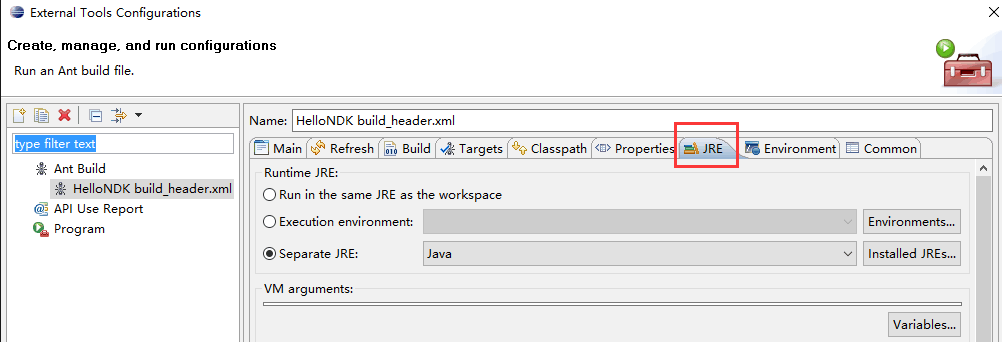
选择Run in Same JRE as workspace
全部完成后,在进行重新编译,一般情况下,问题就可以解决了。要是没有解决,参考方法(2)
参考来源:http://stackoverflow.com/questions/15032230/cant-load-javah-error-in-eclipse
方法(2) 在上图界面中,选择Separete JRE,选择一个新的jre。
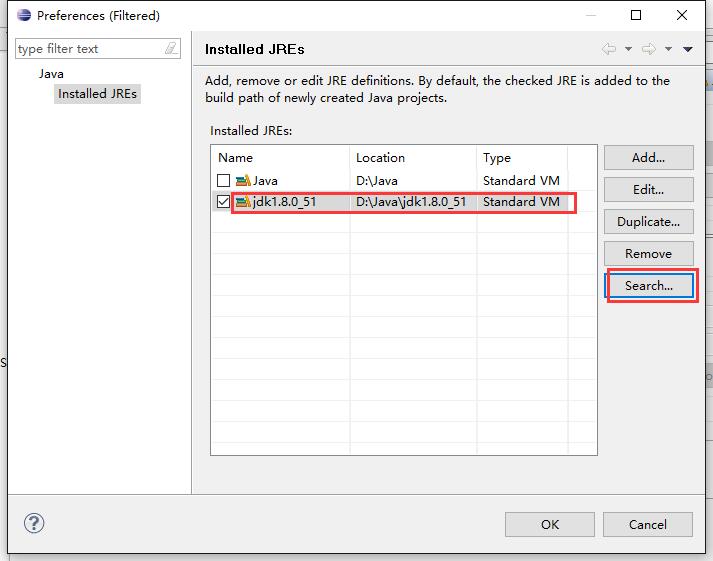
如上图所示,我安装了jdk1.8.0_51。选择之后,点击ok确定。然后在重新进行编译,错误应该就会没有了。
当然,要是你没有安装新的jre,那么安装一个和自己的eclipse版本对应的jdk(记住安装位置),安装好之后,点击上图的Search找到自己安装jdk的位置,导进来就可以了。
NDK: ant 错误 [javah] Exception in thread "main" java.lang.NullPointerException 多种解决办法的更多相关文章
- JAVA错误:Exception in thread "main" java.lang.NullPointerException
JAVA错误:Exception in thread "main" java.lang.NullPointerException例如: Exception in thread &q ...
- GUI学习中错误Exception in thread "main" java.lang.NullPointerException
运行时出现错误:Exception in thread "main" java.lang.NullPointerException 该问题多半是由于用到的某个对象只进行了声明,而没 ...
- 给内部类对象数组属性赋值时报错:Exception in thread "main" java.lang.NullPointerException
前言 1255: 打怪升级(Java),写这个题目程序的时候,控制台提示如下错误: Exception in thread "main" java.lang.NullPointer ...
- MyBatis3错误:Exception in thread "main" java.lang.NoClassDefFoundError: org/apache/log4j/Priority的问题解决
在使用Maven新建QuitStart类型项目时,引入了MyBatis3.2.0版本的JAR包之后,出现如下错误: Exception in thread "main" java. ...
- java使用类数组 报错Exception in thread "main" java.lang.NullPointerException
源代码如下: Point[] points=new Point[n];//Point是一个类 for(int i=0;i<n;i++) { System.out.print("请输入x ...
- Exception in thread "main" java.lang.NullPointerException
1.在window操作系统上,使用eclipse开发工具从hdfs分布式文件系统上下载文件报空指针异常解决方法: log4j:WARN No appenders could be found for ...
- xml出现Exception in thread "main" java.lang.NullPointerException
运行代码出现Exception in thread "main" java.lang.NullPointerException 可以看下这个链接:https://ask.csdn. ...
- MyEclipse8.5集成Tomcat7时的启动错误:Exception in thread “main” java.lang.NoClassDefFoundError org/apache/commons/logging/LogFactory
今天,安装Tomcat7.0.21后,单独用D:\apache-tomcat-7.0.21\bin\startup.bat启动web服务正常.但在MyEclipse8.5中集成配置Tomcat7后,在 ...
- MyEclipse8.5集成Tomcat7时的启动错误:Exception in thread “main” java.lang.NoClassDefFoundError org/apache/commons/logging/LogFactory
今天,安装Tomcat7.0.21后,单独用D:\apache-tomcat-7.0.21\bin\startup.bat启动web服务正常.但 在MyEclipse8.5中集成配置Tomcat7后, ...
随机推荐
- Java静态函数、父类、子类执行顺序
package class_test; /** * 静态函数.父类.子类执行顺序 * @author root * */ public class Test { public static void ...
- js闭包解决多个点击事件
<script> var severalObj=window.document.getElementsByName("button"); for(var i=0;i&l ...
- flutter textfield设置高度后内容区无法居中?
textfiled 设置高度后,内容永远无法居中,最后找到原因 decoration: 中有一个 contentPadding属性,设置这个属性对应的Padding值即可
- UITableView的使用总结
直接贴代码了,很好理解,注释很全,一看就懂...... // // ViewController.m // TableViewSectionTitleDemo // // Created by 思 彭 ...
- DESC加密解密算法
using System; using System.Text; using System.Windows.Forms; using System.Security.Cryptography; usi ...
- JavaEE_Test2_Servlet
package servlet; import javax.servlet.http.HttpSession; import java.io.IOException; import java.io.P ...
- MathType 6.0中MT Extra(TrueType)问题
问题 MathType 6.0中MT Extra(TrueType)字体问题在打开MathType6.0时,有时会提示MathType需要安装一个较新版本的MT Extra(TrueType)字体,这 ...
- redhat 5 中文乱码
安装 1.fonts-chinese-3.02-9.6.el5.noarch.rpm. 如果无法安装,则加个--force 2.fonts-ISO8859-2-75dpi-1.0-17.1.noarc ...
- 给Date的构造函数添加属性和方法
let d = Date.prototype; Object.defineProperties(d, { 'year': { get: function () { return this.getFul ...
- 统计学习方法 | 第1章 统计学习方法概论 | numpy.linspace()
numpy.linspace(start, stop, num=50, endpoint=True, retstep=False, dtype=None) 在指定的间隔内返回均匀间隔的数字. 返回nu ...